kubernetes/networking networking
Core Idea
TLS protects a connection with a handshake that proves identity and negotiates keys; the note walks that flow, then compares one-way TLS with mutual TLS and opens up the encryption beneath it.
- Steps of TLS communication, one-way TLS (standard HTTPS) versus mutual TLS (the default in Kubernetes).
- TLS versions, and encryption fundamentals: plaintext versus ciphertext, symmetric keys versus asymmetric key pairs.
- A recap of TLS communication ties it together.
TLS - First Principle Guide
TLS Introduction
What happens in a TLS handshake? | SSL handshake | Cloudflare
Transport Layer Security (TLS) combines asymmetric cryptography, symmetric cryptography, and digital certificates to secure network channels.
- TLS adds encryption to TCP.
- TLS is an add-on to the TCP/IP suite.
- TLS is a combination of protocols used to ensure traffic is seen between the sender and the intended recipient.
TLS is a protocol which works on top of TCP. HTTPS is HTTP on top of TLS on top of TCP. There are other protocols which use TLS on top of TCP like IMAPS, FTPS etc. One can also establish a TLS session on top of an existing TCP connection and transfer data with ones own application protocol
It provides:
- Encryption → prevents others from reading data
- Authentication → proves the server is genuine
- Integrity → prevents data from being modified
Steps
- TCP Connection (Transport Layer)
- The client initiates a TCP handshake with server.
- Once tcp connection is established, data can start flowing
- TLS/SSL Handshake (Session Layer)
- After the TCP connection, the TLS/SSL handshake happens.
- What happens in a TLS handshake? | SSL handshake | Cloudflare
- The Illustrated TLS Connection: Every Byte Explained
- HTTPS Communication (Application Layer)
- Now that encryption is set up, the client and server can securely exchange HTTP(S) requests and responses using the session key.
- The browser sends an HTTPS request (e.g., GET, POST).
Cipher suite
A cipher suite is a set of algorithms for use in establishing a secure communications connection. There are a number of cipher suites in wide use, and an essential part of the TLS handshake is agreeing upon which cipher suite will be used for that handshake.
One-Way TLS (Standard HTTPS)
The client connects to a server. The server presents its certificate. The client verifies the server’s certificate. The client is anonymous (e.g., standard browsing of google.com).
Mutual TLS (mTLS) - Default in Kubernetes
In a Kubernetes cluster, components cannot allow anonymous connections. The API server must know exactly which node or user is communicating with it.
- Both the server and the client present certificates to each other.
- Both validate the other’s certificate against the shared root CA.
- This establishes mutual authentication and encryption.
TLS Versions
| Version | Status | Key Features | Security Issues |
|---|---|---|---|
| SSL 2.0 | ❌ Obsolete | First SSL version | Weak encryption, vulnerable to attacks |
| SSL 3.0 | ❌ Obsolete | Improved over SSL 2.0 | POODLE attack |
| TLS 1.0 | ❌ Deprecated | Replaced SSL 3.0 | BEAST attack, weak ciphers |
| TLS 1.1 | ❌ Deprecated | Fixed BEAST attack | Weak encryption, vulnerable to POODLE |
| TLS 1.2 | ✅ Secure | Strong ciphers (AES-GCM), supports modern cryptography | None (if configured properly) |
| TLS 1.3 | ✅ Most Secure | Faster handshake, only strong ciphers, no RSA key exchange | None (most secure) |
| [Why use TLS 1.3? | SSL and TLS vulnerabilities | Cloudflare](https://www.cloudflare.com/en-gb/learning/ssl/why-use-tls-1.3/) |
Encryption
The Core Problem: Plaintext vs. Ciphertext
When two entities communicate over a network (e.g., a worker node telling the API server to create a pod), data is transmitted across physical media.
- Plaintext: The original, human-readable data (e.g.,
{"apiVersion": "v1", "kind": "Pod", ...}). - Ciphertext: The encrypted, unreadable version of the plaintext.
Without encryption, any intermediate network device (router, switch, or compromise on the wire) can read this plaintext. Encryption is the mathematical function and key that transforms plaintext into ciphertext :
👉 Symmetric & Asymmetric Encryption
Symmetric Encryption (Shared Secret)
It is a secure way of encryption, but it uses the same key to encrypt and decrypt the data and the key has to be exchanged between the sender and the receiver, there is a risk of a hacker gaining access to the key and decrypting the data.
- Strength: Extremely fast computationally.
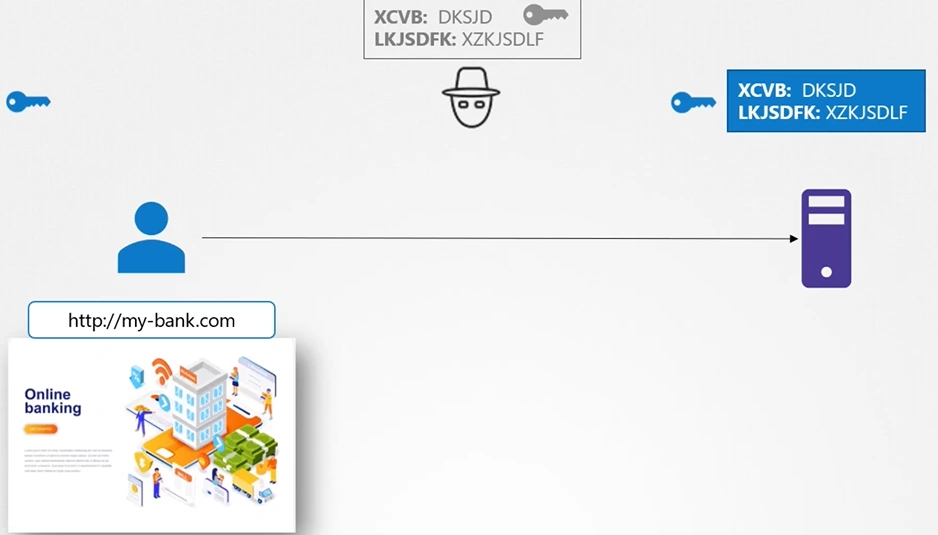
- First-Principles Vulnerability (The Key Exchange Problem): If Alice and Bob have never met, how do they agree on the key over an insecure network? If they send the key in plaintext, an attacker intercepts it and can decrypt all future messages.
Asymmetric Encryption (Key Pairs)
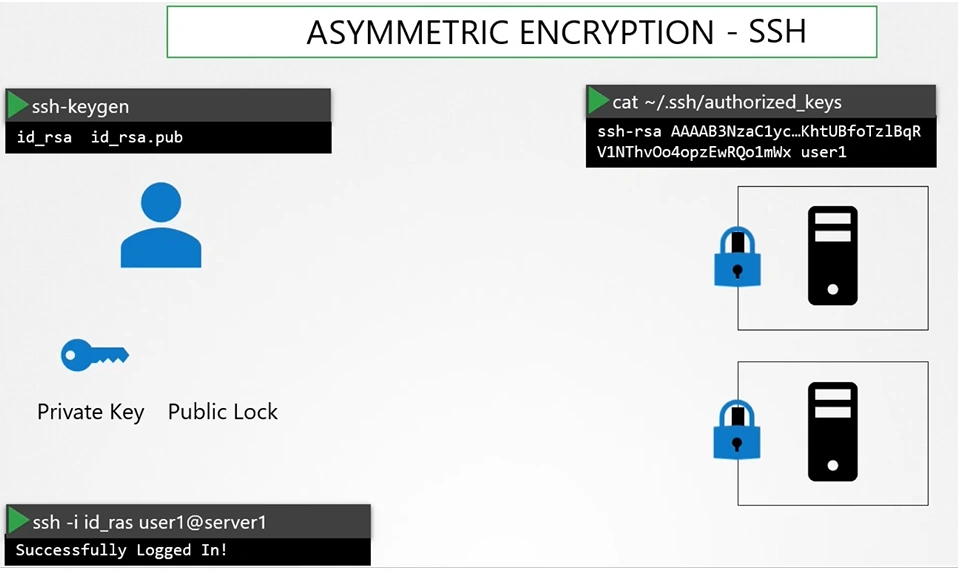
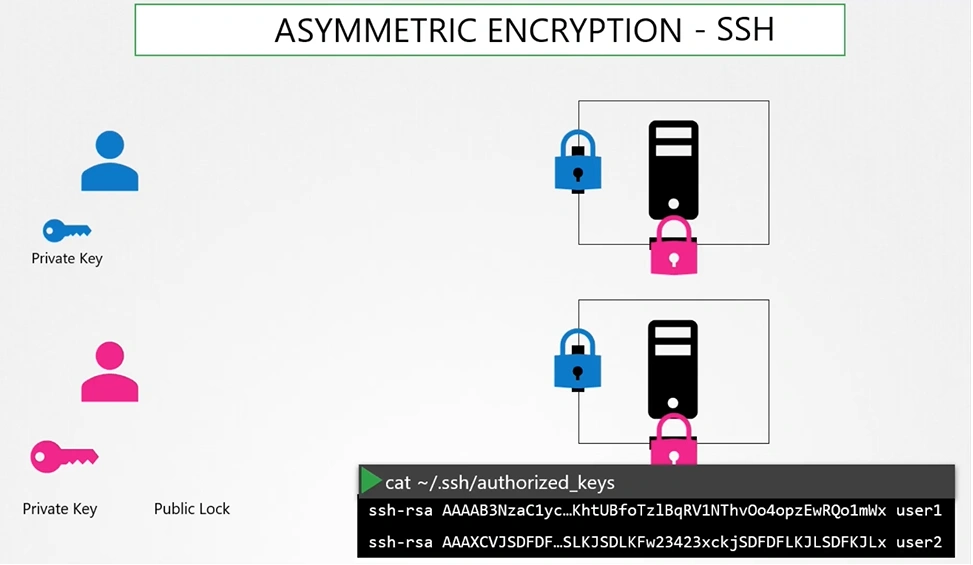
Asymmetric Encryption uses mathematically related pair of keys —> Private key & Public Key (lock).
- Public Key: Shared openly with the world (like an open padlock). Anyone can use it to encrypt a message.
- Private Key: Kept strictly confidential by the owner (like the physical key to the padlock). Only this key can decrypt messages encrypted by the corresponding public key.
- Strength: Solves key exchange. You can publish your public key anywhere.
- Weakness: Much slower computationally than symmetric encryption.
- Hybrid Solution (TLS): In practice, asymmetric encryption is only used once at the beginning of a connection to securely exchange a temporary symmetric key. All subsequent traffic uses that symmetric key.
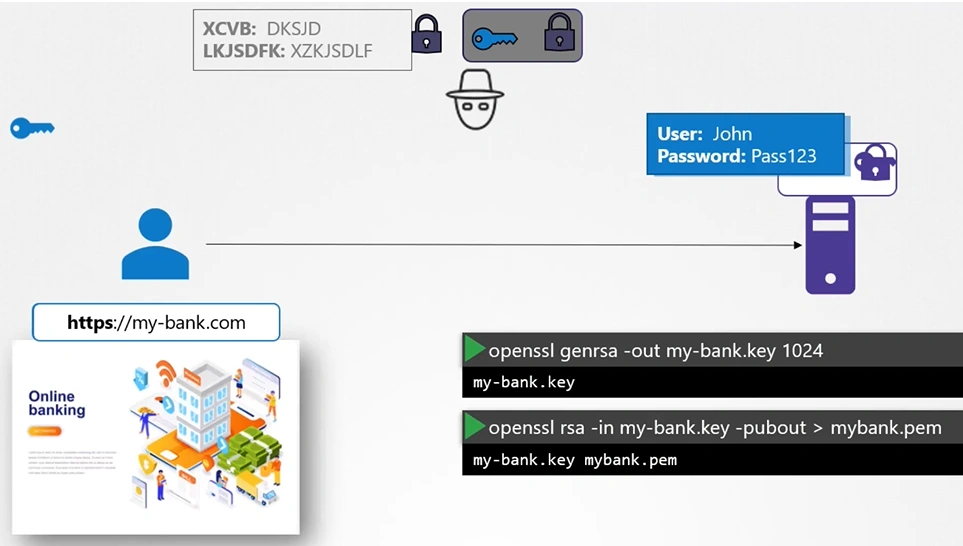
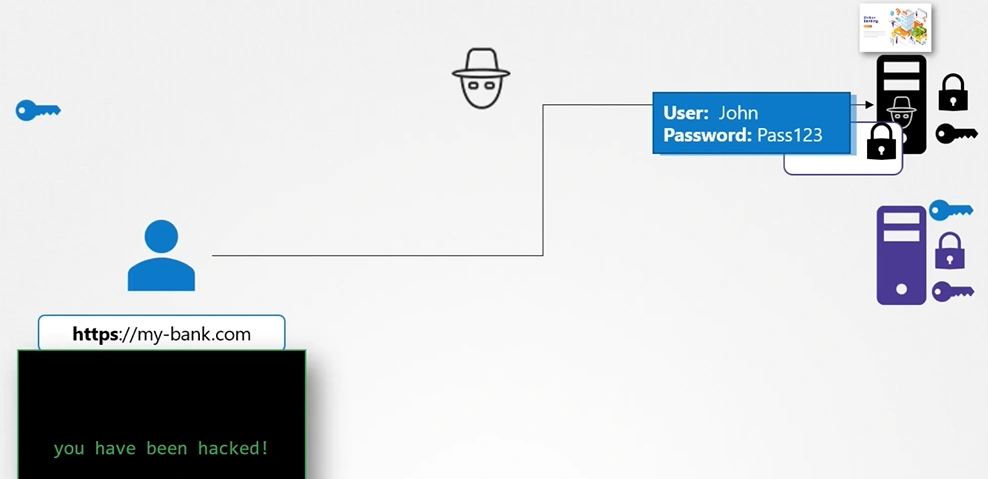
Recap of TLS Communication
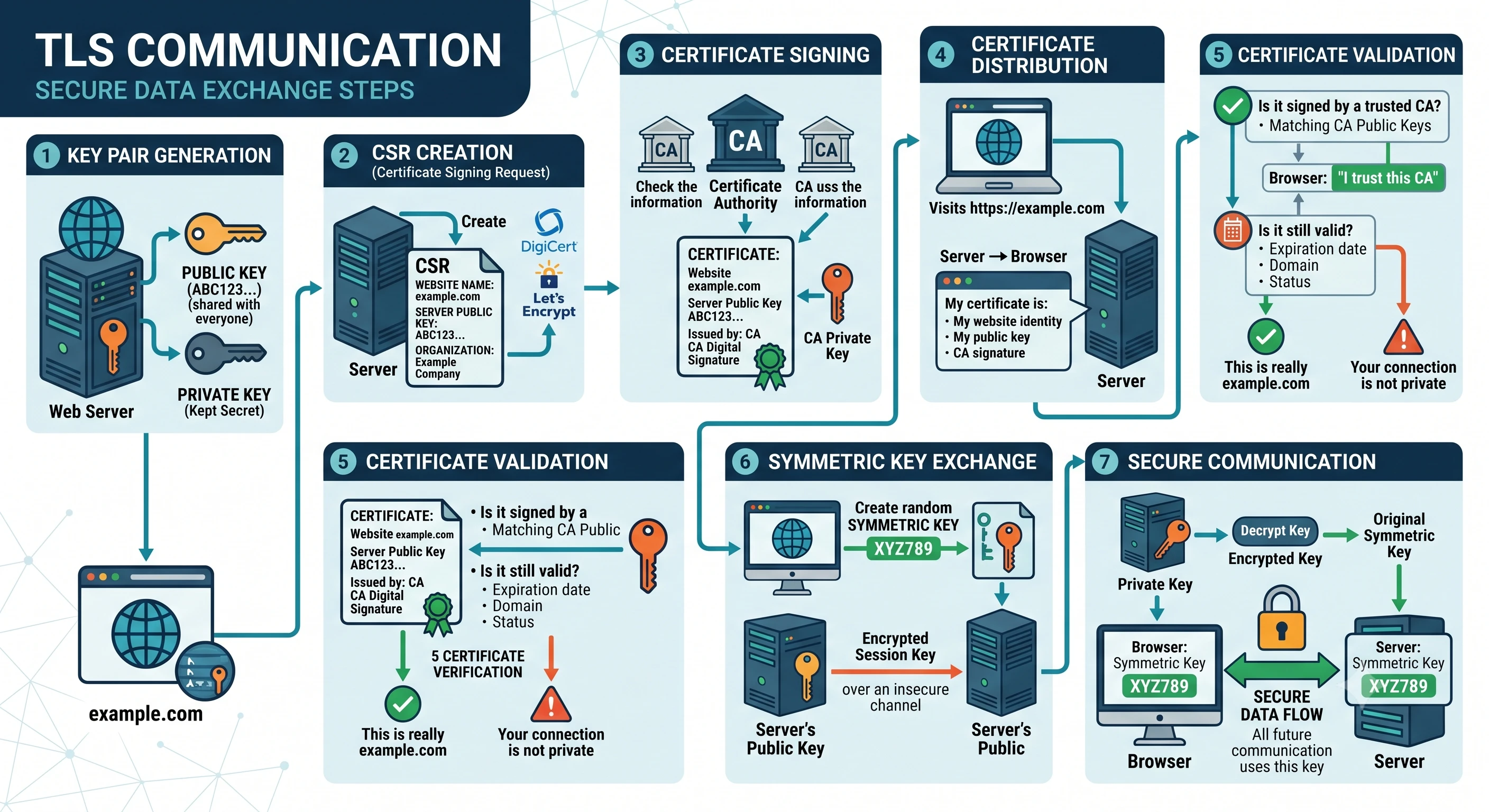
1. Key Pair Generation
TLS uses public key cryptography, which requires a pair of keys.
- Public key → can be shared with everyone
- Private key → kept secret by the owner
The web server generates:
Server:
    Public Key  → shared with users
    Private Key → kept secret
Example:
- A company creates a website:
example.com - The server creates a private key and a matching public key.
The private key is never sent to anyone.
2. CSR Creation (Certificate Signing Request)
The server creates a CSR containing:
- Website name (domain)
- Server public key
- Organization details
- Other information
Example:
CSR:
Website: example.com
Public Key: ABC123...
Organization: Example Company
The server sends this CSR to a Certificate Authority (CA).
A CA is a trusted organization that verifies identities, such as: DigiCert & Let’s Encrypt
3. Certificate Signing
The CA checks:
- Does this company own the domain?
- Is the information valid?
If approved, the CA creates a digital certificate.
The certificate contains:
Certificate:
-----------------
Website: example.com
Server Public Key: ABC123...
Issued by: CA
CA Digital Signature
-----------------
The CA signs it using the CA’s private key.
This proves:
“This public key really belongs to example.com.”
The server receives the signed certificate.
4. Certificate Distribution
When a user visits: https://example.com The browser contacts the server.
The server sends:
Server → Browser

"My certificate is:
- My website identity
- My public key
- CA signature"
The browser now has the server’s public key.
5. Certificate Validation
The browser must verify that the certificate is trustworthy. It checks:
a) Is the certificate signed by a trusted CA?
The browser already has a list of trusted CA public keys.
Example:
Browser:
"I trust this CA."

CA Public Key
        ↓
Checks certificate signature
b) Is the certificate still valid?
Checks: Expiration date, Domain name, Certificate status
If everything is correct: "This is really example.com"
If not: "Your connection is not private"
6. Symmetric Key Exchange
After trusting the server, the browser and server need a fast encryption method. TLS uses symmetric encryption for actual data because it is faster.
The browser creates a random session key:
Browser creates:
Symmetric Key:
XYZ789
The browser encrypts it using the server’s public key:
Encrypted Session Key

Browser
   |
   | encrypted using server public key
   ↓
Server
Only the server can decrypt it because only the server has the matching private key.
7. Secure Communication
The server decrypts the session key:
Encrypted Key
       |
       ↓
Server Private Key
       |
       ↓
Original Symmetric Key
Now both sides have the same secret key:
Browser                 Server

Symmetric Key XYZ789  =  Symmetric Key XYZ789
All future communication uses this key.
Simple analogy
Imagine sending a locked box:
- Server creates a lock and key pair
- Public key = open padlock
- Private key = secret key
- CA verifies the server
- Like a trusted authority saying:
“This lock belongs to this company”
- Like a trusted authority saying:
- Browser receives the lock
- Browser trusts it
- Browser puts a secret message (symmetric key) in the box
- Locks it with the server’s padlock
- Server opens it with its private key
- Both now use the shared secret to communicate securely
In modern TLS (TLS 1.3), the exact key exchange is usually done with algorithms like ECDHE rather than directly encrypting a symmetric key with the server public key, but the main idea remains: use asymmetric cryptography to establish trust, then use symmetric encryption for fast secure communication.
Certificate
Digital Certificates serve as more than just container for public keys. They provide essential details including:
- Certificate owner’s identitiy (subject)
- Issuer’s identity
- Validity dates
- Subject Alternative Names (SANs) for multiple domain support
TLS Certificate
A certificate is used to guarantee trust between 2 parties during transaction.
Example: when a user tries to access web server, tls certificates ensure that the communication between them is encrypted.
- The server sends the TLS certificate to the client. (Server Hello)
- The client validates the certificate (trusted CA, domain match, expiration).
- The public key from the certificate is used for key exchange.
- Once the handshake is complete, the session key encrypts all communication.
For example, a certificate may contain details such as:
Certificate:
    Data:
        Serial Number: 420327018966204255
        Signature Algorithm: sha256WithRSAEncryption
        Issuer: CN=kubernetes
        Validity
            Not After : Feb  9 13:41:28 2020 GMT
        Subject: CN=my-bank.com
        X509v3 Subject Alternative Name:
            DNS:mybank.com, DNS:i-bank.com,
            DNS:we-bank.com,
        Subject Public Key Info:
            00:b9:b0:55:24:fb:a4:ef:77:73:7c:9b
How do you look at a certificate and verify if it is legit?
-
who signed and issued the certificate.
-
If you generate the certificate then you will have it sign it by yourself; that is known as self-signed certificate.
-
Server Certificates: Deployed on servers.
-
**Root Certificates:** Held by the Certificate Authority (CA) to sign server certificates.
-
Client Certificates: Used by clients to authenticate themselves to the server.
Tip
Certificate files follow specific naming conventions:
- Certificates containing public keys typically use
.crtor.pemextensions (e.g.,server.crtorclient.pem).- Private keys often have the term “key” as their extension (e.g.,
.key) or within the filename (e.g.,server-key.pem).
Certificate Authorities
How do you generate legitimate certificate? How do you get your certificates singed by someone with authority?
- That’s where
Certificate Authority (CA)comes in for you. Some of the popular ones are Symantec, DigiCert, Comodo, GlobalSign etc.
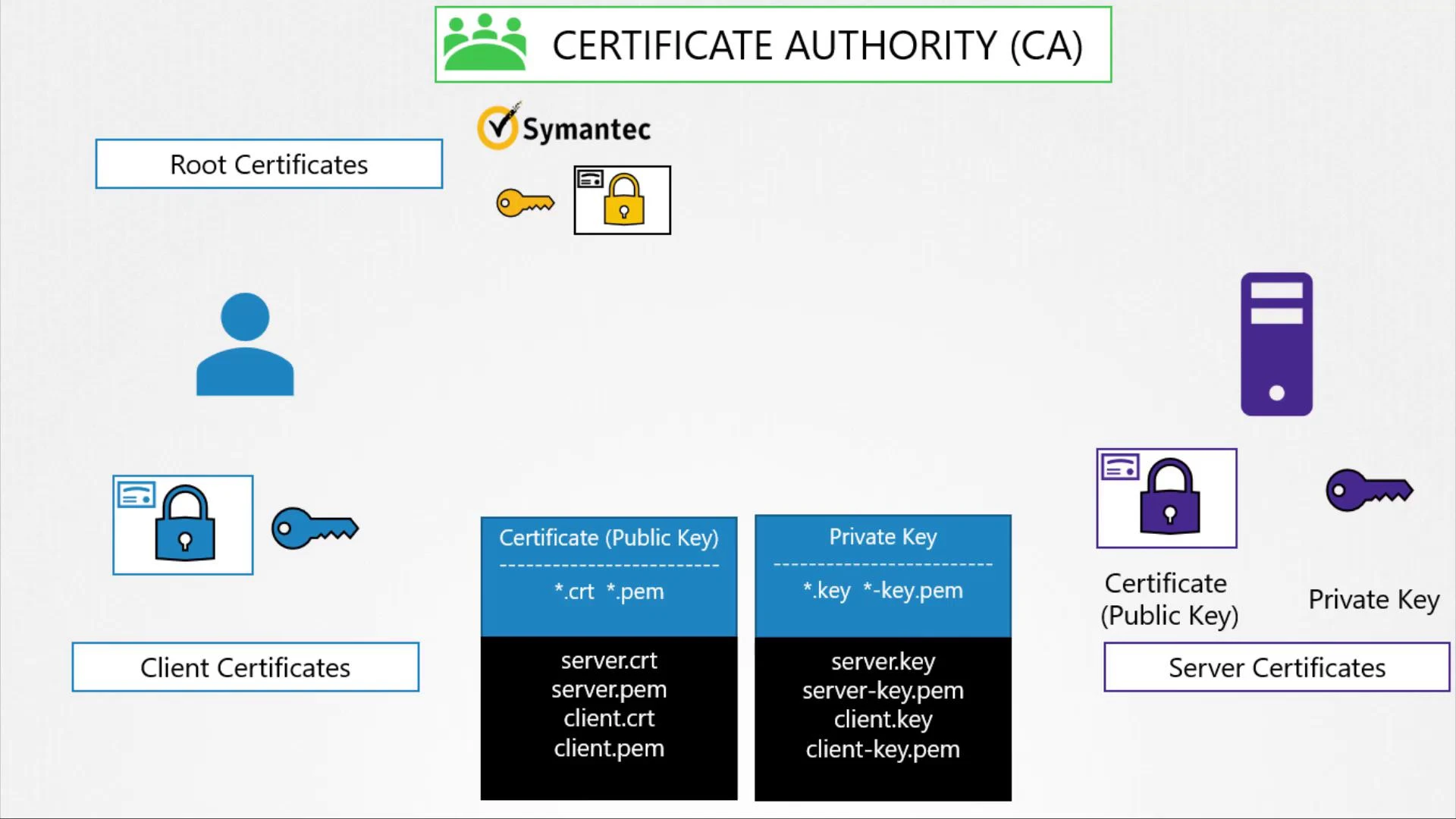
Certifying Trust with Certificate Authorities
The process is as follows:
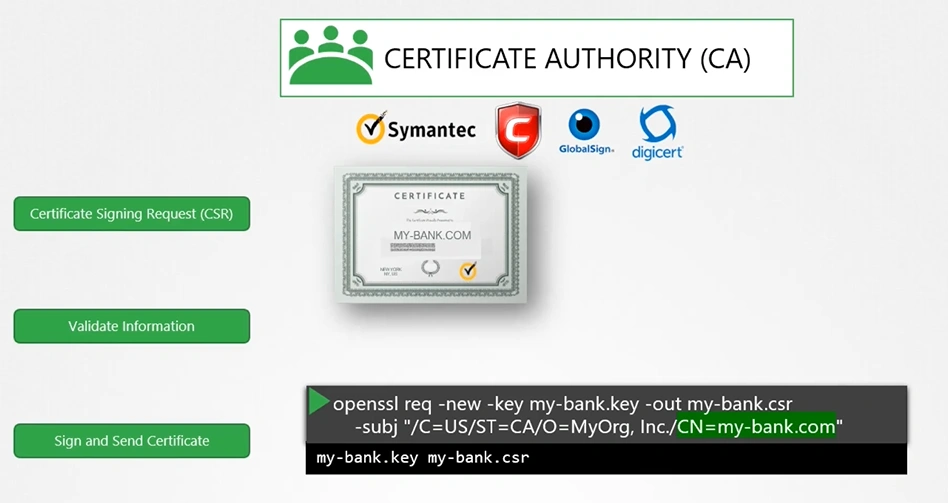
- Generate a Certificate Signing Request (CSR) using your private key and domain name:
openssl req -new -key my-bank.key -out my-bank.csr -subj "/C=US/ST=CA/O=MyOrg, Inc./CN=my-bank.com" - Submit the CSR to a CA.
- The CA verifies your information and, once validated, signs your certificate.
- The signed certificate is returned and installed on your server, ensuring that browsers trust your website.
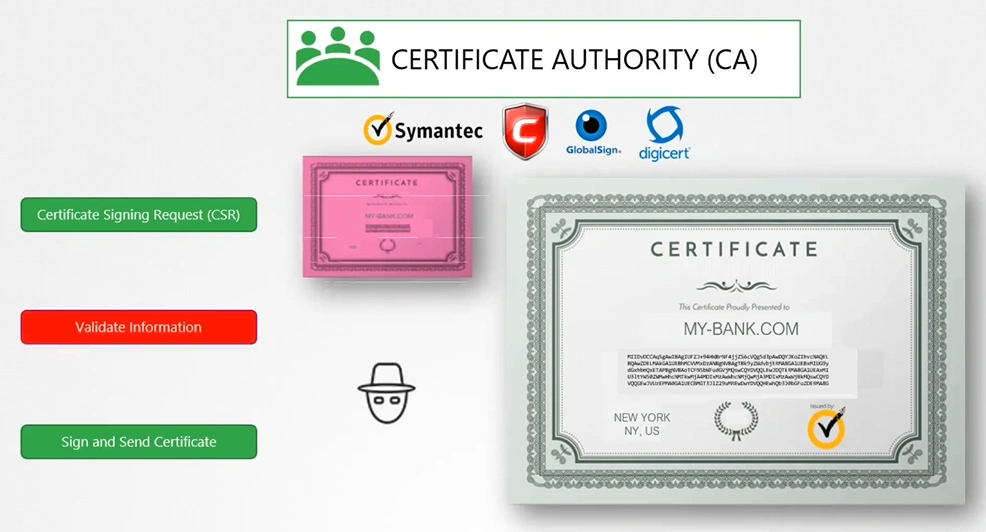
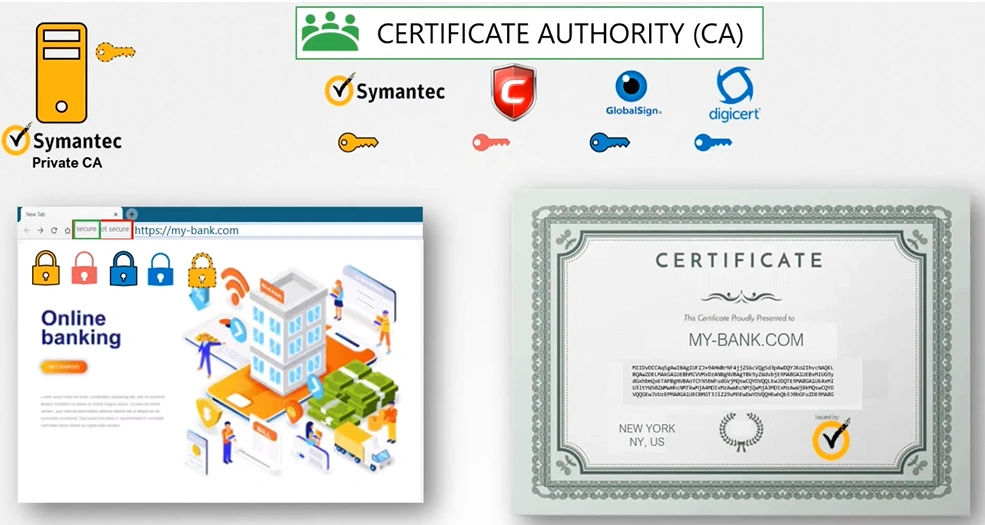
Browsers inherently trust certificates from recognized CAs because they come preloaded with the public keys of these authorities. This allows browsers to verify that a certificate is legitimate.
Important
While public CAs secure external websites like e-commerce platforms, private CAs can also be used to secure internal applications, such as corporate intranets and payroll systems
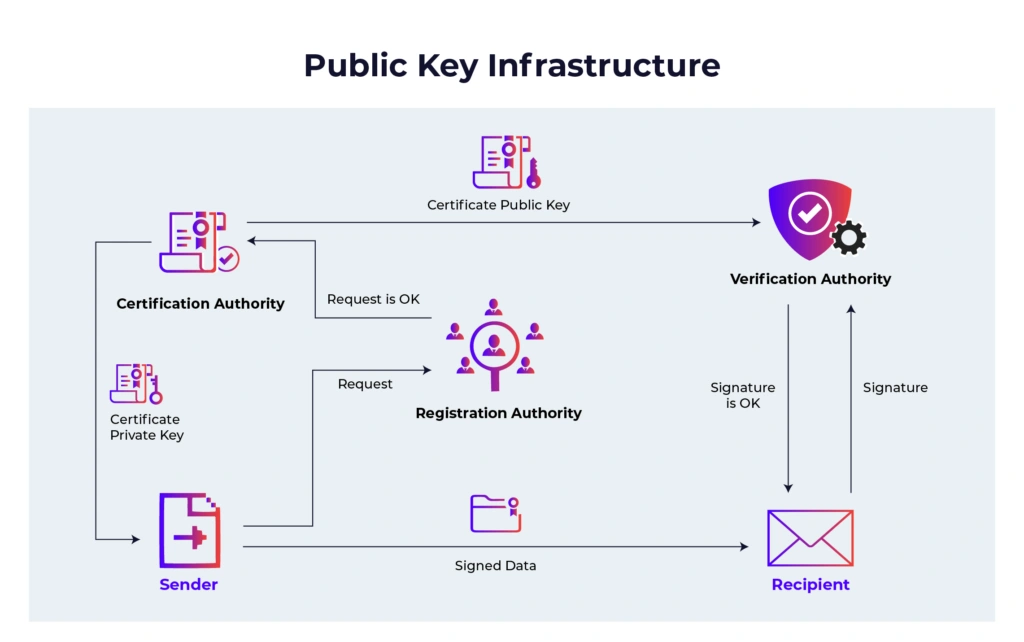
Public Key Infrastructure
What Is Public Key Infrastructure (PKI) & How Does It Work? | Okta
It is the set of technology and processes that make up a framework of encryption to protect and authenticate digital communications.
The main components of public key infrastructure include the following:
- Certificate authority (CA): The CA is a trusted entity that issues, stores, and signs the digital certificate. The CA signs the digital certificate with their own private key and then publishes the public key that can be accessed upon request.
- Registration authority (RA): The RA verifies the identity of the user or device requesting the digital certificate. This can be a third party, or the CA can also act as the RA.
- Certificate database: This database stores the digital certificate and its metadata, which includes how long the certificate is valid.
- Central directory: This is the secure location where the cryptographic keys are indexed and stored.
- Certificate management system: This is the system for managing the delivery of certificates as well as access to them.
- Certificate policy: This policy outlines the procedures of the PKI. It can be used by outsiders to determine the PKI’s trustworthiness.