kubernetes/security kubernetes/networking
Core Idea
Every transaction in a default cluster is mutual TLS, so Kubernetes needs a full PKI: multiple CA domains, front-proxy and etcd CAs, HA designs, and a certificate matrix that ties RBAC to certificates.
- Grouping certificates, then the topologies: multiple CA, API aggregation with a front proxy CA, and HA control plane (shared roots, load balancer SANs).
- Fine-grained kubelet API authorization (GA in v1.36) as a newer PKI concern.
- The comprehensive certificate matrix (control-plane CA domain and etcd CA domain) with the RBAC-certificate connection as the takeaway.
Kubernetes clusters require a complete Public Key Infrastructure (PKI) to establish trust across nodes, users, control-plane components, and databases. Every transaction in a default Kubernetes cluster is authenticated via Mutual TLS (mTLS).
For the basic principles of cryptography, certificates, and mTLS, refer back to 01 - Cryptography and PKI Foundations.
Grouping Certificate
| Certificate Group | Description |
|---|---|
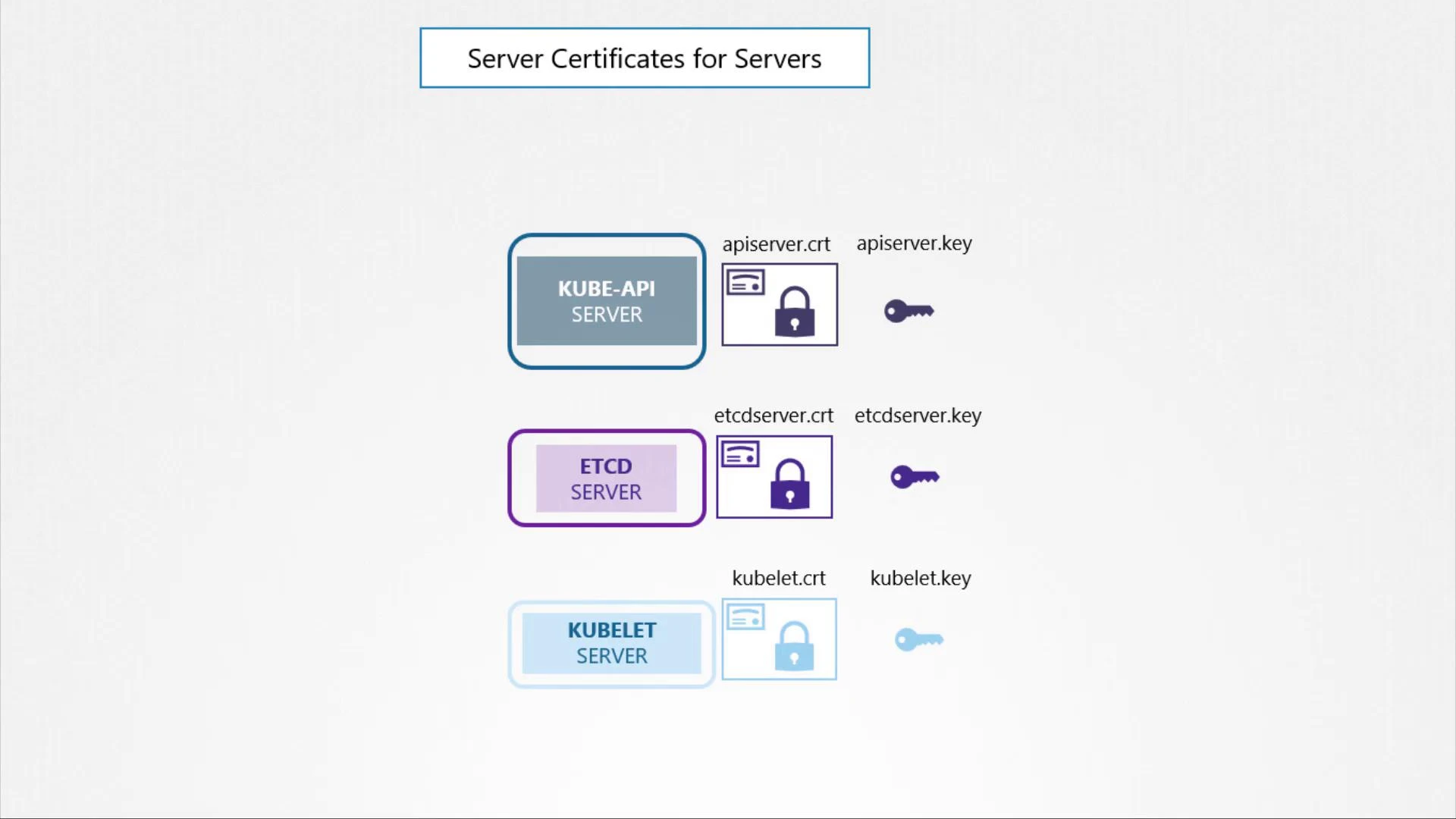
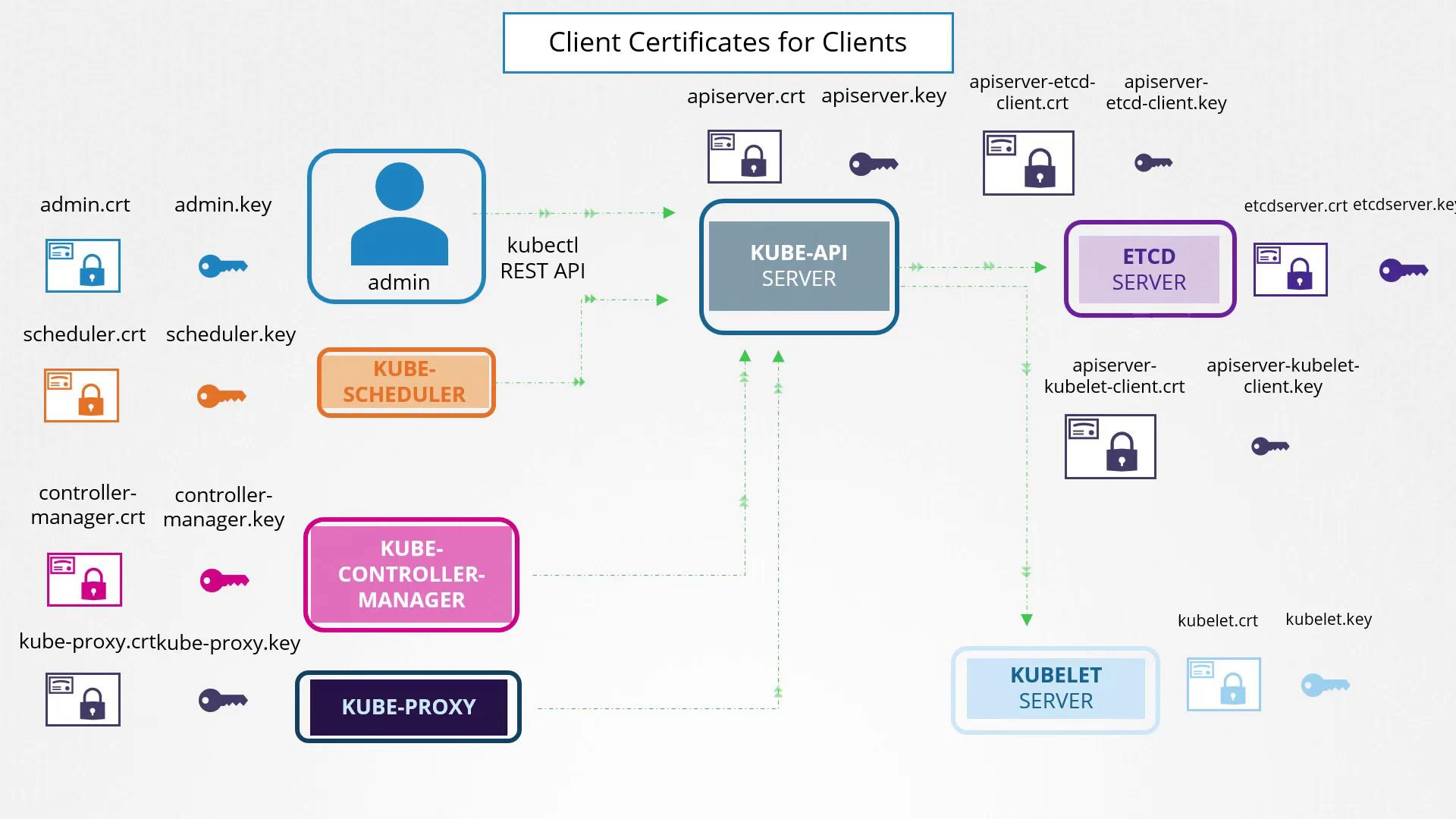
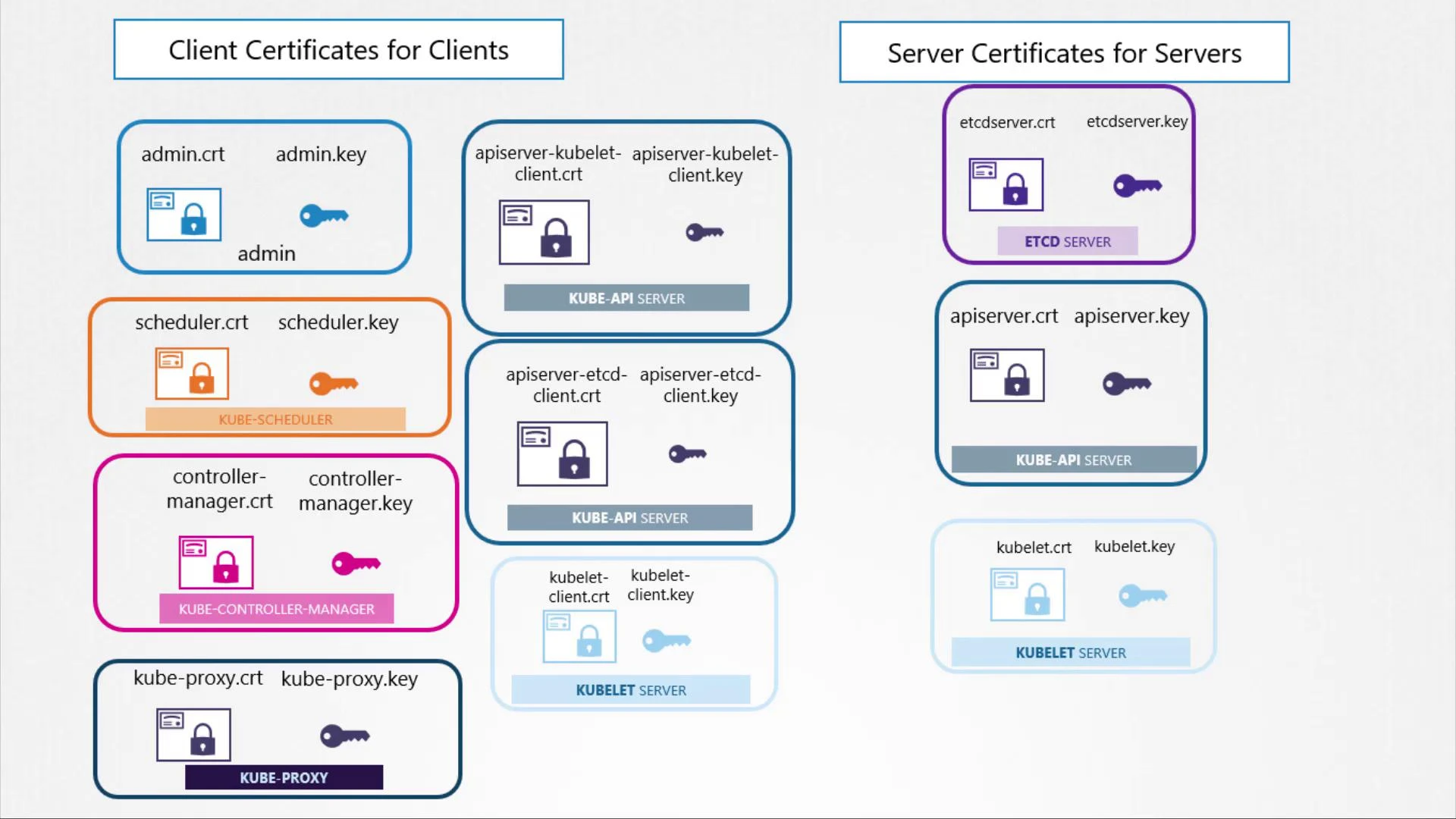
| Client Certificates | Used by administrators, the scheduler, controller-manager, and kube-proxy to access the Kube API server. |
| Server Certificates | Employed by the Kube API server, etcd server, and kubelet to authenticate incoming client connections. |
Root certificate held by the CA
Administrators connect to the Kubernetes cluster via
kubectlor direct REST API calls. The admin user authenticates with a client certificate (admin.crt) and corresponding key (admin.key).
1. Multiple CA Topology
In a standard secure installation (like one created by kubeadm), a single CA is not used for everything. Using separate CAs enforces security boundaries (e.g., compromising the etcd CA doesn’t automatically allow signing control plane client certs).
Usually, there are three distinct trust domains (CAs) in a Kubernetes cluster, plus an asymmetric signing key pair for tokens:
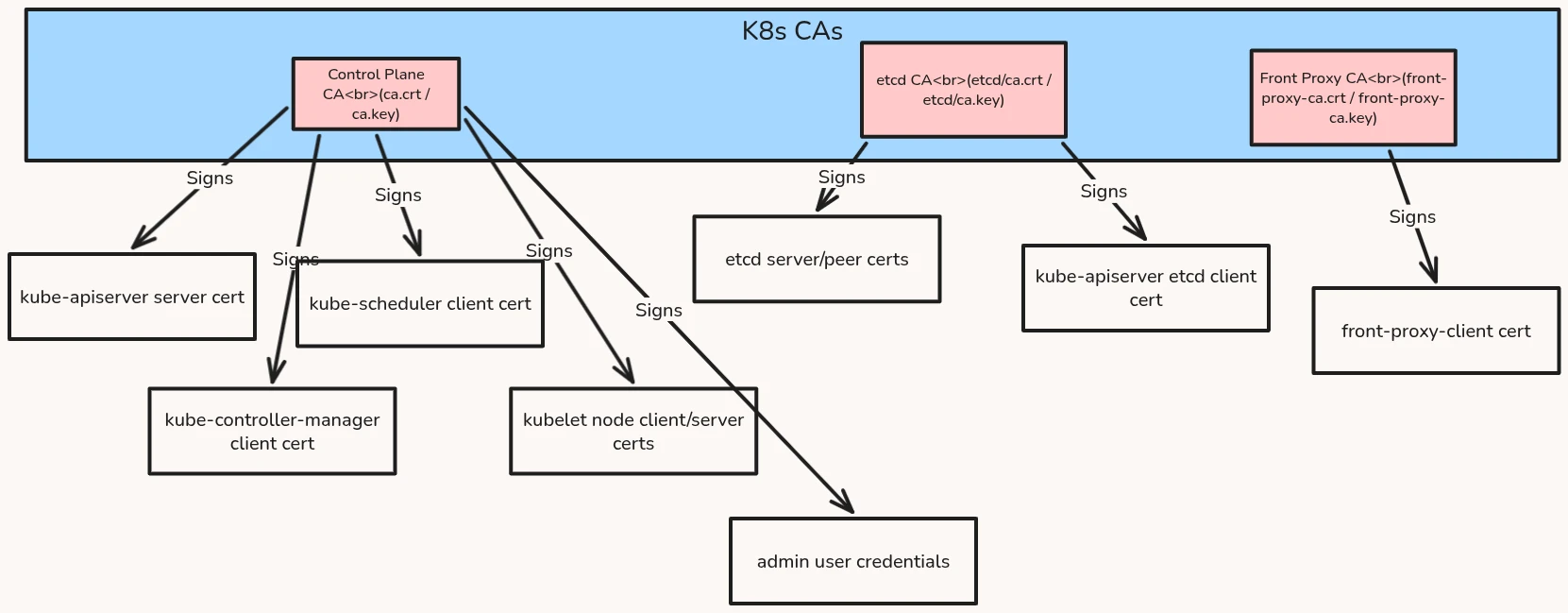
- Control Plane CA: Secures all core components and authentication to the Kube API server.
- etcd CA: Secures database traffic (etcd server-to-client and peer-to-peer clustering).
- Front Proxy CA: Used for API Aggregation (when using extension API servers like metrics-server).
- Service Account Key Pair (
sa.key/sa.pub): This is not a Certificate Authority. It is a raw asymmetric key pair used by thekube-controller-managerto sign ServiceAccount JWT tokens (sa.key) and by thekube-apiserverto verify them (sa.pub).
2. API Aggregation & Front Proxy CA (Deep Dive)
When you run kubectl top nodes, your request goes to the kube-apiserver, which acts as an aggregating proxy and forwards the request to the metrics-server extension API.
To make this secure:
- The extension API server (
metrics-server) must verify that incoming requests are indeed forwarded by the realkube-apiserver(preventing identity spoofing). - The
kube-apiserverauthenticates to the extension API server using a client certificate signed by the Front Proxy CA:front-proxy-client.crt. - The extension API server is configured to trust the
front-proxy-ca.crtto validate this client certificate.
3. High Availability (HA) Control Plane PKI Design
In a multi-master High Availability (HA) cluster, special certificate requirements apply:
A. Sharing the Root CAs
For the control plane to function uniformly, all control plane nodes must share the exact same Root CAs. When setting up a multi-master cluster:
- Generate the CA files on the first master node:
/etc/kubernetes/pki/ca.crt&ca.key/etc/kubernetes/pki/etcd/ca.crt&ca.key/etc/kubernetes/pki/front-proxy-ca.crt&front-proxy-ca.key
- Manually and securely copy these CA keys and certs to all other control plane nodes before running
kubeadm join --control-plane.
B. Load Balancer SAN Requirement
In an HA cluster, control plane components and worker nodes do not connect directly to a single API server’s IP. Instead, they connect to an external Load Balancer (e.g., keepalived, HAProxy, or a cloud load balancer).
- The API Server server certificate (
apiserver.crt) on every control plane node must list the Load Balancer’s DNS name and IP address in its Subject Alternative Names (SANs). - If the load balancer IP is
192.168.1.50and the DNS islb.k8s.local, theopenssl.cnfconfiguration must include:
  [ alt_names ]
  DNS.6 = lb.k8s.local
  IP.4  = 192.168.1.50
4. Fine-Grained Kubelet API Authorization (New in v1.36 GA)
The Kubelet runs on every worker node and exposes an HTTPS API (usually on port 10250) for the kube-apiserver to stream logs, exec commands, and fetch stats.
The Security Challenge
Historically, to query node stats or list pods on a node, monitoring tools or log collectors needed the broad nodes/proxy RBAC permission. However, this permission carries severe security risks, as it also allows dangerous operations like running exec inside a container.
The v1.36 Solution
In Kubernetes v1.36, Fine-Grained Kubelet API Authorization is General Availability (GA).
- The Kubelet now evaluates authorization for specific subresource endpoints via
SubjectAccessReview. - Instead of broad proxy access, you can grant read-only access to specific Kubelet endpoints:
/pods(Subresource:pods)/runningPods/(Subresource:runningpods)/healthz(Subresource:healthz)/configz(Subresource:configz)
Info
This enforces the principle of least privilege: monitoring sidecars can check node health and view running pods without having the power to execute root commands in your containers.
5. Comprehensive Kubernetes Certificate Matrix
Below is the complete map of certificates required in a standard Kubernetes cluster, including their identities and file locations.
A. Control Plane CA Domain
| File / Component | Type | Subject Common Name (CN) | Organization (O) | Subject Alternative Names (SANs) | Purpose | Default Location |
|---|---|---|---|---|---|---|
| Root CA | CA | kubernetes or KUBERNETES-CA | None | None | Signs all control plane certs | /etc/kubernetes/pki/ca.crt (Key: ca.key) |
| admin | Client | kubernetes-admin | system:masters | None | User certificate for full cluster administration | Embedded in ~/.kube/config |
| kube-scheduler | Client | system:kube-scheduler | None | None | Authenticates scheduler to API server | /etc/kubernetes/pki/scheduler.conf (kubeconfig) |
| kube-controller-manager | Client | system:kube-controller-manager | None | None | Authenticates controller-manager to API server | /etc/kubernetes/pki/controller-manager.conf (kubeconfig) |
| kube-proxy | Client | system:kube-proxy | None | None | Authenticates network agent to API server | /etc/kubernetes/pki/kube-proxy.conf (kubeconfig) |
| kube-apiserver Server | Server | kube-apiserver | None | DNS: kubernetes, kubernetes.default, kubernetes.default.svc, kubernetes.default.svc.cluster.local, master-node-nameIP: 10.96.0.1 (Service IP), <master-node-ip> | Secures the main HTTPS endpoint of the API Server | /etc/kubernetes/pki/apiserver.crt (Key: apiserver.key) |
| kube-apiserver Kubelet Client | Client | kube-apiserver-kubelet-client | system:masters | None | Authenticates API Server calls to node Kubelet API | /etc/kubernetes/pki/apiserver-kubelet-client.crt (Key: apiserver-kubelet-client.key) |
| Kubelet Server | Server | system:node:<node-name> | system:nodes | DNS: <node-name> IP: <node-ip> | Secures the node kubelet API (exec/logs/metrics) | /var/lib/kubelet/pki/kubelet.crt (Key: kubelet.key) |
| Kubelet Client | Client | system:node:<node-name> | system:nodes | None | Authenticates node kubelet to the API Server | /etc/kubernetes/kubelet.conf (kubeconfig) |
Kubelet Sever and Kubelet Client
- The Kubelet Server listens on port 10250, acting as a receiver for incoming requests from the
kube-apiserverto execute tasks likekubectl logsandkubectl exec.- The Kubelet Client acts as an initiator, making outbound connections to the
kube-apiserverto report node heartbeats, watch for new pod assignments, and fetch cluster data.- Both sides are secured via mutual TLS (mTLS) to guarantee encrypted communication and strictly verify identity before any action is taken.
B. etcd CA Domain
| File / Component | Type | Subject Common Name (CN) | SANs | Purpose | Default Location |
|---|---|---|---|---|---|
| etcd CA | CA | etcd-ca | None | Signs all database certs | /etc/kubernetes/pki/etcd/ca.crt (Key: ca.key) |
| etcd Server | Server | <node-name> | DNS: localhost, <node-name> IP: 127.0.0.1, <node-ip> | Secures incoming client connections to database | /etc/kubernetes/pki/etcd/server.crt (Key: server.key) |
| etcd Peer | Client & Server | <node-name> | DNS: localhost, <node-name> IP: 127.0.0.1, <node-ip> | Secures replication traffic between etcd cluster members | /etc/kubernetes/pki/etcd/peer.crt (Key: peer.key) |
| kube-apiserver etcd Client | Client | kube-apiserver-etcd-client | None | Authenticates API Server calls to etcd | /etc/kubernetes/pki/apiserver-etcd-client.crt (Key: apiserver-etcd-client.key) |
6. Key Takeaway: The RBAC-Certificate Connection
When the Kube API server validates a client certificate, it reads the certificate attributes:
- Subject Common Name (CN): Placed into the request context as the Username.
- Organization (O): Placed into the request context as the user’s Groups.
For example, when you connect with the admin client certificate, the API server sees O=system:masters. The built-in RBAC ClusterRoleBinding named cluster-admin binds the group system:masters to the cluster-admin role, granting you unrestricted access.
WARNING
Do not hand out certificates containing the group
system:mastersor prefixsystem:to standard users. This bypasses typical authorization logic and grants complete root access.