Core Idea
The sidecar pattern puts cross-cutting work in a second container beside the app, so logging, proxying, or syncing ships as its own process and image.
- Pattern first: the note opens with the microservice sidecar/sidekick concept plus a cheatsheet.
- Then the Kubernetes container: how sidecars share the pod namespace, with examples on Docker and on K8s.
- Keeps the helper separate from the main app without splitting the pod.
Sidecar Pattern
‘Chapter 3. The Sidecar Pattern’
—Brendan Burns, “Designing Distributed Systems”
The sidecar pattern is a design pattern commonly used in distributed systems, microservices architecture.
It’s single-node pattern.
A single-node container refers to a containerized application or service that runs on a single machine or node in a cluster.
Cheatsheet
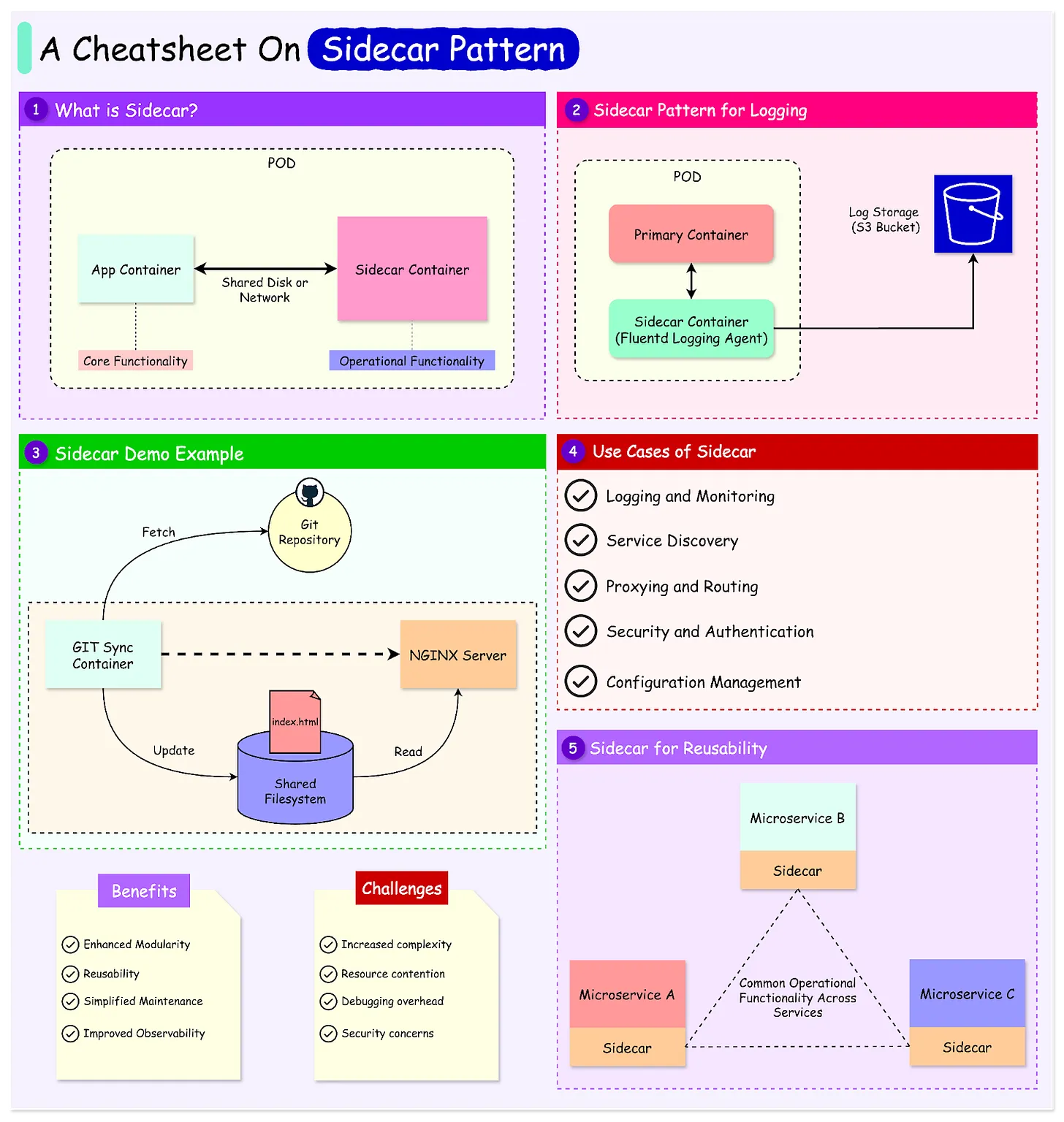
Sidecar Container
Namespace sharing
When a sidecar container shares the process ID (PID) namespace with the main application container, both containers can see and interact with each other’s processes. This setup enables the sidecar container to monitor, manage, or manipulate the processes of the primary application container as if they were running on the same system.
On Docker
PID Namespace
A PID namespace is a Linux kernel feature that isolates the process IDs (PIDs) for a group of processes. Containers typically use their own PID namespace to ensure process isolation, meaning each container has its own independent set of process IDs.
However, when two containers share the same PID namespace:
- They can see each other’s process tree.
- They can interact with each other’s processes (e.g., monitor or signal processes).
Docker containers do not share namespaces with other containers or the host system. Each Docker container is designed to run in its own isolated namespaces for process IDs (PID), network, file systems, and more.
Explicit Sharing:
- You can configure PID namespace sharing using the
--pidoption when running a container:--pid=host: The container shares the host’s PID namespace, meaning it can see and interact with all processes on the host.--pid=container:<container_id>: The container shares the PID namespace of another container, enabling process interaction between the two containers.
Namespace sharing must be explicitly enabled using Docker options like:
--pid: Controls process visibility and interaction.--net: Controls network isolation or sharing.--ipc: Controls shared memory and IPC communication.
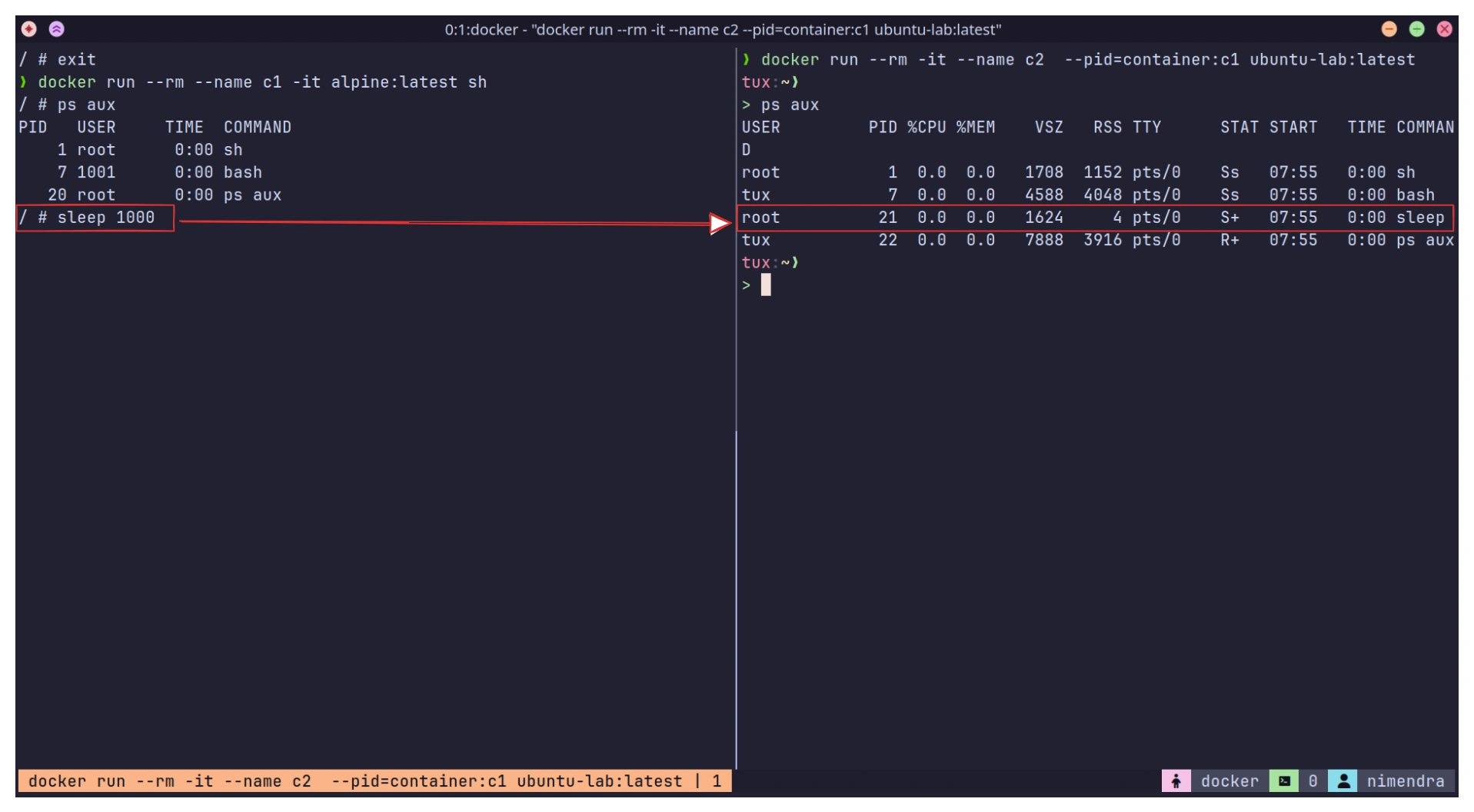
👉 10. Docker Security > Kernel Namespaces
👉 Namespace & Cgroups > Namespaces
On K8s
By default, each container in a Kubernetes Pod runs in its own PID namespace.similar to the default Docker behavior.
K8s Provides an option to share namespace between containers within the same pod. This is enabled by setting the shareProcessNamespace: true flag in the Pod specification.
after sharing namespace, all containers in that Pod will see each other’s processes and can send signals (e.g., kill, SIGTERM, etc.) to each other’s processes. This can be useful in cases like sidecar pattern.
apiVersion: v1
kind: Pod
metadata:
  name: nginx
spec:
  shareProcessNamespace: true # Share namespace
  containers:
  - name: nginx
    image: nginx
  - name: shell
    image: busybox:1.28
    command: ["sleep", "3600"]
    securityContext:
      capabilities:
        add:
        - SYS_PTRACE
    stdin: true
    tty: true
Share Process Namespace between Containers in a Pod | Kubernetes
Warning
You cannot directly access the same file between containers in a Kubernetes Pod without using a shared volume.
In Kubernetes, each container in a Pod runs in its isolated filesystem. 👉 05. Docker Containers
While containers share the same network and namespace (and optionally the same PID namespace), their filesystems are separate unless explicitly connected via a shared volume. 👉 Storage > Volume Creating
The Kubernetes SideCar Pattern explained
Sidecar Pattern & Sidecar Containers