Core Idea
Kubernetes storage is layered: pods mount volumes (ephemeral or persistent), the PV/PVC subsystem matches claims to provisioned storage, and CSI plugs in the actual providers.
- Volume and mounts: types of volumes, starting with ephemeral and persistent, and how they attach to pods.
- The persistent volume subsystem: PV definitions, PVC definitions, and using them inside pods.
- Storage providers, with the Container Storage Interface as the standard hook.
Volume & Mounts
09. Volume & persistent data
11. Storage Drivers & Volume Drivers
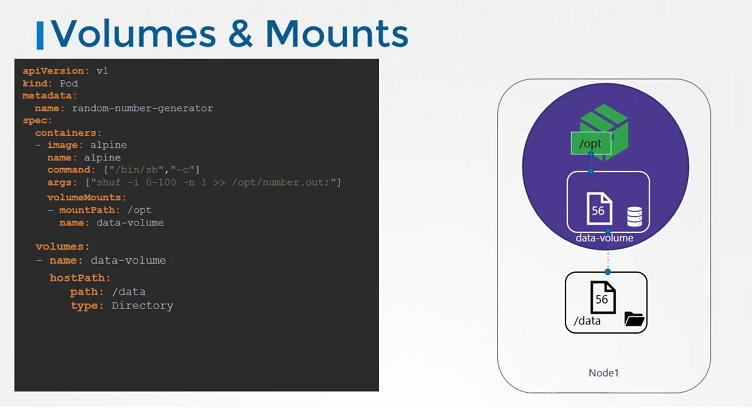
Types of Volumes
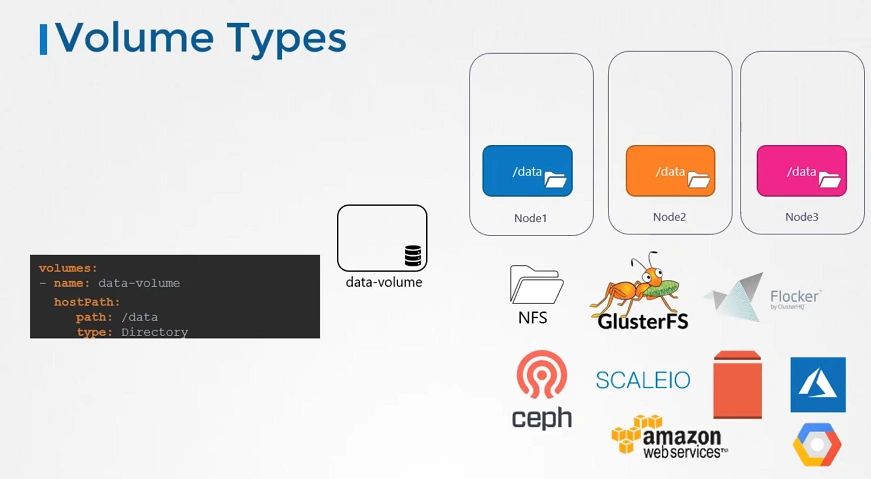
1. Ephemeral Volumes
Simply these volumes follow the Pod’s lifetime and get created and deleted along with the Pod
emptyDir: Temporary directory per Pod.configMaporsecret: Mount configuration data or secrets as files.- Created locally on the node (e.g.,
emptyDir, ConfigMap, Secret). - Stored in
/var/lib/kubelet/pods/<PodUID>/volumes/.
2. Persistent Volumes
- Backed by storage infrastructure (e.g., NFS, AWS EBS, Azure Disk).
- Managed through PVCs and PVs.
- Provisioned dynamically or statically.
- Storage location depends on the backend:
- Cloud Providers: AWS EBS, Azure Disk, GCE Persistent Disk.
- Local Host: For
hostPath.
Persistent Volume Subsystem
A Persistent Volume is a cluster-wide pool of storage volumes configured by an administrator to be used by users deploying application on the cluster. The users can now select storage from this pool using Persistent Volume Claims.
Kubernetes persistent volume subsystem lets you connect enterprise-grade storage systems that provide advanced data management services such as backup and recovery, replication, snapshots, and more.
Kubernetes supports many types of storage from many different providers. These include block, file, and object storage from various external systems that can be in the cloud or your on-premises datacenters.
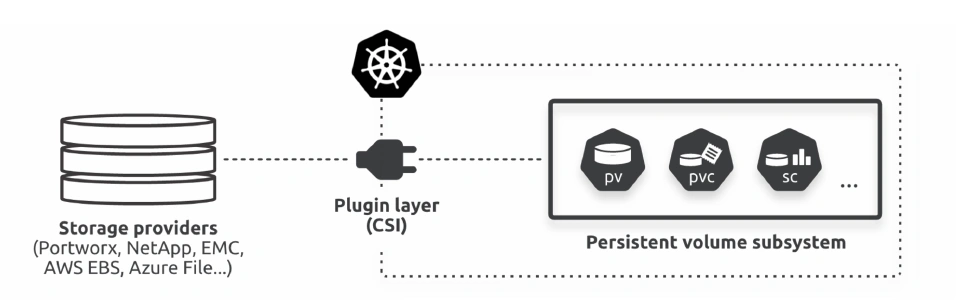
In the middle of the diagram is the plugin layer. This is the interface that connects the external storage systems with Kubernetes.
Modern plugins use the Container Storage Interface (CSI), which is an industry-standard storage interface for container orchestrators such as Kubernetes.
If you’re a developer writing storage plugins, the CSI abstracts the internal Kubernetes machinery and allows you to develop out-of-tree.
Kubernetes persistent volume subsystem
This is a standardized set of API objects that make it easy for applications running on Kubernetes to consume storage.
- PersistentVolumes (PV) —> Map external volumes
- PersistentVolumeClaims (PVC) —> Grant access to PVs
- StorageClasses (SC) —> allow applications to create PVs dynamically
Workflow
- The Pod needs a volume and requests it via a PersistentVolumeClaim
- The PVC asks the StorageClass to create a new PV and associated volume on the AWS backend
- The SC makes the call to the AWS backend via the CSI plugin
- The CSI plugin creates the device (50GB EBS volume) on AWS
- The CSI plugin reports the creation of the external volume back to the SC
- The SC creates the PV and maps it to the EBS volume on the AWS backend
- The Pod mounts the PV and uses it
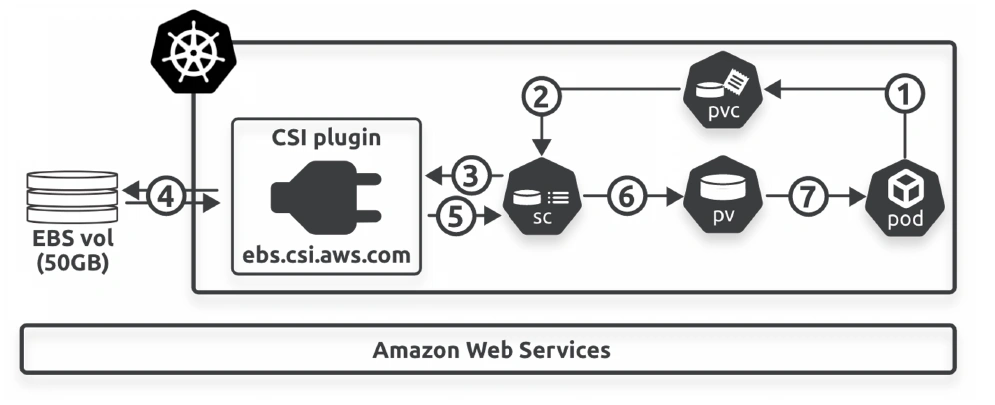
You cannot map a single 50GB external volume to 2 x 25GB PVs.
You Cannot bind 2 pvc to the same pv.
Persistence Volume
# pv-definition.yaml

kind: PersistentVolume
apiVersion: v1
metadata:
  name: pv-vol1
spec:
  accessModes: [ "ReadWriteOnce" ]
  capacity:
   storage: 1Gi
  hostPath: # storage type
   path: /tmp/data
Persistent Volume Claims
- Volumes and Persistent Volume Claim are two separate objects in the Kubernetes namespace.
- Once the Persistent Volume Claim created, Kubernetes binds the Persistent Volumes to claim based on the request and properties set on the volume.
- If properties not matches or Persistent Volume is not available for the Persistent Volume Claim then it will display the pending state.
# pvc-definition.yaml

kind: PersistentVolumeClaim
apiVersion: v1
metadata:
  name: myclaim
spec:
  accessModes: [ "ReadWriteOnce" ]
  resources:
   requests:
     storage: 1Gi
Using In Pods
- Persistent Volume Claim must exist in the same namespace as the Pod using the claim.
- The cluster finds the claim in the Pod’s namespace and uses it to get the Persistent Volume backing the claim. The volume is then mounted to the host and into the Pod.
- Persistent Volume is a cluster-scoped and Persistent Volume Claim is a namespace-scoped.
# pod-definition.yaml

apiVersion: v1
kind: Pod
metadata:
  name: mypod
spec:
  containers:
    - name: myfrontend
      image: nginx
      volumeMounts:
      - mountPath: "/var/www/html"
        name: web
  volumes:
    - name: web
      persistentVolumeClaim:
        claimName: myclaim
Storage Providers
Each provider supplies its own CSI plugin and has unique features and configuration options.
The provider usually distributes the plugin via a Helm chart or YAML installer.
Once installed, the plugin runs as a set of Pods in the kube-system Namespace, and it’s your responsibility to read the plugin’s documentation and configure it properly.
Container Storage Interface (CSI)
The CSI is an open-source project that defines an industry-standard interface so container orchestrators can leverage external storage resources in a uniform way.
You’ll have to manually install plugins for third-party storage systems, but most are available as Helm charts or can be installed via YAML files from the provider.
Once installed, CSI plugins usually run as a set of Pods in the kube-system Namespace.
05. Container Interfaces > Container Storage Interface
Provisioning of Persistent Volumes
⎈ A Hands-On Guide to Kubernetes Volumes 🛠️ | by Anvesh Muppeda | Medium
Dynamic Volume Provisioning | Kubernetes
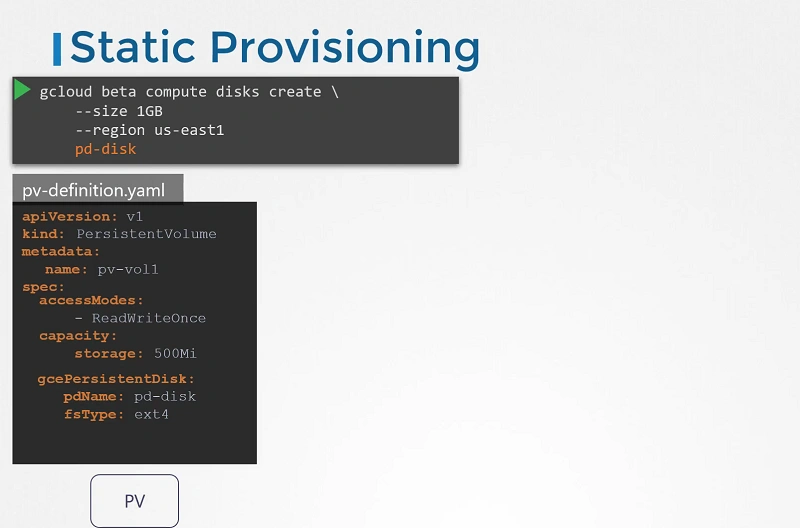
Static Provisioning
In static provisioning, the cluster administrator creates PVs with details of available storage. These PVs are pre-defined in the Kubernetes API and are ready for use by cluster users.
Dynamic Provisioning
In dynamic provisioning, when no static PV matches a user’s PersistentVolumeClaim (PVC), the cluster can automatically provision a volume. This is based on StorageClasses:
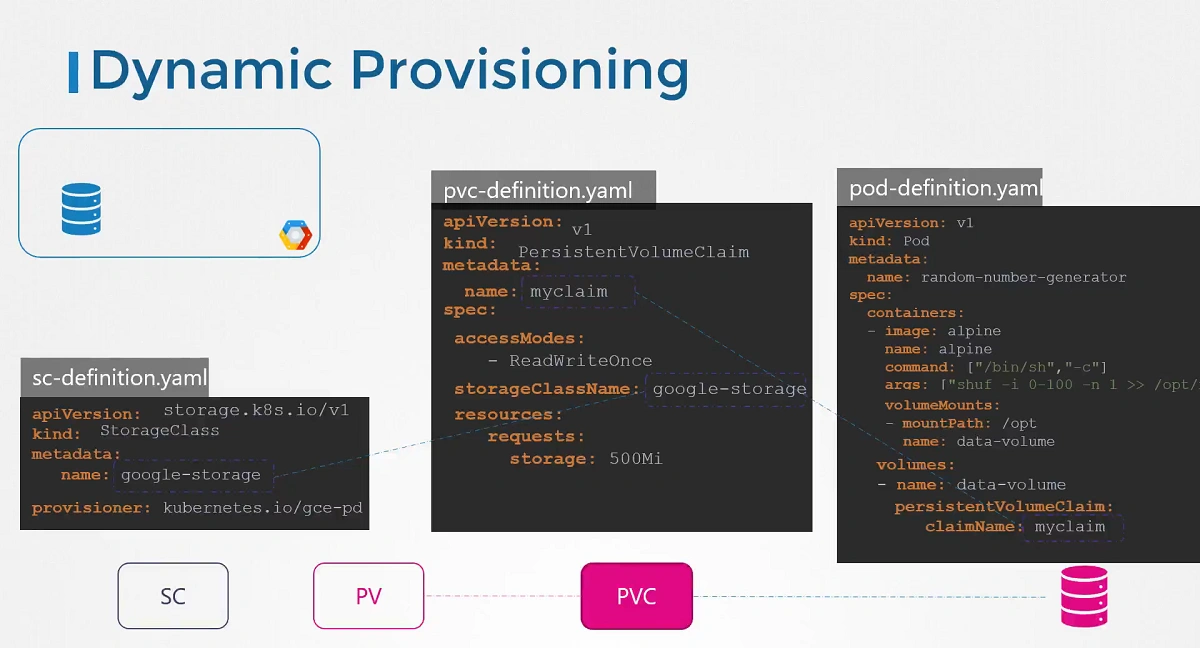
Dynamic provisioning with Storage Classes
Storage classes are resources in the storage.k8s.io/v1 API group.
The resource type is StorageClass, and you define them in regular YAML files.
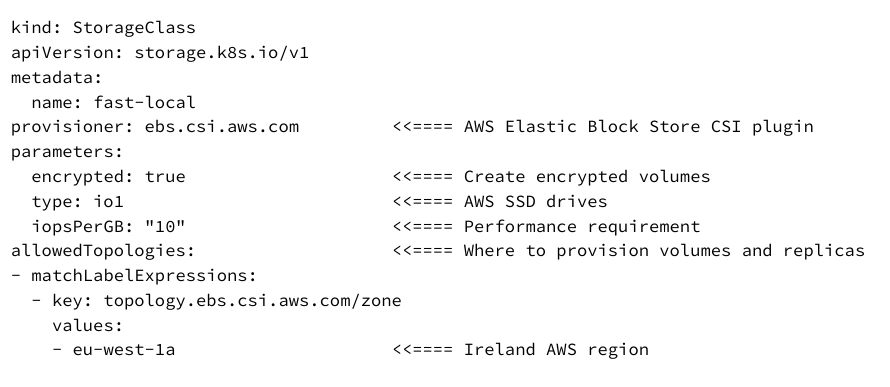
StorageClasses let you define different classes of storage that apps can request.if you have a storage system with fast and slow storage, as well as optional remote replication, you might define these four classes:
- fast-local
- fast-replicated
- slow-local
- slow-replicated
Important
- StorageClass objects are immutable — once you deploy them, you can’t modify them
- metadata.name should be meaningful, as it’s how you and other objects refer to the class
- The terms provisioner, plugin, and driver are sometimes used interchangeably
- The parameters block is for plugin-specific values and is different for every plugin
Projected Volume
Projected volume allows to combine multiple volume sources into a single directory.
Usage:
- Aggregate data from different sources, such as Secrets, ConfigMaps, Downward API, and ServiceAccount tokens, into a unified locatiConfigMaps & Secrets > Downward API://kubernetes.io/docs/concepts/storage/projected-volumes/)
👉 05012 [[ConfigMaps & Secrets > Downward API11 - Storage-20250130193120211.webp]]
Storage
[!video]- Storage
[!video]- Storage