Core Idea
Containers are runtime instances of images: one image can back many containers, and the note takes them from the VM comparison through starting apps, connecting in, and keeping them alive.
- Containers versus VMs, then what a container actually is.
- Lifecycle and ops: how containers start apps, connecting to a container, pause and stop.
- Docker debug and self-healing containers with restart policies.
Containers are run-time instances of images, and you can start one or more containers from a single image.
Containers and VMs
Containers and VMs are both virtualization technologies for running applications.
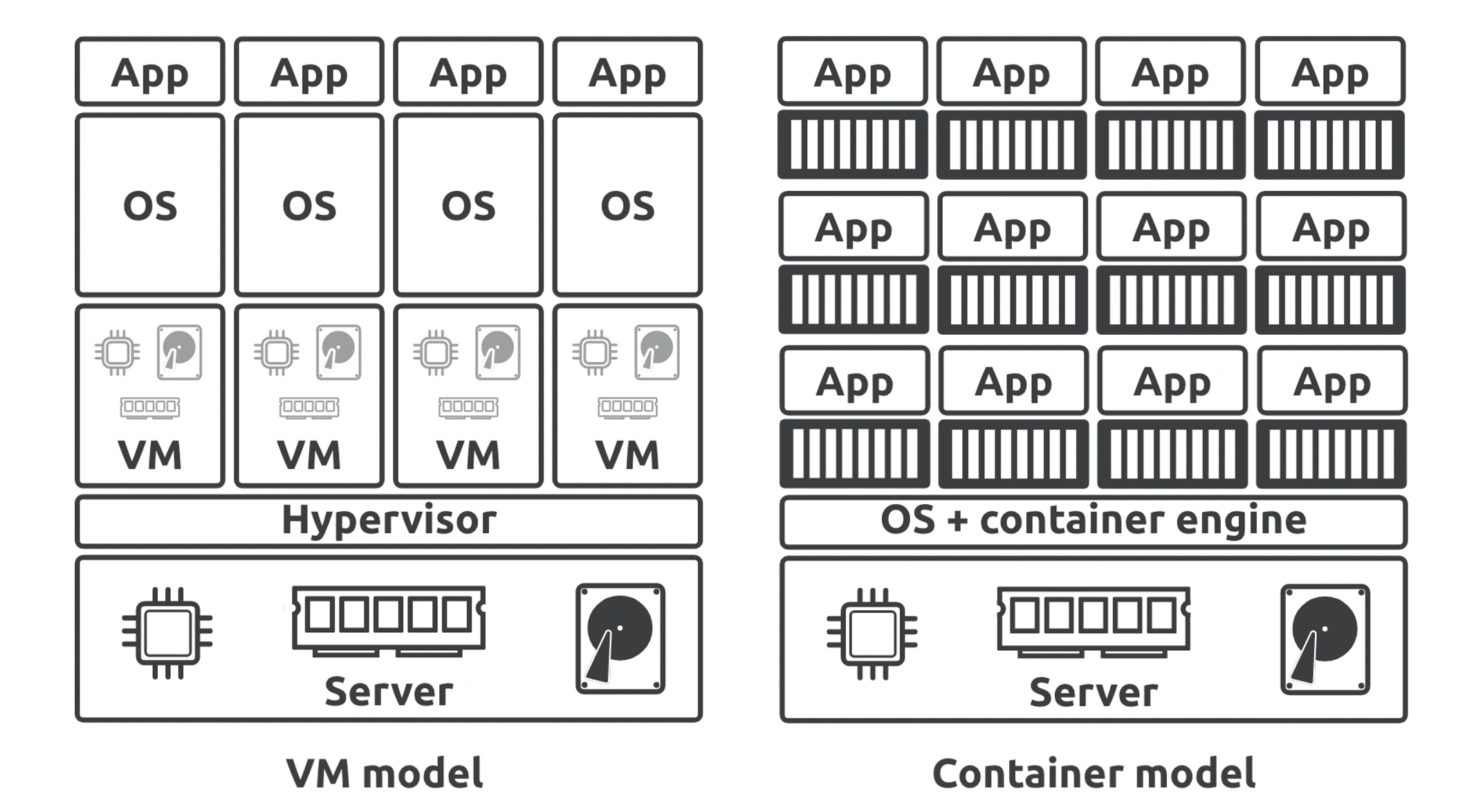
- VMs virtualize hardware
- Containers virtualize operating systems
hypervisors perform hardware virtualization where they divide hardware resources into virtual versions and package them as VMs.
Container engines perform OS virtualization where they divide OS resources into virtual versions and package them as containers.
VMs look and feel exactly like physical servers. Containers look and feel exactly like regular operating systems.
Containers
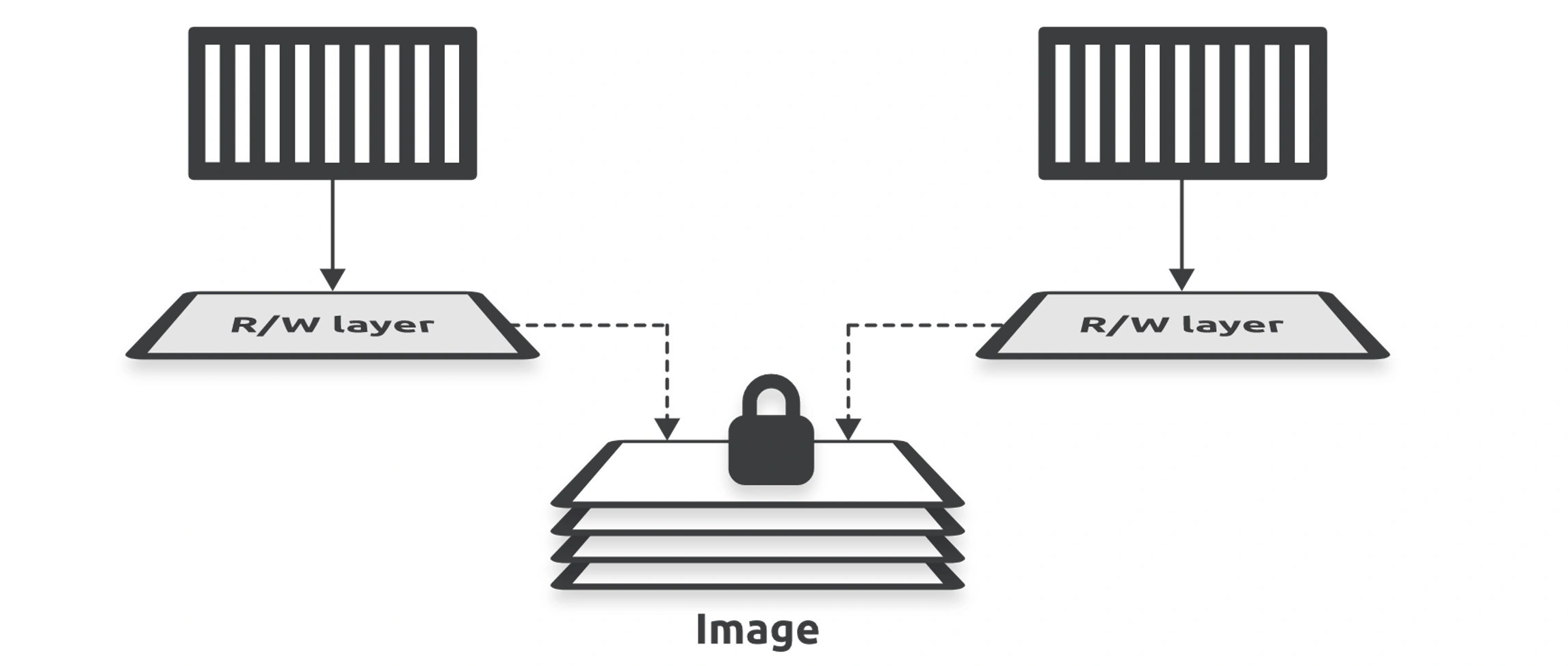
In this example, each container has its own thin R/W layer but shares the same image. The containers can see and access the files and apps in the image through their own R/W layer, and if they make any changes, these get written to their R/W layer. When you stop a container, Docker keeps the R/W layer and restores it when you restart the container. However, when you delete a container, Docker deletes its R/W layer. This way, each container can make and keep its own changes without changing the shared image.
👉 04. Docker Images > Image Layers
👉 Docker Overlayfs > MergedDir
👉 Docker container file system (OverlayFS) > Introducing layers
How Containers starts apps
There are three ways you can tell Docker how to start an app in a container:
- An
Entrypointinstruction in the image - A
Cmdinstruction in the image - A CLI argument
Tip
Entrypointinstructions cannot be overridden on the CLI, and anything you pass in via the CLI will be appended to the Entrypoint instruction as an argument.
Cmdinstructions can be overridden by CLI arguments
Connecting to a container
Interactive exec sessions connect your terminal to a shell process in the container and behave like remote SSH sessions. Remote execution mode lets you send commands to a running container and prints the output to your local terminal.
docker exec -it exampleserver shPause and Stop
Docker Debug
01105 - Docker Containers
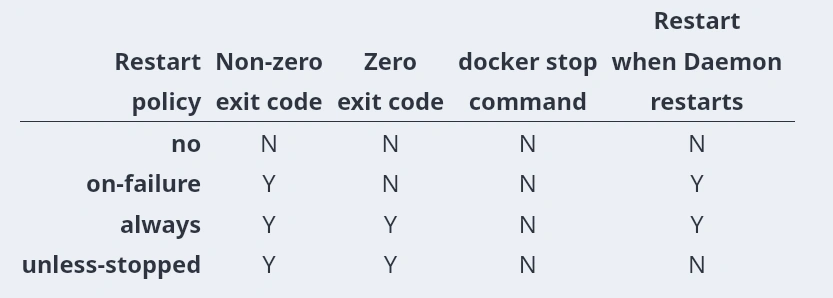
Self-healing containers with restart policies
Container restart policies are a simple form of self-healing that allows the local Docker Engine to automatically restart failed containers.
You apply restart policies per container, and Docker supports the following four policies:
no(default)on-failurealwaysunless-stopped