Core Idea
Move configuration out of images: ConfigMaps feed env vars or mounted files into pods, Secrets do the same for sensitive data, and both can be updated without rebuilding.
- Flow from Docker’s
-eenv vars to K8s-native apps using ConfigMaps, created imperative or declarative.- Injection into pods and containers, plus three update strategies:
kubectl rollout restart,envFromwith a volume, and a sidecar for hot reload.- Secrets: same patterns with encode/decode and creation commands.
Environment Variables
ENV in Docker
docker run -e APP_COLOR=pink simple-webapp-colorENV variables in kubernetes
- To set an environment variable set an
envproperty in pod definition file.
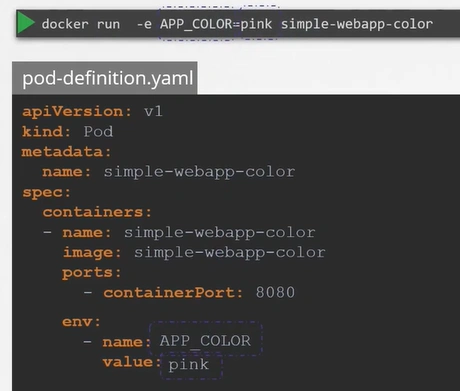
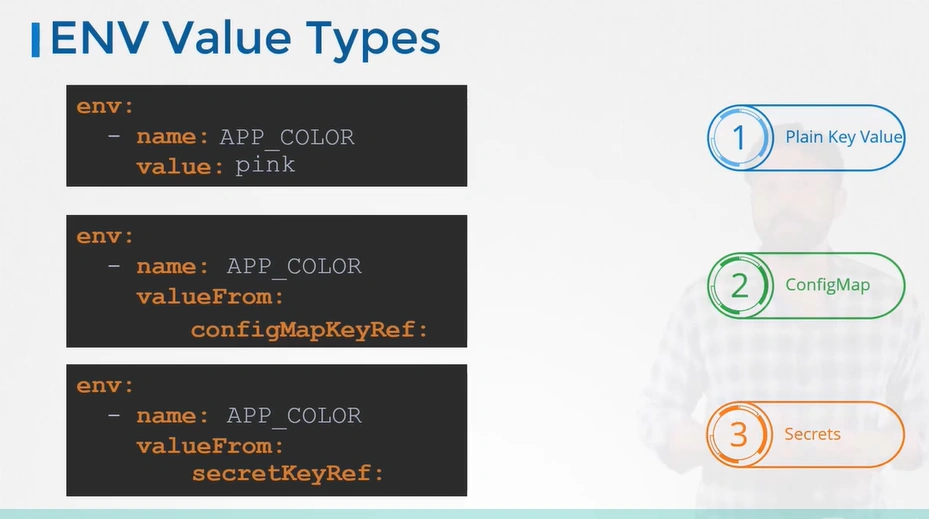
- There are other ways of setting the environment variables such as
ConfigMapsandSecrets.
ConfigMaps
In the past, we packaged the application and the configuration into a single easy-to-deploy unit. We brought this pattern with us as we moved into the early days of cloud-native microservices.
However, it’s an anti-pattern1, and modern applications should be
decoupled from their configurations. Doing this brings the following benefits:
- Reuse
- Simpler development and testing
- Simpler and less-disruptive changes
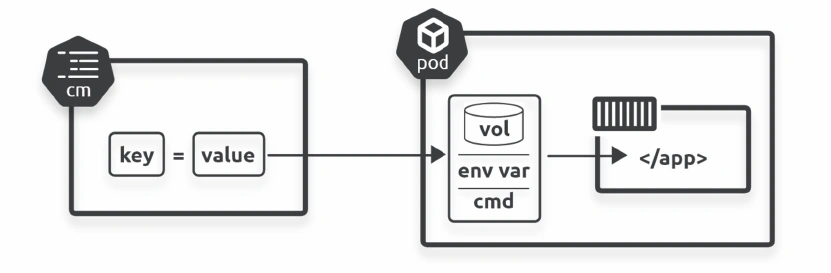
Kubernetes has an API resource called a ConfigMap (CM) that lets you store configuration data outside of Pods and inject it at run time.
typically use ConfigMaps to store non-sensitive configuration data such as:
- Environment variables
- Configuration files such as web server configs and database configs
- Hostnames
- Service ports
- Account Names
You should not use ConfigMaps to store sensitive data such as certificates and passwords, as Kubernetes makes no effort to protect their contents.
ConfigMaps are Kubernetes objects that hold a map of key-value
pairs:
- Keys are an arbitrary name that can include alphanumerics, dashes, dots, and underscores
- Values can include anything, including full configuration files with multiple lines and carriage returns
- You separate keys and values with a colon – key:value
- They’re also limited to 1MiB (1,048,576 bytes) in size
kind: ConfigMap
apiVersion: v1
metadata:
	name: cm2
data:
	test.conf: |
		env = plex-test
		endpoint = 0.0.0.0:31001
		char = utf8
		vault = PLEX/test
		log-size = 512M
❯ kubectl describe cm test-config
Name: test-config
Namespace: default
Labels: <none>
Annotations: <none>
Data
====
test.conf:
----
env = plex-test
endpoint = 0.0.0.0:31001
char = utf8
vault = PLEX/test
log-size = 512M
BinaryData
====
K8s Native Apps
Kubernetes-native applications know they’re running on Kubernetes and can talk to the API server.
This means they can directly access ConfigMap data via the API server without needing environment variables or volumes.
This can simplify things, but the application will only run on Kubernetes (Kubernetes lock-in).
👉 Kubernetes Native Applications
Hands On
Imperative
kubectl create configmap testmap1 \
--from-literal shortname=AOS \
--from-literal longname="Agents of Shield"
Declarative
kind: ConfigMap
apiVersion: v1
metadata:
name: multimap
data:
given: Nigel
family: Poulton
Injecting CM data into Pods and containers
Env variables
You can inject ConfigMap data into containers as environment variables. However, if you make changes to the ConfigMap after deploying the container, they won’t appear in the container
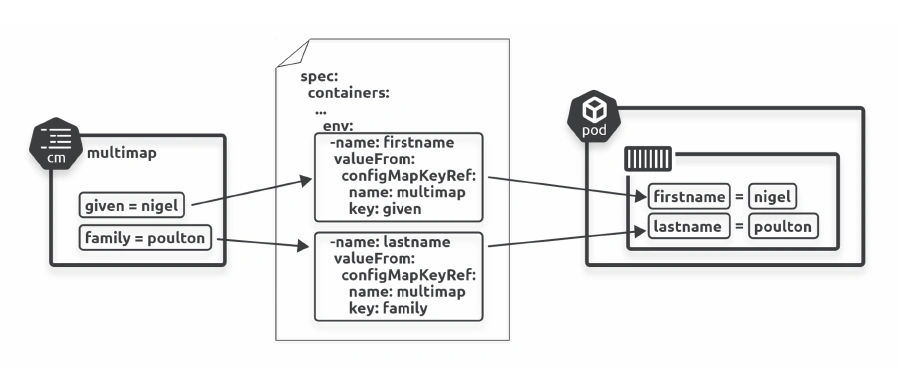
Single Environment Variables:
apiVersion: v1
kind: Pod
metadata:
  labels:
    chapter: configmaps
  name: envpod
spec:
  containers:
    - name: ctr1
      image: busybox
      command: ["sleep"]
      args: ["infinity"]
      env:
        - name: FIRSTNAME
          valueFrom:
            configMapKeyRef:
              name: multimap
              key: given
        - name: LASTNAME
          valueFrom:
            configMapKeyRef:
              name: multimap
              key: family
Environment Variables:
apiVersion: v1
kind: Pod
metadata:
  name: simple-webapp-color
spec:
 containers:
 - name: simple-webapp-color
   image: simple-webapp-color
   ports:
   - containerPort: 8080
   envFrom: # <--
   - configMapRef:
       name: app-config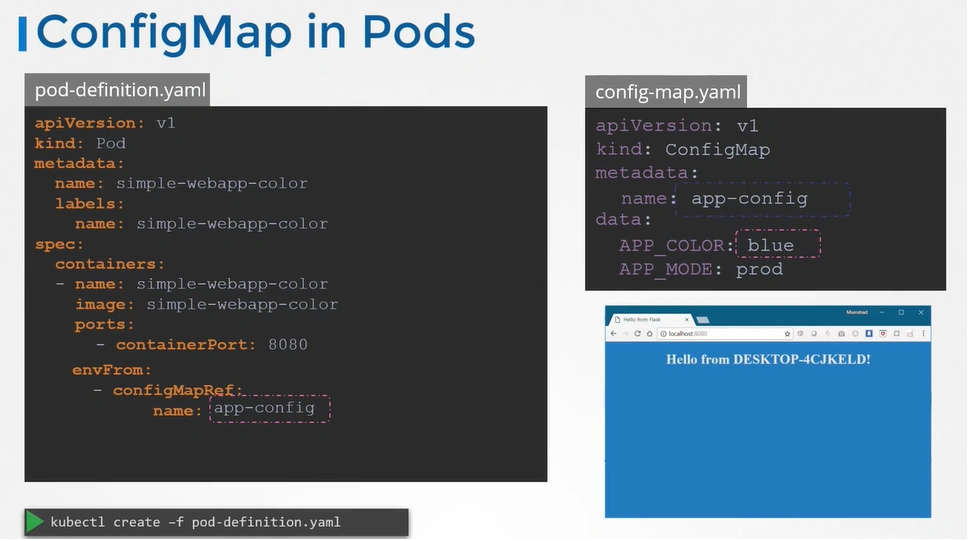
Container startup commands
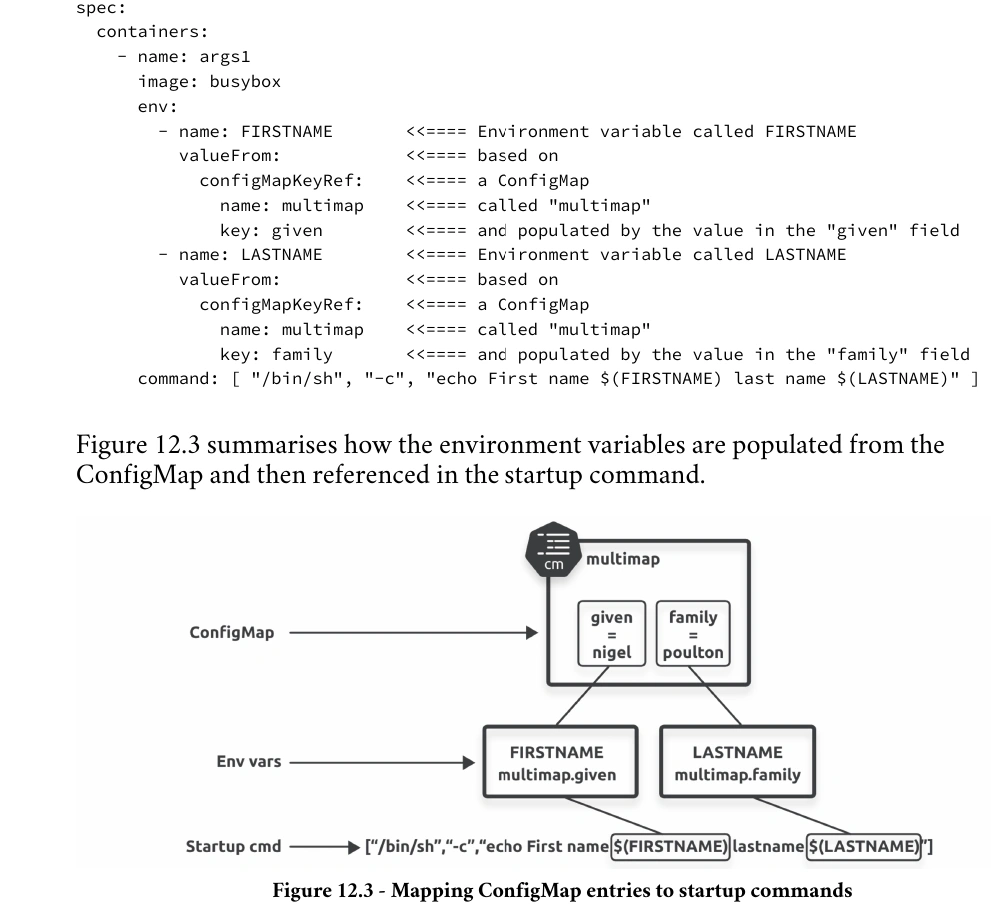
Start a new Pod from the
startuppod.ymlfile. The Pod will start, print First name Nigel last name Poulton to the container’s logs and then quit (succeed). It might take a few seconds for the Pod to start and execute.
Volumes
Using ConfigMaps with volumes is the most flexible option. You can reference entire configuration files, and updates get reflected in running containers. The updates may take a minute or so to appear in the container.
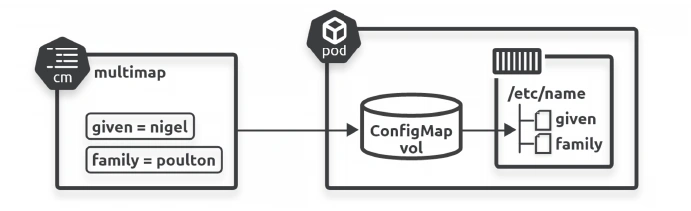
- Create the ConfigMap
- Define a ConfigMap volume in the Pod template
- Mount the ConfigMap volume into the container
- ConfigMap entries will appear as files inside the container
Update ConfigMap
Important
Although the value of the key inside the ConfigMap has changed, the environment variable in the Pod still shows the earlier value. This is because environment variables for a process running inside a Pod are not updated when the source data changes; if you wanted to force an update, you would need to have Kubernetes replace your existing Pods. The new Pods would then run with the updated information.
Solutions:
1. Use kubectl rollout restart
This will cause the pods to reload with the new environment variables and configuration.
kubectl rollout restart deployment <deployment-name>2. Use envFrom to Load ConfigMap as Volume
If you want to have more flexibility and allow the pod to pick up updates from the ConfigMap without a restart, you can mount the ConfigMap as a volume.
apiVersion: apps/v1
kind: Deployment
metadata:
  name: my-app
spec:
  replicas: 1
  selector:
    matchLabels:
      app: my-app
  template:
    metadata:
      labels:
        app: my-app
    spec:
      containers:
        - name: my-app
          image: my-image
          volumeMounts:
            - name: config-volume
              mountPath: /etc/config  # Path where the ConfigMap is mounted
      volumes:
        - name: config-volume
          configMap:
            name: my-config-map  # The name of your ConfigMap
3. Use a Sidecar container for Hot Reloading
02.Areas/DevOps/0500 - Kubernetes/0550 - K8s-Extras/../../Kubernetes/K8s-Extras/K8s Sidecar Container
Sidecar Pattern & Sidecar Containers
Secrets
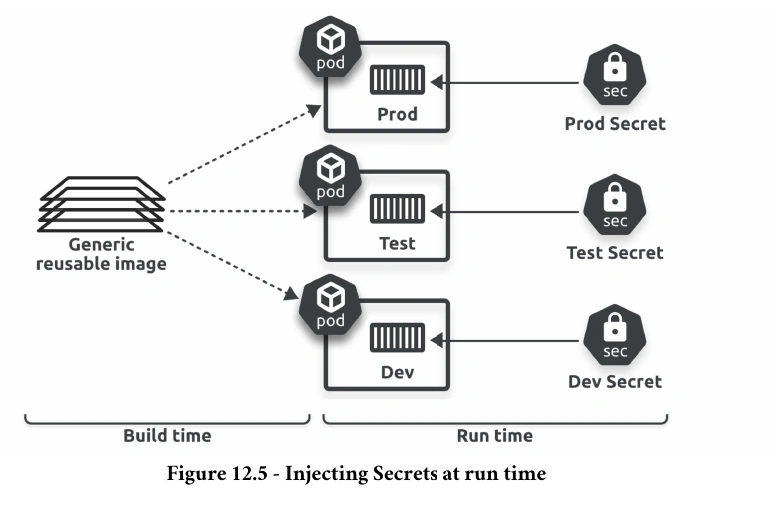
Secrets are almost identical to ConfigMaps — they hold application configuration data that Kubernetes injects into containers at run time.
However, Secrets are designed to hold sensitive data such as passwords, certificates, and OAuth tokens.
Important
Despite being designed for sensitive data, Kubernetes does not encrypt Secrets in the cluster store.
It only obscures them as base-64 encoded values, which anyone can decode without a key.
Fortunately, most service meshes encrypt network traffic, and you can configure encryption-at-rest withEncryptionConfigurationobjects.
However, many people use tools such as HashiCorp’s Vault for a more complete and secure secrets management solution.
👉 HCP Vault
Warning
Secrets are not encrypted in the cluster store (etcd), not encrypted in-flight on the network, and not encrypted when surfaced in a container.
Even if you implement solutions that encrypt them in the cluster store and on the network, they always surface as plain text in containers so that applications can use them.
- You create the Secret and it gets persisted to the cluster store as an un-encrypted object
- You schedule a Pod that uses the Secret
- Kubernetes transfers the un-encrypted Secret over the network to the node running the Pod
- The kubelet on the node starts the Pod and its containers
- The container runtime mounts the Secret into the container via an in-memory tmpfs filesystem and decodes it from base64 to plain text
- The application consumes it
- When you delete the Pod, Kubernetes deletes the copy of the Secret on the node (it keeps the copy in the cluster store)
Encode & Decode
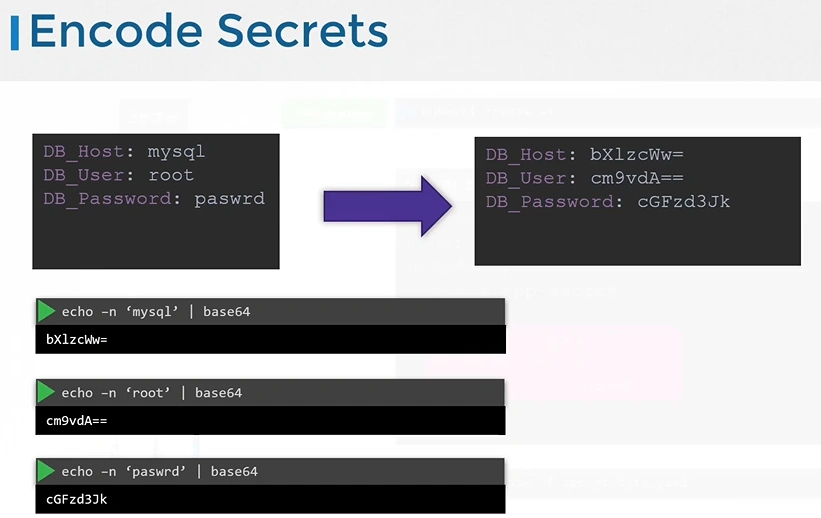
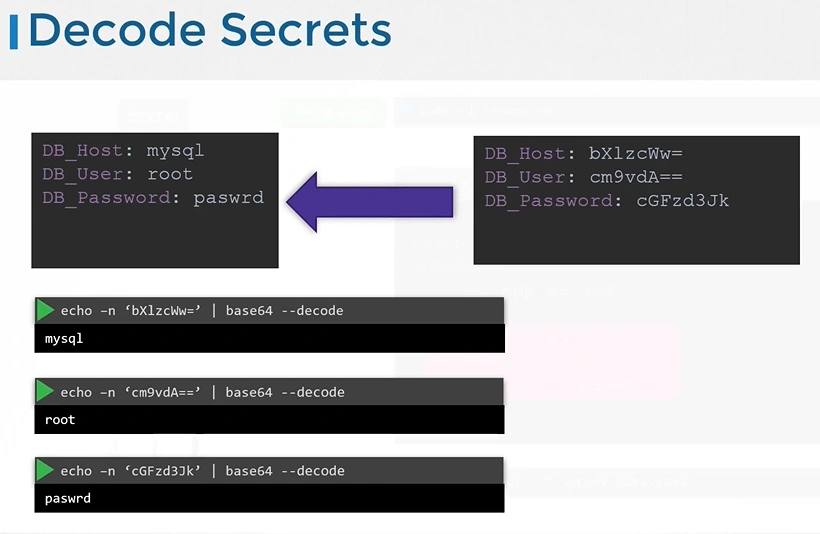
Create Secret
Imperative
kubectl create secret generic creds --from-literal user=nigelpoulton \
--from-literal pwd=Password123
kubectl get secret creds -o yaml
apiVersion: v1
kind: Secret
data:
pwd: UGFzc3dvcmQxMjM= <-- base64 Encoded
user: bmlnZWxwb3VsdG9u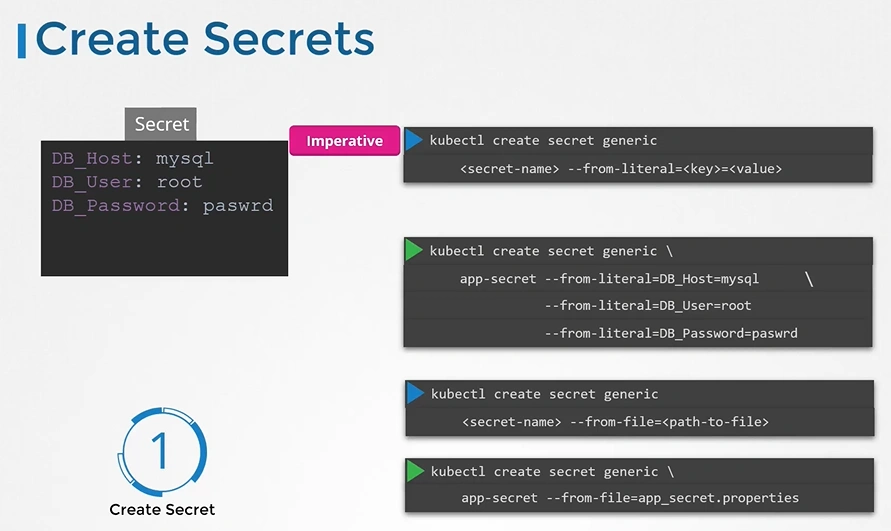
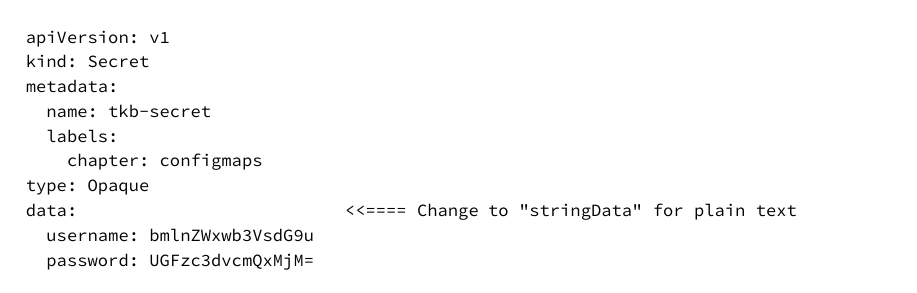
Declarative
Using in Pods
apiVersion: v1
kind: Pod
metadata:
  name: secret-pod
  labels:
    topic: secrets
spec:
  volumes:
  - name: secret-vol <-- Volume name
    secret:          <-- Volume Type
      secretName: tkb-secret <-- Populate volume with this secret
  containers:
  - name: secret-ctr
    image: localhost:5000/nginx:alpine
    volumeMounts:
    - name: secret-vol
      mountPath: "/etc/tkb" <-- Mount the volume defined above
      readOnly: true <-- into this path
Secrets Encryption
ETCD
Encrypting Confidential Data at Rest | Kubernetes
Secrets Encryption | K3s
Important
Remember that secrets encode data in base64 format. Anyone with the base64 encoded secret can easily decode it. As such the secrets can be considered not very safe.
The concept of safety of the Secrets is a bit confusing in Kubernetes. The kubernetes documentation page and a lot of blogs out there refer to secrets as a “safer option” to store sensitive data. They are safer than storing in plain text as they reduce the risk of accidentally exposing passwords and other sensitive data. In my opinion it’s not the secret itself that is safe, it is the practices around it.
Secrets are not encrypted, so it is not safer in that sense. However, some best practices around using secrets make it safer. As in best practices like:
Not checking-in secret object definition files to source code repositories.
Enabling Encryption at Rest for Secrets so they are stored encrypted in ETCD.
👉 Encryption Types
Also the way kubernetes handles secrets. Such as:A secret is only sent to a node if a pod on that node requires it.
Kubelet stores the secret into a tmpfs so that the secret is not written to disk storage.
Once the Pod that depends on the secret is deleted, kubelet will delete its local copy of the secret data as well.
Read about the protections and risks of using secrets here
Having said that, there are other better ways of handling sensitive data like passwords in Kubernetes, such as using tools like Helm Secrets, HashiCorp Vault. I hope to make a lecture on these in the future.
Secret Store CSI Driver
🌟 Introduction - Secrets Store CSI Driver
ConfigMaps & Secrets
Downward API
What is Kubernetes Downward API and why you might need it?
Expose Pod Information to Containers Through Files | Kubernetes
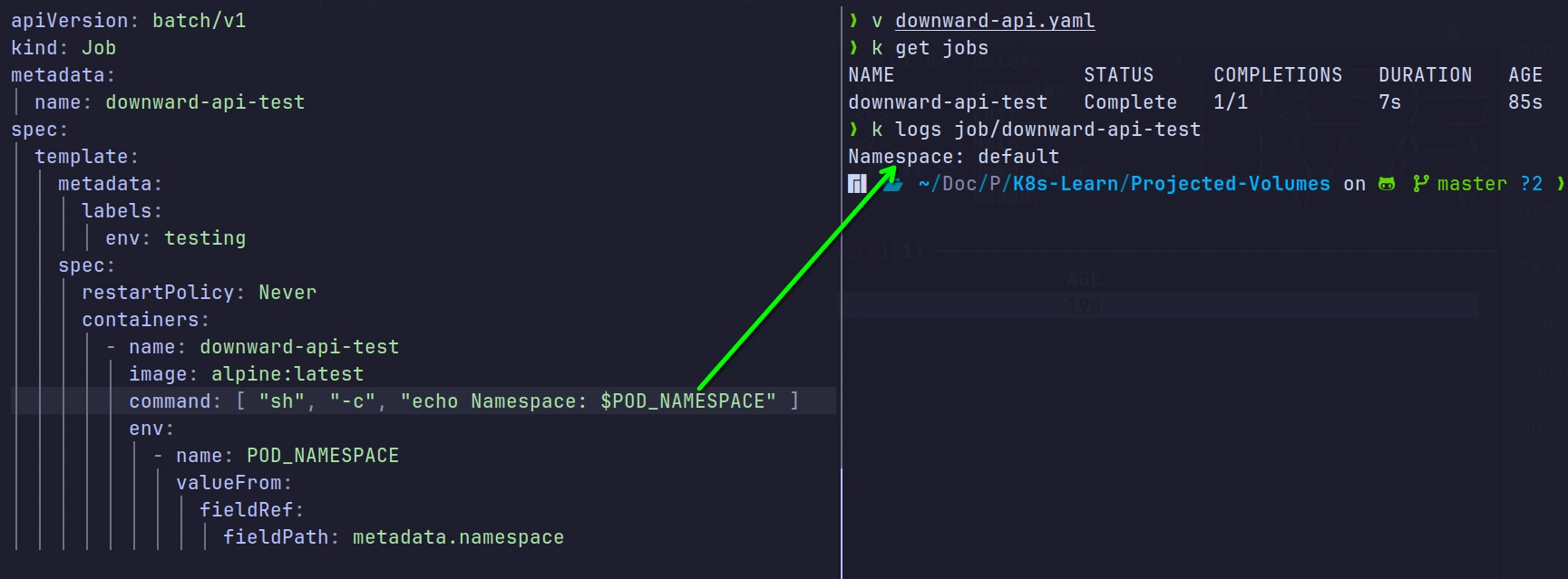
Sometimes our applications want to get the information about the pod inside the container.
By default application not aware that it’s running inside Kubernetes - it knows nothing about the pod, the namespace, the deployment and all the other Kubernetes-specific entities.
The Downward API gives you two platform-agnostic ways to supply the information about the pod into the container inside the pod - either via the environment variables or via the files.
Footnotes
-
An anti-pattern is something that seems like a good idea but turns out to be a bad idea. ↩