Core Idea
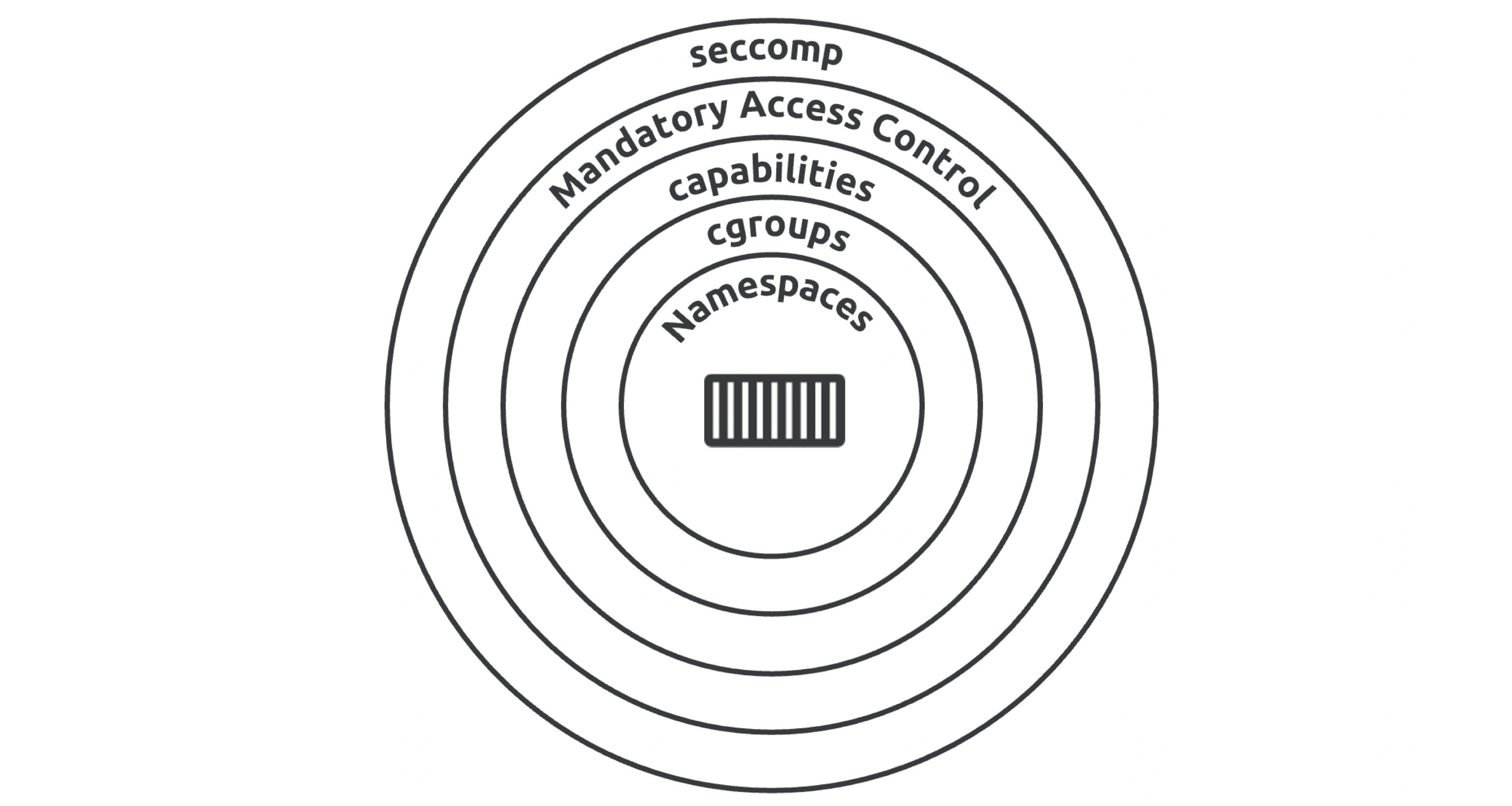
Container security is defense in depth: the kernel isolates with namespaces, meters with cgroups, restricts with capabilities, MAC (AppArmor or SELinux), and seccomp, then Docker adds its own layers.
- Linux defenses covered one by one: kernel namespaces, control groups, capabilities, mandatory access control (AppArmor vs SELinux), and seccomp.
- Docker security technologies on top, including Swarm security and join tokens.
- The comparison sections weigh the options rather than naming a single winner.
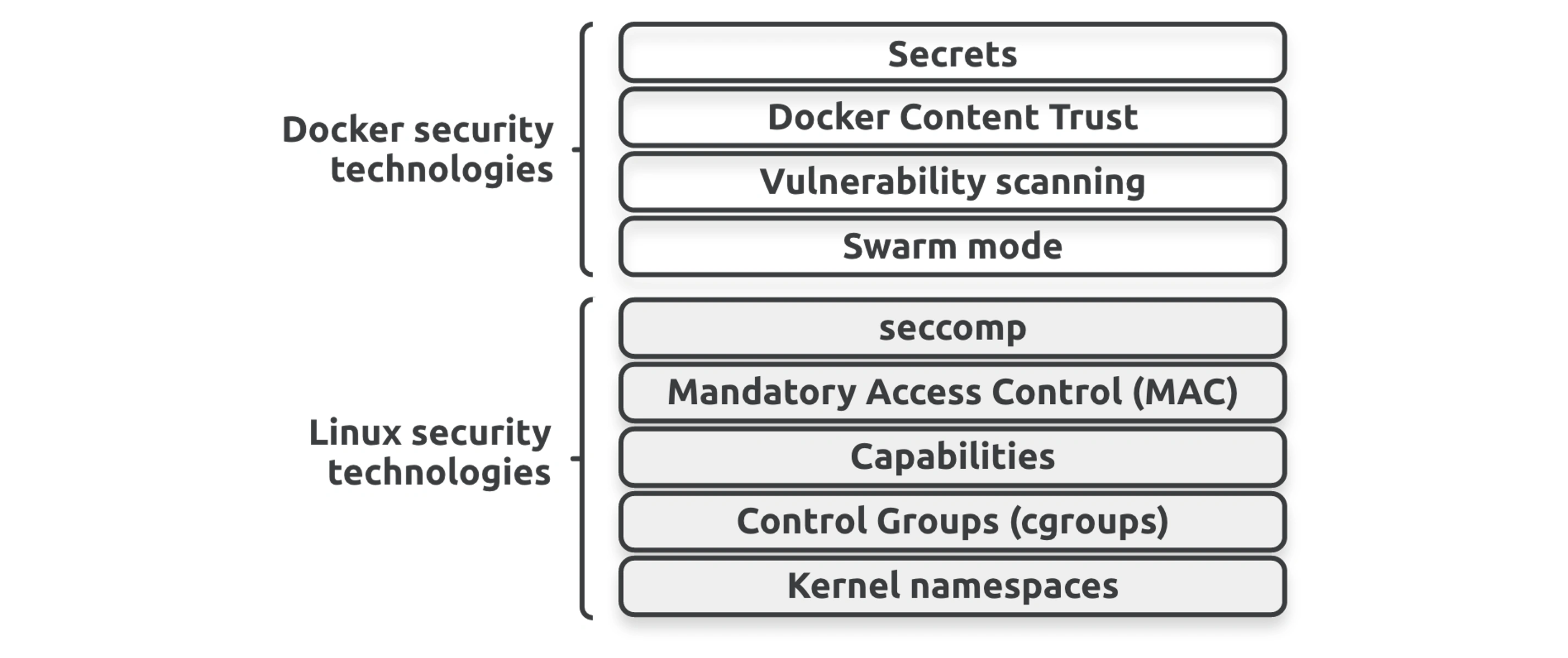
Linux security defense in depth
Kernel Namespaces
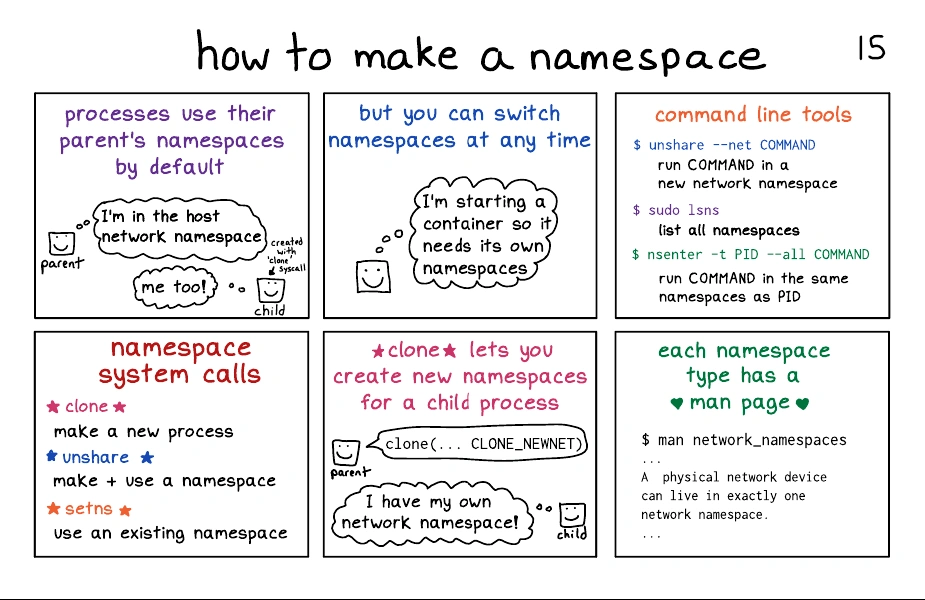
namespaces, are the main technology for building containers.
- Namespaces virtualize operating system constructs such as process trees and filesystems.
- Hypervisors* virtualize physical resources_ such as CPUs and disks.
In the VM model, hypervisors create virtual machines by grouping virtual CPUs, virtual disks, and virtual network cards so that every VM looks, smells, and feels like a physical machine.
In the container model, namespaces create virtual operating systems (containers) by grouping virtual process trees, virtual filesystems, and virtual network interfaces so that every container looks, smells, and feels exactly like a regular OS.
namespaces provide lightweight isolation but do not provide a strong security boundary. Compared with VMs, containers are more efficient, but virtual machines are more secure.
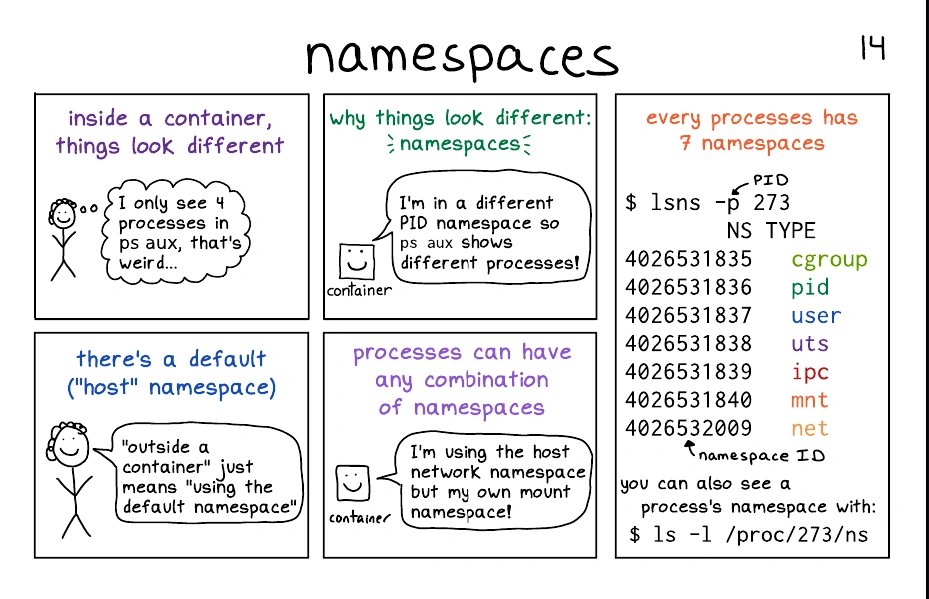
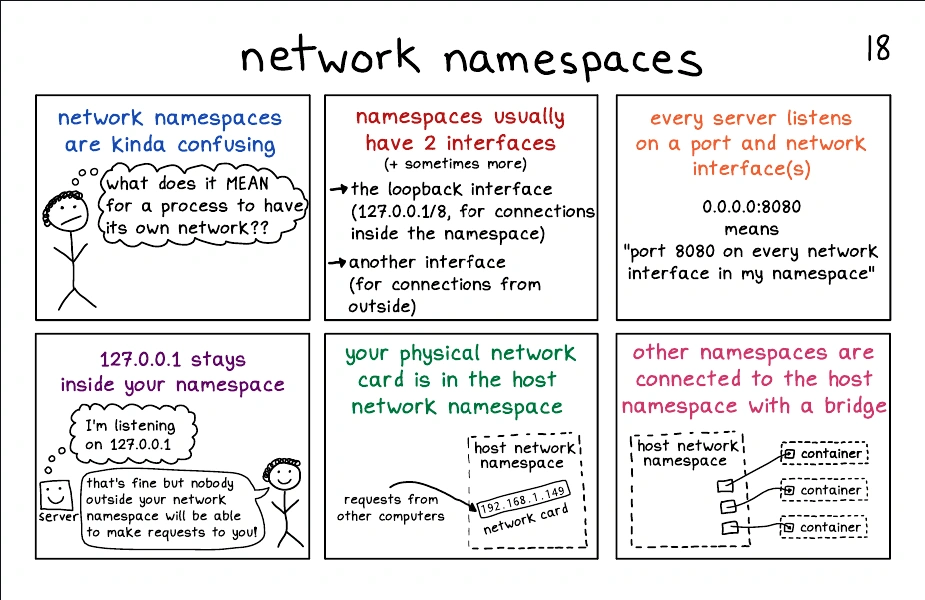
The host OS has its own collection of namespaces we call the root namespaces, and each container has its own collection of equivalent isolated namespaces.
Every Docker container gets its own instance of the following namespaces:
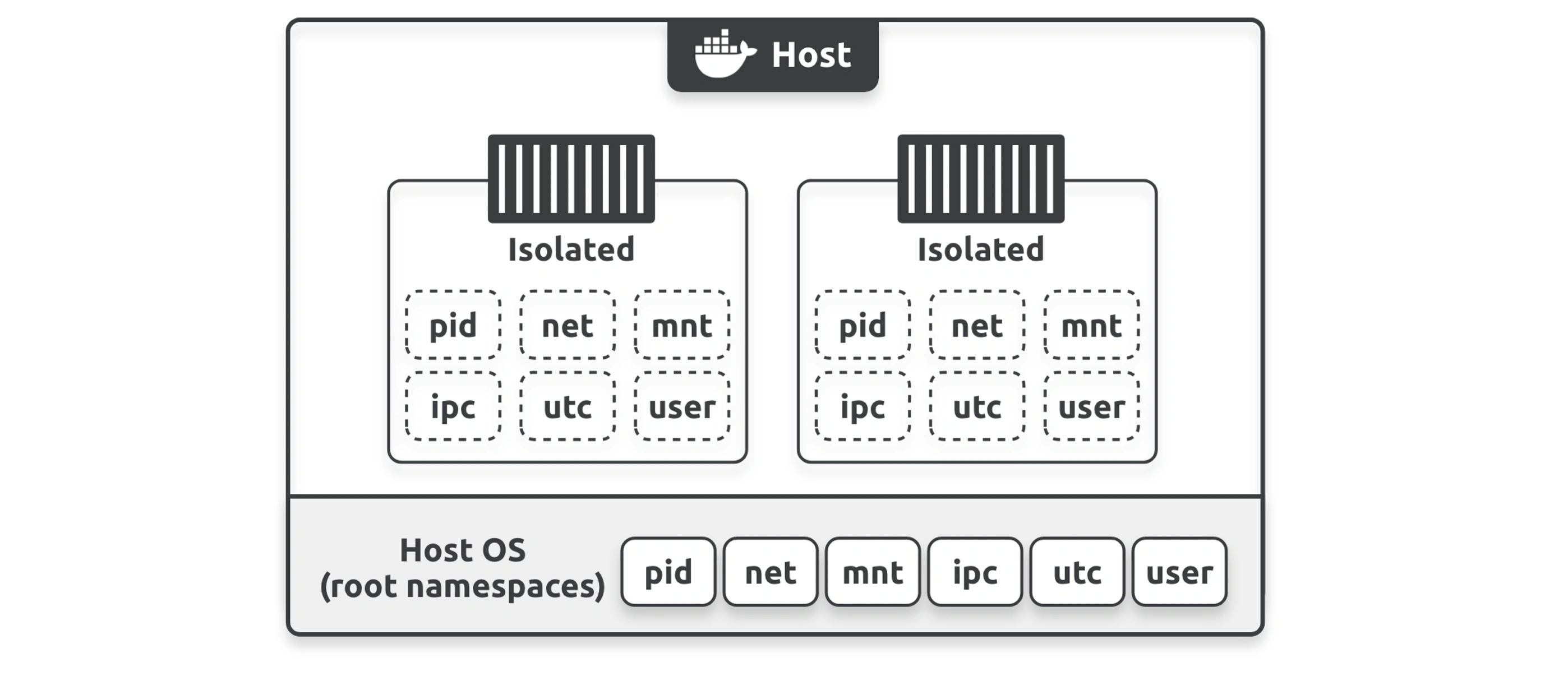
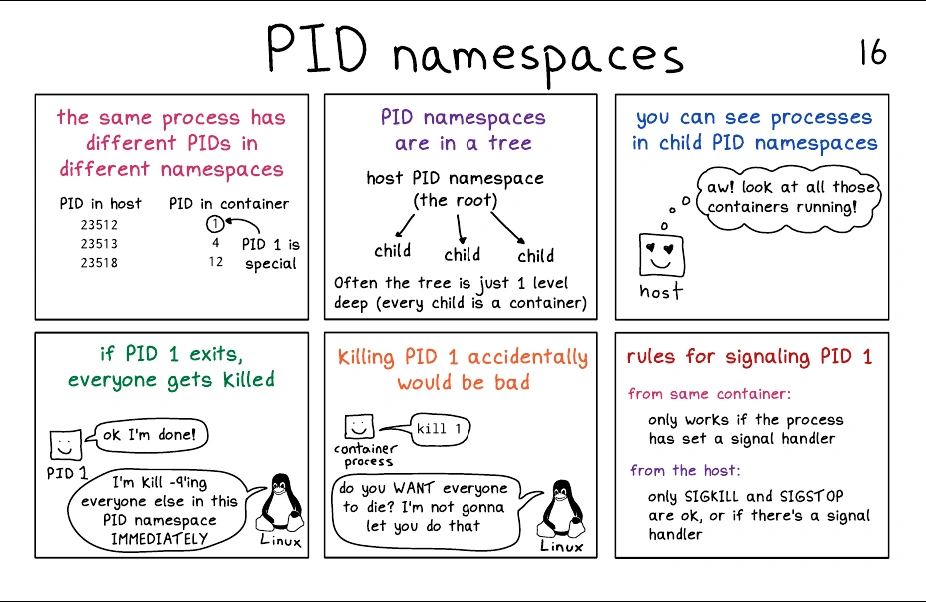
- Process ID namespace: Docker uses the pid namespace to give each container its own isolated process tree. This means every container gets its own PID 1 and cannot see or access processes running in other containers. Nor can any container see or access processes running on the host.
- Network namespace: Docker uses the net namespace to provide each container with an isolated network stack. This stack includes interfaces, IP addresses, port ranges, and routing tables. For example, every container gets its own eth0 interface with its own unique IP and range of ports.
- Mount namespace: Every container has its own mnt namespace with its own unique isolated root (
/) filesystem. This means every container can have its own/etc,/var,/dev, and other important filesystem constructs. Processes inside a container cannot access the host’s filesystem or filesystems in other containers. - Inter-process Communication namespace: Docker uses the ipc namespace for shared memory access within a container. It also isolates the container from shared memory on the host and other containers.
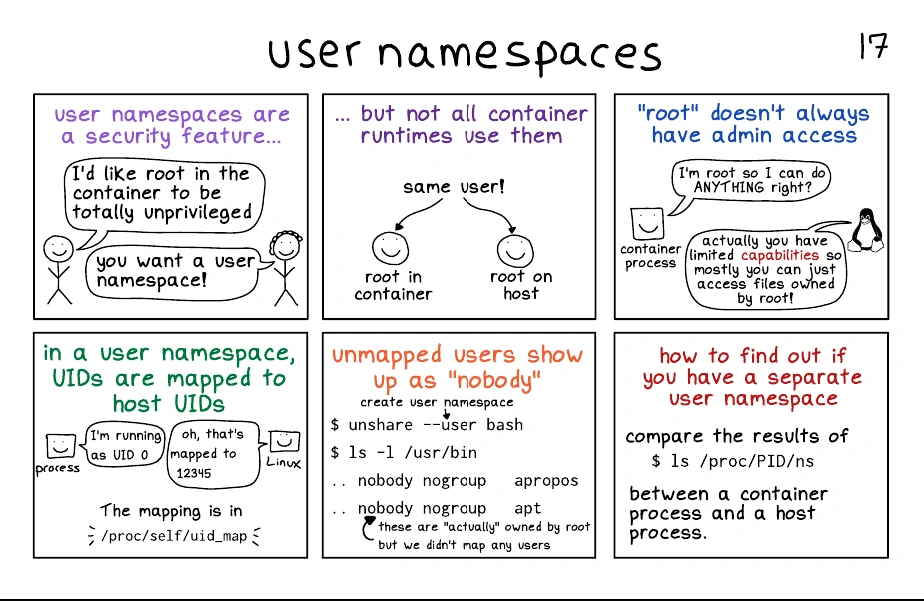
- User namespace: Docker gives each container its own users that are only valid inside the container. It also lets you map those users to different users on the Docker host. For example, you can map a container’s root user to a non-root user on the host.
- UTS namespace: Docker uses the uts namespace to provide each container with its own hostname.
01110 - Docker Security
👉 Sidecar Pattern & Sidecar Containers > Namespace sharing
- Understanding Linux Namespaces » The Bored Dev
- How to Run Containers in the Same PID Namespace? | by Md Shamim | Nerd For Tech | Medium
Control Groups
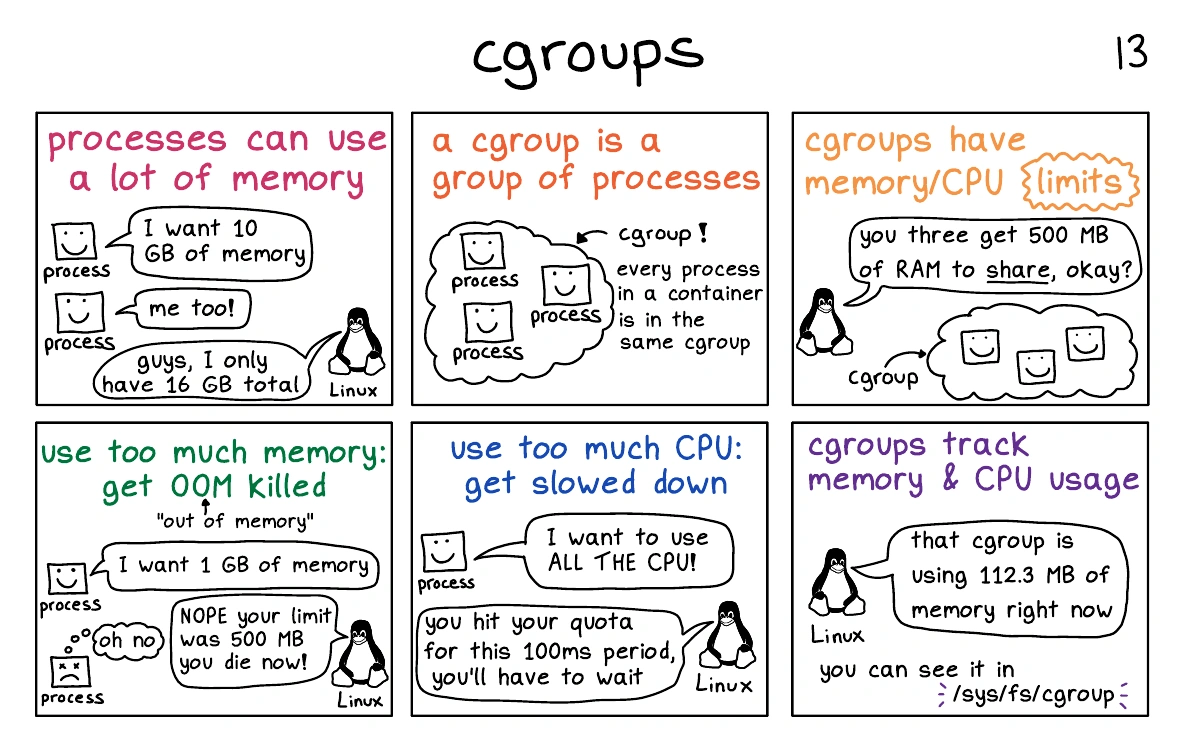
Namespaces are about isolation, control groups are about limits
Docker uses cgroups to limit a container’s use of these shared resources and prevent any container from consuming them all and causing a denial of service (DoS) attack.
Analogy
Think of containers as similar to rooms in a hotel. While each room might appear to be isolated, they actually share a lot of things such as water supply, electricity supply, air conditioning, swimming pool, gym, elevators, breakfast bar, and more. Containers are similar — even though they’re isolated, they share a lot of common resources such as the host’s CPU, RAM, network I/O, and disk I/O.
Capabilities
Under the hood, the Linux root user is a combination of a long list of capabilities. Some of these capabilities include:
- CAP_CHOWN: lets you change file ownership
- CAP_NET_BIND_SERVICE: lets you bind a socket to low-numbered network ports
- CAP_SETUID: lets you elevate the privilege level of a process
- CAP_SYS_BOOT: lets you reboot the system.
Docker leverages capabilities so that you can run containers as root but strip out all the capabilities you don’t need. For example, suppose the only capability your container needs is the ability to bind to low-numbered network ports. In that case, Docker can start the container as root, drop all root capabilities, and then add back the CAP_NET_BIND_SERVICE capability.
This is a good example of implementing the principle of least privilege as you end up with a container that only has the capabilities it needs. Docker also sets restrictions to prevent containers from re-adding dropped capabilities
docker run -cap-add MAC_ADMIN ubuntu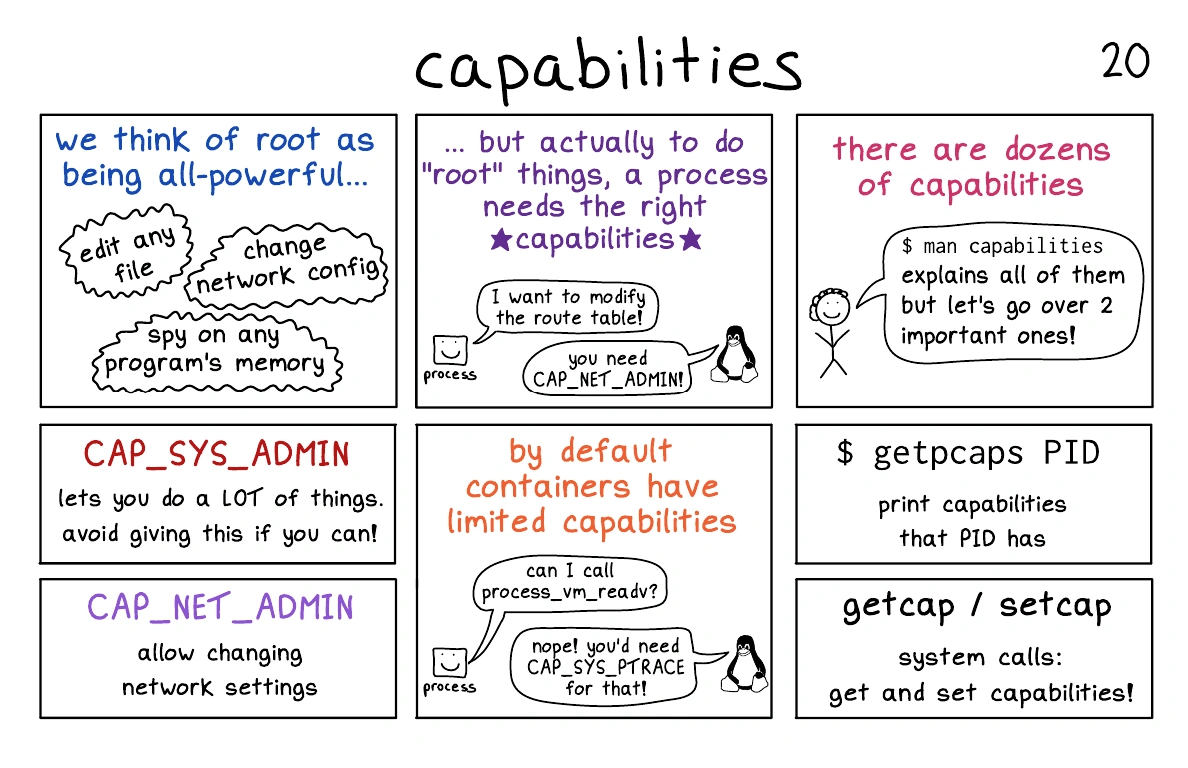
Analogy
Imagine a secured office building:
The Office Building: Represents the host Linux system where Docker is running.
Employees: Represent containerized processes.
Access Cards: Represent capabilities.
Restricted Areas: Represent privileged system operations, like managing files, accessing hardware, or modifying networking.
- Each employee has an access card with specific permissions (e.g., entry to certain floors or rooms).
- No one gets full access to the entire building unless absolutely necessary.
How Capabilities Work
- By default, a root user has all permissions (full access).
- Containers can be granted a subset of these permissions via capabilities, limiting what they can do:
- CAP_NET_ADMIN: Permission to modify network settings (like changing IP addresses).
- CAP_SYS_ADMIN: Broad system administration tasks (e.g., mounting filesystems).
- CAP_CHOWN: Change ownership of files.
- Instead of giving containers full root privileges, you assign only the necessary “access cards” (capabilities).
- Containers run with a reduced set of capabilities by default, ensuring a secure baseline.
Mandatory Access Control Systems
Docker works with major Linux MAC technologies such as AppArmor and SELinux.
Depending on your Linux distribution, Docker applies default AppArmor or SELinux profiles to all new containers, and according to the Docker documentation, the default profiles are moderately protective while providing wide application compatibility.
AppArmor
-
Purpose: Provides application-level access control by confining programs to a set of resource and capability restrictions.
-
How it works:
- Uses profiles to define allowed actions for applications (e.g., file access, network usage).
- Profiles can be in enforcing (block unauthorized actions) or complain (log unauthorized actions) modes.
SELinux
-
Purpose: Provides fine-grained access control for all system objects, including files, processes, and devices.
-
How it works:
- Uses contexts to label files, processes, and resources.
- Enforces access policies based on these contexts.
Comparison
| Aspect | AppArmor | SELinux |
|---|---|---|
| Policy Type | Path-based | Label-based |
| Ease of Use | Easier | More complex |
| Flexibility | Moderate | High |
| Default Distros | Ubuntu, SUSE | Red Hat, Fedora, CentOS |
| Modes | Enforcing, Complain, Disabled | Enforcing, Permissive, Disabled |
seccomp (Secure Computing Mode)
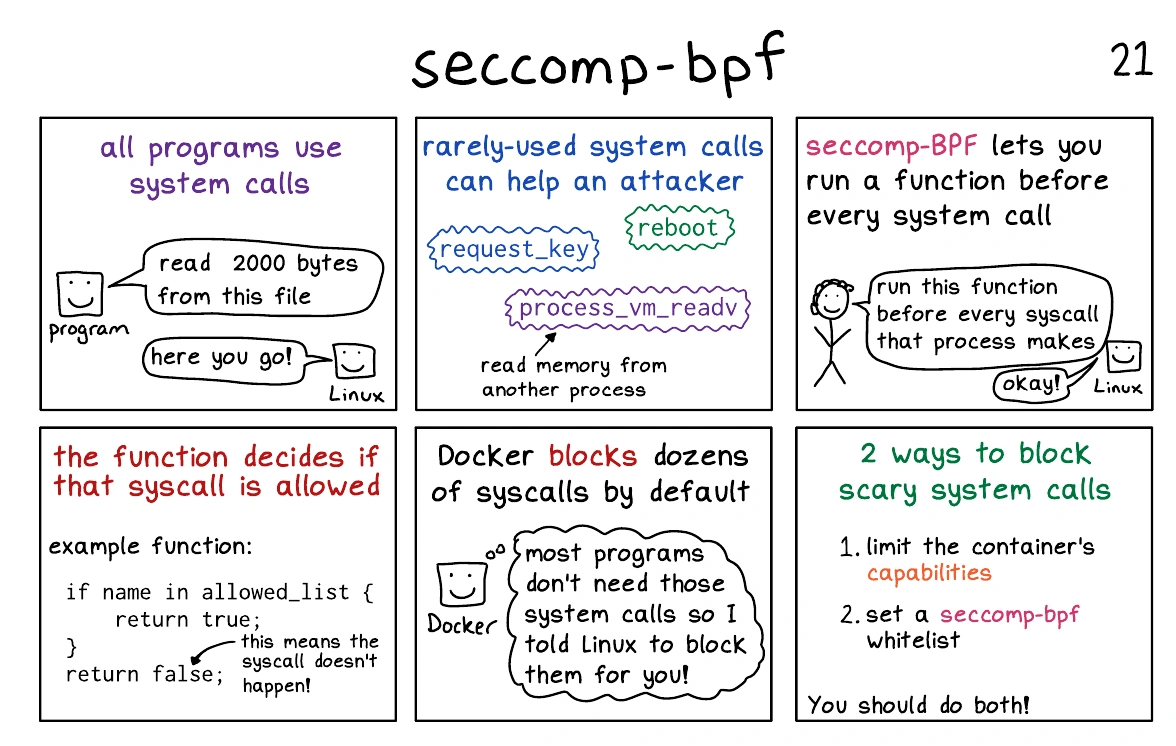
Docker uses seccomp to limit which syscalls a container can make to the host’s kernel.
Syscalls are how applications ask the Linux kernel to perform tasks. At the time of writing, Linux has over 300 syscalls and the default Docker profile disables approximately 40-50.
As per the Docker security philosophy, all new containers get a default seccomp profile configured with sensible defaults designed to provide moderate security without impacting application compatibility.
As always, you can customize your own seccomp profiles or tell Docker to start containers without one.
Analogy
The Club: Represents the Linux system.
Guests: Represent the processes inside a container.
Bouncer: Represents Seccomp.
Guest Actions: Represent system calls (requests from a process to the kernel, like opening a file, networking, or creating a process).
Guest List: Represents the Seccomp policy (a list of allowed or denied system calls).
Bouncer with a Guest List:
- The bouncer only allows guests (system calls) that are on the list.
- If a guest tries to enter who isn’t on the list, the bouncer either:
- Denies entry (blocks the system call).
- Ejects the guest (kills the container process).
Strict Security:
- By default, the club only allows specific, trusted guests (whitelisted system calls) to enter.
- If a guest (system call) isn’t on the list, they can’t come in, reducing risks of unwanted behavior or threats.
Seccomp in Action
- A container might only need a few specific system calls (e.g., to read files or bind to a network port). Seccomp ensures:
- Only those system calls are allowed.
- Dangerous system calls (e.g.,
mount,ptrace) are blocked.Example: If a container tries to perform a
rebootsystem call:
- The Seccomp policy intercepts the call and says, “You’re not on the list—denied!”
Docker Security Technologies
Swarm Security
swarm mode includes many security features that Docker automatically configures with sensible defaults.
- Cryptographic node IDs
- TLS for mutual authentication
- Secure join tokens
- CA configuration with automatic certificate rotation
- Encrypted cluster store
- Encrypted networks
Join Tokens
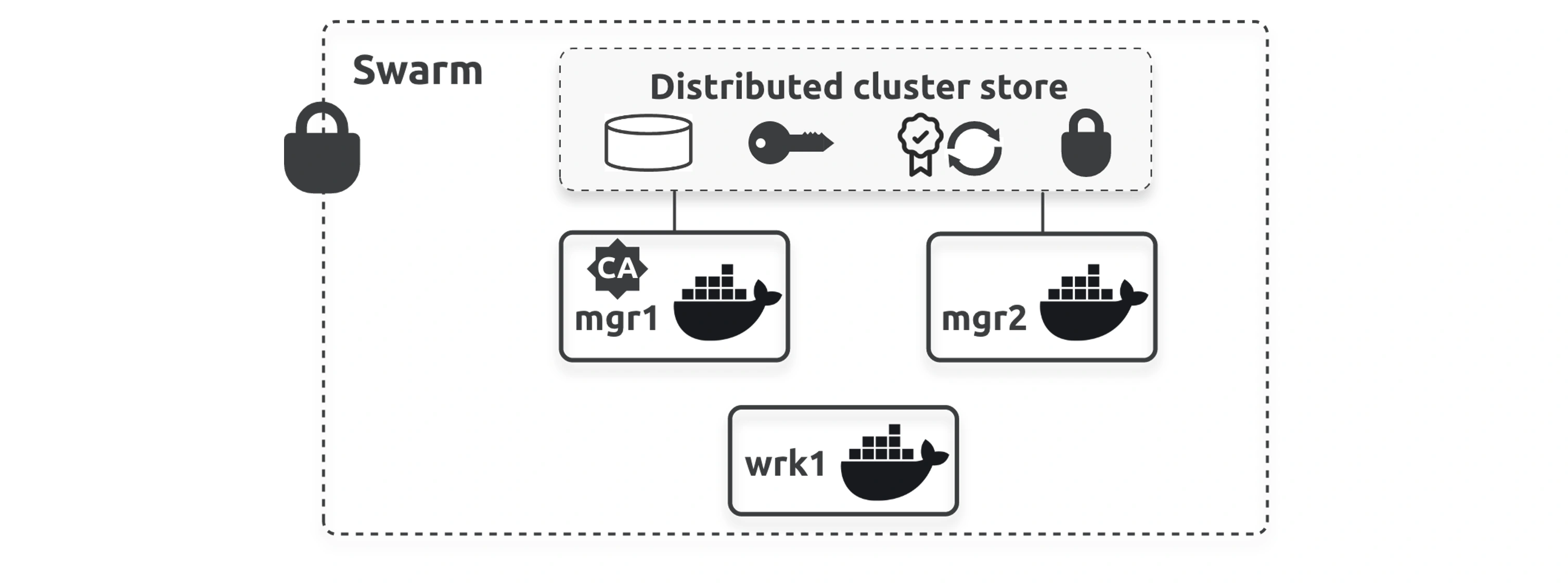
If you suspect either of your join tokens are compromised, you can revoke them and issue new ones with a single command. The following example revokes the existing manager token and issues a new one.
$ docker swarm join-token --rotate manager
Successfully rotated manager join token
Existing managers are unaffected, but you can only add new ones with the new token.
TLS and mutual authentication
Docker issues every manager and worker with a client certificate that they use for mutual authentication. It identifies the node, the swarm it’s a member of, and whether it’s a manager or worker.
$ sudo openssl x509 \ -in /var/lib/docker/swarm/certificates/swarm-node.crt \ -text
Certificate:
    Data:
        Version: 3 (0x2)
        Serial Number:
            7c:ec:1c:8f:f0:97:86:a9:1e:2f:4b:a9:0e:7f:ae:6b:7b:b7:e3:d3
        Signature Algorithm: ecdsa-with-SHA256
        Issuer: CN = swarm-ca
        Validity
            Not Before: May 23 08:23:00 2024 GMT
            Not After : Aug 21 09:23:00 2024 GMT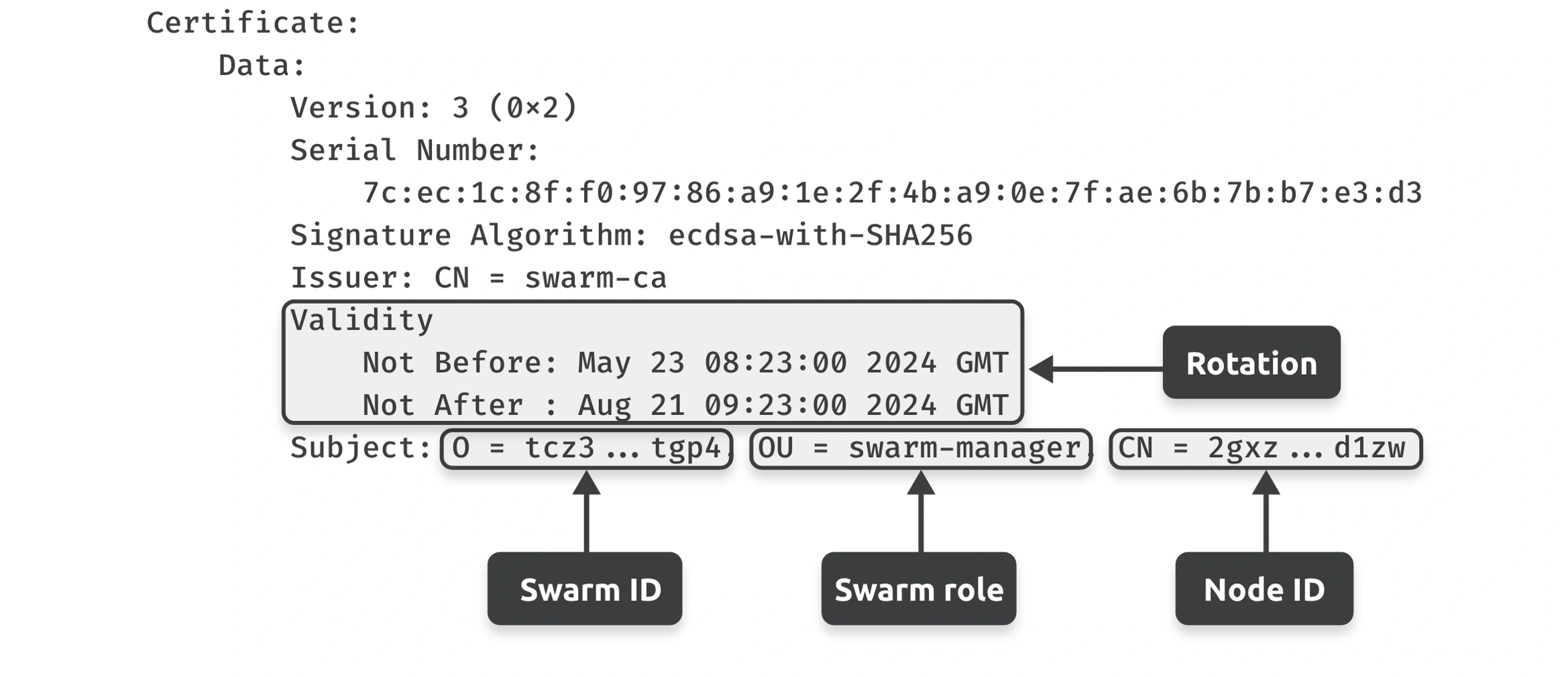
Swarm CA Config
You can use the docker swarm update command to configure the certificate rotation period. The following example changes it to 30 days.
docker swarm update --cert-expiry 720h

docker swarm ca --help
Swarm allows nodes to renew certificates early so that all nodes don’t update at exactly the same time.
Cluster store
The cluster store is based on the popular etcd distributed database and is automatically encrypted and replicated to all managers.
Docker Secrets
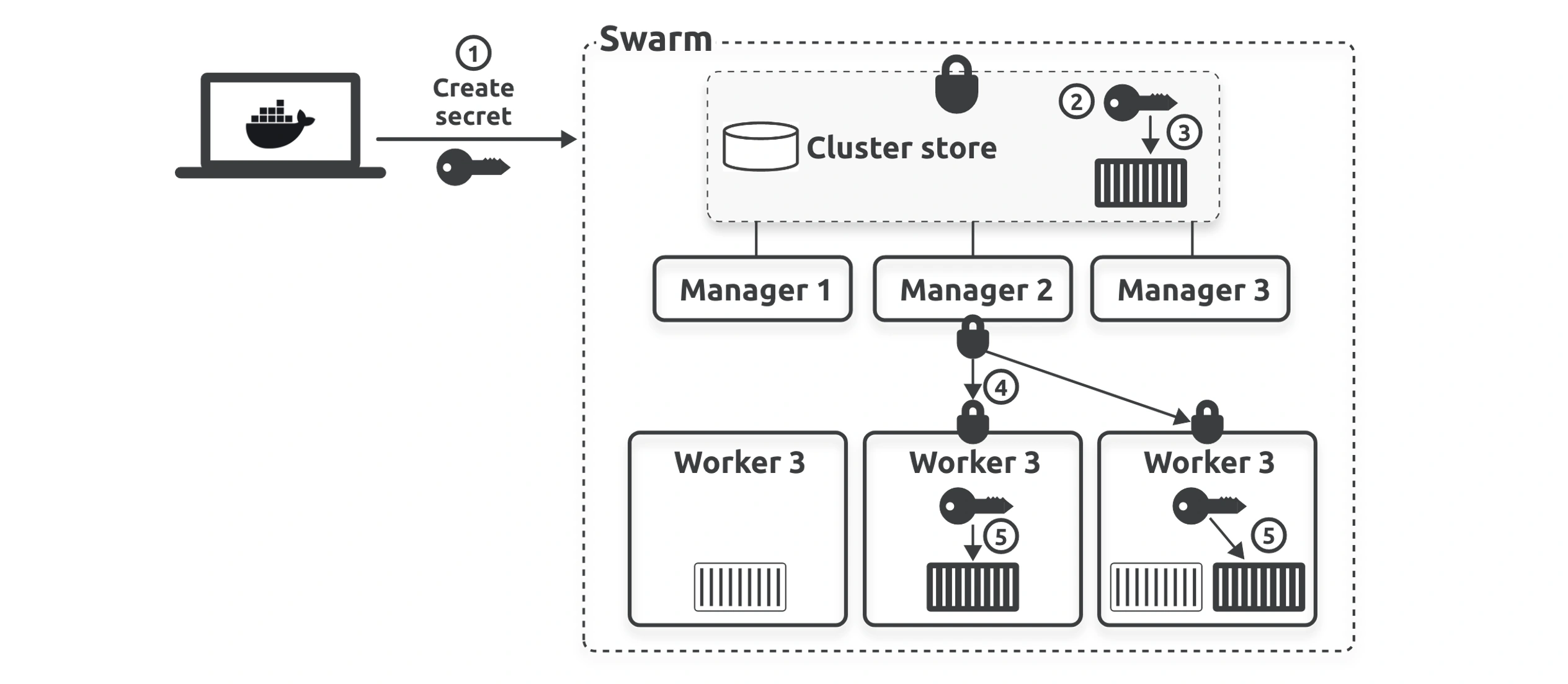
Secrets only work in swarm mode as they leverage the cluster store.
Behind the scenes, Docker encrypts secrets when they’re at rest in the cluster store and while they’re in flight on the network. It also uses in-memory filesystems to mount secrets into containers and operates a least-privilege model, where secrets are only available to services that have been explicitly granted access. There’s even a docker secret command.
Docker Content Trust
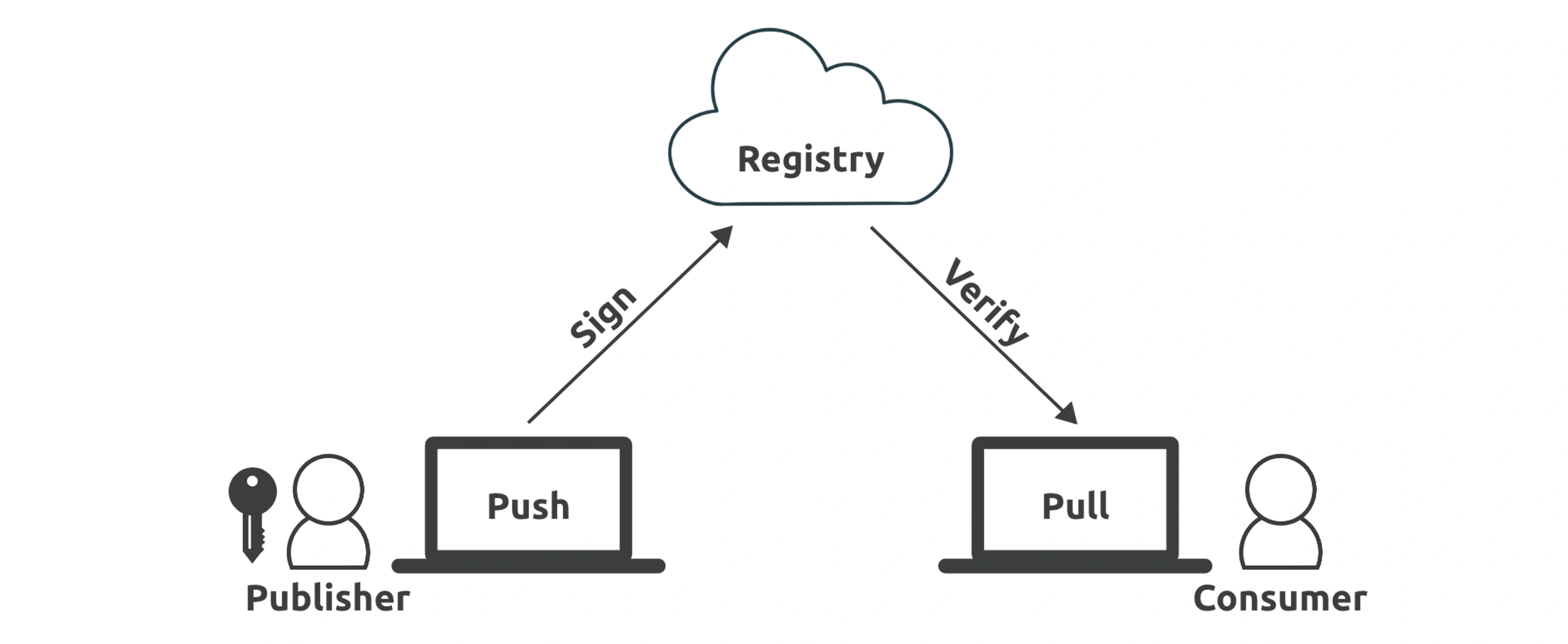
Docker Content Trust (DCT) makes it simple for you to verify the integrity and publisher of images and is especially important when you’re pulling images over untrusted networks such as the internet.