devops platformengineering/policyascode sitereliabilityengineering
OPA Intro and Deep Dive
Open Policy Agent (OPA) | Open Policy Agent
Rego Playground
Core Idea
OPA is a general-purpose policy engine that separates policy decisions from policy enforcement, so one Rego policy can gate anything in the stack.
- Core architecture and philosophy, including the OPA evaluation cycle.
- Rego (v1.0 standard) is the policy language: rule anatomy plus a hands-on REST API example with deny-by-default, role-based allows, and an audit list.
- Key benefits of pulling policy out of application code.
OPA
Open Policy Agent (OPA) is an open-source, general-purpose policy engine that graduates out of the Cloud Native Computing Foundation (CNCF). It provides a unified framework to decouple policy decision-making from policy enforcement across your entire technology stack.
1. Core Architecture & Philosophy
The foundational philosophy of OPA is decoupling policy from application logic. Instead of hardcoding authorization rules (e.g., if (user.role == 'admin')) directly into your application code, database queries, or CI/CD pipelines, you delegate those decisions to OPA.
       [ Client Request ]
               │
               ▼
   ┌───────────────────────┐
   │    Service / API      │ <── (Policy Enforcement Point)
   └───────────────────────┘
         │           ▲
  1. Ask │           │ 4. Return Decision
  for    │           │    (JSON)
  Query  ▼           │
   ┌───────────────────────┐
   │   OPA Policy Engine   │ <── (Policy Decision Point)
   └───────────────────────┘
         ▲           ▲
         │           │
     2. Policy   3. Data / Context
     (Rego)      (JSON)
The OPA Evaluation Cycle
- The Query (Input): A service receives a request (e.g., an API call, a Kubernetes admission review, or an SSH login). It packages this context as a structured JSON object and queries OPA.
- Evaluation: OPA evaluates this JSON input against loaded Rego policies and external system data.
- The Decision: OPA returns a structured JSON response representing the policy decision. This decision is not limited to a simple
true/false; it can return strings, arrays, or complex nested JSON objects (e.g., a list of allowed endpoints or mutated configurations).
2. Key Benefits of OPA
- Single Policy Language: Write policy rules for Kubernetes, HTTP APIs, Terraform/OpenTofu, SSH access, and Envoy proxies using a single language: **Rego**.
- High Performance: OPA is written in Go and stores policies and data in-memory. It can make authorization decisions in sub-milliseconds, making it highly suitable for high-throughput APIs and microservice sidecars.
- Declarative Logic: Rego focuses on defining what the system state should look like, not how to calculate it.
- Inspectability and Testing: OPA provides built-in tooling to dry-run policies, trace evaluations step-by-step, and write native unit tests.
3. Writing Policies in Rego (v1.0 Standard)
Rego (pronounced “ray-go”) is a declarative query language.
⚠️ Important Note: In OPA 1.0 (and modern configurations), the
ifandcontainskeywords are mandatory. Pre-1.0 formats that omitifor use older bracket notations for sets are deprecated. Always prepend your policy files withimport rego.v1to ensure compatibility.
Structural Anatomy of a Rule
- Single-Value Rule: Evaluates to a single value (defaults to
trueif the value is omitted in the rule head). - Multi-Value (Partial) Rule: Builds a set of values. It requires the
containskeyword.
4. Hands-on Example: Securing a REST API
To understand OPA in practice, let us look at a simple scenario where a web application needs to decide if an incoming HTTP request should be permitted.
Step 1: Define the Input (input.json)
This is the context the application passes to OPA:
{
  "user": "alice",
  "role": "developer",
  "action": "DELETE",
  "resource": "/billing/v1/accounts"
}
Step 2: Write the Rego Policy (policy.rego)
This policy uses Rego v1.0 syntax. It restricts deletion of billing resources to managers, while letting developers read them.
package authz

# Force OPA 1.0 syntax rules (mandatory 'if' and 'contains')
import rego.v1

# 1. Deny by default
default allow := false

# 2. Allow admins full access
allow if input.role == "admin"

# 3. Allow developers to read (GET) billing resources
allow if {
    input.role == "developer"
    input.action == "GET"
}

# 4. Create an audit list of policy violations
violations contains msg if {
    input.action == "DELETE"
    input.resource == "/billing/v1/accounts"
    input.role != "manager"
    msg := sprintf("Security Alert: User '%v' (role: %v) attempted unauthorized delete on billing endpoints.", [input.user, input.role])
}
Step 3: Run and Test Locally
You can evaluate policies directly using the OPA Command Line Interface (CLI):
# 1. Download OPA
curl -L -o opa https://openpolicyagent.org/downloads/v1.16.1/opa_linux_amd64
chmod +x opa

# 2. Evaluate the allow rule
./opa eval --data policy.rego --input input.json "data.authz.allow"

# 3. Evaluate the violations set
./opa eval --data policy.rego --input input.json "data.authz.violations"
Given our input (user: "alice", role: "developer", attempting a DELETE on a /billing resource), OPA will output:
data.authz.allowfalsedata.authz.violations["Security Alert: User 'alice' (role: developer) attempted unauthorized delete on billing endpoints."]
5. Major Integration Ecosystems
| Integration Point | Tooling / Implementation | Action Type |
| Kubernetes | OPA Gatekeeper | Validating & Mutating Admission Webhook |
| Infrastructure as Code | Conftest (uses OPA) | Command Line linter for Terraform/Helm prior to apply |
| Service Mesh / Gateway | Envoy Proxy, Kong, Istio | Authorization filter (External Authz API) |
| Linux Host Security | Linux PAM module | SSH login authorization checks |
6. OPA Best Practices
- Keep Policies Stateless: Do not try to make OPA manage runtime database changes. Pass the database attributes as read-only context data inside the request payload (
input) or load them as cached static bundles (data). - Write Unit Tests: Rego supports native unit testing. Create
policy_test.regofiles alongside your rules and validate them usingopa test .during CI/CD steps. - Log Decisions: In production environments, configure OPA to ship its raw decision logs to a centralized collector (like Elasticsearch or Splunk). This creates a highly auditable ledger of exactly why requests were allowed or denied.
- Automate Syntax Migrations: If you are migrating older legacy Rego code to v1.0, you can run
opa fmt --write --v0-v1 <filepath>to automatically insert the modernifandcontainskeywords.
OPA Gatekeeper
OPA is the general-purpose engine, and OPA Gatekeeper is a specific product built to make OPA work seamlessly inside Kubernetes.
An easy analogy is to think of OPA as an engine and Gatekeeper as a specialized off-road vehicle built specifically to house that engine. You can put an OPA engine into an API gateway, a Linux server, or a CI/CD pipeline—but Gatekeeper is the custom car body built strictly to drive it through Kubernetes.
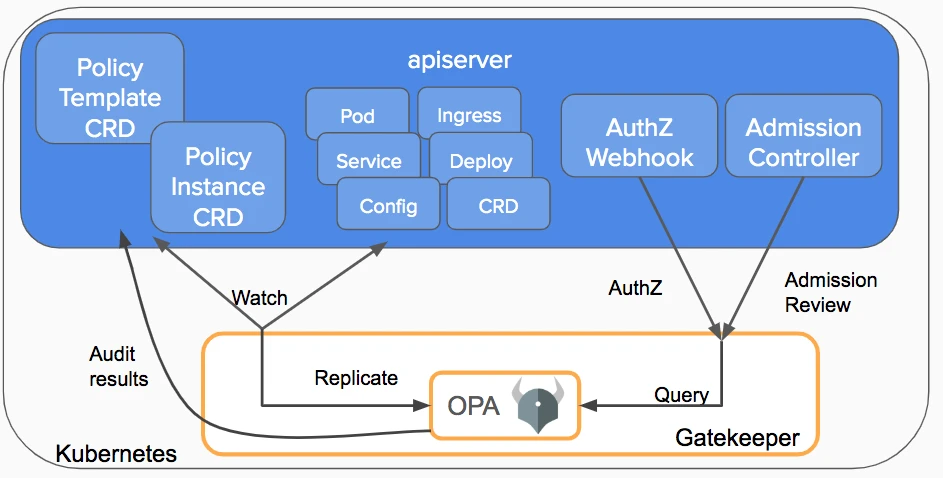
- Kubernetes Custom Resources (CRDs): Instead of manually managing raw Rego files, Gatekeeper allows you to declare policies using Kubernetes manifests called
ConstraintTemplatesandConstraints. - Audit Capabilities: Gatekeeper doesn’t just block bad deployments at the door; it continuously runs a background audit loop to scan existing resources in your cluster that might already be violating updated policies.
- Data Replication: To make advanced policy decisions (like “Ensure every Ingress hostname is unique across the whole cluster”), Gatekeeper automatically syncs and caches cluster state into OPA’s memory so your rules have context.
OPA and Kyverno
The fundamental difference comes down to philosophy: OPA is a universal policy engine that can run anywhere, while Kyverno is a Kubernetes-native engine built specifically for Kubernetes resources using standard YAML.
| Feature | OPA Gatekeeper | Kyverno |
|---|---|---|
| Scope | Universal (K8s, APIs, Envoy, Linux, CI/CD) | Kubernetes-Only |
| Policy Language | Rego (a specialized query language) | Standard Kubernetes YAML |
| Learning Curve | Steep (requires mastering Rego syntax) | Shallow (uses familiar K8s paradigms) |
| Primary Capabilities | Validate, Mutate | Validate, Mutate, Generate |
| Resource Generation | Not natively supported | Excellent (e.g., auto-create NetworkPolicies for new namespaces) |
| Performance | Extremely fast (compiled Rego evaluates in memory) | Highly performant, but can scale linearly with massive YAML schemas |
| Ecosystem Ecosystem | CNCF Graduated (Massive, multi-industry adoption) | CNCF Incubating (Rapidly growing, K8s-centric) |
Which should you choose?
Choose Kyverno if: You are a pure Kubernetes shop, your team is already stretched thin, and you want to implement guardrails quickly using standard YAML. It is also the clear winner if you need to automatically generate resources (like default network profiles) on the fly.
Choose OPA Gatekeeper if: You need a single, unified policy framework that spans across your entire enterprise architecture—not just Kubernetes. If you plan to enforce policies on APIs, CI/CD pipelines, public cloud IAM, and service meshes, OPA’s steep learning curve pays off at scale.