Core Idea
API security is a pipeline: authenticate the caller, then authorize the action, with RBAC objects as the practical way to express who may do what cluster-wide or in a namespace.
- Clients making CRUD requests to the API server: operators and developers using kubectl, control plane services, and Kubernetes-native apps.
- Authorization modes covered: configure modes, Node authorizer, webhook, ABAC, and RBAC (users and permissions, cluster roles, check access).
- Service accounts and users plus authentication mechanisms set up who the caller even is.
Following make CRUD-style requests to the API server.
- Operators and developers using kubectl
- PoK8s APItrol plane services
- Kubernetes-native apps
👉 05015 [[K8s APIntication
The authentication layer in Kubernetes is pluggable, and popular modules include client certs, webhooks, and integration with external identity management systems such as Active Directory (AD) and cloud-based Identity Access Management (IAM).
In fact, Kubernetes does not have its own built-in identity database. Instead, it forces you to use an external system.
This avoids creating yet another identity management silo.
Service Accounts & Users
Users, Groups, Roles and API Access in Kubernetes
Service Accounts
A user is an identity for humans or external systems accessing the Kubernetes API from outside the cluster.
A service account is an identity for processes running inside a Kubernetes Pod. It is used to authenticate within the cluster and interact with the API server.
| Feature | Service Account | User Account |
|---|---|---|
| Managed By | Kubernetes | External System (IAM, LDAP) |
| Scope | Inside Cluster (for pods) | Outside Cluster (for humans/apps) |
| Stored In | Kubernetes API | Not stored in Kubernetes |
| Authentication | Service account tokens | Certificates, OIDC, Webhooks |
| Usage | Used by applications inside the cluster | Used by administrators and CI/CD |
| Example Scenario |
- A pod needs to list other pods: Use a service account with RBAC permissions.
- A developer wants to use
kubectlto manage resources: Use a user account authenticated via a certificate. - A CI/CD pipeline needs to deploy applications: Use a user account with a token or a Kubernetes service account with RBAC permissions.
Authentication Mechanisms
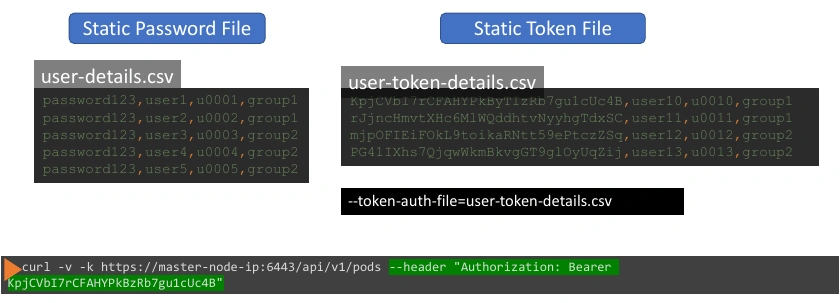
- Static Password File:
- Store user details (password, username, user ID) in a CSV file.
- Configure the API server with the
--basic-auth-fileoption. - Example format:
password123,user1,u0001.
- Static Token File:
- Store tokens for users in a CSV file, along with usernames and optional group details.
- Configure the API server with the
--token-auth-fileoption. - Example format:
token123,user10,u0010,group1. - Authenticate by passing the token as a Bearer token in requests.
- Certificates: Use client certificates for authentication.
- Third-Party Identity Services: Leverage protocols like LDAP or Kerberos.
Important
- Static files are not recommended as they store credentials in plain text, making them insecure.
- For kubeadm setups, volume mounts may be required to pass authentication files.
- Always configure Role-Based Access Control (RBAC) for fine-grained permissions.
Authorization
Authorization Modes
- RBAC Authorization (Role based access control)
- Grants or denies access to resources based on the roles assigned to users or groups
- ABAC Authorization (Attribute based access control)
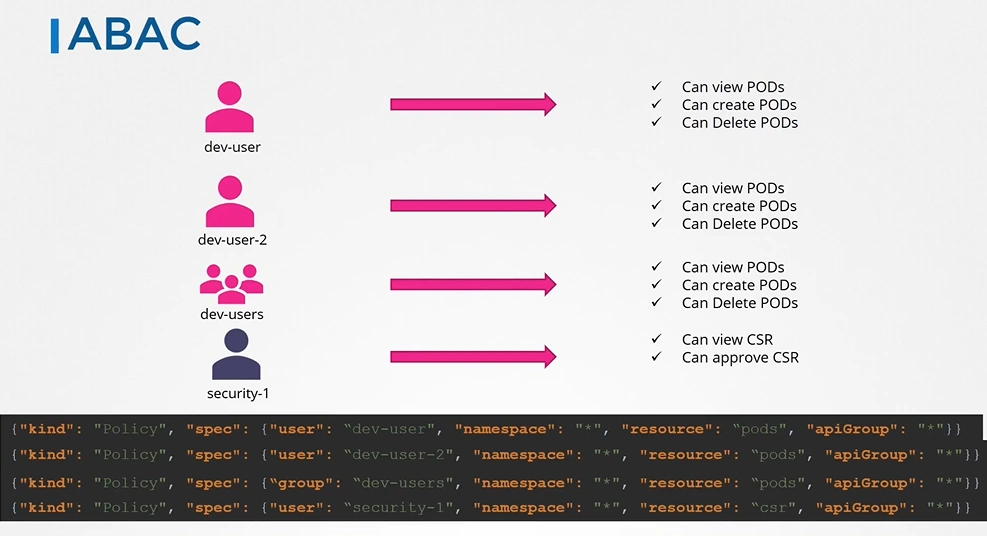
- Determines access based on user-defined policies specified in a JSON or CSV file
- Node Authorization
- Limits what a Kubernetes node can do based on its identity.
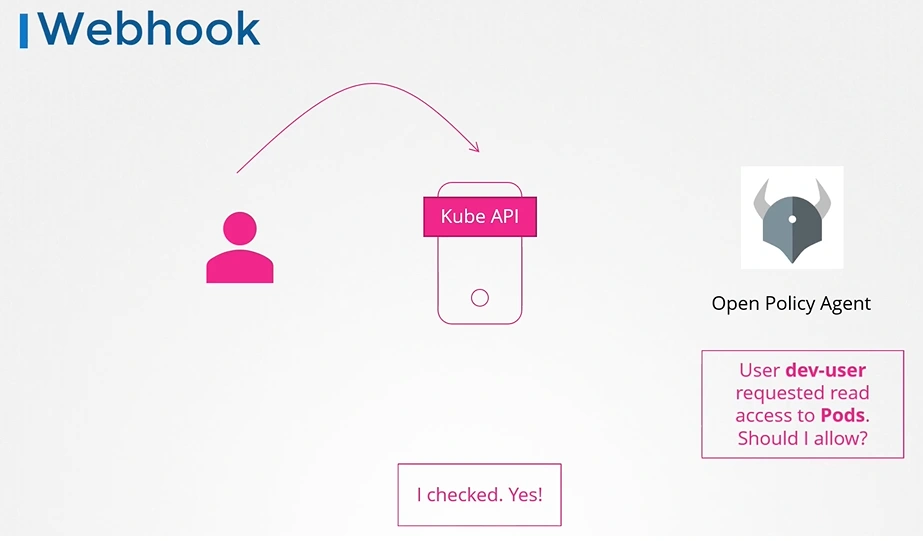
- Webhook Mode
- Delegates authorization decisions to an external service via HTTP API calls.
There are two in addition to this.
- AlwaysAllow —> Allow all requests without performing any authorization checks.
- AlwaysDeny —> Deny all requests without performing any authorization checks.
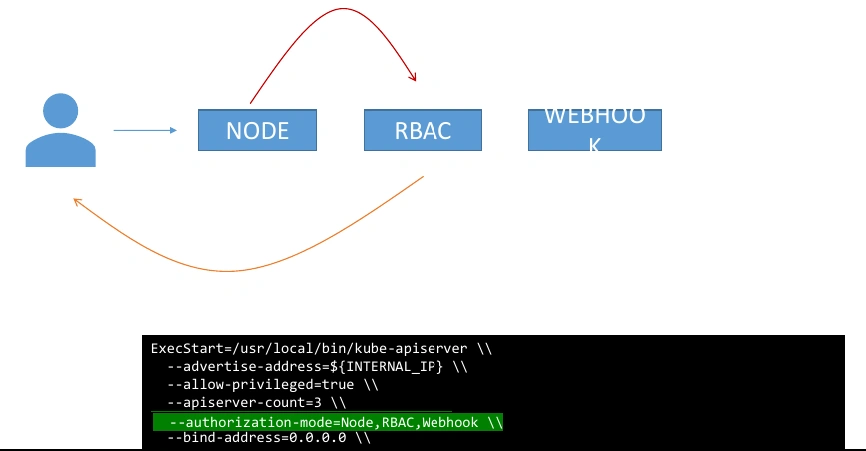
Configure Authz Modes
When you have multiple modes configured, your request is authorized using each one in the order it is specified.
So everytime a module denies a request it goes to the next one in chain. And as soon as a request is approved the user is granted permission.
Node Authorizer
The Node Authorizer is a special authorization mode in Kubernetes that restricts what kubelet (nodes) can access in the API server.
- Only allows nodes to access resources related to their assigned pods.
- Uses RBAC rules to limit access.
- Ensures nodes cannot read secrets or modify other workloads.
🔒 Security → Prevents nodes from accessing data they don’t own.
⚡ Performance → Limits API calls to only required data.
📜 Least Privilege Principle → Each node only gets what it needs.
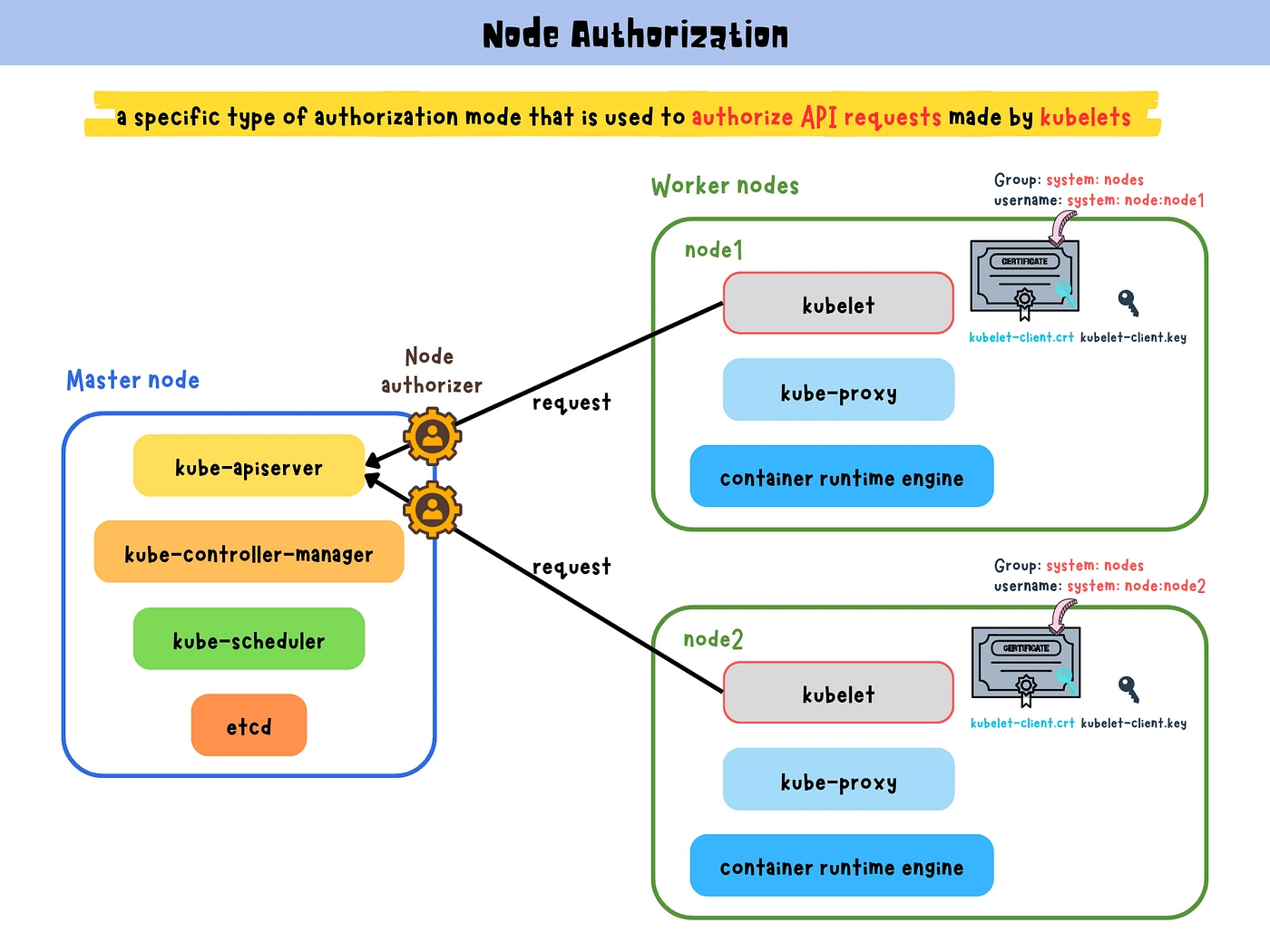
If a node is running Pod A, it can only fetch data related to Pod A but not Pod B or Pod C.
Webhook
- OPA (Open Policy Agent) is a third party tool that helps with admission control and authorization.
ABAC Authorization
RBAC Authorization
RBAC —> Role-Based Access Control
Kubernetes authorization is pluggable, and you can run multiple authZ modules on a single cluster.
However, most clusters use RBAC.
Which users can perform which actions against which resources.

RBAC is enabled on most Kubernetes clusters and is a **least-privilege deny-by-default** system.
you need to create allow rules to open things up. In fact, Kubernetes doesn’t support deny rules, it only supports allow rules.
Users & Permission
Roles define a set of permissions, and RoleBindings bind them to users.
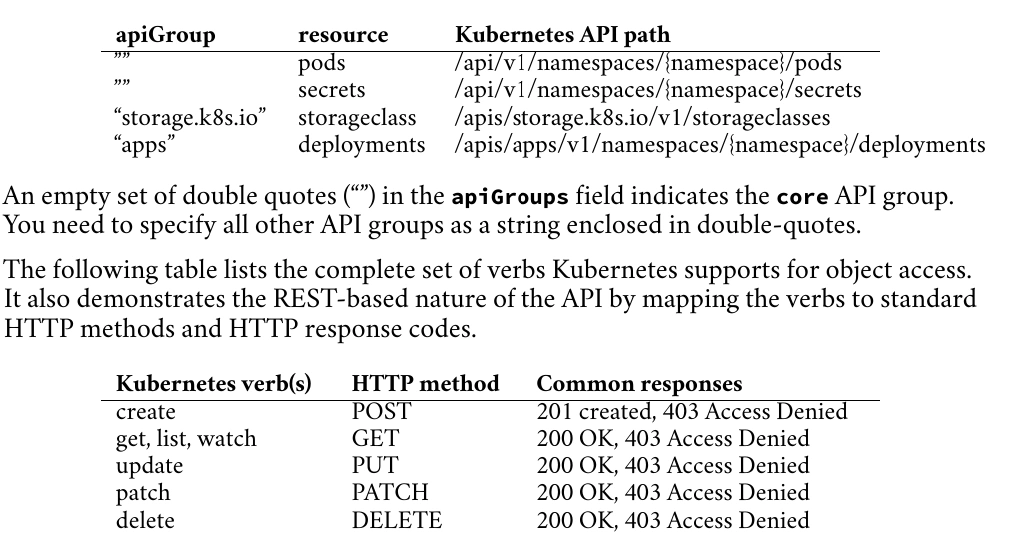
The verbs field lists permitted actions, whereas the apiGroups and resources fields identify which objects the actions are permitted on.
apiVersion: rbac.authorization.k8s.io/v1
kind: Role
metadata:
	namespace: shield
	name: read-deployments
rules:
	- verbs: ["get", "watch", "list"] # <== Allowed actions
	  apiGroups: ["apps"] # <== on resources
	  resources: ["deployments"] # <== of this type
⭐
apiGroups: [""]mean Core Group
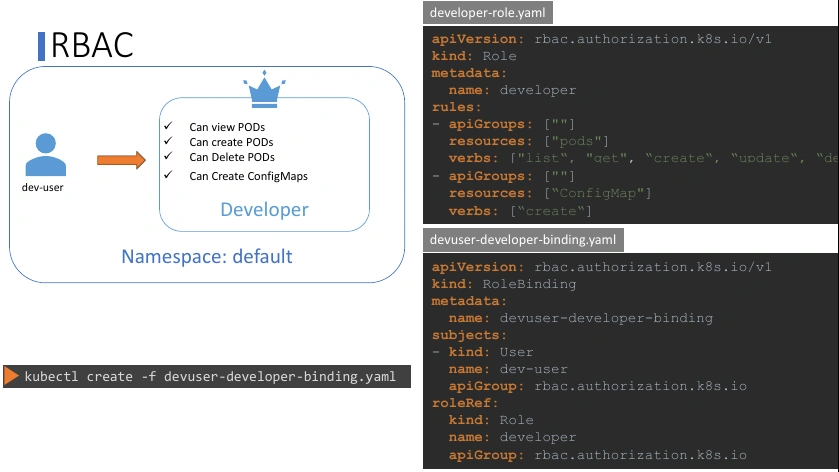
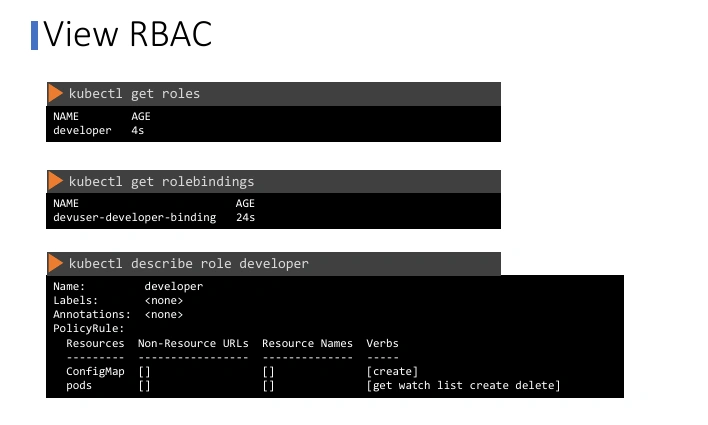
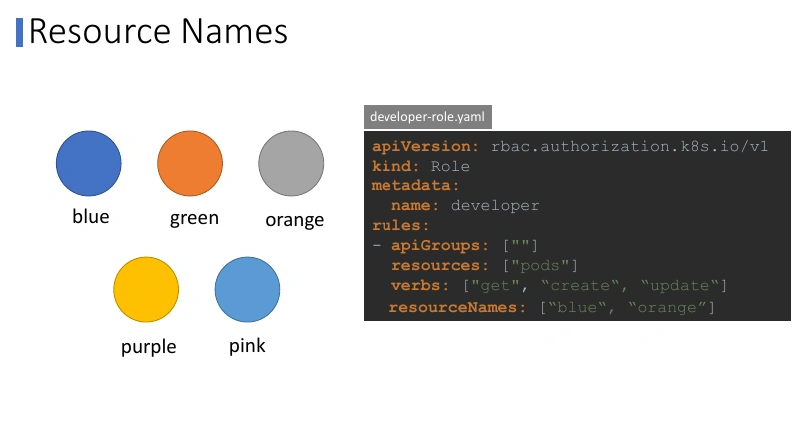
You want to give access to a user to pods, but not all pods. You can restrict access to the blue and orange pod alone by adding a resourceNames field to the rule.
Cluster Level users and permission
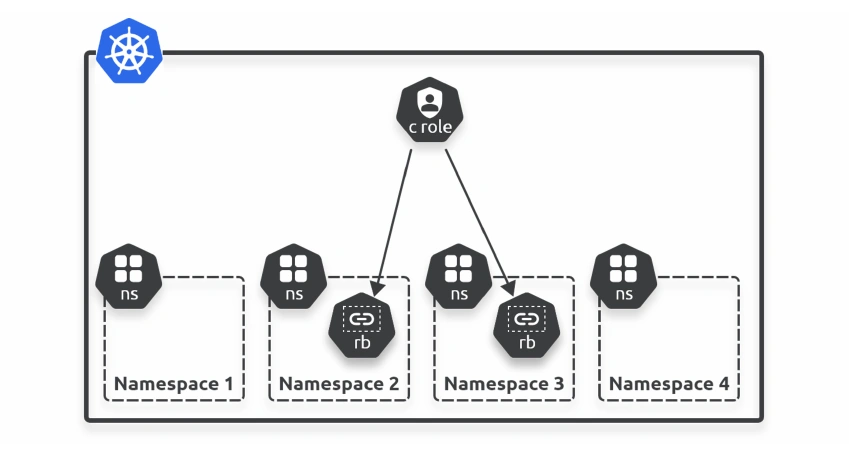
Roles and RoleBindings are namespaced objects. This means you apply them to specific Namespaces.
ClusterRoles and ClusterRoleBindings are cluster-wide objects and apply to all Namespaces.
apiVersion: rbac.authorization.k8s.io/v1
kind: ClusterRole # <== Cluster-scoped role
metadata:
	name: read-deployments
rules:
- verbs: ["get", "watch", "list"]
  apiGroups: ["apps"]
  resources: ["deployments"]
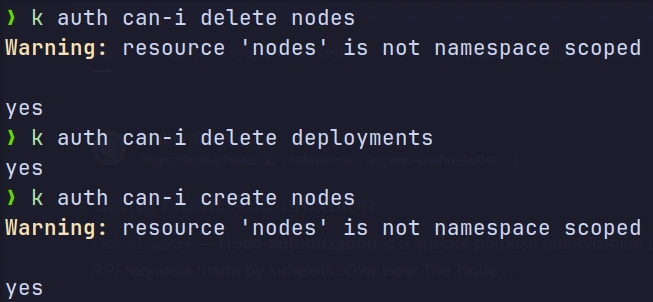
Check Access
Namespaces
Can you group or isolate nodes within a namespace?
-
No, those are cluster wide or cluster scoped resources. They cannot be associated to any particular namespace.
-
So the resources are categorized as either namespaced or cluster scoped.
-
To see namespaced resources
kubectl api-resources --namespaced=true- To see non-namespaced resources
kubectl api-resources --namespaced=false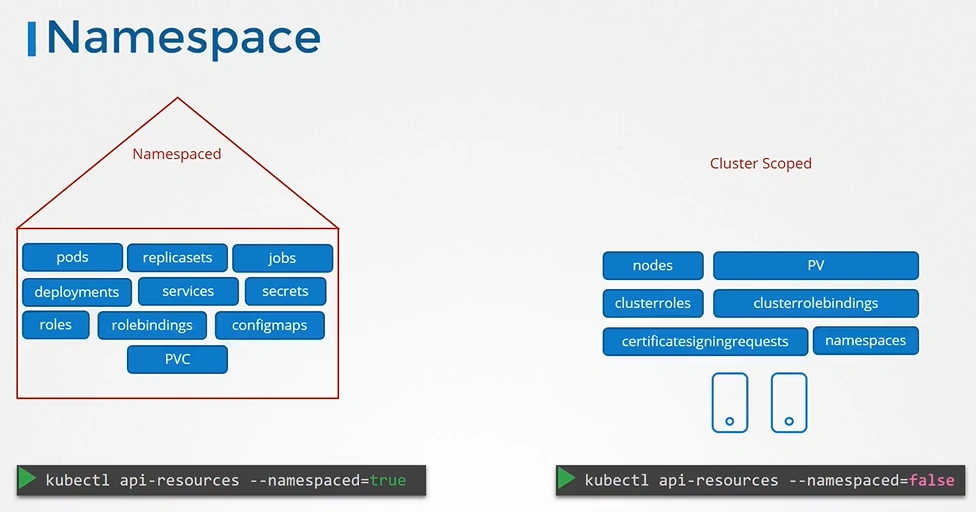
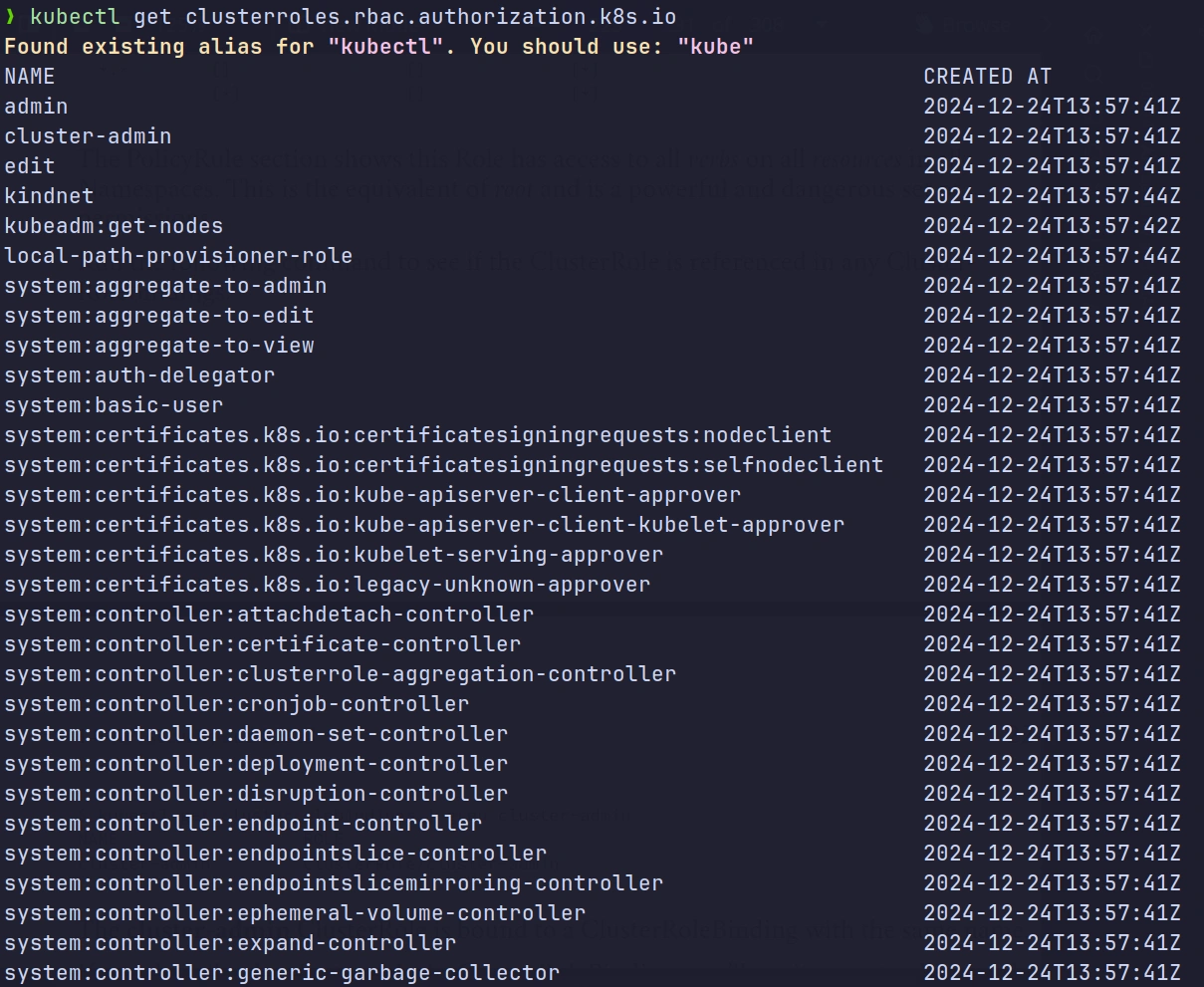
Cluster roles
Most clusters have pre-created roles and bindings to help with initial configuration and getting started.
- List All Cluster-Scoped Resources
kubectl api-resources --namespaced=falseNAME SHORTNAMES APIGROUP NAMESPACED KIND
clusterroles rbac.authorization.k8s.io false ClusterRole
clusterrolebindings rbac.authorization.k8s.io false ClusterRoleBinding
nodes - false Node
persistentvolumes pv - false PersistentVolume- Describe Cluster roles
❯ kubectl describe clusterrole cluster-admin
Name:         cluster-admin
Labels:       kubernetes.io/bootstrapping=rbac-defaults
Annotations:  rbac.authorization.kubernetes.io/autoupdate: true
PolicyRule:
  Resources  Non-Resource URLs  Resource Names  Verbs
  ---------  -----------------  --------------  -----
  *.*        []                 []              [*]
             [*]                []              [*]
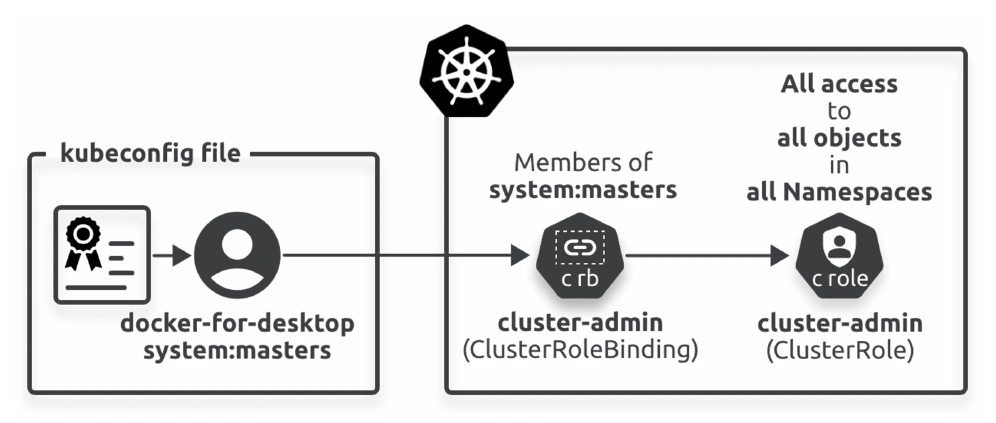
Cluster-Role Bindings
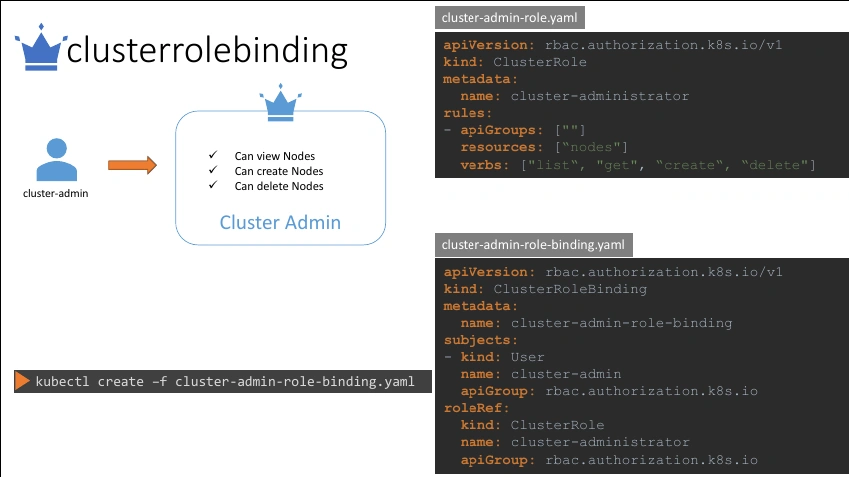
Admission control
Admission control runs immediately after successful authentication and authorization and is all about policies.
Kubernetes supports two types of admission controllers:
- Mutating —> check for compliance and can modify requests,
- Validating —> check for compliance but cannot modify requests
Mutating controllers always run first, and both types only apply to requests attempting to modify the state of the cluster.
Read requests are not subjected to admission control.
Example
you might have a production cluster with a policy that all new and updated objects must have the
env=prodlabel.
A mutating controller can check new and updated objects for the presence of the label and add it if it doesn’t exist.
However, a validating controller can only reject the request if the label doesn’t exist.