Taints and Tolerations in Kubernetes are mechanisms used to control how Pods are scheduled on Nodes. They work together to ensure that specific workloads can only run on certain Nodes, or to prevent workloads from being scheduled on inappropriate Nodes.
Kubernetes Taints & Tolerations: Tutorial With Examples - Kubecost Blog
Taints
- A taint is a property applied to a Node to repel Pods that do not explicitly tolerate it.
- Purpose: To mark a Node as having special requirements or restrictions.
- Syntax: Applied using
kubectl taintcommand.
Components of a Taint:
- Key: The identifier for the taint (e.g.,
key=value). - Value: Additional information (optional) paired with the key.
- Effect: Determines the behavior of the taint. It can be one of the following:
- NoSchedule: Pods will not be scheduled on the Node unless they tolerate the taint.
- PreferNoSchedule: Kubernetes will try to avoid scheduling Pods on the Node but will not strictly enforce it.
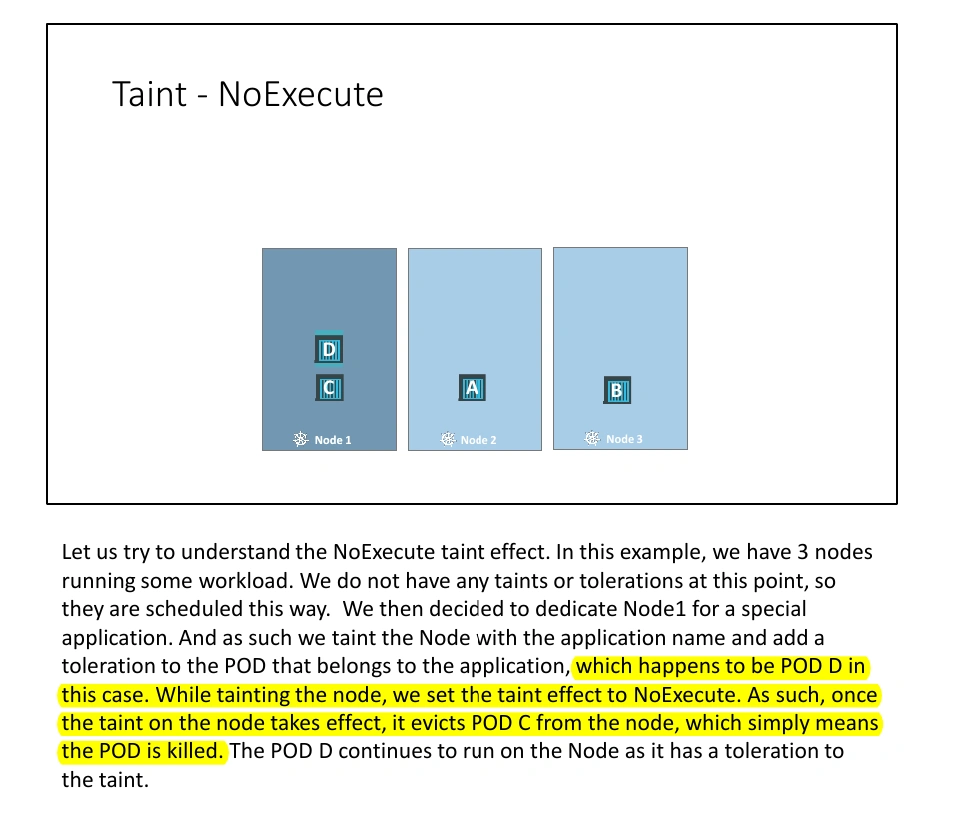
- NoExecute: Existing Pods will be evicted1 from the Node unless they tolerate the taint.
Example:
kubectl taint nodes node1 key=value:NoScheduleThis adds a taint to node1 with key key, value value, and Taint effect NoSchedule.
Tolerations
- A toleration is a property applied to a Pod that allows it to be scheduled on Nodes with matching taints.
- Purpose: To declare that the Pod can “tolerate” the conditions of a tainted Node.
Components of a Toleration:
- Key: Matches the taint key.
- Operator: Specifies the condition (e.g.,
Equal,Exists). - Value: Matches the taint value (if applicable).
- Effect: Matches the taint effect (e.g.,
NoSchedule,PreferNoSchedule,NoExecute). - TolerationSeconds: Specifies how long the Pod can tolerate a taint with the
NoExecuteeffect before being evicted.
Example:
tolerations:
- key: "key"
  operator: "Equal"
  value: "value"
  effect: "NoSchedule"
all of these values need to be encoded in double quotes.
This toleration allows the Pod to be scheduled on Nodes with a matching taint (key=value:NoSchedule).
View Taint
kubectl describe node <node-name> | grep TaintHow Taints and Tolerations Work Together
- If a Node has a taint, only Pods with matching tolerations can be scheduled on that Node.
- If no matching toleration exists, the Pod will be repelled from the Node.
Important
- Taints restrict Nodes from accepting Pods unless those Pods have matching tolerations.
- They do not guarantee that a Pod will always be placed on a specific Node.
- Example:
- Node1 with a taint accepts only Pod D, but Pod D can still be scheduled on other Nodes without taints.
- To ensure a Pod is scheduled on specific Nodes, Node Affinity is used, not taints and tolerations.
Master Node Behavior
- By default, Kubernetes sets a taint on the master node (
node-role.kubernetes.io/master:NoSchedule).- This prevents Pods from being scheduled on the master node.
- While this behavior can be modified, best practice is to avoid deploying application workloads on the master node.
Example
Use Cases
- Dedicated Nodes: Mark a Node for a specific workload using taints, and add tolerations to those workloads.
- Resource Constraints: Prevent overloading Nodes by tainting them when they approach resource limits.
- Isolation: Use taints to keep sensitive workloads away from general-purpose workloads.
Summary
- Taints: Apply to Nodes to repel Pods.
- Tolerations: Apply to Pods to allow them to tolerate specific taints.
- They enable fine-grained scheduling control in Kubernetes, ensuring workloads run on appropriate Nodes.
Footnotes
-
expel (someone) from a property, especially with the support of the law.(Similar: ejected) ↩