Node Selectors
Node selectors can be used to limit what nodes a Pod can run on in a given K8s clusters.
# Label Node
kubectl label nodes node-1 size-Large
# Pod-definitions.yaml
apiVersion:
kind: Pod
metadata:
name: myapp-pod
spec:
containers:
- name: data-processor
image: data-processor
nodeSelector:
size: LargeNode Affinity
- Ensures Pods are scheduled on specific Nodes based on labels.
- Advanced replacement for Node Selectors, supporting complex expressions like
In,NotIn, andExists. - Syntax includes:
requiredDuringSchedulingIgnoredDuringExecution: Ensures Pods are placed only on matching Nodes; if no match, Pods are not scheduled.preferredDuringSchedulingIgnoredDuringExecution: Prefers matching Nodes but falls back to others if unavailable.
- Changes in Node labels after scheduling are ignored, and Pods remain running on their assigned Nodes.
- Planned types like
requiredDuringSchedulingRequiredDuringExecutionwill enforce eviction of Pods if Node labels no longer match.
apiVersion:
kind:
metadate:
	name: myapp-pod
spec:
	containers:
	- name: data-processor
	  image: data-processor
affinity:
	nodeAffinity:
		requiredDuringSchedulingIgnoredDuringExecution:
			nodeSelectorTerms:
			- matchExpressions:
				key: size
				operator: In
				values:
				- Large
				- Medium
Node Affinity Types
These are Node Affinity types in Kubernetes, used to influence where Pods are scheduled based on Node labels.
They define behavior during the Pod lifecycle: scheduling (when a Pod is being placed on a Node) and execution (after the Pod has been placed).
Available Node Affinity Types
1. requiredDuringSchedulingIgnoredDuringExecution
- Behavior:
- During Scheduling: The scheduler mandates that the Pod can only be placed on a Node that matches the specified Node Affinity rules.
- During Execution: Changes to Node labels do not affect running Pods. The Pod will continue to run on the Node, even if the Node no longer matches the affinity rules.
- Use Case: Critical workloads that must be placed on specific Nodes during scheduling.
2. preferredDuringSchedulingIgnoredDuringExecution
- Behavior:
- During Scheduling: The scheduler prefers Nodes that match the Node Affinity rules but will place the Pod on any available Node if no matches are found.
- During Execution: Changes to Node labels do not affect running Pods. The Pod will continue to run on the Node.
- Use Case: Non-critical workloads where matching a Node is preferable but not mandatory.
Planned Node Affinity Types
3. requiredDuringSchedulingRequiredDuringExecution (Planned)
- Behavior:
- During Scheduling: Works like
requiredDuringSchedulingIgnoredDuringExecution. The Pod will only be scheduled on Nodes that match the rules. - During Execution: If the Node’s labels change and no longer match the affinity rules, the Pod will be **evicted** and rescheduled on a matching Node.
- During Scheduling: Works like
- Use Case: Scenarios where Pods must remain on Nodes that meet specific criteria throughout their lifecycle.
Comparison
| Type | During Scheduling | During Execution |
|---|---|---|
requiredDuringSchedulingIgnoredDuringExecution | Mandates placement on matching Nodes. | Ignores changes to Node labels. |
preferredDuringSchedulingIgnoredDuringExecution | Prefers matching Nodes but falls back. | Ignores changes to Node labels. |
requiredDuringSchedulingRequiredDuringExecution | Mandates placement on matching Nodes. | Evicts Pods if Node labels no longer match. |
Summary
- The “IgnoredDuringExecution” types allow Pods to remain on Nodes even if labels change after scheduling.
- The planned “RequiredDuringExecution” types enforce stricter rules, ensuring Pods dynamically respond to label changes.
Node Selectors vs. Node Affinity
- Node Selectors are simple and do not support expressions like
ORorNOT. - Node Affinity is more flexible and powerful but adds complexity.
Practical Scenario
- There are 3 Nodes (Blue, Red, Green) and 3 Pods (Blue, Red, Green).
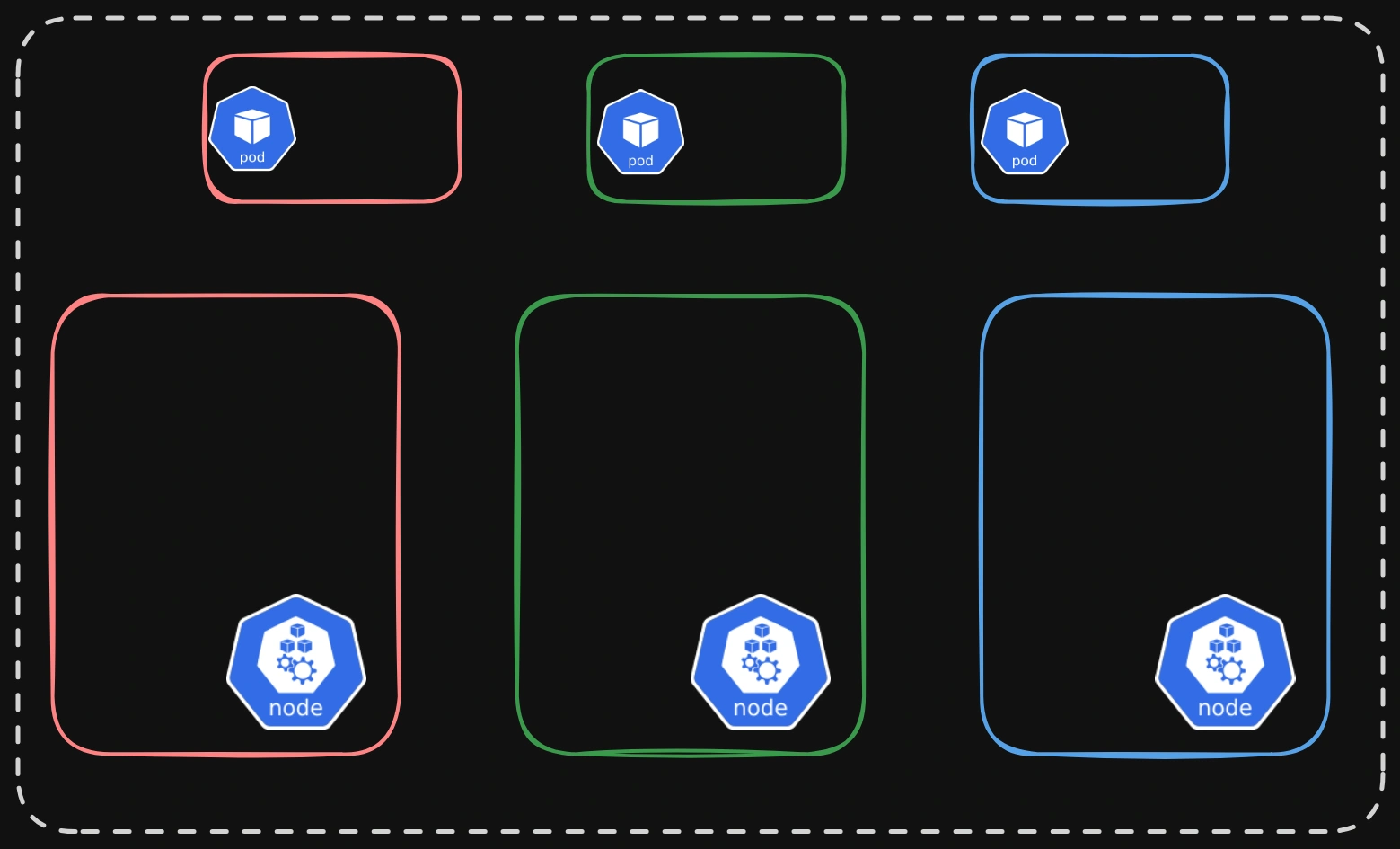
- The goal is:
- Place each Pod on its corresponding Node (e.g., Blue Pod on Blue Node).
- Prevent other Pods from being placed on these Nodes.
- Prevent these Pods from being placed on unrelated Nodes.
Solution Attempts
1. Using Taints and Tolerations:
- Steps:
- Apply a taint to each Node (e.g., Blue Node with a “blue” taint).
- Add tolerations to the corresponding Pods (e.g., Blue Pod with a “blue” toleration).
- Outcome:
- Ensures Pods are only accepted by Nodes with matching tolerations.
- Issue: Other Nodes without taints can still host these Pods, breaking exclusivity.
2. Using Node Affinity:
- Steps:
- Label Nodes with their respective colors (e.g.,
color=bluefor Blue Node). - Set Node Affinity on Pods to prefer Nodes with matching labels (e.g., Blue Pod prefers
color=blue).
- Label Nodes with their respective colors (e.g.,
- Outcome:
- Ensures Pods are placed on Nodes with matching labels.
- Issue: Does not prevent other Pods from being placed on these Nodes.
3. Combining Taints/Tolerations and Node Affinity:
- Steps:
- Use taints and tolerations to prevent unrelated Pods from being placed on the Nodes.
- Use Node Affinity to ensure Pods are placed on their corresponding Nodes.
- Outcome:
- Achieves the desired goal of complete Node-Pod exclusivity.
Conclusion:
- Taints and Tolerations: Control which Pods can be scheduled on specific Nodes.
- Node Affinity: Controls which Nodes Pods prefer or require during scheduling.
- Combining both ensures exclusive Node-Pod relationships.