‘Chapter 11. DaemonSets’
—Brendan Burns, “Kubernetes: Up and Running”
Core Idea
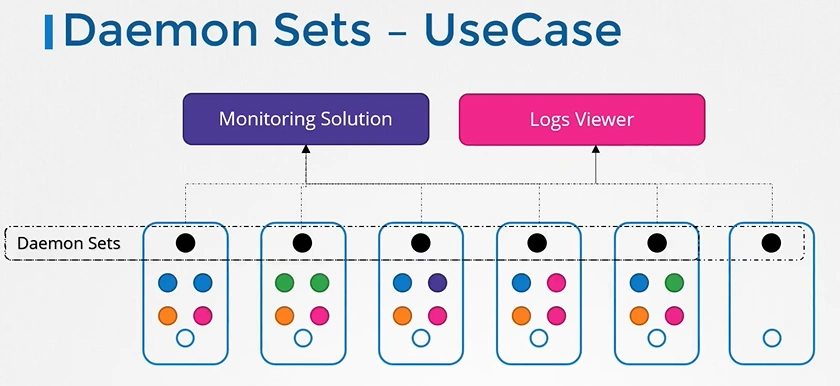
A DaemonSet keeps one pod copy running on every node (or a selected subset), which is exactly what node-level daemons like log collectors and monitoring agents need.
- Covered operations: creating, limiting to specific nodes, updating, and deleting a DaemonSet.
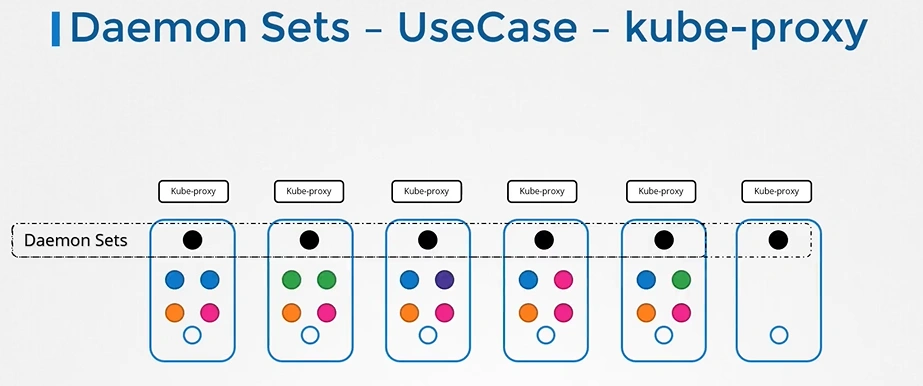
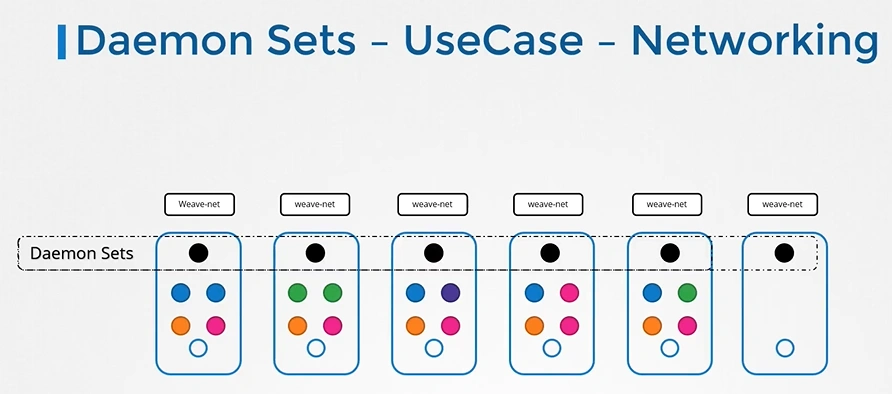
- Use cases section maps the pattern to real system daemons.
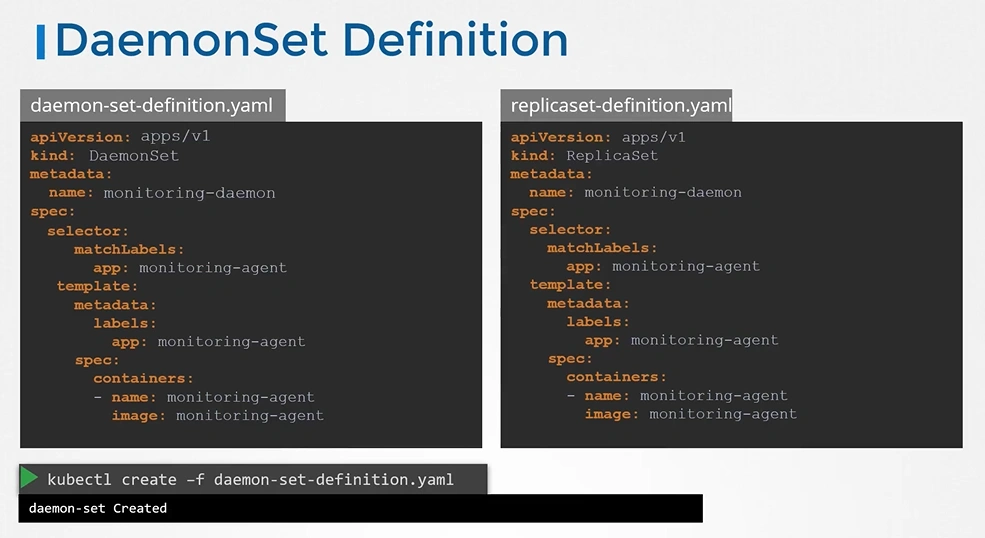
- ReplicaSets answer “how many pods,” DaemonSets answer “on which nodes.”
A DaemonSet ensures that a copy of a Pod is running across a set of nodes in a Kubernetes cluster.
DaemonSets are used to deploy system daemons such as log collectors and monitoring agents, which typically must run on every node.
Important
ReplicaSets should be used when your application is completely decoupled from the node and you can run multiple copies on a given node without special consideration.
DaemonSets should be used when a single copy of your application must run on all or a subset of the nodes in the cluster.
You can also use DaemonSets to install software on nodes in a cloud-based cluster.
DaemonSets determine which node a Pod will run on at Pod creation time by specifying the nodeName field in the Pod spec. As a result, Pods created by DaemonSets are ignored by the Kubernetes scheduler.
Like replicaset daemonsets maintain desired state.
DaemonSet controller creates a Pod on each node that doesn’t currently have a matching Pod.
Creating Daemonsets
apiVersion: apps/v1
kind: DaemonSet
metadata:
  name: fluentd
  labels:
    app: fluentd
spec:
  selector:
    matchLabels:
      app: fluentd
  template:
    metadata:
      labels:
        app: fluentd
    spec:
      containers:
        - name: fluentd
          image: fluent/fluentd:v0.14.10
          resources:
            limits:
              memory: 200Mi
            requests:
              cpu: 100m
              memory: 200Mi
          volumeMounts:
            - name: varlog
              mountPath: /var/log
            - name: varlibdockercontainers
              mountPath: /var/lib/docker/containers
              readOnly: true
      terminationGracePeriodSeconds: 30
      volumes:
        - name: varlog
          hostPath:
            path: /var/log
        - name: varlibdockercontainers
          hostPath:
            path: /var/lib/docker/containers
kubectl describe daemonset fluentdLimiting DaemonSets to Specific Nodes
there are some cases where you want to deploy a Pod to only a subset of nodes. For example, maybe you have a workload that requires a GPU or access to fast storage only available on a subset of nodes in your cluster. In cases like these,node labels can be used to tag specific nodes that meet workload requirements.
Updating a DaemonSet in Kubernetes
Before Kubernetes 1.6, updating DaemonSets required manually deleting Pods to trigger re-creation. However, Kubernetes 1.6 introduced a rolling update feature for DaemonSets, similar to Deployments, enabling automated upgrades.
- RollingUpdate Strategy: By setting
spec.updateStrategy.typetoRollingUpdate, updates to the DaemonSet’s template trigger a rolling update where Pods are gradually updated. - Key Parameters:
spec.minReadySeconds: Defines how long a Pod must be “ready” before the next Pod is updated (typically 30-60 seconds).spec.updateStrategy.rollingUpdate.maxUnavailable: Controls how many Pods can be updated simultaneously. A value of 1 is safe but slow; increasing it speeds up the update at the cost of risk during a failure.
Rollout Management: Use kubectl rollout commands (e.g., kubectl rollout status daemonSets my-daemon-set) to monitor the status of the DaemonSet update.
This update strategy helps ensure gradual, controlled upgrades of DaemonSet Pods, balancing speed and reliability based on the application’s needs.
Deleting a Daemonset
kubectl delete -f fluentd.yamlWarning
Deleting a DaemonSet will also delete all the Pods being managed by that DaemonSet. Set the
--cascadeflag tofalseto ensure only the DaemonSet is deleted and not the Pods.
Use Cases