Core Idea
A deployment strategy decides how version N+1 replaces version N: recreate accepts downtime, rolling is the zero-downtime default, blue/green and canary trade resources or traffic share for safety.
- Recreate scales the old ReplicaSet to zero then starts the new one; use it when the two versions cannot run at the same time.
- Rolling replaces pods gradually without downtime, guarded by readiness probes, tuned with
maxSurgeandmaxUnavailable, and reversible by stopping the rollout.- Blue/green runs green beside blue and flips a fronting service over once verified (double resources, minimal downtime); canary gives a subset of pods or users (e.g. 90/10) the new version; A/B targets segments by headers or cookies and weights traffic by conversion.
When Deploying application on k8s cluster. we want to choose deployment strategy.
Deployment strategy determine how applications are updated to older version to newer version.
Some strategies have downtime of application service, some have testing concepts.
Basic Deployment Strategies:
- Recreating
- Rolling (Default Strategy)
Advanced Deployment Strategies
- Blue/Green
- Canary
- A/B
- Ramped Slow Rollout
- Best-Effort Controlled Rollout
- Shadow Deployment
Visualize
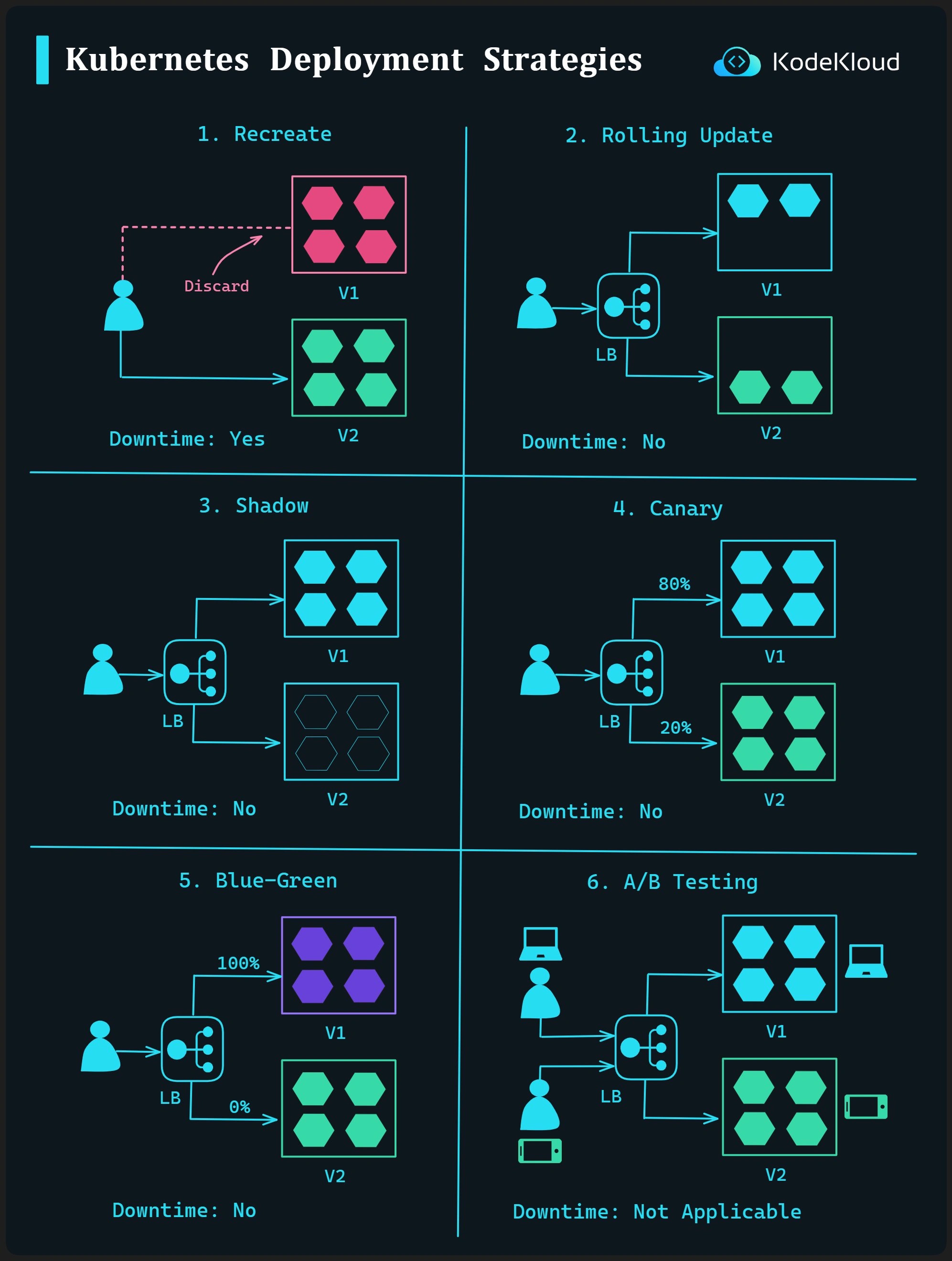
1. Recreate Deployment
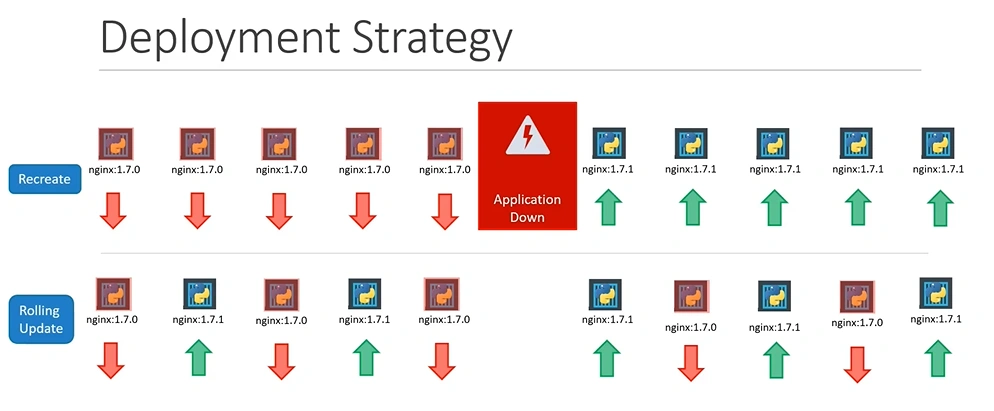
Recreating Deployment terminates all the pods and replace them with the new version.
Amount of downtime incurred using this strategy will depend on how long the application takes to shut down and start back up.
Use Case: Old and new version of the application cannot run at the same time.
spec:
	replicas: 10
	strategy:
		type: Recreate
2. Rolling Deployment
Replaces pods running the old version of the application with new version without downtime.
This process ensures continuous availability using Readiness probes, which monitor application readiness and prevent traffic routing to unavailable pods.
Key aspects:
-
Readiness Probes:
- Monitor when an application is ready to receive traffic.
- Prevent traffic if initialization or recovery from overload is needed.
-
Rollback:
- If an issue occurs during deployment, the rollout can be stopped and reverted to the previous version.
-
Deployment Triggers:
- Triggered by changes in the pod specification (e.g., image, environment, or labels).
- Use
kubectl set imageto update pod images.
-
Parameters to manage pod replacement:
- maxSurge: Maximum number of extra pods during rollout.
- maxUnavailable: Maximum number of unavailable pods during rollout.
spec:
  replicas: 10
  strategy:
    type: RollingUpdate
    rollingUpdate:
      maxSurge: 3
      maxUnavailable: 1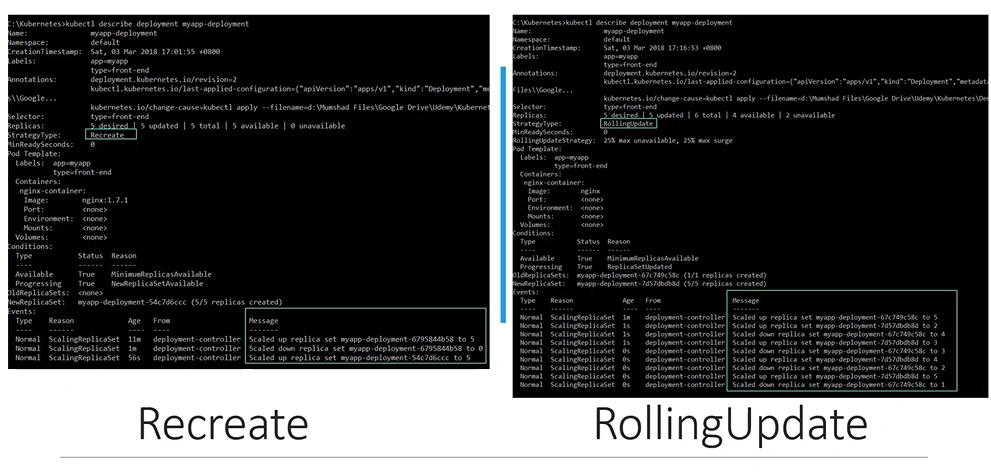
On Recreate: Scale down current replicaset to replica = 0, and scale up new replicaset. This cause downtime.
On RollingUpdate: Gradually replaces pods running the old version of the application with new ones.
3. Blue/Green Deployment
A Blue/Green Deployment involves running the new application version (green) alongside the old one (blue) and switching traffic to the new version once it is verified.
This approach ensures minimal downtime but requires double the resources during the transition.
To enable this, we set up a service sitting in front of the deployments. we direct traffic to specific application version (Blue or Green).
Blue / green deployments may also be referred to as ‘best-effort controlled rollouts’
4. Canary Deployment
A Canary deployment can be used to let a subset of the users test a new version of the application or when you are not fully confident about the new version’s functionality.
Example:
- Total Pods = 100
- v1.0.0 = 90 pods
- v2.0.0 = 10 pods
90% of the users will be routed to the old version, and 10% will be routed to the new version.
It might be impractical and costly to run 100 pods. A better way to achieve this is to use a load balancer such as NGINX, HAProxy, or Traefik, or a service mesh like Istio, Hashicorps Consul, or Linkrd.
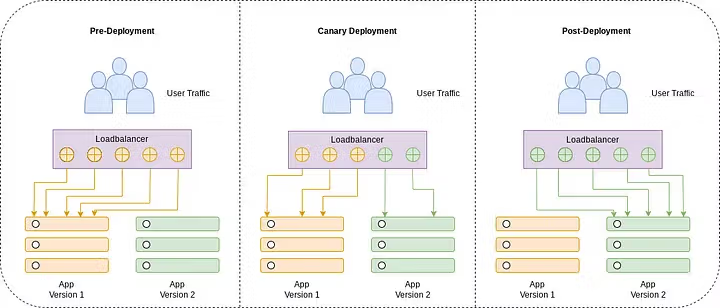
Canary or ‘Ramped slow rollout’ strategies are sometimes used interchangeably with the term ‘Shadow Deployment’.
Ramped Slow Rollout means the new version is rolled out slowly, creating new replicas replacing the old ones. This is also another term for a Canary deployment
5. A/B Deployment
Similar to a Canary deployment, using an A/B deployment, you can target a given subsection of users based on some target parameters (usually the HTTP headers or a cookie), as well as distribute traffic amongst versions based on weight.
This technique is widely used to test the conversion of a given feature, and then the version that converts the most is rolled out.
This approach is usually taken based on data collected on user behavior and can be used to make better business decisions.
A/B deployments can be automated using Istio and Flagger.
Istio A/B Testing | Flagger
👉 From Big Bang to Canary Exploring Software Deployment Strategies
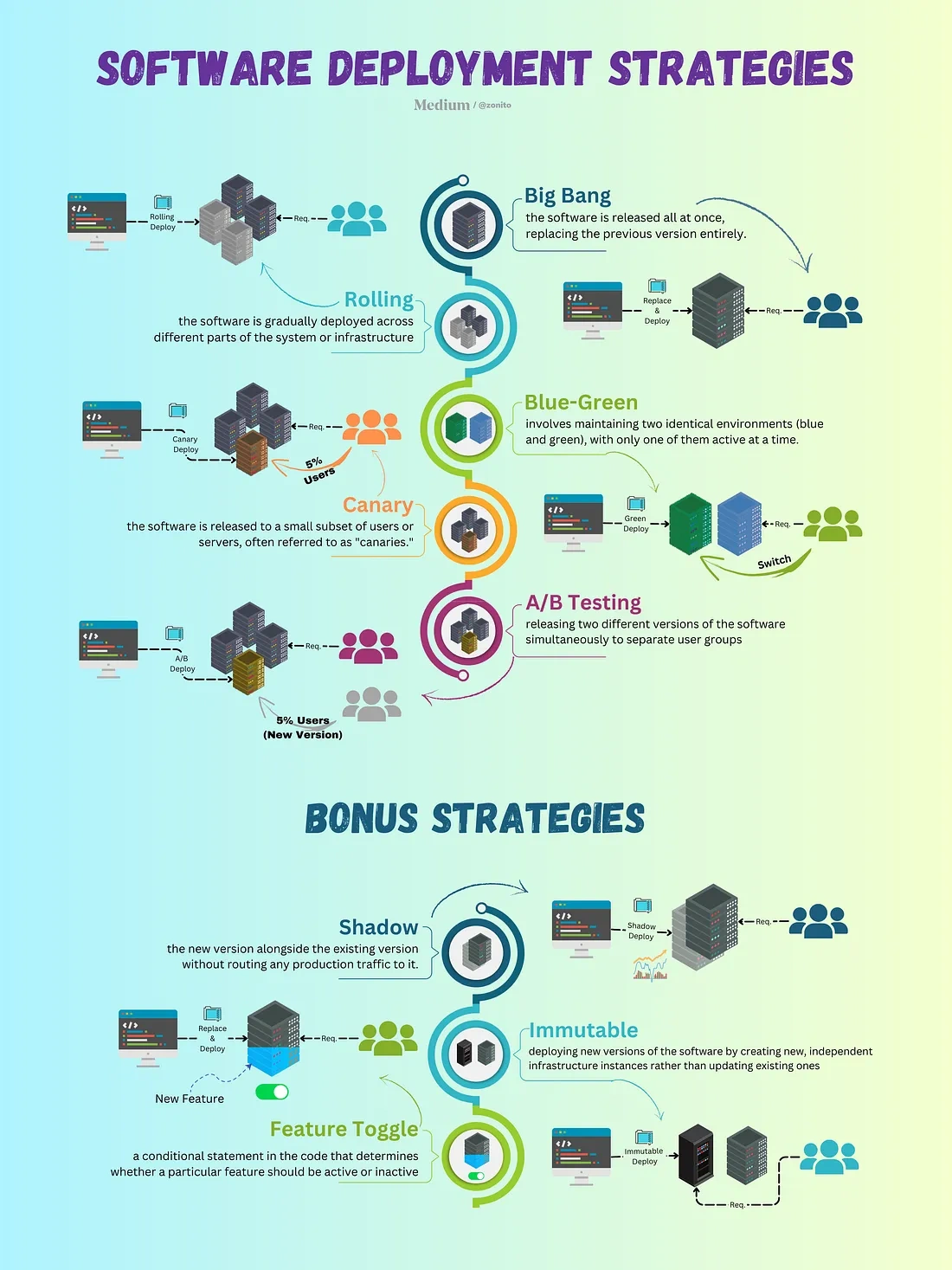
Deployment Strategies