kubernetes kubernetes/extras clippings
Core Idea
Deployment strategies trade blast radius for complexity: big bang ships everything at once, rolling and canary drain risk gradually, blue-green swaps whole environments, and A/B splits real traffic.
- The top five: big bang, rolling, canary, blue-green, and A/B testing deployment.
- Bonus strategies: shadow, immutable, and feature toggle deployment.
- Context: continuous deployment is mainstream with DevOps and Agile, and each strategy has its own strengths and trade-offs across the SDLC.
Software deployment is a challenging and integral aspect of the software development lifecycle (SDLC). Developers and teams must deploy software applications efficiently and effectively as the software industry proliferates. Continuous deployment and integration have become mainstream with DevOps and Agile practices. Consequently, various software deployment strategies have emerged, each with unique strengths and potential applications.
This article explores eight key software deployment strategies: Big Bang, Rolling, Canary, Blue-Green, A/B Testing, Shadow, Immutable, and Feature Toggle. We’ll explore what they entail and how they can be applied in real-world scenarios.
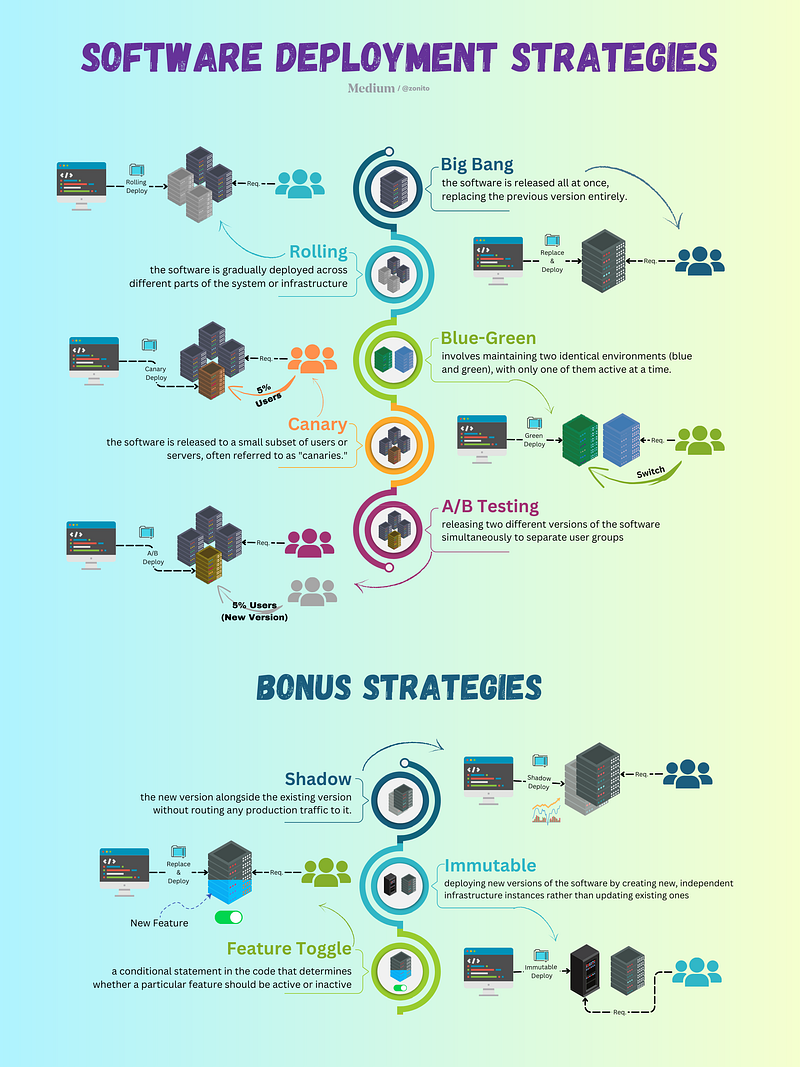
Software Deployment Strategies: Cheatsheet
Top 5 Most widely used strategies
1. Big Bang Deployment
The Big Bang deployment strategy refers to an all-at-once approach. It means the new software version is made live simultaneously, replacing the older version. While this approach can be simple, it also carries risks. If there’s a problem, the entire system can be affected.
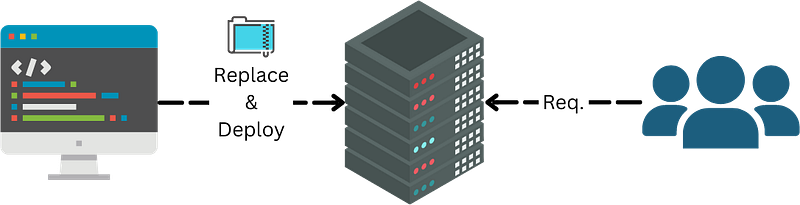
Big Bang Deployment
Application example: Big Bang deployment might be suitable for small systems or non-critical applications. For instance, deploying a small internal tool within a company that won’t significantly impact operations if something goes wrong.
2. Rolling Deployment
Rolling deployment, or phased rollout, introduces changes incrementally across the system. Instead of one big switch, the new software version is deployed to a small part of the system, then gradually to other factors. This reduces the risk of system-wide issues.
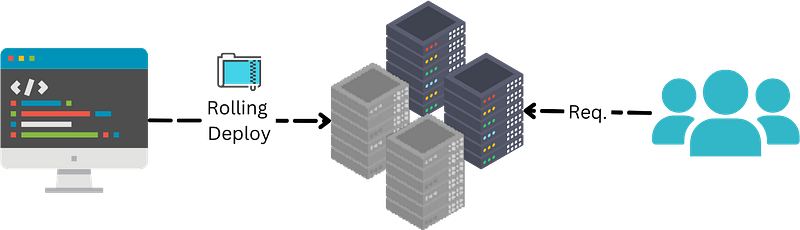
Rolling Deployment
Application example: Rolling deployments can be ideal for large-scale web applications. For example, an e-commerce site might introduce a new interface to a small group of users, then gradually roll it out to all users.
3. Canary Deployment
Canary deployment is a specific type of rolling deployment. It is named after the practice of using canary birds in coal mines to detect toxic gases. The new software version is deployed on a small part of the production infrastructure in this strategy. If the ‘canary’ performs as expected, the latest version is gradually rolled out to the rest of the infrastructure.
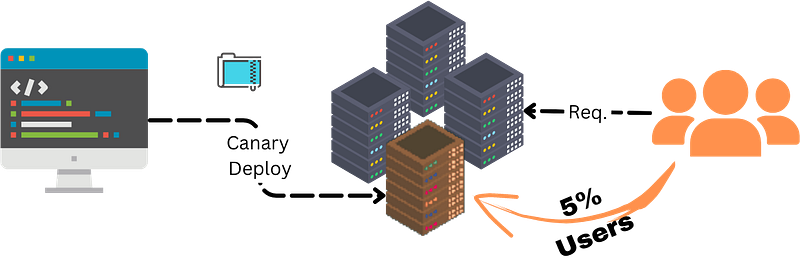
Canary Deployment
Application example: Canary deployments are often used in SaaS products. For instance, a new feature in a cloud-based project management tool might be initially rolled out to a few users. If successful, it’s then released to all users.
4. Blue-Green Deployment
The Blue-Green deployment strategy involves having two identical production environments: “Blue” and “Green.” At any time, only one is live. When a new software version is ready, it’s deployed to the idle environment (for example, Green), while Blue remains live. Once everything is tested in the Green environment, the router switches, and Green becomes the live environment.
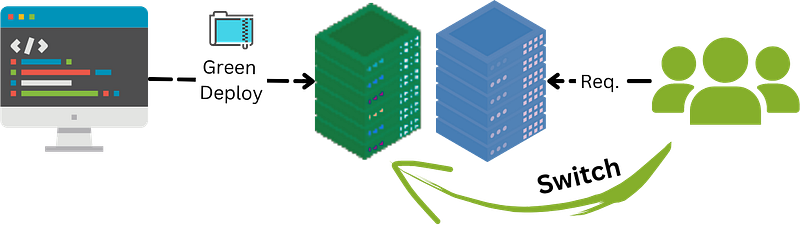
Application example: Blue-Green deployment could be used in a financial services application where zero downtime is crucial. The new version is thoroughly tested and lives in a Green environment before the switch, reducing the chance of disruption.
5. A/B Testing Deployment
A/B Testing is more of a feature experiment than a deployment strategy. In A/B Testing, two versions (A and B) are compared. A portion of users is directed to version A, while another part goes to version B. This enables developers to understand which version users prefer or which performs better.
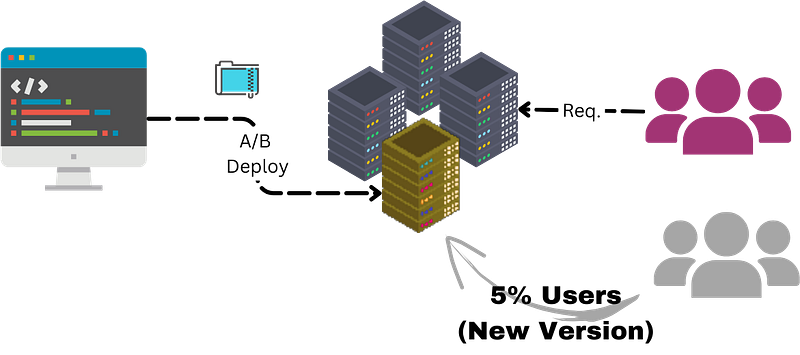
Application example: A/B testing is commonly used in web development. For instance, an online retailer might create two different landing page designs (A and B) and monitor which leads to more user engagement or sales.
Bonus Strategies
6. Shadow Deployment
In Shadow deployment, the new software version is released alongside the old version — however, only the old version serves the live traffic. The latest version receives the exact requests, allowing teams to test and observe its performance without affecting users.
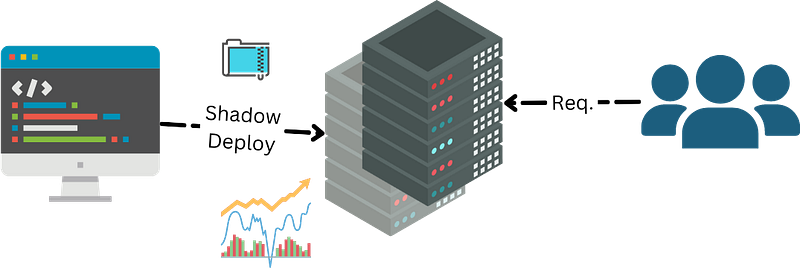
Application example: Shadow deployments could be valuable in data-intensive applications. For example, a data processing system might use this strategy to validate a new algorithm’s efficiency and correctness without impacting production traffic.
7. Immutable Deployment
Immutable deployments are based on the principle of immutability, where something cannot be changed once it’s created. Instead of updating the existing environment, a new one is made for each release. Old environments can be retired once the new one is up and running.
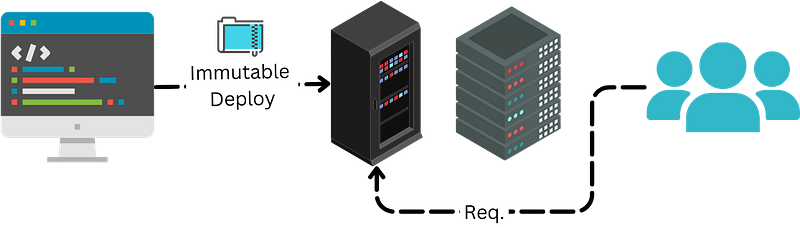
Application example: Immutable deployments are widespread in containerized applications, like those running on Kubernetes. When a new application version is ready, a new set of containers is created and deployed.
8. Feature Toggle Deployment
Feature Toggle (feature flagging) allows teams to hide, enable, or turn off a feature during runtime. Instead of deploying a new version, features can be turned ‘on’ or ‘off’ without affecting the entire system.
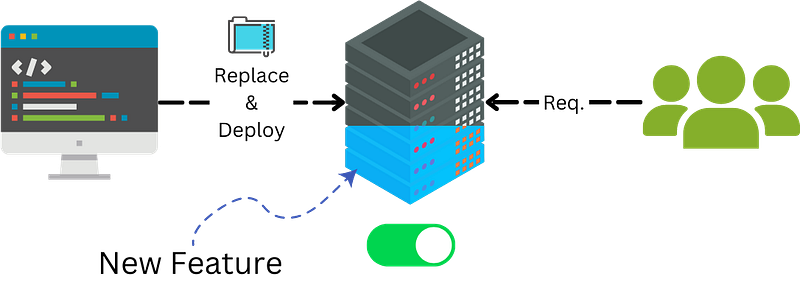
Application example: Feature toggles are helpful for incremental development in large web applications. For example, a social media platform might selectively use feature toggles to release new features to certain user groups.
Conclusion
In conclusion, the deployment strategy choice depends on your project’s requirements and constraints. Each approach carries different benefits and potential drawbacks. By understanding these strategies, teams can make better decisions about deploying software updates effectively, efficiently, and with less risk.
As we explore the eight key software deployment strategies, remember that there isn’t a one-size-fits-all solution. Each deployment strategy has its advantages and pitfalls, and the decision on which to adopt should hinge on your project’s specific requirements, the team’s expertise, and the organization’s risk appetite.
Here are a few final tips and tricks to guide your deployment strategy:
- Thorough Testing: Regardless of your chosen deployment strategy, thorough testing is imperative. A robust testing environment can help uncover issues before they affect your users.
- Use Automation: Use automation wherever possible to reduce manual errors and speed up deployment. Continuous Integration/Continuous Deployment (CI/CD) tools are a godsend.
- Monitor and Learn: After deploying, closely monitor the application. Collect data, learn from it, and use it to improve subsequent deployments.
- Plan for Rollbacks: Regardless of how much testing you do, problems may still occur in the live environment. Have a rollback strategy to revert to the older version if required.
As Grace Hopper, a pioneer in the field of computer programming, once said,
“The most dangerous phrase in the language is ‘we’ve always done it this way.’”
The world of software deployment is dynamic and constantly evolving, so always be open to change, experiment with new strategies, and adopt what works best for your unique circumstances. The strategy detailed in this article should provide a comprehensive foundation for anyone seeking to understand or refine their approach to software deployment.