Deployments
A Deployment is a Kubernetes object that provides a declarative way to manage the lifecycle of applications by ensuring the desired state of Pods and ReplicaSets is maintained.
Replicaset and Deployments
A ReplicaSet ensures that a number of Pods is created in a cluster. The pods are called replicas and are the mechanism of availability in Kubernetes. But changing the ReplicaSet will not take effect on existing Pods, so it is not possible to easily change, for example, the image version.
A deployment is a higher abstraction that manages one or more ReplicaSets to provide a controlled rollout of a new version. When the image version is changed in the Deployment, a new ReplicaSet for this version will be created with initially zero replicas. Then it will be scaled to one replica, after that is running, the old ReplicaSet will be scaled down. (The number of newly created pods, the step size so to speak, can be tuned.)
As long as you don’t have a rollout in progress, a deployment will result in a single replicaset with the replication factor managed by the deployment.
Faq
- Can I update the container image version directly in a ReplicaSet?
- No, you cannot directly update the container image version in a ReplicaSet because it does not support updates to the Pod template after creation. ReplicaSets are designed to maintain the current state of Pods, not to perform updates.
The Deployment resource exists in the apps/v1 API and defines all supported attributes and capabilities.
The Deployment controller runs on the control plane, watches Deployments, and reconciles observed state with desired state.
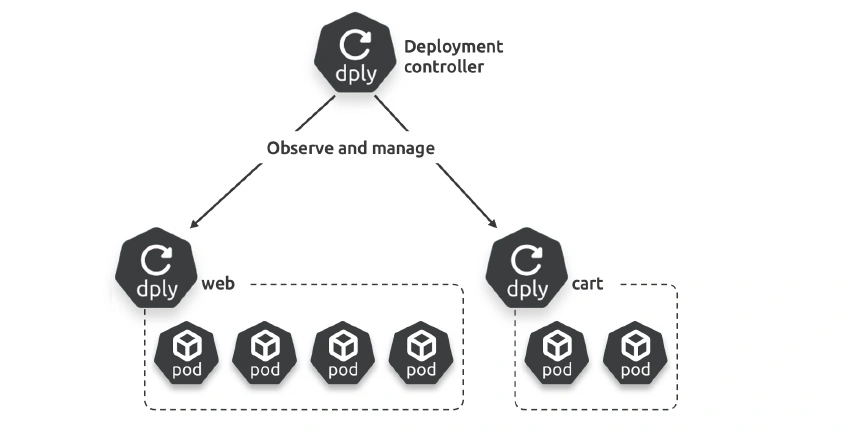
Deployments & pods
Every Deployment manages one or more identical Pods.
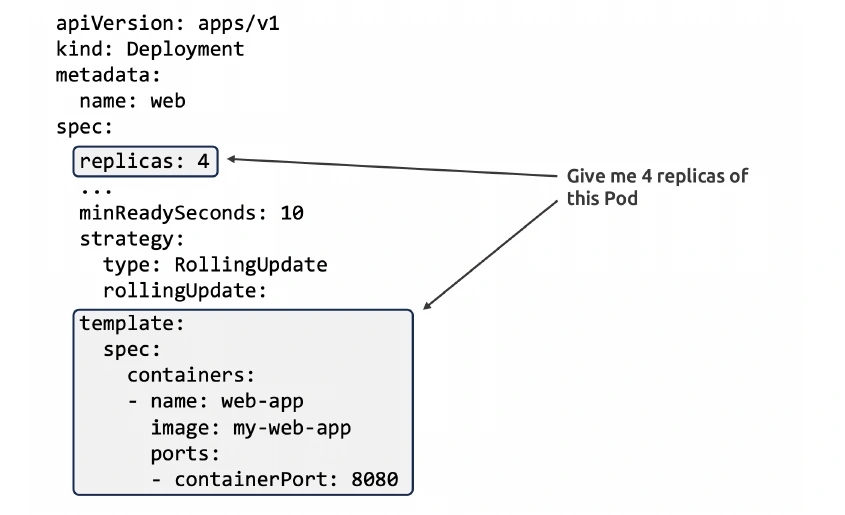
Replicaset
replicaset provides the self-healing and scaling.
Posting this Deployment YAML to the cluster will create a Deployment, a ReplicaSet, and two identical Pods running identical containers. The Pods are managed by the ReplicaSet, which, in turn, is managed by the Deployment.
You should then perform all management via the Deployment and never directly manage the ReplicaSet or Pods.
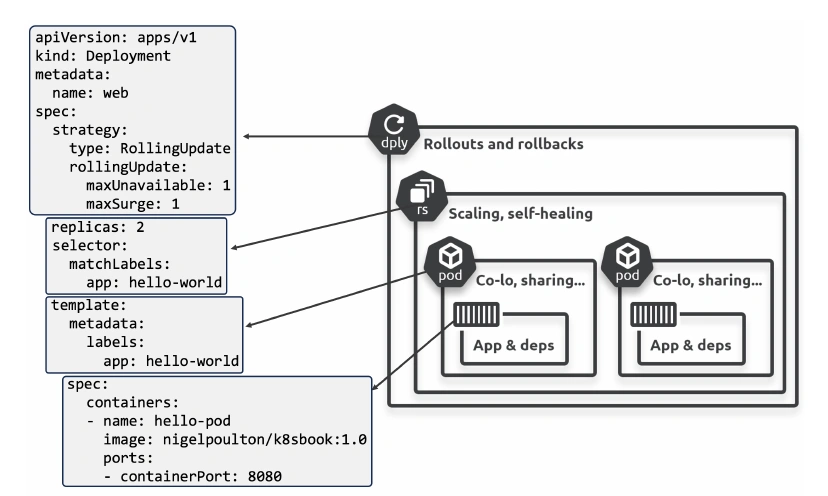
Scaling
We can scale our apps manually.
However k8s has several autoscalers that automatically scale your apps and infrastructure.
The **Horizontal Pod Autoscaler** (HPA) adds and removes Pods to meet current demand. Most clusters install it by default, and it’s widely used.
The **Cluster Autoscaler** (CA) adds and removes cluster nodes so you always have enough to run all scheduled Pods. This is also installed by default and widely used.
The Vertical Pod Autoscaler (VPA) increases and decreases the CPU and memory allocated to running Pods to meet current demand. It isn’t installed by default, has several known limitations, and is less widely used.
multi-dimensional autoscaling - This is jargon for combining multiple scaling methods — scaling Pods and nodes, or scaling apps horizontally (adding more Pods) and vertically (adding more resources to existing Pods).
Controllers and reconciliation
ReplicaSets are implemented as a background controller running in a
reconciliation loop, ensuring the correct number of Pod replicas are always present.
If there aren’t enough Pods, it adds more. If there are too many, it terminates some.
The exact same reconciliation process enables self-healing, scaling, rollouts, and rollbacks.
Rolling Updates
Roll-Outs
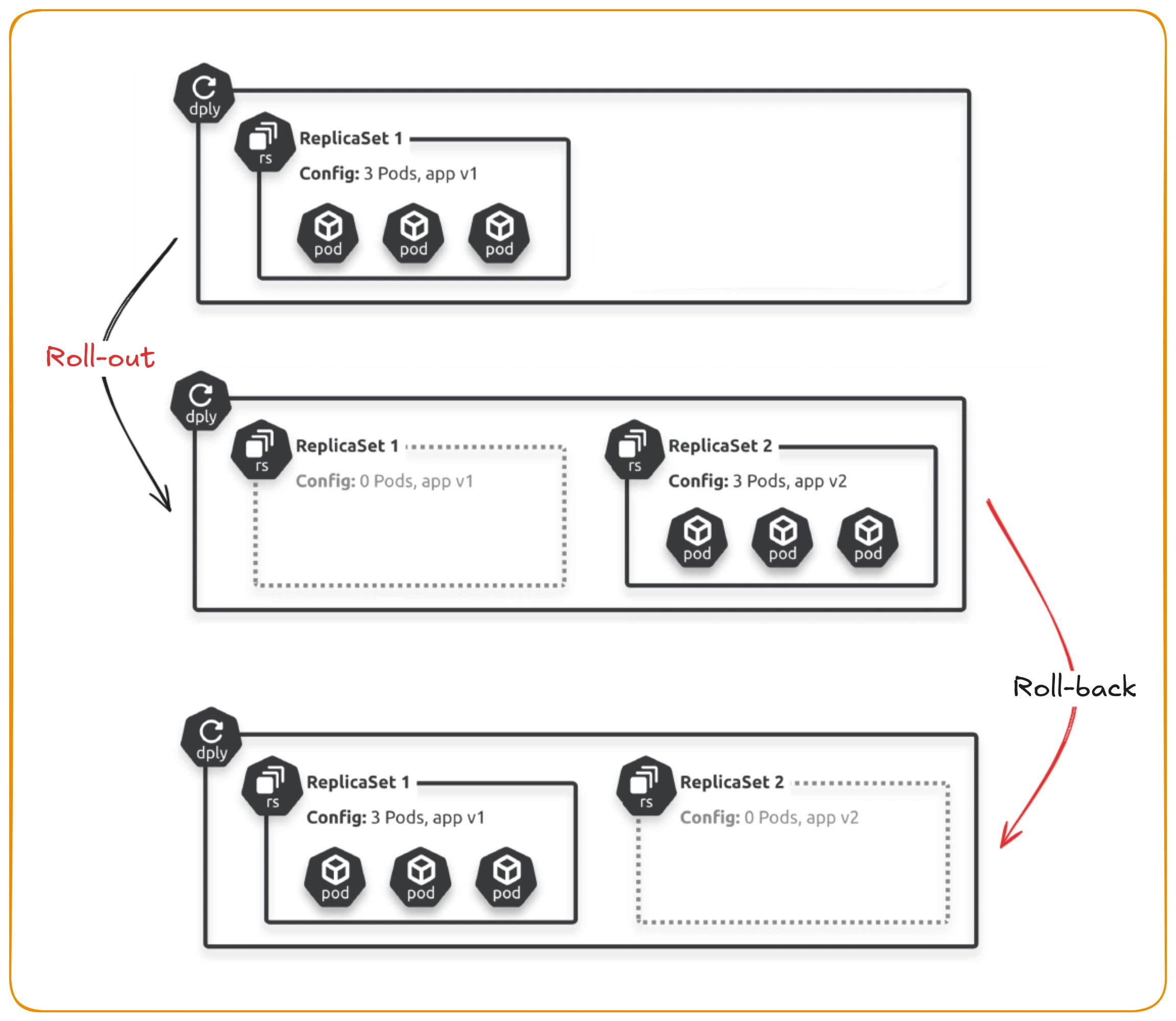
Deployments are amazing at zero-downtime rolling updates (rollouts).
Your microservices should always be **loosely coupled** and only communicate via well-defined APIs.
Ensuring releases are backward and forward-compatible means you can perform independent updates without caring which versions of clients are consuming the service.
Now, assume you’re exposed to a known vulnerability and need to release an update with the fix. To do this, you update the same Deployment YAML file with the new Pod spec and re-post it to the API server. This updates the existing Deployment object with a new desired state requesting the same number of Pods, but all running the newer version containing the fix.
At this point, observed state no longer matches desired state — you’ve got five old Pods, but you want five new ones.
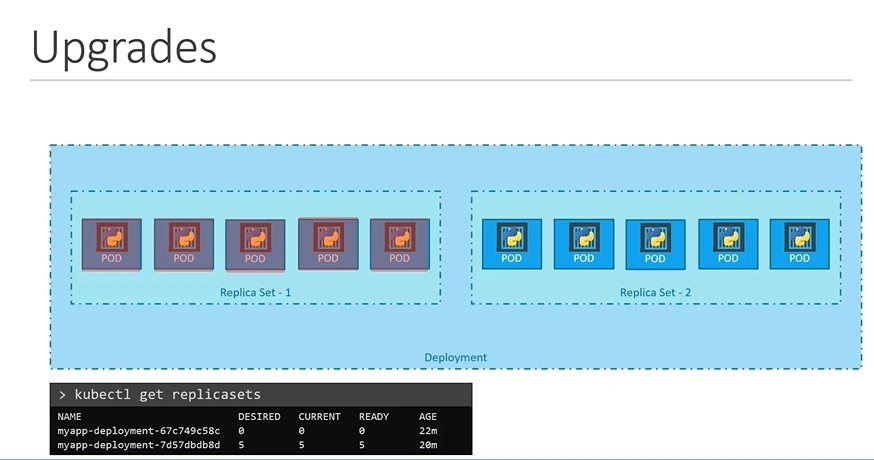
To reconcile, the Deployment controller creates a new ReplicaSet defining the same number of Pods but running the newer version. You now have two ReplicaSets — the original one for the Pods with the old version and the new one for the Pods with the new version. The Deployment controller systematically increments the number of Pods in the new ReplicaSet as it decrements the number in the old ReplicaSet.
The net result is a smooth incremental rollout with zero downtime.
Rollout Commands
# see rollout status
kubectl rollout status deployment/myapp-deployment

# See history & revisions
kubectl rollout history deployment/myapp-deployment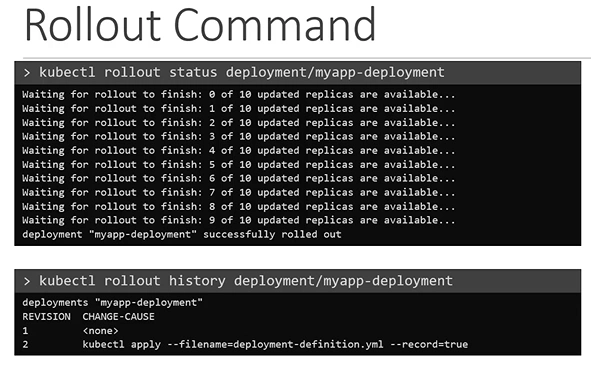
Rollbacks
After roll-outs previous replicaset configuration still exists and can be used to easily roll-back to previous versions.
Kubernetes gives you fine-grained control over rollouts and rollbacks. For example, you can insert delays, control the pace and cadence of releases,and even probe the health and status of updated replicas.
Comparison
| Feature | Deployment | ReplicaSet | DaemonSet | StatefulSet |
|---|---|---|---|---|
| Purpose | Manage app lifecycle with updates and rollbacks. | Ensure a specific number of replicas. | Run a Pod on every node. | Manage stateful applications requiring stable identities and storage. |
| Pod Identity | Pods are stateless; no guarantees of order or identity. | Pods are stateless; no guarantees of order or identity. | Pods are stateless; runs one per node. | Each Pod gets a stable, unique identity and persistent storage. |
| Updates | Supports rolling updates. | No direct update mechanism. | Updates all nodes together. | Supports ordered, rolling updates. |
| Self-Healing | Yes, through ReplicaSets. | Yes, for Pods. | Yes, for node-level Pods. | Yes, with consistent identity. |
| Scaling | Easy to scale up/down replicas. | Easy to scale up/down replicas. | Scaling is tied to the number of nodes. | Limited; scaling must consider stable Pod identities. |
| Storage | Ephemeral storage by default. | Ephemeral storage by default. | Ephemeral storage by default. | Designed for persistent storage with volume claims. |
| Use Cases | Stateless applications (e.g., web apps, APIs). | Simplistic, low-level Pod management. | Node-level workloads like logging or monitoring agents. | Stateful applications like databases, Kafka, or Redis. |
Deployments : Hands on
apiVersion: apps/v1
kind: Deployment
metadata:
  name: hello-deploy
spec:
  replicas: 10
  selector:
    matchLabels:
      app: hello-world
  revisionHistoryLimit: 5
  progressDeadlineSeconds: 300
  minReadySeconds: 10
  strategy:
    type: RollingUpdate
    rollingUpdate:
      maxUnavailable: 1
      maxSurge: 1
  template:
    metadata:
      labels:
        app: hello-world
    spec:
      containers:
      - name: hello-pod
        image: nigelpoulton/k8sbook:1.0
        ports:
        - containerPort: 8080
        resources:
          limits:
            memory: 128Mi
cpu: 0.1spec.progressDeadlineSecondstells Kubernetes to give each new replica a five- minute start window before reporting the update as stalled. The counter is reset for each replica, meaning each replica has its own five-minute window to come up properly (progress).revisionHistoryLimittells Kubernetes to keep the configs from the previous five releases for easy rollbacks.progressDeadlineSecondstells Kubernetes to give each new Pod replica a five-minute window to start properly before assuming it’s failed.- The desired state of this app is ten replicas. Therefore,
maxSurge: 1means Kubernetes can go up to 11 replicas during the rollout, andmaxUnavailableallows it to go down to 9. The net result is a rollout that updates two Pods at a time (the delta between 9 and 11 is 2).
Pause & Resume rollout
You can use kubectl to pause and resume rollouts.
If your rollout is still in progress, pause it with the following command.
kubectl rollout pause deploy hello-deploy
deployment.apps/hello-deploy paused

kubectl rollout resume deploy hello-deploy
deployment.apps/hello-deploy resumed
Upgrade
rollback
kubectl rollout history deployment hello-deploy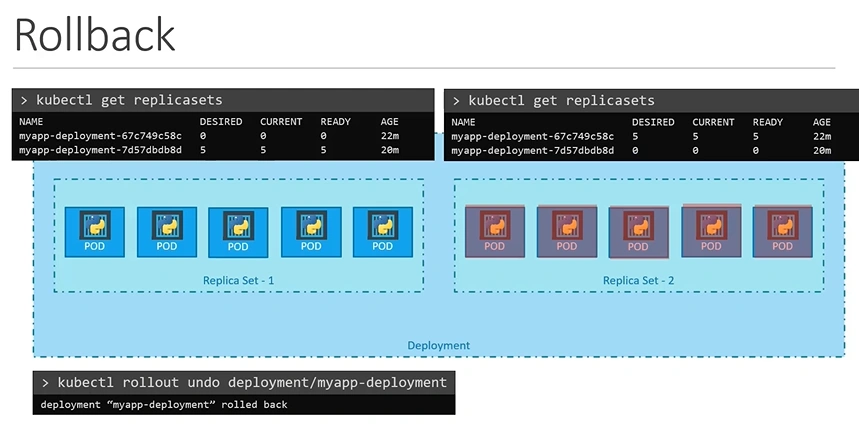
- Undo rollout:
kubectl rollout undo deployment/myapp-deploymentWarning
Why Replica Count is Unchanged During Rollback
Rollback Scope:
- Rollbacks are designed to revert changes in the Pod template (e.g., container images, environment variables, labels) to a previous revision.
- The
replicasfield is part of the Deployment’s higher-level specification, and it is not versioned alongside the Pod template.Separation of Concerns:
- Kubernetes treats the replica count as an independent aspect of a Deployment.
- This ensures that scaling operations (e.g., increasing or decreasing the number of Pods) remain unaffected by changes to the Pod template.
User Intent:
- Rollbacks assume that the current replica count reflects the user’s desired state for workload scaling, so Kubernetes does not modify it during a rollback.