Tldr
- Definition: Caching is using temporary, fast storage (like Redis) to hold frequently accessed data, reducing DB load and latency dramatically.
- Locations: Caching occurs everywhere, including Browsers, CDNs, Load Balancers, External services (Redis), and within the Application Process (In-Process).
- Cache-Aside (Lazy Loading): Most common pattern; data is only loaded into the cache on a read miss.
- Write-Through: Synchronously writes to both cache and DB; ensures data freshness but has slower writes and risks the dual-write problem (inconsistency).
- Write-Back: Writes only to cache, which updates the DB asynchronously; offers fast writes but risks data loss on cache crash.
- Cache Invalidation: The hard problem of ensuring cache data remains fresh and consistent with the database.
- Cache Eviction: Removing old data to free space when the cache is full (e.g., using LRU or TTL).
- Cache Stampede: Overload caused when multiple threads rush to recompute a single, expired “hot key”.
- Cache Penetration: Repeated requests for non-existent data, hitting the database unnecessarily.
Quote
There are only two hard things in Computer Science: cache invalidation and naming things.
- Phil Karlton
(Two Hard Things)
Introduction
A cache is just a temporary storage that keeps recently used data handy so you can get it much faster next time. (Caches are anything that helps you avoid an expensive network I/O, disk I/O or Heavy computation.)
Reading a user profile from Postgres may take 50 milliseconds, but reading from an in-memory cache like Redis takes just 1 millisecond. That’s a 50x improvement in latency. Databases store data on disk, and every query pays the cost of disk access. Memory sits much closer to the CPU and avoids that entirely.
Caches are essential for scalable systems. They reduce load on the database and cut latency dramatically. But they also create new challenges around invalidation and failure handling.
- API call to get profile information
- Reading a specific line from a file
- Doing multiple table joins
We use caching techniques to store frequently accessed data closer to the application (or API) to improve performance. Fetching the same data from a database for every request can be expensive—either due to costly queries or expensive I/O operations.
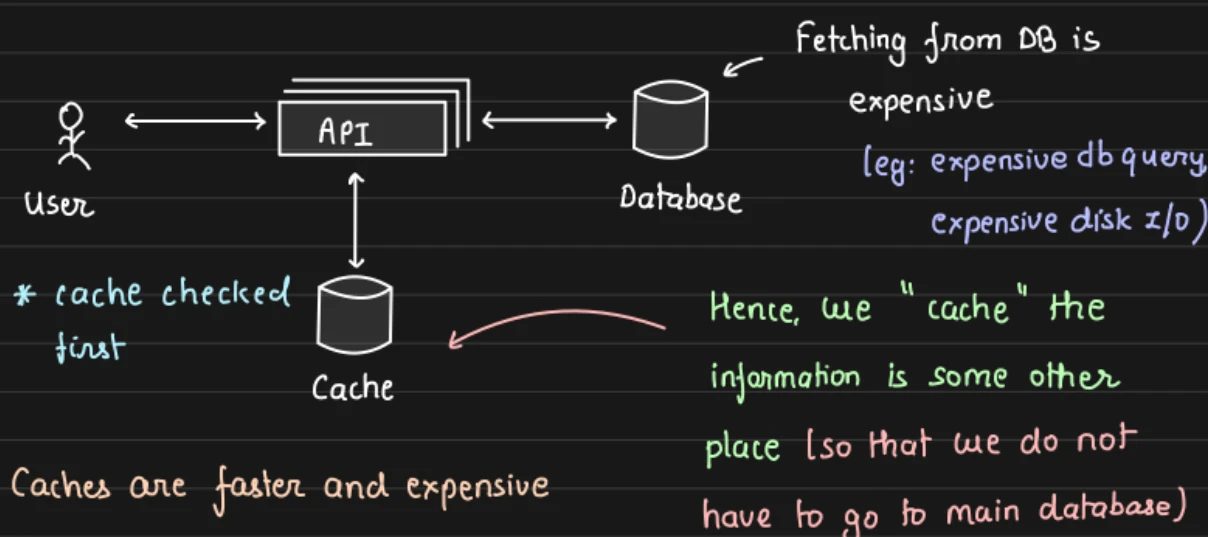
To achieve faster performance, we often use in-memory caching solutions like Redis or Memcached. However, these are relatively costly because they use RAM instead of disk storage. As a result, we typically cache only a subset of the data—specifically the data that is most likely to be accessed frequently.
Most of the time, caches are implemented as key-value stores. At their simplest, caches are just glorified Hash Table.
Important
Caches are not limited to RAM-based storage. Any storage that is closer to your application and helps avoid expensive operations can serve as a cache.
Different Levels of the Caching
The most common cache we see is Redis, but it’s not the only type of cache available—nor is it the only place caching can occur.
In fact, almost every component in your infrastructure is capable of caching something:
- Browsers cache static assets like images and stylesheets.
- CDNs (like Cloudflare) cache responses close to users.
- Databases have internal caching mechanisms (e.g., query cache, buffer pool).
- Reverse proxies (like NGINX or Varnish) can cache full HTTP responses.
- Even application-level caches using in-memory maps or local LRU caches can play a part.
Client Side Caching
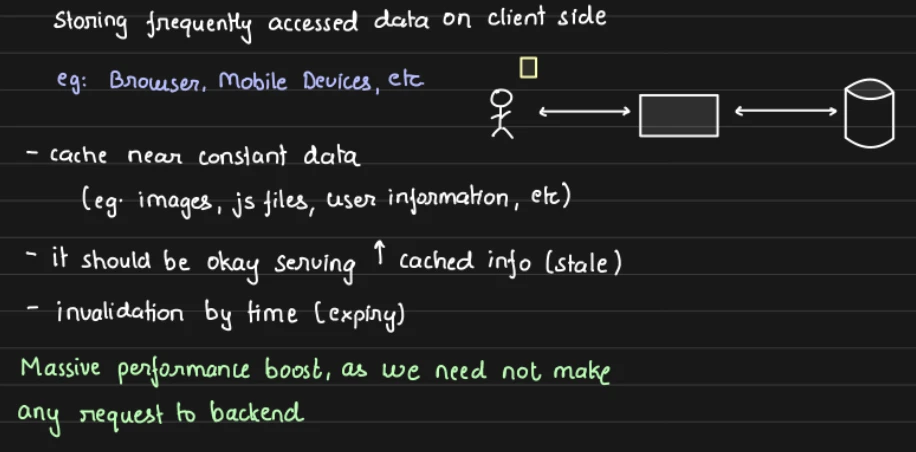
Client-side caching stores data close to the requester to avoid unnecessary network calls. This usually means the user’s device, like a browser (HTTP cache, localStorage) or mobile app using local memory or on-device storage.
But it can also mean caching within a client library. For example, Redis clients cache cluster metadata like which nodes are in the cluster and which slots are assigned to them. That way, the client can route requests directly to the right node without querying the cluster on every operation.
For user-facing caching, you have limited control from the backend. Data can go stale and invalidation is harder.
CDN (Content Delivery Network)
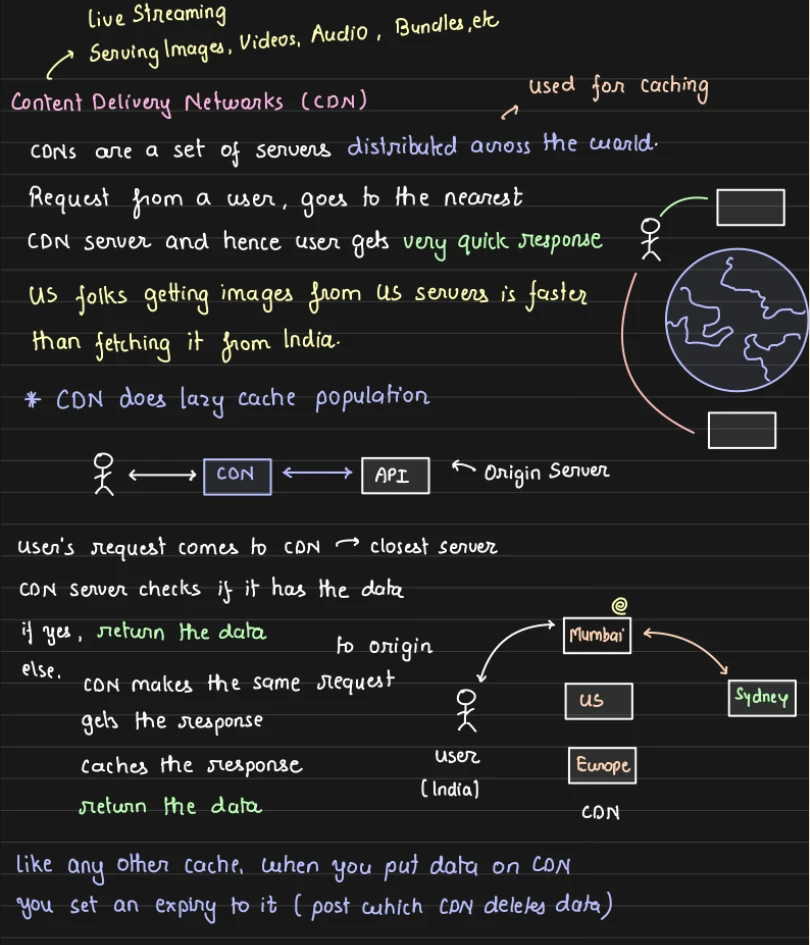
A CDN is a geographically distributed network of servers that caches content close to users. Instead of every request traveling to your origin server, a CDN stores copies of your content at edge servers around the world.
Modern CDNs like Cloudflare, Fastly, and Akamai can cache much more than static files. They can also cache public API responses, HTML pages, and even run edge logic to personalize content or enforce security rules before requests reach your servers. But the most common and most impactful use of a CDN is still media delivery.
External Caching (Remote Cache)
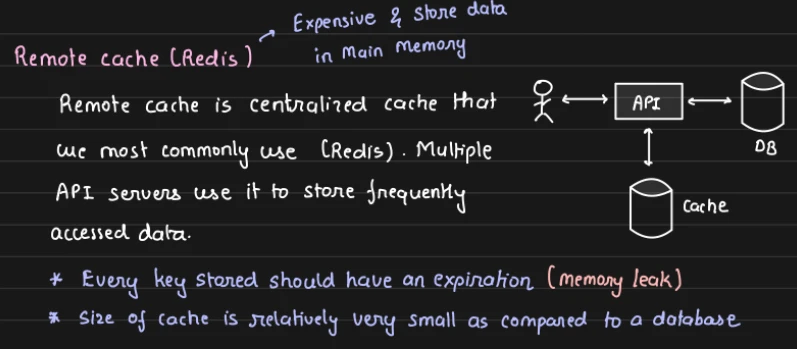
Use standalone cache service(Redis, Memcached) that your application talks to over the network.
This method scale well coz every application can share same cache, and we can easily implement cache eviction policies like LRU and TTL.(Redis HSET, EXPIRE & TTL > EXPIRE Command)
In-Process Caching
Most candidates, and engineers, overlook the fact that servers run on machines with a lot of memory. As hardware improves, this becomes increasingly true. You can use that memory to cache data directly inside the application process instead of always calling out to Redis or the database.
The idea is simple: if your service keeps requesting the same small pieces of data again and again, store them in a local cache inside the process. Reads from local memory are even faster than reads from Redis because they avoid any network call.
This light-weight form of caching makes sense for small pieces of data that are requested frequently like:
- Configuration values
- Feature flags
- Small reference datasets
- Hot keys
- Rate limiting counters
- Precomputed values
In-process caching is blazing fast, but it comes with obvious limitations. Each instance of your application has its own cache, so cached data is not shared across servers. If one instance updates or invalidates a cached value, the others will not know.
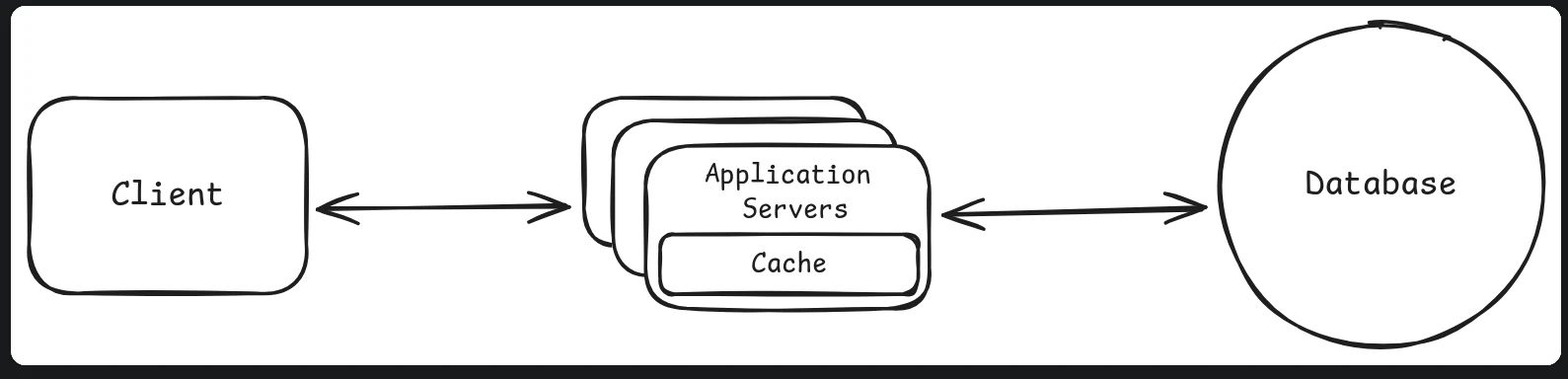
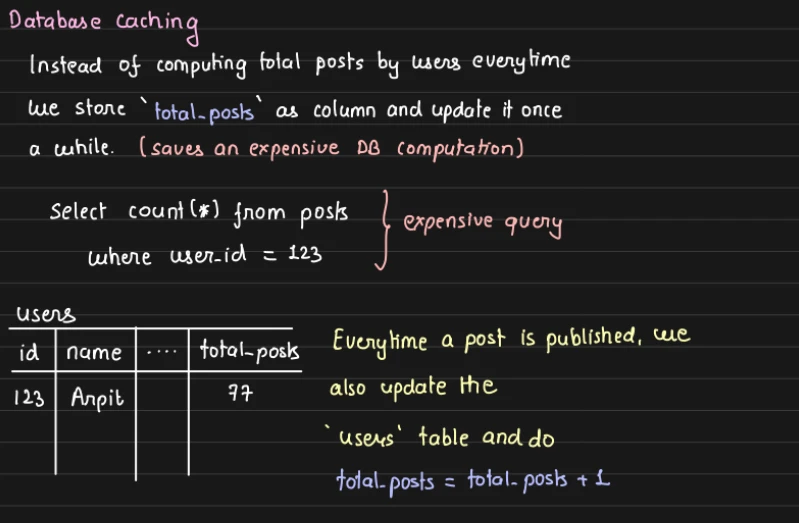
Database Caching
Load balancer / Reverse proxy
Load balancers and reverse proxies (like NGINX, HAProxy, or Varnish) can also act as caching layers in your infrastructure.
They sit in front of your application servers and can serve cached content directly to clients, reducing load on backend services.
What Can Be Cached?
- Static assets (CSS, JS, images)
- API responses (especially GET requests)
- HTML pages (for anonymous/public users)
Example: NGINX Caching
location /api/products {
    proxy_cache my_cache;
    proxy_pass http://backend_server;
    proxy_cache_valid 200 1m;
}
Considerations:
- You must handle cache invalidation correctly (e.g., purge cache when product info changes).
- Use it mostly for idempotent and safe requests (like
GET). - Avoid caching personalized data unless segmented by user/session.
Cache Architectures
- Write Through Cache
- Write Back Cache - Writes go to the cache first, and then asynchronously to the database.
- Cache Aside
- TTL - Each cache entry has a TTL. After expiry, it’s automatically removed or marked stale.
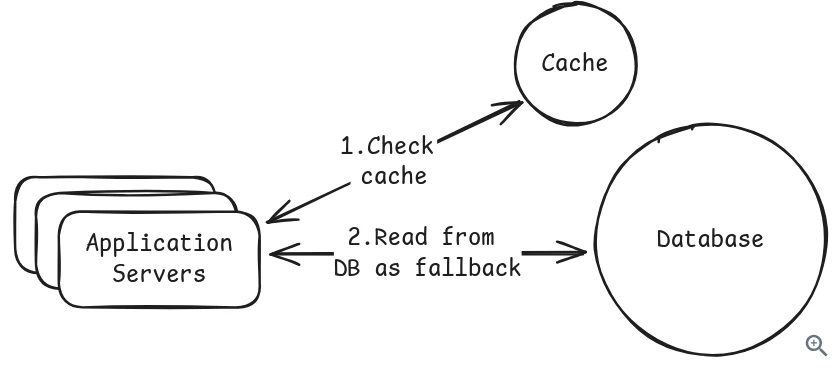
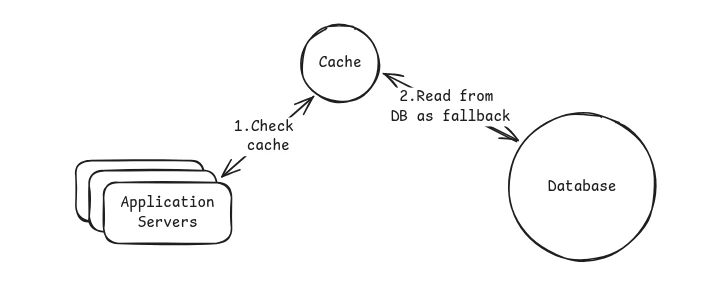
1. Cache-Aside (Lazy-Loading)
Most Common caching pattern.
- Application checks the cache.
- If the data is there, return it.
- If not, fetch from the database, store it in the cache and return it.
Cache-aside only caches data when needed, which keeps the cache lean.
Downside: But when cache missed it caused the latency.
Write through Caching
The application only directly write data to the cache(cache server) then synchronously it writes to the database. (The operation does not complete until both the cache and database are updated.)
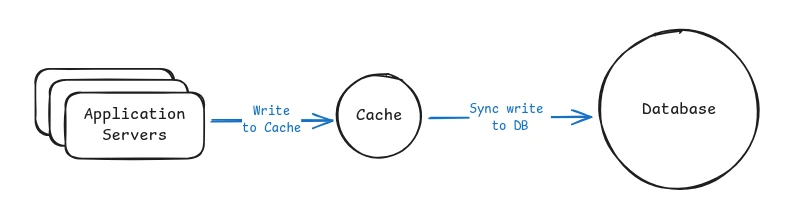
Redis does not natively support these feature, so we want implement a this pattern using application code or framework.
The trade-off is slower writes because the application must wait for both the cache update and the database write to complete. Write-through can also pollute the cache with data that may never be read again.
Write-through still suffers from the dual-write problem. If the cache update succeeds but the database write fails, or vice versa, the systems can end up inconsistent. You need retry logic, error handling, or eventually accept that perfect consistency is difficult without distributed transactions.
Info
Use this when reads must always return fresh data and your system can tolerate slightly slower writes.
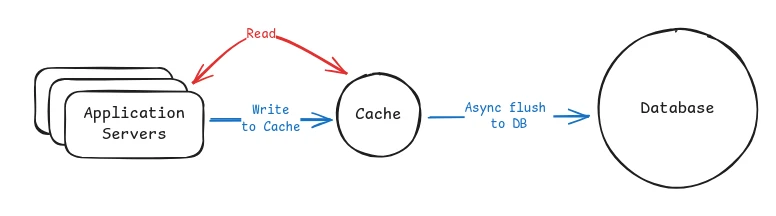
3. Write Behind aka write-back Caching
Application writes only to the cache. Cache batches and writes the data to the database asynchronously in the background.
This makes writes very fast, but introduces risk. If the cache crashes before flushing, you can lose data. This is best for workloads where occasional data loss is acceptable.
Info
Use this when you need high write throughput and eventual consistency is acceptable. Common in analytics and metrics pipelines.
4. Read-Through Caching
Cache act as the proxy. Application only talks to the cache if cache missed Cache(Cache server) fetches data itself in the database and return it to the Application.
This is the read equivalent of write-through. In both patterns, the cache acts as an intermediary that handles database operations. Read-through manages reads, write-through manages writes. Systems often combine both patterns.
This centralizes caching logic but adds complexity and usually requires a specialized caching library or service. It is less common in practice than cache-aside.
Important
CDNs are a form of read-through cache. When a CDN gets a cache miss, it fetches from your origin server, caches the result, and returns it. But for application-level caching with Redis, cache-aside is far more common.
Generally speaking, there are very few reasons to propose this pattern in system design interviews unless you’re discussing CDNs or similar infrastructure.
Potential Issues with Excessive Caching:
However, too much caching can be harmful.
- Stale Data: Cached data may become outdated, leading to incorrect or inconsistent results.
- Invalidation Complexity: Keeping the cache in sync with the underlying data source is hard. Cache invalidation is famously considered one of the two hardest problems in computer science.
Cache Invalidation
Cache Invalidation using SNS + SQS at Atlassian and then they moved away!
[!video]- Caching | Cache Patterns | Cache Invalidation & Eviction | System Design Tutorials | Part 9 | 2020
Caches improve speed and reduce load—but if they serve old or incorrect data, they can hurt the user experience and data consistency.
Cache invalidation is the process of removing or updating data in a cache when the underlying source of truth (like a database) has changed.
The goal is to prevent stale or outdated data from being served to users.
Important
Cache invalidation ensures that the data in the cache remains fresh and consistent with the main database, while cache eviction focuses on managing the cache’s size by removing old data
For browser caches, we typically set a max-age for each file,
Cache Eviction
The process of removing items from the cache to make room for new data.
Since cache storage—especially in-memory caches like Redis or Memcached—is limited, you can’t store everything indefinitely. When the cache is full or when data becomes stale, the system needs to “evict” some existing data to free up space.
Common Cache Eviction Policies:
1. LRU (Least Recently Used)
- Removes the item that hasn’t been accessed in the longest time.
- Example: If a product detail hasn’t been looked at in hours while others are being accessed repeatedly, it gets evicted first.
- It is the default in many systems because it adapts well to most workloads where recently used data is likely to be used again
2. LFU (Least Frequently Used)
- Evicts the item that has been used the least number of times.
- Good for keeping popular (hot) items in the cache.
- This works well when certain keys are consistently popular over time, like trending videos or top playlists.
3. FIFO (First In, First Out)
- Evicts items in the order they were added—oldest first, regardless of usage.
- Because it may evict items that are still hot, it is rarely used in real systems beyond simple caching layers.
4. TTL-Based (Time-To-Live)
- Each item has an expiration time. Once the TTL expires, the item is removed automatically.
- Redis supports this natively with
EXPIREorSET key value EX seconds. - TTL is a must have when data must eventually refresh, like API responses or session tokens.
5. Random
- Randomly evicts items when the cache is full. Simple, but unpredictable.
Population the cache (Caching Patterns)
Logically, a cache sits between the data source and the API. It acts as an intermediary layer that helps reduce load on the backend and improves response time.
There are two main ways to populate the cache:
1. Lazy Population (Most Popular) (Reactive Approach)
Also known as cache-aside or lazy loading, this approach populates the cache only when data is requested.
Workflow:
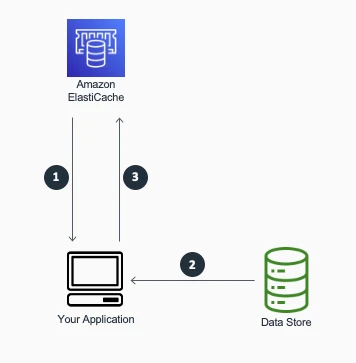
- When your application needs to read data from the database, it checks the cache first to determine whether the data is available.
- If the data is available (a cache hit), the cached data is returned, and the response is issued to the caller.
- If the data isn’t available (a cache miss), the database is queried for the data. The cache is then populated with the data that is retrieved from the database, and the data is returned to the caller.
Real-World Example:
Imagine an e-commerce website like Amazon:
- When a user views a product, the service first checks Redis to see if the product details are cached.
- If not found, it fetches the product details from the database and caches the result for the next request.
Benefits
- The cache contains only data that the application actually requests, which helps keep the cache size cost-effective.
- Implementing this approach is straightforward and produces immediate performance gains, whether you use an application framework that encapsulates lazy caching or your own custom application logic.
Drawbacks
A disadvantage when using cache-aside as the only caching pattern is that because the data is loaded into the cache only after a cache miss, some overhead is added to the initial response time because additional roundtrips to the cache and database are needed.
2. Eager Population
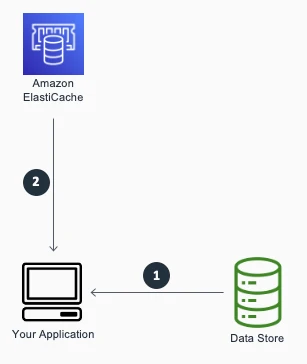
Also known as write-through caching or proactive caching, this approach updates the cache immediately when data is written or updated.
Workflow:
- When the application writes data, it simultaneously writes to both the cache and the data source.
- Optionally, data can be preloaded into the cache on app startup or via background jobs.
Real-World Example:
In a user profile service, when a user updates their profile:
- The updated user data is written to both PostgreSQL and Redis in the same API call.
- This ensures that subsequent reads will get fresh data directly from the cache without a cache miss.
Eager population is useful when data changes frequently and you want to ensure the cache is always fresh.
When not to Cache
Example
Caching transaction details (like payment records, order history, or bank transfers) is generally not recommended in most real-world systems due to the high consistency, accuracy, and security requirements of such data.
| Don’t Cache If… | Why? |
|---|---|
| Data changes very frequently | Staleness risk |
| It’s personalized or sensitive | Privacy/security risk |
| The system is write-heavy | Caching offers little benefit |
| Data is cheap or fast to compute | Overhead outweighs gain |
| It’s a non-idempotent or unsafe request | May cause side effects |
| Cache invalidation is complex or risky | Leads to bugs or inconsistencies |
| Legal/compliance prohibits it | Privacy/legal violations |
Caching Pitfalls
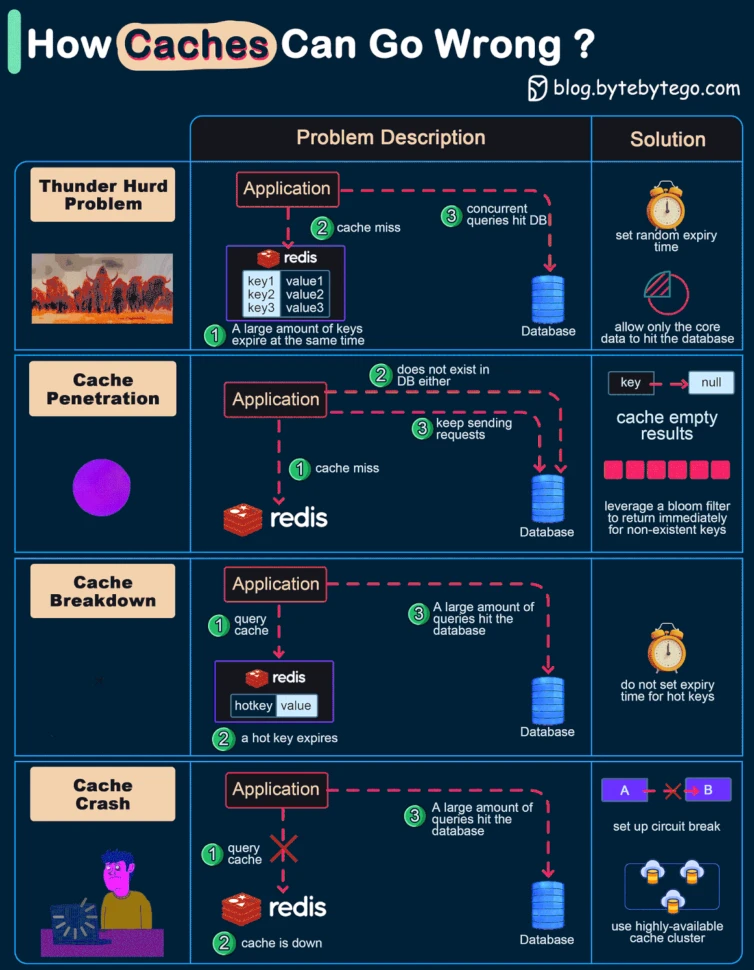
1. Cache Stampede (aka Cache Thrashing, Thundering Herd)
What: When a heavily requested cache item expires, multiple threads try to recompute it at the same time, overloading the backend.
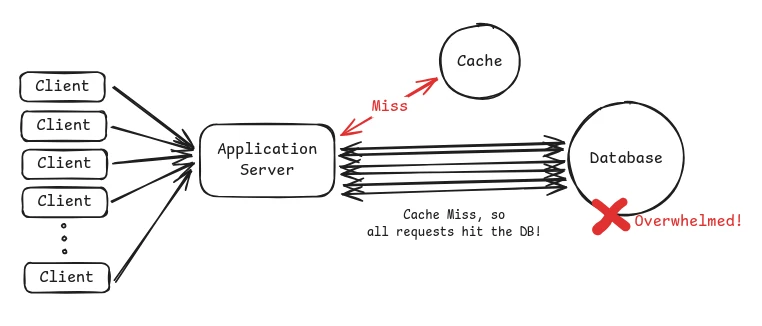
Example
imagine your system caches the homepage feed with a TTL of 60 seconds. When the cache expires at exactly 12:01:00, every request at that moment misses the cache and queries the database. If traffic is high, this spike can overwhelm the database and cause cascading failures.
Mitigation
-
Request coalescing (single flight): Allow only one request to rebuild the cache while others wait for the result. This is the most effective solution.
-
Cache warming: Refresh popular keys proactively before they expire. This only helps when using TTL-based expiration. If you invalidate cache on writes instead, warming does not prevent stampedes.
-
Locking: Only one thread recomputes the value; others wait or serve stale data.
-
Background Refresh: Precompute soon-to-expire cache entries via a background job.
-
Probabilistic Early Expiration: Randomly trigger early refreshes before TTL ends to avoid thundering herd.
2. Cache Penetration
What: Repeated requests for non-existent data (not in cache or DB), causing unnecessary DB load.
Mitigation:
- Placeholder Values: Cache a “not found” placeholder with TTL.
- Bloom Filters: Probabilistically check key existence before hitting cache/DB.
3. Cache Crash / Avalanche
Cache Crash: Entire cache system fails → all traffic hits DB suddenly.
Cache Avalanche: A large portion of cache expires or restarts at once → floods DB with requests.
Mitigation:
- Circuit Breaker: Temporarily block traffic to protect the system.
- Highly Available Cache Clusters: Add redundancy to minimize downtime.
- Cache Pre-warming: Refill essential cache entries before serving traffic (especially after cold starts).
Cache Stampede vs. Cache Avalanche
| Aspect | Cache Stampede | Cache Avalanche |
|---|---|---|
| Scope | One hot key expires | Many keys expire or cache restarts |
| Cause | All threads rush to recompute the same value | Many keys become cold at once |
| Result | DB overload from one point | DB overload from many points |
Cache Consistency
Happen when the cache and database return different values for the same data. This is common because most systems read from the cache but write to the database first. That creates a window where the cache still holds stale data.
Example
if a user updates their profile picture, the new value is written to the database but the old value might still be in the cache. Other users may see the outdated profile picture until the cache eventually refreshes.
How to Handle It:
- Cache invalidation on writes: Delete the cache entry after updating the database so it gets repopulated with fresh data.
- Short TTLs for stale tolerance: Let slightly stale data live temporarily if eventual consistency is acceptable.
- Accept eventual consistency: For feeds, metrics, and analytics, a short delay is usually fine.
Hot Keys
Hot key is a cache entry that receives a huge amount of traffic compared to everything else.
Even if the cache hit rate is high, a single hot key can overload one cache node or one redis shard and become a bottleneck.
Example
if you are building Twitter and everyone is viewing Taylor Swift’s profile, the cache key for her user data (user:taylorswift) may receive millions of requests per second. That one key can overload a single Redis node even though everything is working “correctly.”
How to handle it:
- Replicate hot keys: Store the same value on multiple cache nodes and load balance reads across them.
- Add a local fallback cache: Keep extremely hot values in-process to avoid pounding Redis.
- Apply rate limiting: Slow down abusive traffic patterns on specific keys.
Caching Pitfalls Every Developer Should Know
Cache States
Transclude of 02.-system-performance---methodologies#cache-states
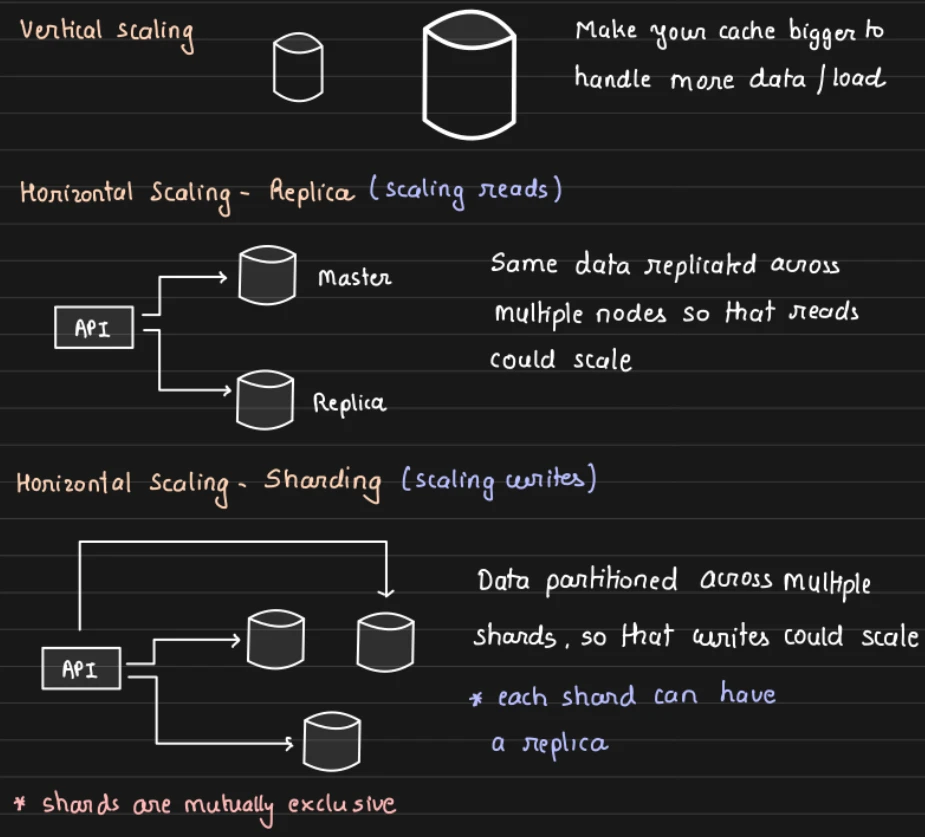
Cache Scaling
It’s similar to a regular database scaling.
🌟 Database Scaling, Sharding and Replication
Distributed Caching
Distributed caching is a caching strategy where the cache is spread across multiple servers or nodes, rather than being stored in a single machine’s memory. It is designed to support scalable, fault-tolerant, and high-performance systems, especially in large-scale, distributed environments.
Common Distributed Cache Systems
- Redis Cluster
- Memcached Cluster
- Hazelcast
- Apache Ignite
- Amazon ElastiCache
Introduction to Distributed Caching - Systems Design Interview 0 to 1 with Ex-Google SWE
[!video]- What are Distributed CACHES and how do they manage DATA CONSISTENCY?