What is Prompt Caching? Optimize LLM Latency with AI Transformers
Abstract
Prompt caching lets an LLM provider reuse the internal computation (the KV cache) from a previous request instead of recomputing it. When a new request shares an identical prefix with a cached one, the provider skips redundant GPU work — and passes some of that savings to you as a cache hit discount. This note covers the mechanics, pricing model, provider differences, and practical usage patterns.
Why Prompt Processing Is Expensive
Every token in a prompt has to pass through the full transformer stack before generation can even begin:
Token → Embed → Attention (all layers) → Store Keys/Values → Next Token
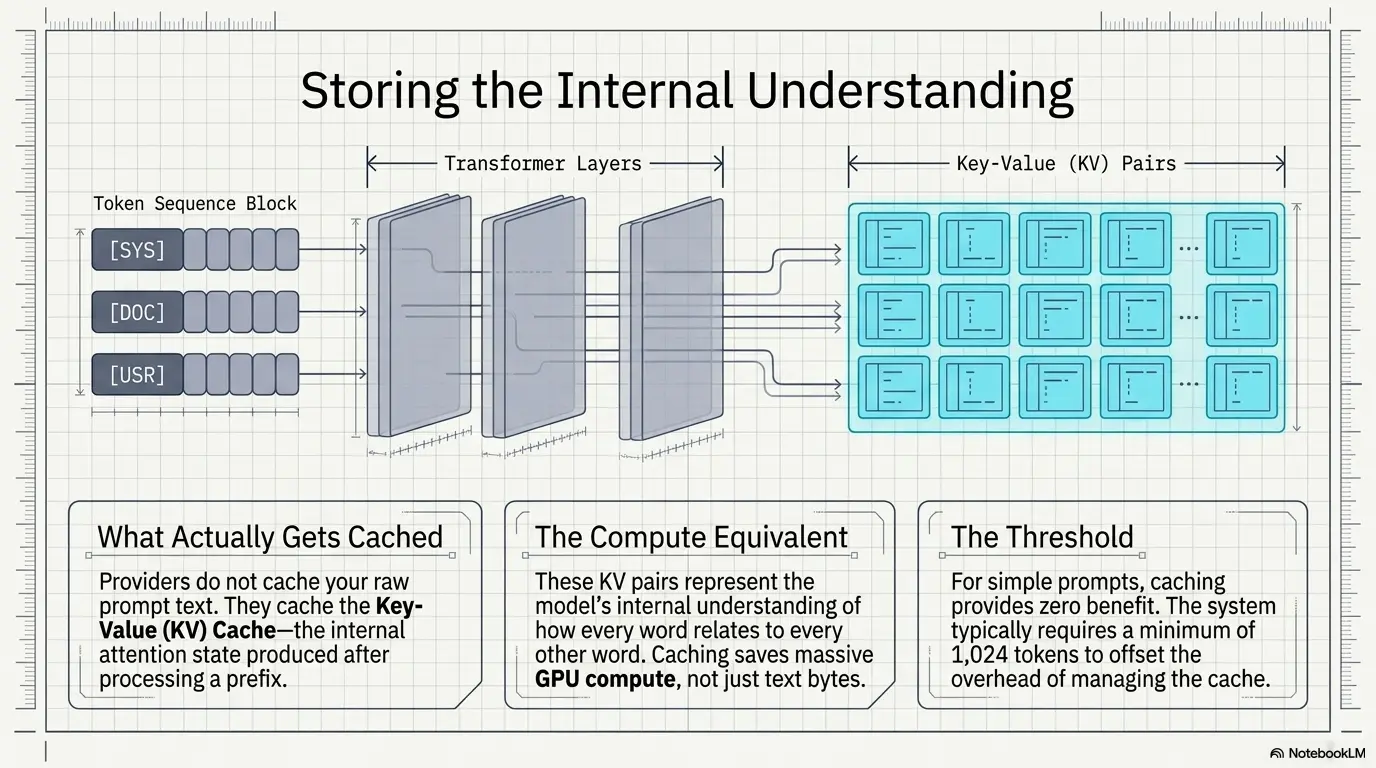
For a 20,000-token prompt, that’s 20,000 tokens’ worth of attention computation before the model writes a single output token. Send that same 20K-token prefix again tomorrow, and — without caching — the provider redoes all of it from zero.
Info
The core insight Inference cost scales with prompt length. Anything that lets a provider skip recomputation of unchanged input directly reduces their GPU cost — and that’s exactly what caching does.
What Actually Gets Cached
A common misconception: providers cache your _prompt text_. They don’t — they cache the Key-Value (KV) cache, the internal attention state produced after processing a prefix.
This differ from traditional Caching.
flowchart TD
    %% First Request
    subgraph First_Request["🚀 First Request"]
        A["📝 Prompt Prefix"]
        B["⚙️ Transformer Layers"]
        C["🗂️ Create KV Cache<br/>(Keys + Values)"]
        D["💾 Store Cache"]

        A --> B
        B --> C
        C --> D
    end

    %% Next Request
    subgraph Next_Request["⚡ Next Request"]
        E["📝 Same Prompt Prefix"]
        F["📂 Load KV Cache"]
        G["➕ New Tokens"]
        H["⚙️ Transformer Layers"]
        I["🤖 Generate New Tokens"]

        E -. "Cache Hit" .-> F
        G --> H
        F --> H
        H --> I
    end

    %% Cache reused
    D ==> F

    %% Colors
    style A fill:#E3F2FD,stroke:#1E88E5,stroke-width:2px
    style E fill:#E3F2FD,stroke:#1E88E5,stroke-width:2px

    style B fill:#FFF3E0,stroke:#FB8C00,stroke-width:2px
    style H fill:#FFF3E0,stroke:#FB8C00,stroke-width:2px

    style C fill:#FFF9C4,stroke:#FBC02D,stroke-width:2px
    style D fill:#C8E6C9,stroke:#43A047,stroke-width:2px
    style F fill:#C8E6C9,stroke:#43A047,stroke-width:2px

    style G fill:#F3E5F5,stroke:#8E24AA,stroke-width:2px
    style I fill:#FFCDD2,stroke:#E53935,stroke-width:2px

    %% Subgraph backgrounds
    style First_Request fill:#F5F5F5,stroke:#616161,stroke-width:2px
    style Next_Request fill:#F5F5F5,stroke:#616161,stroke-width:2px

    %% Reused cache link
    linkStyle 4 stroke:#2E7D32,stroke-width:3px
This means:
- The cache is provider/model/account-scoped — not portable across providers or even model versions.
- A single-character edit to the cached prefix typically invalidates the match (exact prefix matching).
- Nothing about your output is cached — see Common Misconceptions.
The Four Pricing Categories
Most providers bill input/output across four buckets:
| Category | What it means | Relative cost |
|---|---|---|
| Regular input | Freshly processed, non-cached tokens | 1× (baseline) |
| Cache write | First time a prefix is seen; provider computes and stores the KV cache | ~1.25×–2× baseline |
| Cache read (hit) | Prefix matches an existing cache entry; provider just loads it | ~0.1×–0.5× baseline |
| Output tokens | Generated tokens — never cached, always computed fresh | 1× baseline (output rate) |
Tip
Why cache reads are so cheap A cache hit skips the most expensive part of inference — the forward pass over the prefix. The provider’s marginal cost is closer to a memory read than a computation, so pricing reflects that: often ~90% cheaper (Anthropic) to ~50% cheaper (OpenAI) than normal input.
Warning
Cache writes cost more, not less Storing a KV cache is extra work on the first pass. If you never reuse that prefix again, caching cost you money rather than saving it. Caching only pays off with repeated reuse within the TTL window.
Worked Cost Example
LLMs are stateless between API calls.
They retain no memory of previous requests. So to maintain a “conversation,” the full context (system prompt, chat history, etc.) must be resent with every request.
Coding assistant sending a fairly typical payload:
| Component | Tokens |
|---|---|
| System prompt | 4,000 |
| Coding rules | 8,000 |
| Repo summary | 12,000 |
| Current file | 2,000 |
| User request | 200 |
| Total | 26,200 |
Without caching: every request pays for all 26,200 input tokens.
With caching: the first 24,000 tokens (system prompt + rules + repo summary) are cached after the first call. Every subsequent call in the session pays the cheap cache-read rate on those 24,000 tokens and the normal rate only on the ~2,200 tokens that actually changed (file + request).
Over a long agentic session with dozens of turns, this compounds into a large fraction of total cost saved — which is why caching matters so much for tools like Claude Code, 12. Retrieval-Augmented Generation (RAG) pipelines, and long chat sessions.
Cache Lifetime (TTL)
Caches expire. Once gone, the next request is billed as a fresh cache write.
- Typical TTLs: 5 min, 30 min, 1 hr, sometimes configurable per request.
- TTL policy varies by provider and pricing tier.
- Bursty, infrequent usage patterns may never benefit from caching if requests are spaced further apart than the TTL.
Provider Comparison
| Provider | Cache control | Matching | Cache write cost | Cache hit discount |
|---|---|---|---|---|
| OpenAI | Automatic, no manual setup | Automatic prefix detection (~1,024+ tokens) | Not separately priced | ~50% off input |
| Anthropic (Claude) | Explicit cache breakpoints in the prompt | Exact prefix match at breakpoints | ~1.25× input | ~90% off input |
| DeepSeek | Mostly automatic | Prefix-based | Varies | Often steep discounts |
Best Practices
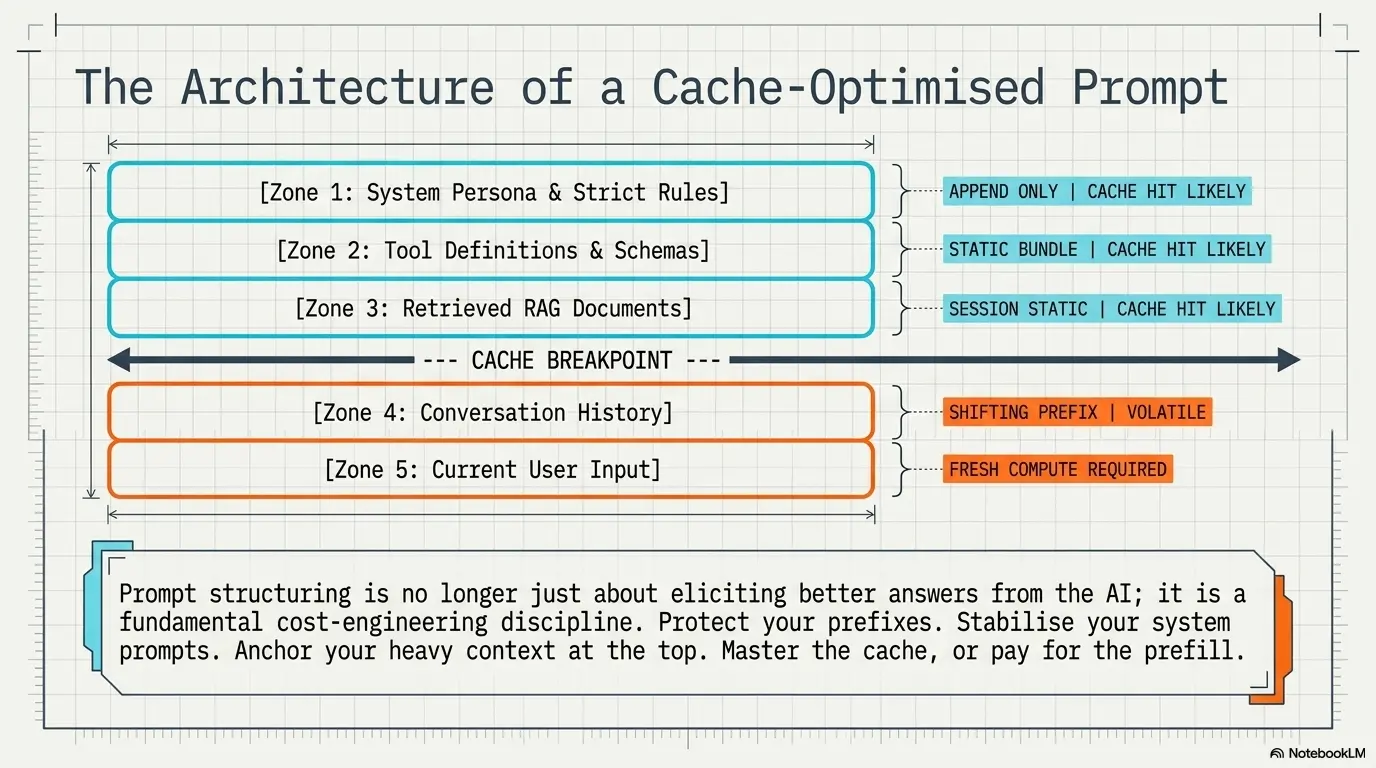
- Static content first, dynamic content last. System prompt → tools → docs → conversation → current message. Anything after the first change breaks the cached prefix.
- Keep prefixes byte-identical across calls. Even whitespace or wording tweaks (“a helpful assistant” vs. “an extremely helpful assistant”) create a different cache entry.
- Don’t rebuild system prompts per request. Stabilize them; treat them as append-only where possible.
- Match your call frequency to the TTL. If your app calls the same context every 10 minutes but the TTL is 5, you’re always paying cache-write rates.
- Don’t cache one-off prompts. Translation requests, single Q&A, anything genuinely unique gets no benefit — sometimes a net cost increase.
Common Misconceptions
Failure
“My prompt is stored forever.” No — caches expire per the provider’s TTL (minutes, not days).
Failure
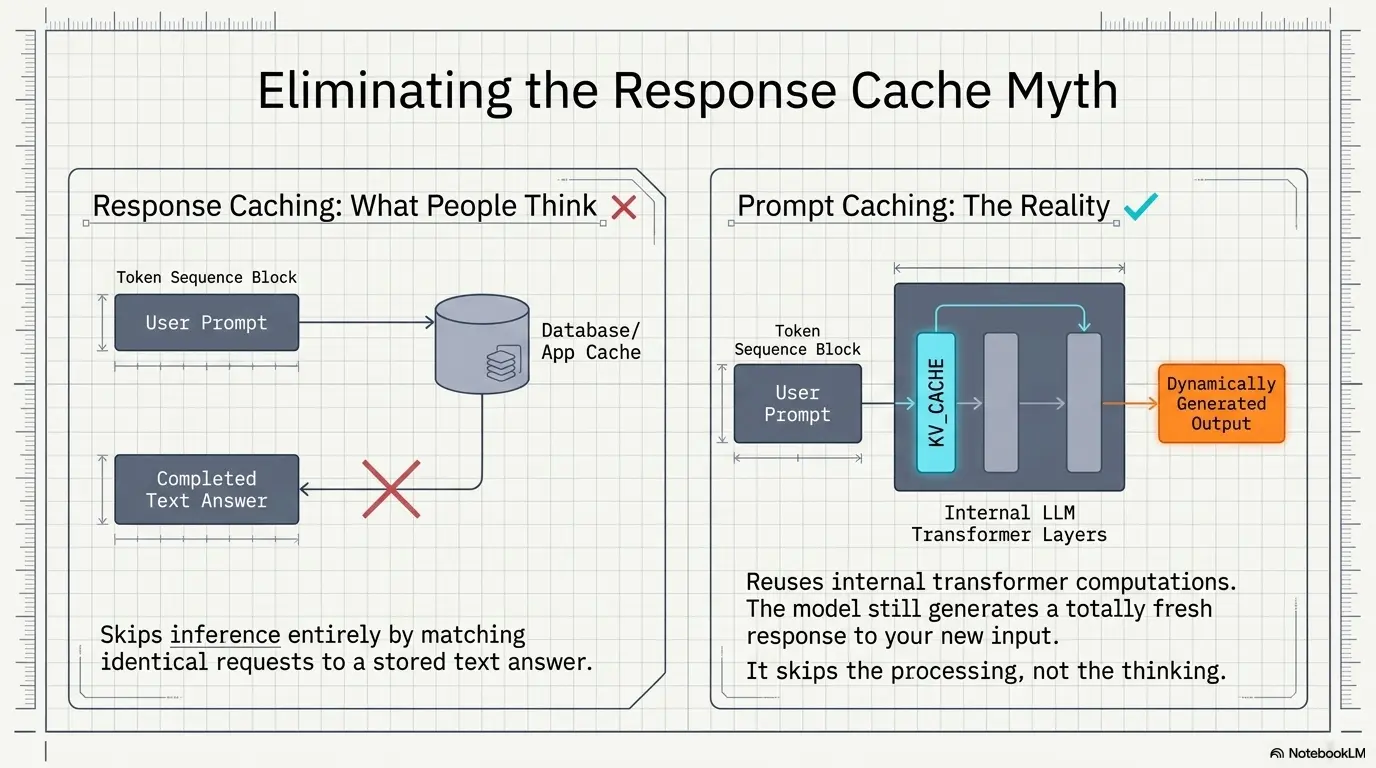
“The cached answer is returned instantly with no new generation.” No — only the prefix’s computation is skipped. The model still generates a fresh response to your actual new input every time. This is prompt caching, not response caching.
Failure
“Caching increases my context window.” No — context window and prompt caching are unrelated. Caching only affects compute cost, not how much the model can attend to.
Prompt Caching vs. Response Caching
| Prompt Caching | Response Caching |
|---|---|
| Reuses transformer computation | Reuses a completed answer |
| Still generates a fresh response | Skips inference entirely |
| Works even if the question differs | Only works for identical requests |
| Implemented via KV cache | Implemented via app/database cache |
Prompt Caching vs. Context Window
- Context window = how much the model can attend to in one request (e.g., 128K, 1M tokens).
- Prompt caching = how cheaply it re-processes portions of that context across requests.
These are orthogonal — a model can have a huge context window with no caching support, or a small window with aggressive caching.
When It Helps Most
- AI agents with fixed system prompts + tool definitions
- Coding assistants (stable guidelines, changing file content)
- RAG systems with unchanged retrieved documents across turns
- Long multi-turn conversations resending full history
- Enterprise bots grounded in static policy/handbook documents
When It Doesn’t Help
- Fully unique, one-off prompts
- Rapidly changing context on every call
- Very short prompts (below the provider’s minimum cacheable length)
- Calls spaced further apart than the cache TTL
Key Takeaways
- Caching stores KV state, not prompt text — and not output.
- Four billing buckets: regular input, cache write (pricier), cache hit (much cheaper), output (unaffected).
- Biggest wins come from long-lived, mostly-static prefixes reused within the TTL window — agents, coding tools, RAG, long chats.
- Structure prompts static-first, dynamic-last, and keep the cached portion byte-identical to actually get hits.