Array vs Slices
Array: Fixed size. ts length is specified and cannot be changed.
Slice: Dynamic size. Slices are flexible and can grow or shrink as needed with the help of the append function.
var arr [3]int      // Array with a fixed size of 3
arr2 := [...]{1,2,3} // The `...` tells Go to automatically determine the length of the array based on the number of elements provided in the initializer.
var arr1 [10]int // [0 0 0 0 0 0 0 0 0 0]

// With value, infer-length
arr2 := [...]int{1, 2, 3, 4, 5} // [1 2 3 4 5]

// With index, infer-length
arr3 := [...]int{11: 3} // [0 0 0 0 0 0 0 0 0 0 0 3]

// Combined index and value
arr4 := [5]int{1, 4: 5} // [1 0 0 0 5]
arr5 := [5]int{2: 3, 4, 4: 5} // [0 0 3 4 5]

slice := []int{1, 2, 3} // Slice with initial elements, can grow dynamically
Go - Arrays & Slices
Memory Allocation
- Array: Stored as a contiguous block in memory. When you assign an array to another array, a copy of the entire array is made.
- Slice: A slice is a **reference type** that points to an underlying array. When you assign one slice to another, both slices point to the same array, meaning changes in one affect the other.
   arr1 := [3]int{1, 2, 3}
   arr2 := arr1     // arr2 is a copy of arr1, so they are independent

   slice1 := []int{1, 2, 3}
   slice2 := slice1 // slice2 references the same underlying array as slice1
Length and Capacity
- Array: Length is fixed and equals its declared size.
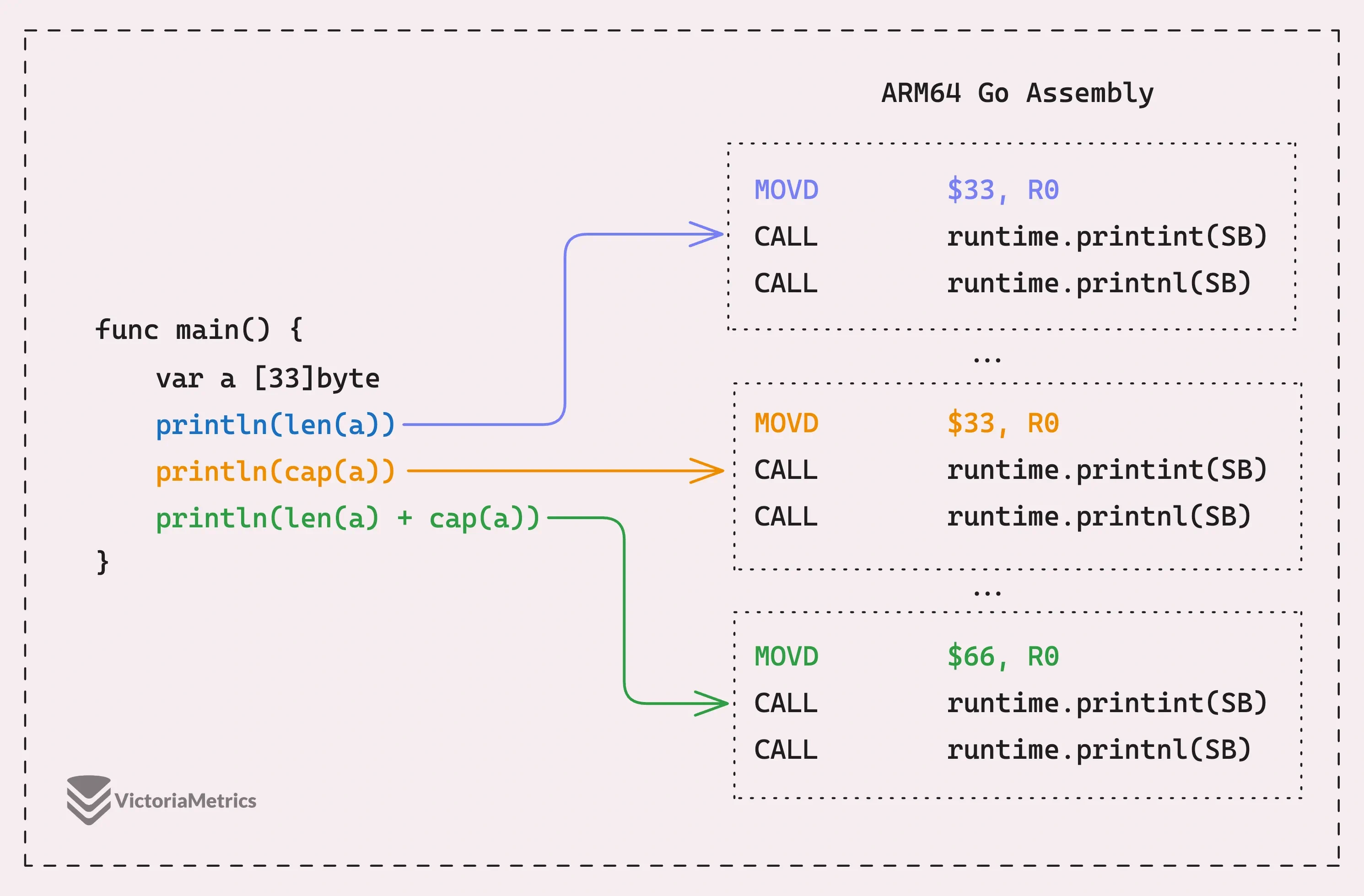
- Slice: Has a length (the number of elements in use) and a capacity (the number of elements it can hold before needing to grow). You can check these with
len(slice)andcap(slice).
slice := []int{1, 2, 3}
fmt.Println(len(slice)) // Length: 3
fmt.Println(cap(slice)) // Capacity (may be greater, depending on how it was created)
Go - Arrays & Slices
Resizing
- Array: Cannot be resized. Its size is determined at the time of declaration.
- Slice: Can be resized using
append, which will expand the underlying array if capacity is exceeded.
slice := []int{1, 2, 3}
slice = append(slice, 4) // Slice grows to accommodate new elements
Use Cases
- Array: Typically used for fixed-size collections where performance or memory layout matters. They are often seen in low-level programming or when interfacing with libraries requiring fixed-size collections.
- Slice: Used far more frequently in Go for dynamic collections. Slices are more versatile and are the idiomatic choice for handling lists or arrays of unknown or variable size.
Summary Table
| Feature | Array | Slice |
|---|---|---|
| Size | Fixed | Dynamic |
| Declaration | [size]Type | []Type |
| Resizable | No | Yes (append) |
| Memory | Value type (copies on assign) | Reference type (shares data on assign) |
| Use Cases | Fixed-size data | Variable-size lists, dynamic arrays |
Array
func main() {
	arr := [5]byte{0, 1, 2, 3, 4}
	println("arr", &arr)

	for i := range arr {
		println(i, &arr[i])
	}
}

// arr 0x1400005072b
// 0 0x1400005072b
// 1 0x1400005072c
// 2 0x1400005072d
// 3 0x1400005072e
// 4 0x1400005072f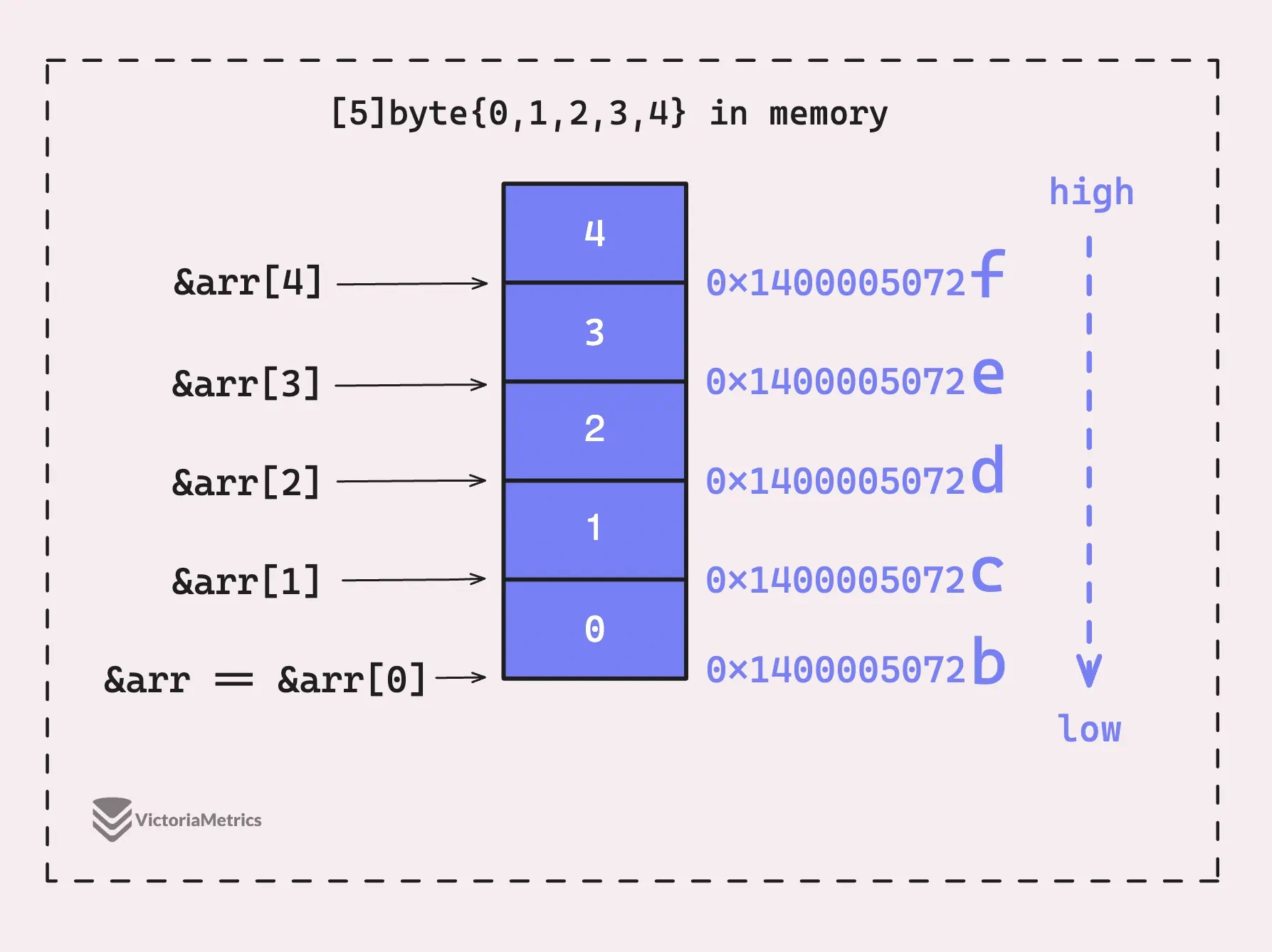
func main() {
	a := [3]int{99, 100, 101}

	p := unsafe.Pointer(&a[0])

	a1 := unsafe.Pointer(uintptr(p) + 8)
	a2 := unsafe.Pointer(uintptr(p) + 16)

	fmt.Println(*(*int)(p))
	fmt.Println(*(*int)(a1))
	fmt.Println(*(*int)(a2))
}

// Output:
// 99
// 100
// 101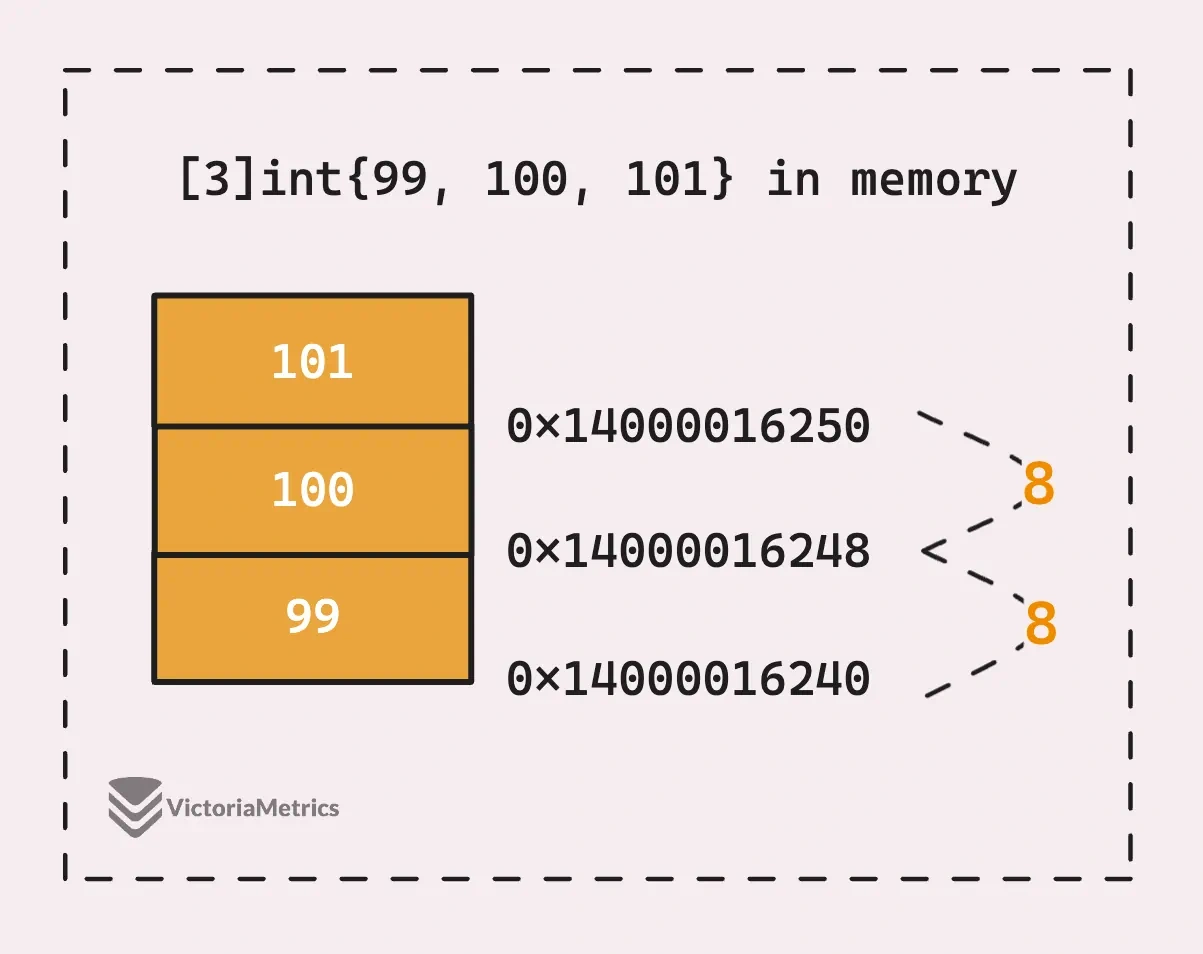
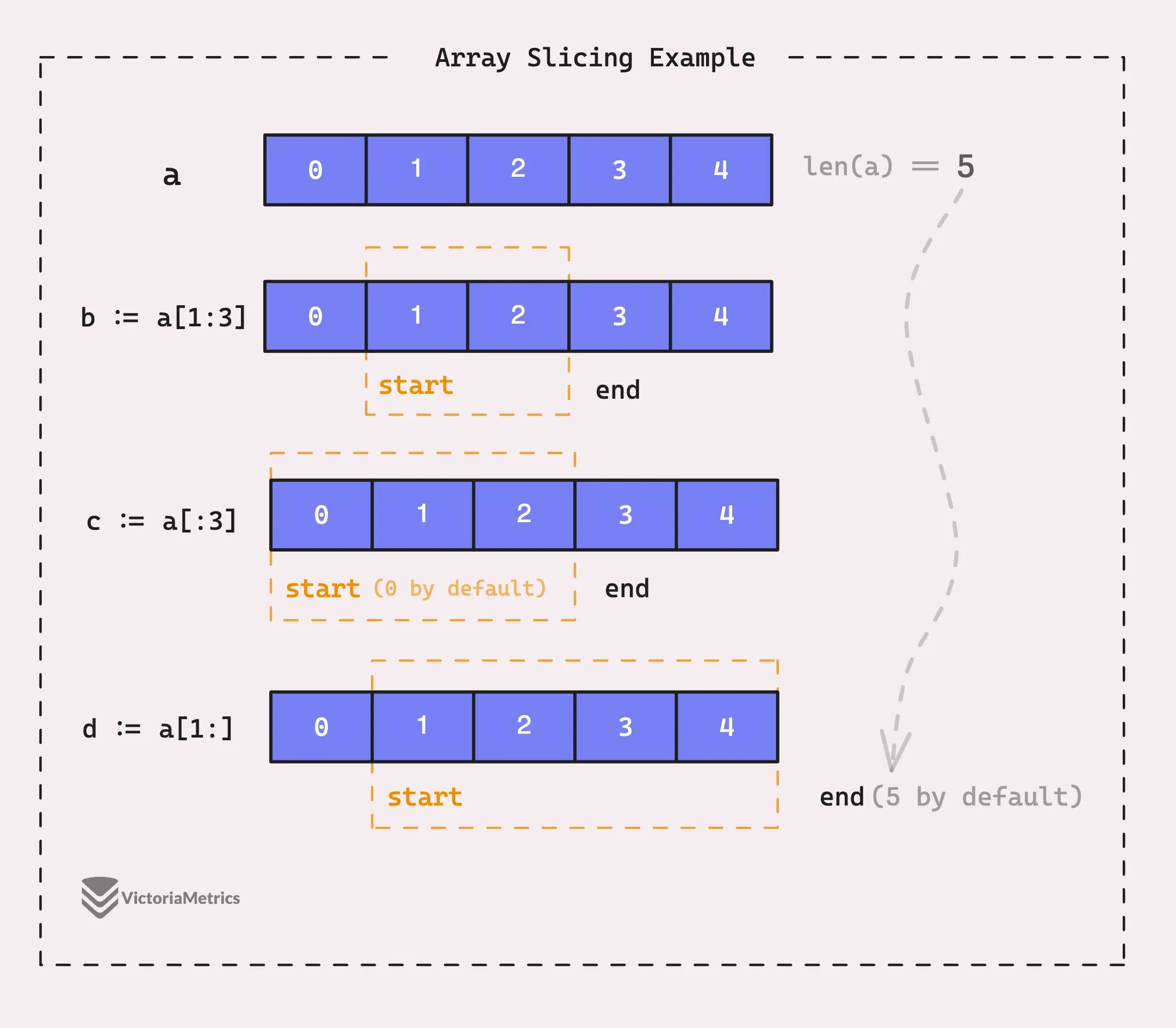
Array Slicing
func main() {
    a := [5]int{0, 1, 2, 3, 4}

    // new slice from a[1] to a[3-1]
    b := a[1:3]  // [1 2]

    // new slice from a[0] to a[3-1]
    c := a[:3] // [0 1 2]

    // new slice from a[1] to a[5-1]
    d := a[1:] // [1 2 3 4]
}
Slices
Go - Nil Slices and Empty Slices
// a is a nil slice
var a []byte

// slice literal
b := []byte{1, 2, 3}

// slice from an array
c := b[1:3]

// slice with make
d := make([]byte, 1, 3)

// slice with new
e := *new([]byte)
Slice Literal
A slice literal is a shorthand way to create and initialize a slice. It combines:
numbers := []int{1,2,3}- The underlying array.
- The slice header that refers to that array.
How It Differs From an Array
If you wrote
numbers := [3]int{1, 2, 3}, this would create an array instead:
- Arrays have a fixed size, specified in
[3]int.- Arrays cannot grow dynamically, unlike slices.
- You’d need to explicitly convert the array to a slice to use slice operations.
Slices are really just a way to describe a ‘slice’ of the underlying array.
Since a slice points to the underlying array, any changes you make to the slice will also change the underlying array.
func main() {
	array := [6]byte{0, 1, 2, 3, 4, 5}
	slice := array[1:3]

    println("array:", &array)
	println("slice:", slice, len(slice), cap(slice))
}

// Output:
// array: 0x1400004e6f2
// slice: [2/5]0x1400004e6f3 2 5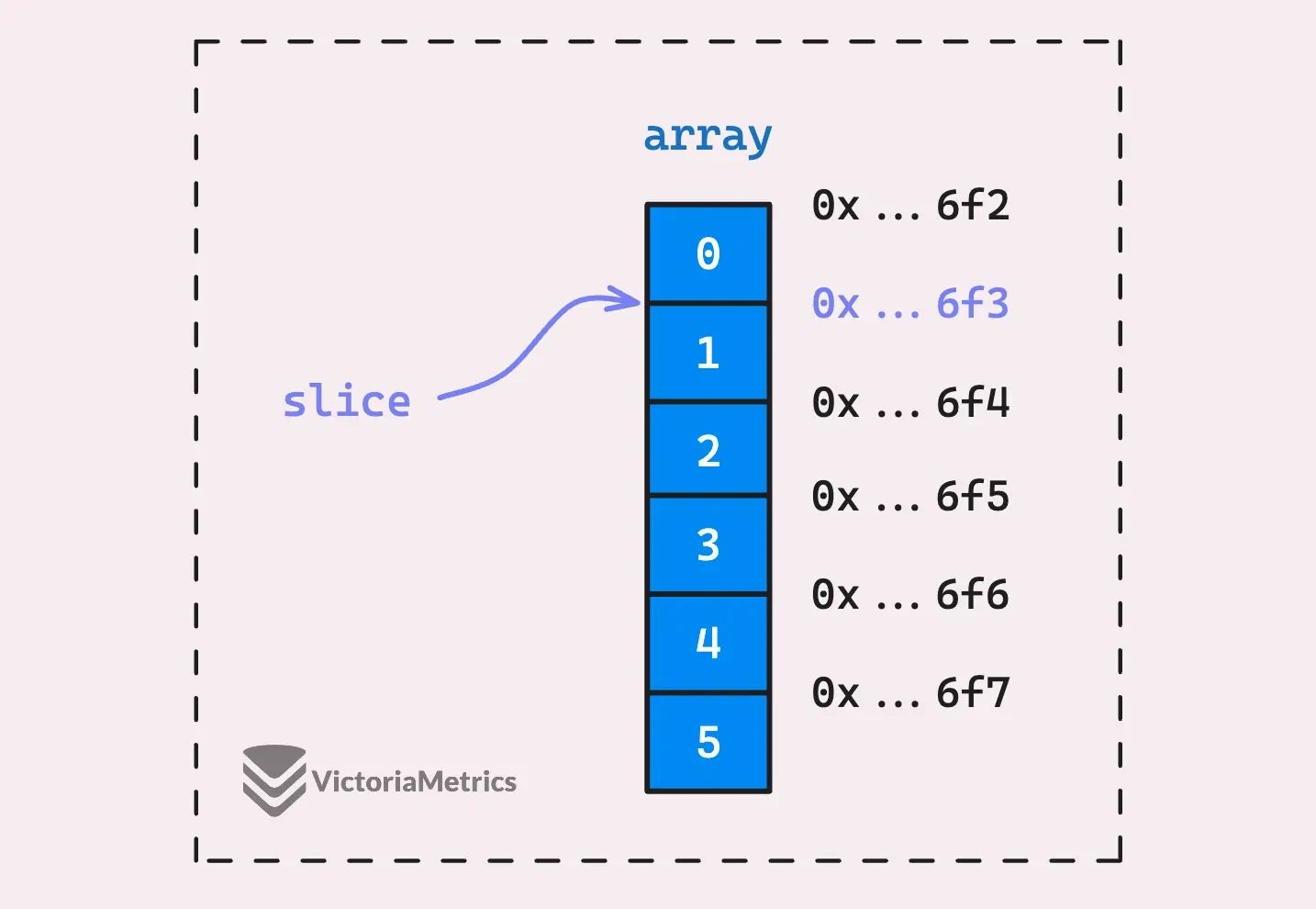
how slices work internally
type slice struct {
	array unsafe.Pointer
	len   int
	cap   int
}
type sliceHeader struct {
array unsafe.Pointer
len int
cap int
}
func main() {
array := [6]byte{0, 1, 2, 3, 4, 5}
slice := array[1:3]
println("slice", slice)
header := (*sliceHeader)(unsafe.Pointer(&slice))
println("sliceHeader:", header.array, header.len, header.cap)
}
// Output:
// slice [2/5]0x1400004e6f3
// sliceHeader: 0x1400004e6f3 2 5How Slice Grow
func main() {
	array := [6]int{0, 1, 2, 3, 4, 5}

	slice := array[1:3:4]
	fmt.Println("slice:", slice)

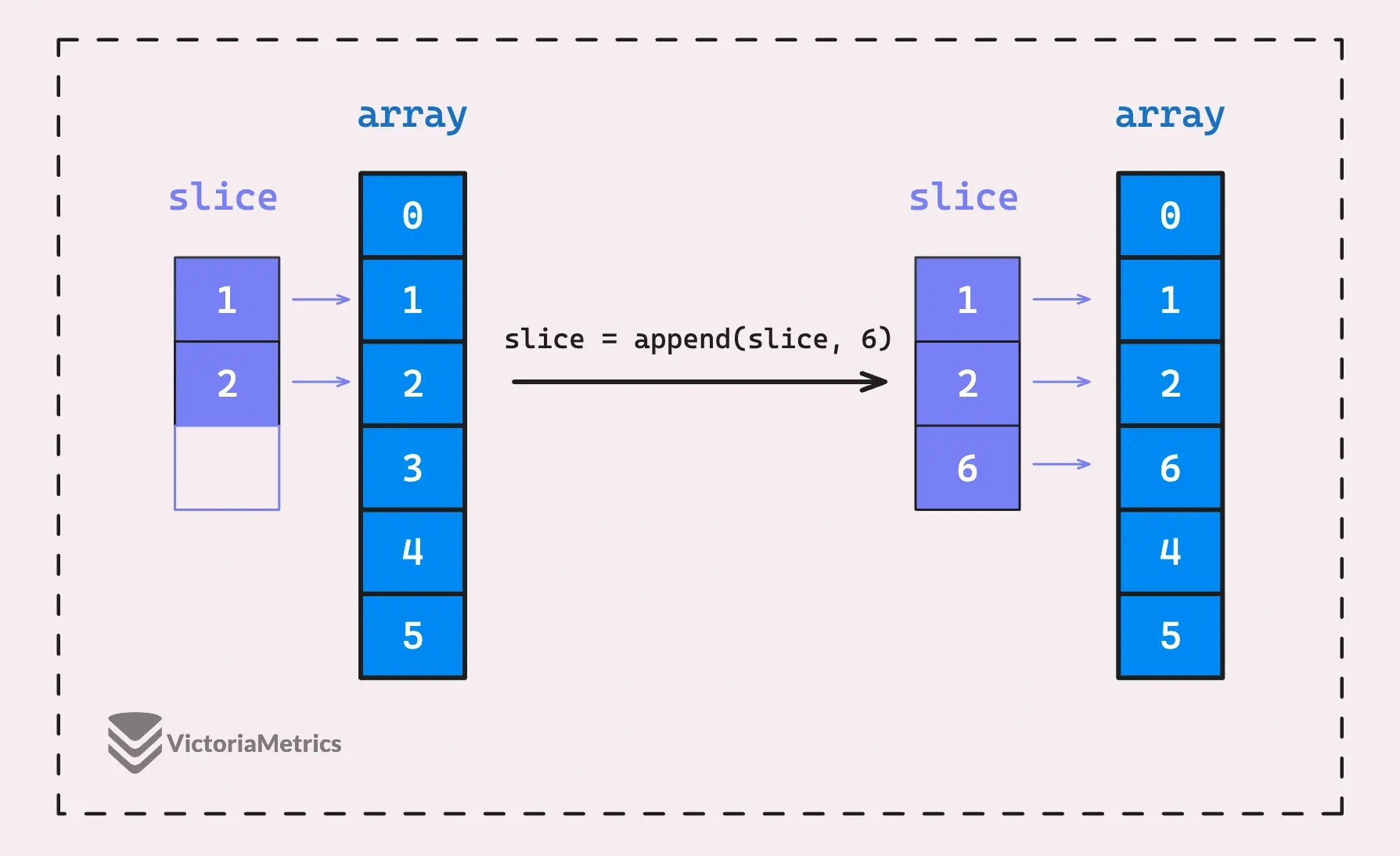
	slice = append(slice, 6)
	fmt.Println("slice after appending 6:", slice, unsafe.SliceData(slice))
	fmt.Println("array now:", array)

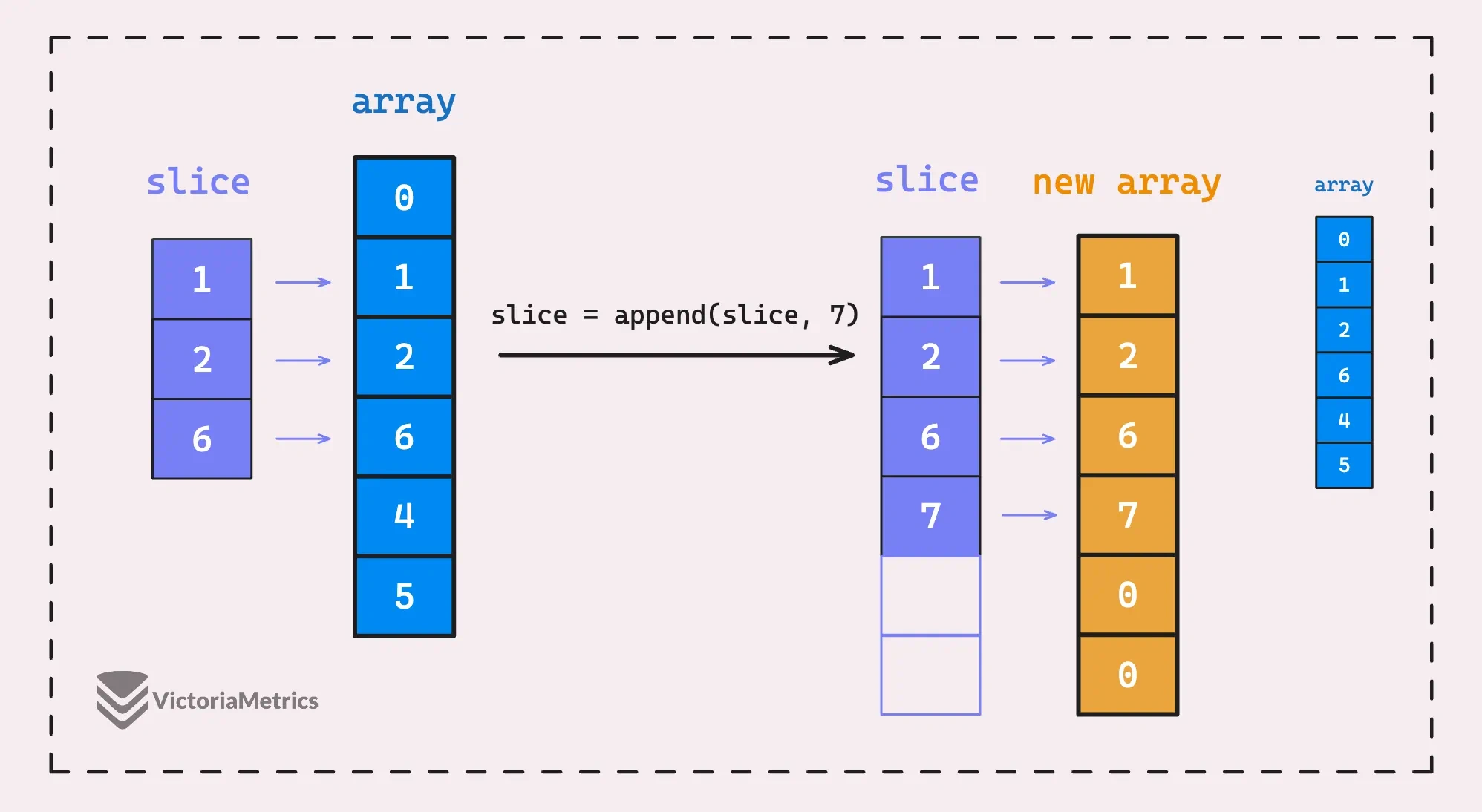
	slice = append(slice, 7)
	fmt.Println("slice after appending 7:", slice, unsafe.SliceData(slice))
	fmt.Println("array now:", array)
}

// Output:
// slice: [1 2]
// slice after appending 6: [1 2 6] 0x14000128038
// array now: [0 1 2 6 4 5]
// slice after append 7: [1 2 6 7] 0x14000128090
// array now: [0 1 2 6 4 5]
Explanation
When we append 6 to the slice
[1 2], the slice is still pointing to the underlying array[0 1 2 3 4 5]. The wayappend()works in this case is similar toarray[2] = 6, directly setting the element at index 2 of the underlying array to 6.
But when we append 7 to the slice, **the slice exceeds its own capacity (not the array’s capacity), so Go creates a new underlying array,** copies the elements over, and then appends 7 to this new slice.
The new array has an address of
0x14000128090, which is different from the old one0x14000128038.