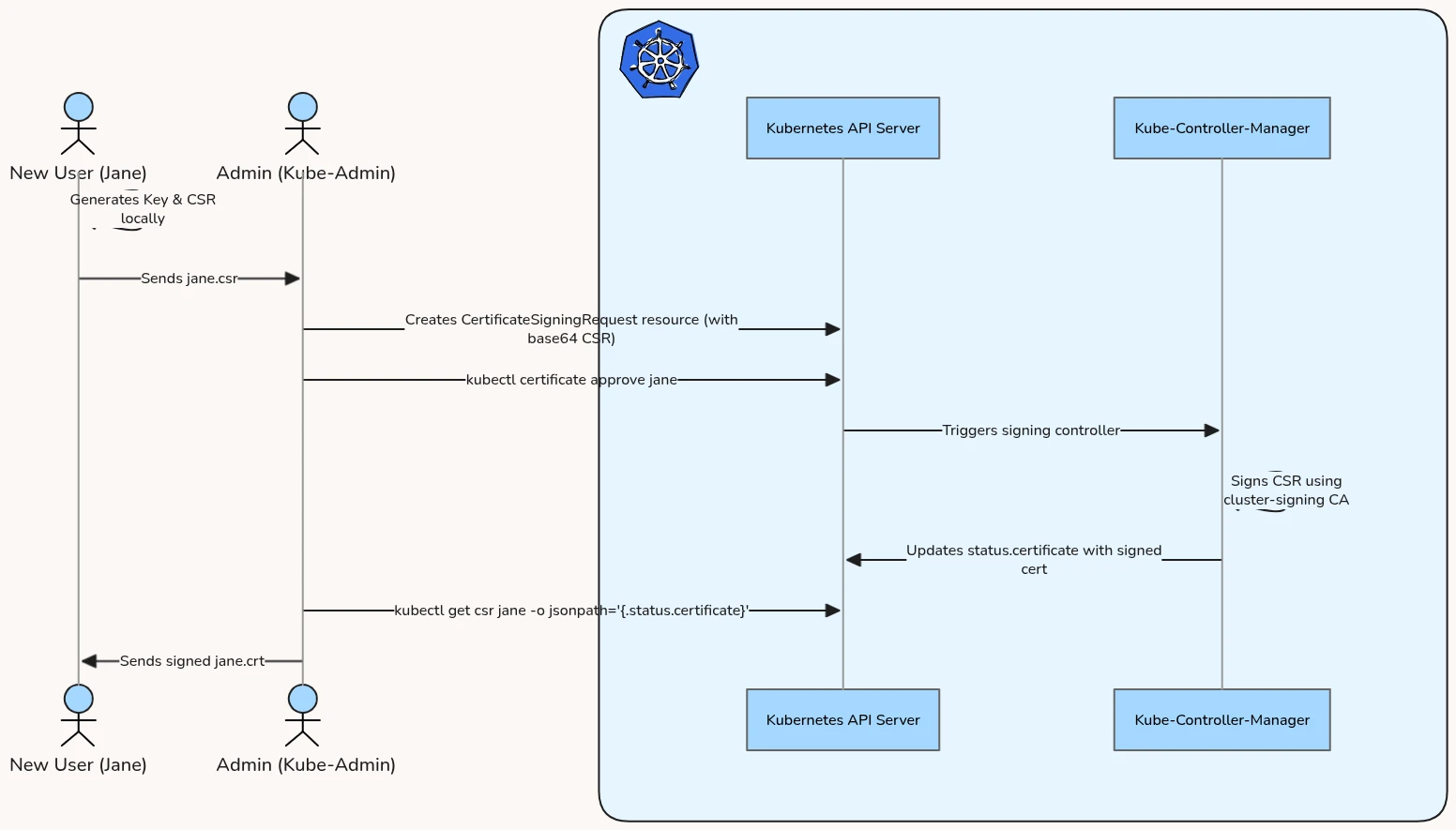
Skip manual signing on the master: the Certificates API turns certificate issuance into a CSR workflow (request, approve, download), and kubelet TLS bootstrapping automates node enrollment with it.
How the Certificates API works through the CertificateSigningRequest custom resource.
Worked example onboarding user Jane: generate key and CSR, create the CSR, review and approve, extract and decode, configure kubeconfig, test.
Worker node auto-enrollment: kubelet TLS bootstrapping and its key components.
Instead of manually generating certificates on the master node, you can use the Kubernetes Certificates API to request, approve, and download certificates. This is useful for onboarding new users or automating node additions.
signerName is required in the stable v1 API (standard in v1.36). The signer kubernetes.io/kube-apiserver-client is used for client authentication certificates. If you were requesting a server certificate (e.g., for a web service), you would use kubernetes.io/kubelet-serving or a custom signer.
Apply the resource to the cluster:
kubectl apply -f jane-csr.yaml
Step 3: Review and Approve the CSR
The administrator lists all CSRs in the cluster.
Check status:
kubectl get csr
Expected Output:
NAME AGE SIGNERNAME REQUESTOR CONDITIONjane-developer 12s kubernetes.io/kube-apiserver-client kubernetes-admin Pending
Approve the certificate:
kubectl certificate approve jane-developer
Re-check status:
kubectl get csr jane-developer
Expected Output:
NAME AGE SIGNERNAME REQUESTOR CONDITIONjane-developer 45s kubernetes.io/kube-apiserver-client kubernetes-admin Approved,Issued
Step 4: Extract and Decode the Certificate
Once the status changes to Approved,Issued, the signed certificate is embedded back in the resource’s status.certificate field as a base64-encoded string.
Generating client certificates manually for every new worker node is operations-heavy. Kubernetes solves this via Kubelet TLS Bootstrapping:
sequenceDiagram
    participant Node as Kubelet Node
    participant API as Kube-APIServer
    participant RBAC as Auto-Approver Controller
    participant Signer as Cert-Signing Controller

    Node->>Node: Boots up with Bootstrap Token
    Node->>API: Authenticates as system:bootstrappers
    Node->>API: Submits CSR for Node Client Cert (CN=system:node:<name>)
    RBAC->>API: Auto-approves CSR (if RBAC rules permit)
    Signer->>API: Signs CSR using Control Plane CA key
    Node->>API: Polls and downloads signed certificate
    Node->>Node: Writes kubelet.conf (uses new certificate)
    Node->>Node: Deletes Bootstrap Token config
Key Components of TLS Bootstrapping:
Bootstrap Token: A short-lived shared secret (token-id.token-secret) stored as a Kubernetes Secret in the kube-system namespace. It allows the new Kubelet to authenticate to the API server as a member of the group system:bootstrappers.
Kubelet Configuration: The node starts with a bootstrap kubeconfig (/etc/kubernetes/bootstrap-kubelet.conf).
Auto-Approval: To prevent administrators from manually running kubectl certificate approve for every node joining the cluster, RBAC permissions are configured to allow the controller manager to auto-approve node client cert CSRs submitted by the system:bootstrappers group.
Certificate Rotation: Under the hood, the Kubelet configuration contains:
rotateCertificates: true
This tells the Kubelet to automatically detect when its node client certificate is nearing expiration (typically 70-80% of its lifetime), generate a new key pair, submit a CSR to the API server, download the signed cert, and reload its configuration without restarting the service.