kubernetes kubernetes/cka kubernetes/primer
Kubernetes Kustomize Tutorial (Comprehensive Guide)
Kuztomize Secret & Configmap Generators
Declarative Management of Kubernetes Objects Using Kustomize | Kubernetes
Core Idea
Kustomize customizes YAML without templates: keep a base manifest and let overlays, transformers, and patches produce each environment’s render.
- Everything hangs off the directory structure and a
kustomization.yamlfile.- Base and overlays; transformers (including image transformers) and patches (JSON 6902 and strategic merge).
- Components for reusable slices, plus linked guides for secret and configmap generators.
Kustomize is a Kubernetes-native tool for managing configurations without using templates. It enables configuration customization for multiple environments using overlays, transformers, and patches.
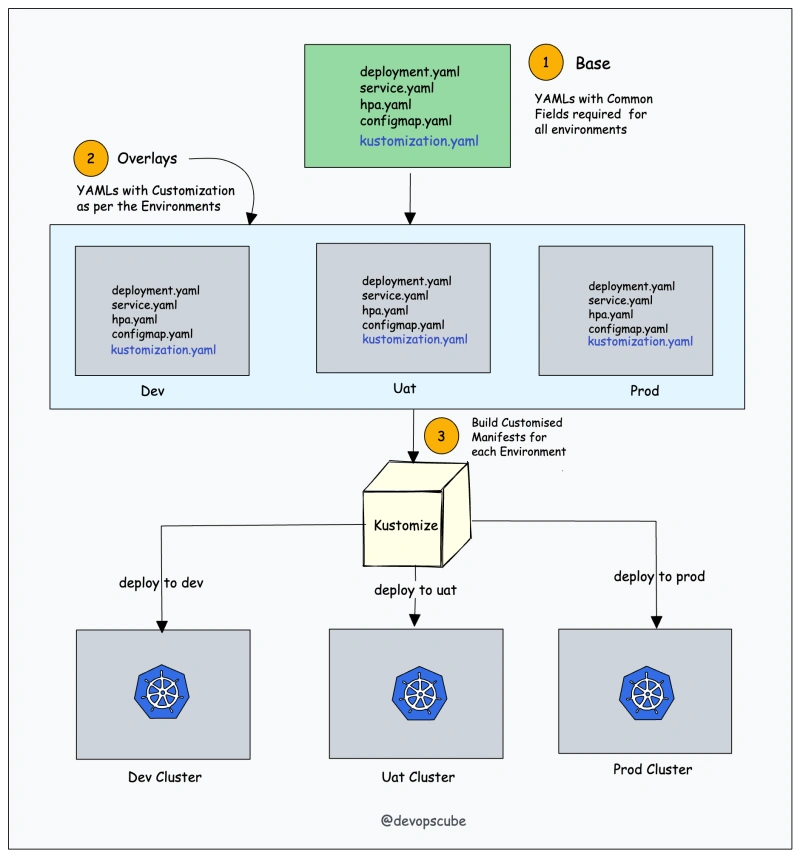
Kustomize vs Helm
While both Kustomize and Helm are configuration management tools for Kubernetes, they have different approaches. Kustomize focuses on providing a native and declarative way to manage configurations without using templates. Helm, on the other hand, uses charts and templates to package and deploy applications.
👉 Helm
Directory Structure
k8s/
├── base/
│   ├── kustomization.yaml
│   ├── nginx-depl.yaml
│   ├── service.yaml
└── overlays/
    ├── dev/
    │   ├── kustomization.yaml
    │   ├── config-map.yaml
    ├── stg/
    │   ├── kustomization.yaml
    └── prod/
        ├── kustomization.yaml
        └── grafana-depl.yaml
kustomization.yaml file
The kustomization.yaml file is the main file used by the Kustomize tool.
Base and Overlays
The Base folder represents the config that going to be identical across all the environments. We put all the Kubernetes manifests in the Base. It has a default value that we can overwrite.
On the other side, the Overlays folder allows us to customize the behavior on a per-environment basis. We can create an Overlay for each one of the environments. We specify all the properties and parameters that we want to overwrite & change.
Base + Overlays —> K8s Manifests
Transformers
As the name indicates, transformers are something that transforms one config into another. Using Transformers, we can transform our base Kubernetes YAML configs.
Built-in transformers:
commonLabel– It adds a label to all Kubernetes resourcesnamePrefix– It adds a common prefix to all resource namesnameSuffix– It adds a common suffix to all resource namesNamespace– It adds a common namespace to all resourcescommonAnnotations– It adds an annotation to all resources
Image Transformers
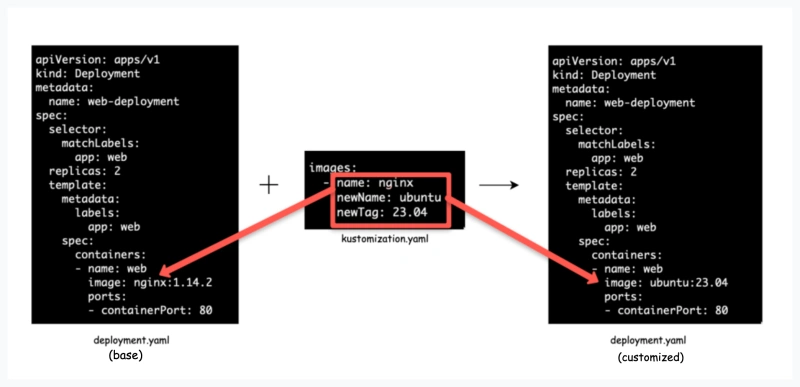
The image transformer checks the nginx image name as mentioned deployment.yaml and changes it to the new name which is ubuntu in the kustomization.yaml file. We can change the tags as well.
Patches (Overlays)
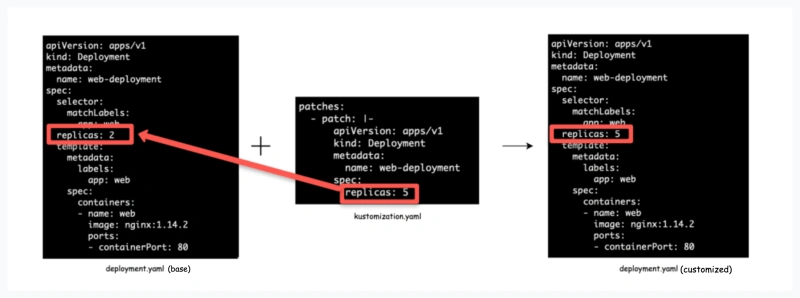
Patches or overlays provide another method to modify Kubernetes configs. It provides more specific sections to change in the configuration.
There are 3 parameters we need to provide:
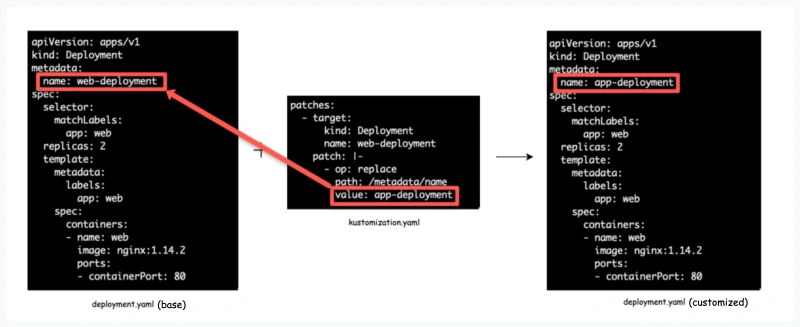
Operation Type:add or remove or replaceTarget:Resource name which we want to modifyValue:Value name that will either be added or replaced. For the remove operation type, there would not be any value.
1. JSON 6902
2. Stragetic Merge Patching
Components
Components in Kustomize allow you to define reusable, modular pieces of configuration logic that can be selectively included in overlays. They are helpful when certain configurations or features need to be enabled in some environments but not others.
| Aspect | Overlays | Components |
|---|---|---|
| Purpose | Manage environment-specific setups. | Provide reusable features or configurations. |
| Scope | A complete environment configuration. | A subset of resources or configurations. |
| Usage | Defines resources, patches, generators, etc. for an environment. | Defines reusable configurations (added selectively). |
| Inclusion | Always applied as part of the environment. | Selectively included in overlays. |
Kustomize