Core Idea
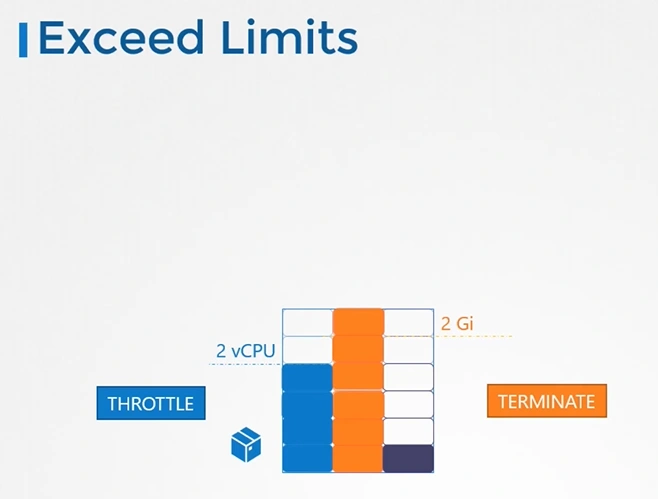
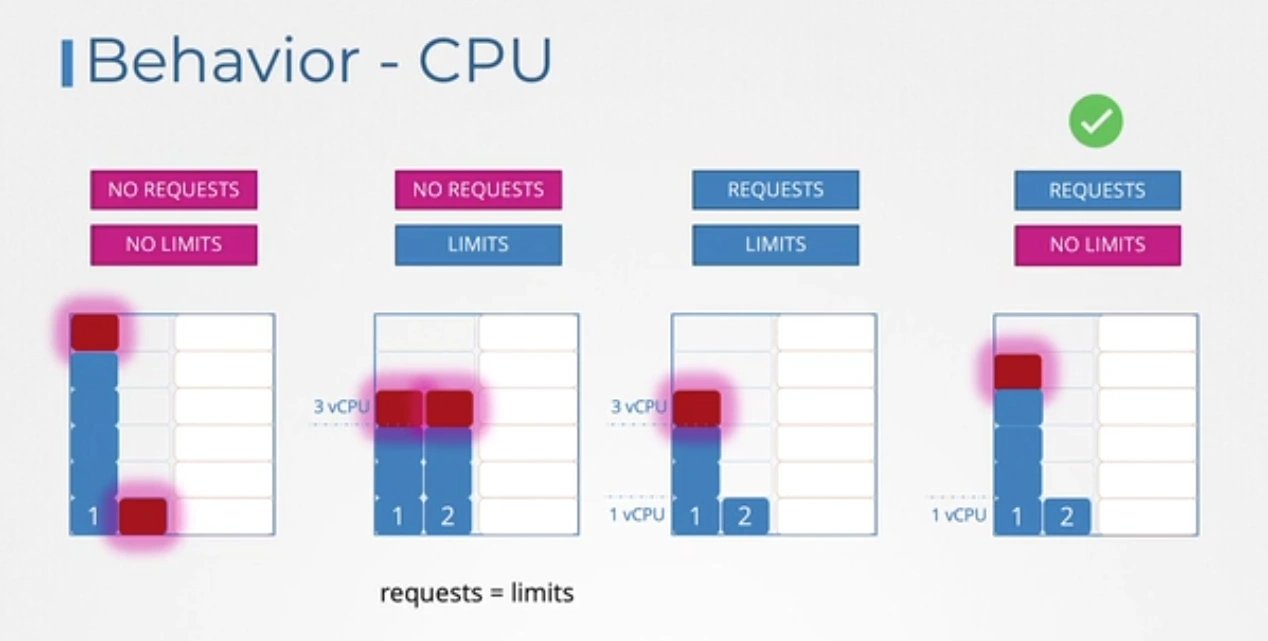
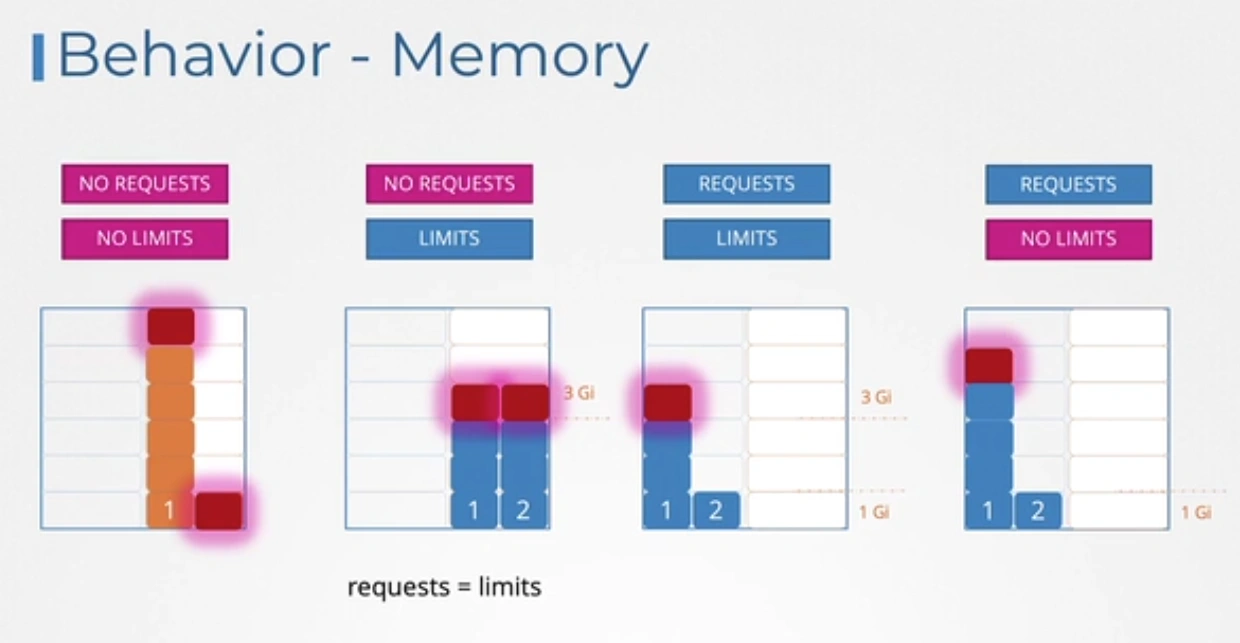
Requests decide where a pod gets scheduled, limits decide how much it may use: run over the CPU limit and you get throttled, run over the memory limit and the container is killed.
- If no node has room, the pod stays Pending with an insufficient CPU or memory event.
- CPU behavior is throttling, memory behavior is termination (OOM kill); the note walks through both.
- LimitRange sets per-object defaults and caps inside a namespace; ResourceQuota caps the total a namespace may consume.
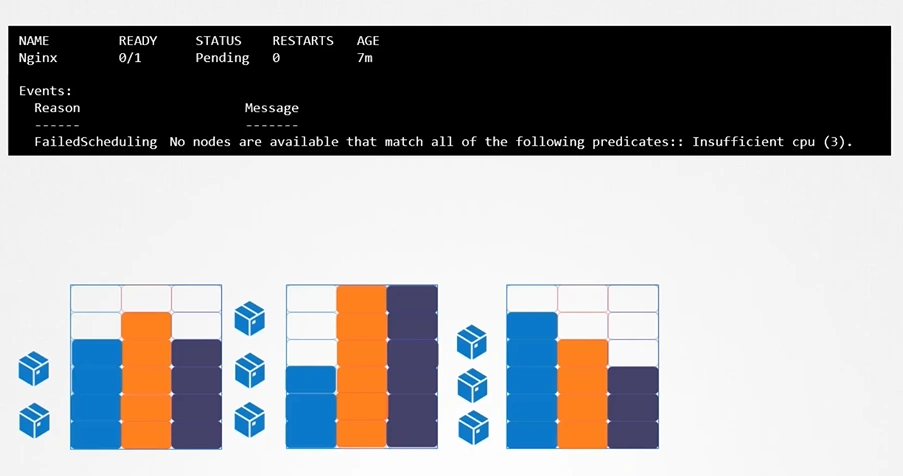
Let us take a look at 3 node kubernetes cluster.
- Each node has a set of CPU, Memory and Disk resources available.
- If there is no sufficient resources available on any of the nodes, kubernetes holds the scheduling the pod. You will see the pod in pending state. If you look at the events, you will see the reason as insufficient CPU.
Requests & Limits
requestsdefine the minimum amount of resources (e.g., CPU, memory) that a container requires to run.
limitsdefine the maximum amount of resources (e.g., CPU, memory) that a container is allowed to use.
Aspect Requests Limits Purpose Minimum resources required Maximum resources allowed Used By Kubernetes scheduler Kubelet (runtime) Behavior on Exceed Resources are guaranteed; no throttling or termination occurs. CPU: Throttled, Memory: OOMKilled Impact on Node Determines if a pod can fit on a node Ensures resource usage doesn’t exceed allocation
Resource Requirements
-
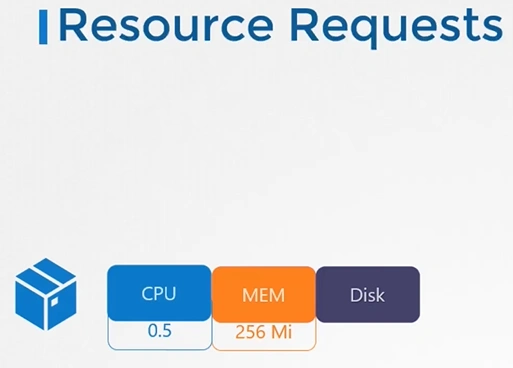
By default, K8s assume that a pod or container within a pod requires
0.5CPU and256Miof memory. This is known as theResource Requestfor a container.
-
If your application within the pod requires more than the default resources, you need to set them in the pod definition file.
  apiVersion: v1
  kind: Pod
  metadata:
    name: simple-webapp-color
    labels:
      name: simple-webapp-color
  spec:
   containers:
   - name: simple-webapp-color
     image: simple-webapp-color
     ports:
      - containerPort:  8080
     resources:
       requests:
        memory: "1Gi"
        cpu: "1"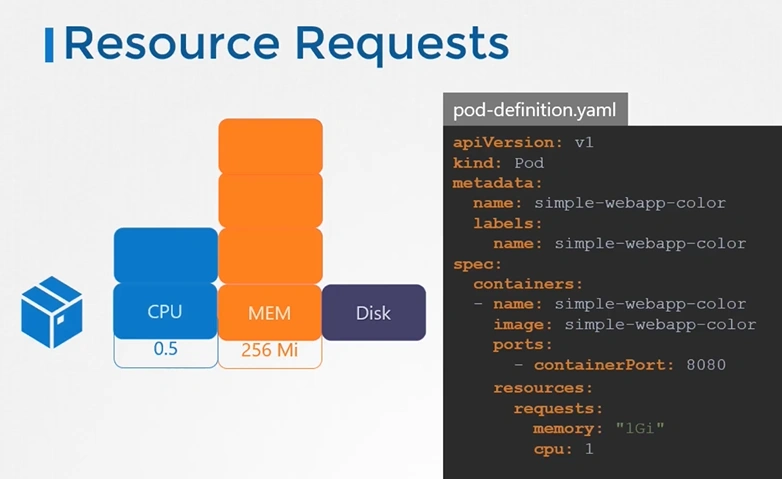
Resources - Limits
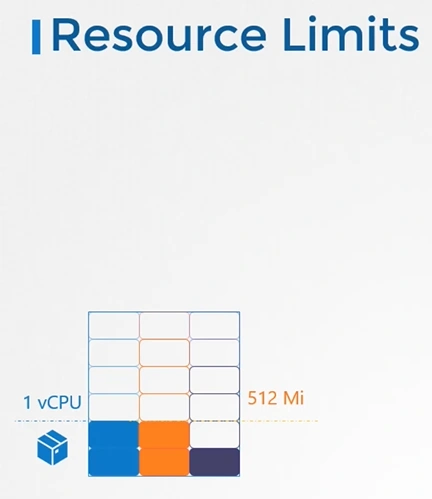
By default, k8s sets resource limits to 1 CPU and 512Mi of memory
You can set the resource limits in the pod definition file.
  apiVersion: v1
  kind: Pod
  metadata:
    name: simple-webapp-color
    labels:
      name: simple-webapp-color
  spec:
   containers:
   - name: simple-webapp-color
     image: simple-webapp-color
     ports:
      - containerPort:  8080
     resources:
       requests:
        memory: "1Gi"
        cpu: "1"
       limits:
         memory: "2Gi"
         cpu: "2"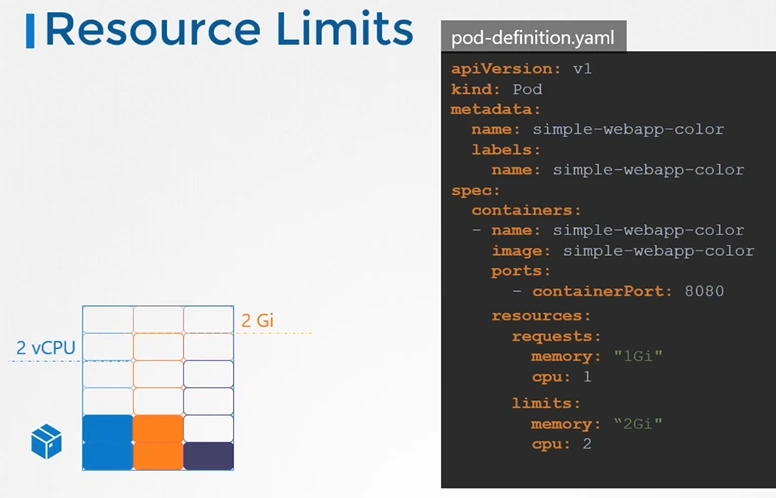
Remember Requests and Limits for resources are set per container in the pod.
Exceed Limits
- what happens when a pod tries to exceed resources beyond its limits?
CPU Behaviour
Memory Behaviour
LimitRange Resource
A LimitRange in Kubernetes is a resource that defines constraints on the minimum and maximum resources (like CPU and memory) that can be requested or limited for a namespace.
apiVersion: v1
kind: LimitRange
metadata:
  name: resource-limits
  namespace: example-namespace
spec:
  limits:
  - type: Container
    max:
      cpu: "2"           # Maximum 2 CPU cores per container
      memory: "4Gi"      # Maximum 4 GiB of memory per container
    min:
      cpu: "200m"        # Minimum 200 millicores (0.2 cores) per container
      memory: "256Mi"    # Minimum 256 MiB of memory per container
    default:
      cpu: "500m"        # Default CPU request if not specified
      memory: "512Mi"    # Default memory request if not specified
    defaultRequest:
      cpu: "300m"        # Default request if not explicitly specified
      memory: "300Mi"    # Default memory request if not explicitly specified
    maxLimitRequestRatio:
      cpu: "10"          # Max CPU limit/request ratio is 10
      memory: "4"        # Max memory limit/request ratio is 4
ResourceQuota
A ResourceQuota in Kubernetes limits the amount of resources (like CPU, memory, or storage) that can be consumed by all pods, containers, or other objects within a specific namespace.
apiVersion: v1
kind: ResourceQuota
metadata:
  name: compute-quota
  namespace: example-namespace
spec:
  hard:
    pods: "20"               # Maximum number of pods in the namespace
    requests.cpu: "10"       # Total CPU requests cannot exceed 10 cores
    requests.memory: "20Gi"  # Total memory requests cannot exceed 20Gi
    limits.cpu: "15"         # Total CPU limits cannot exceed 15 cores
    limits.memory: "30Gi"    # Total memory limits cannot exceed 30Gi