kubernetes kubernetes/cka kubernetes/networking
Core Idea
Lock down workloads at two layers: authenticate to private registries so only approved images run, then drop privileges with pod-level and container-level security contexts and capabilities.
- Private registry access: create a secret with the credentials so the worker node can pull the image.
- Security context runs at pod level (applies to every container) and container level, with capabilities to add or remove specific privileges, and a privileged versus unprivileged split.
- Pod Security Policies appear as the cluster-side gate over those settings.
Image Security
Private Registry
To pass the credentials to the docker untaged on the worker node for that we first create a secret object with credentials in it.
kubectl create secret docker-registry regcred \
  --docker-server=private-registry.io \
  --docker-username=registry-user \
  --docker-password=registry-password \
  --docker-email=registry-user@org.com
We then specify the secret inside our pod definition file under the imagePullSecret section
apiVersion: v1
kind: Pod
metadata:
  name: nginx-pod
spec:
  containers:
  - name: nginx
    image: private-registry.io/apps/internal-app
  imagePullSecrets:
  - name: regcred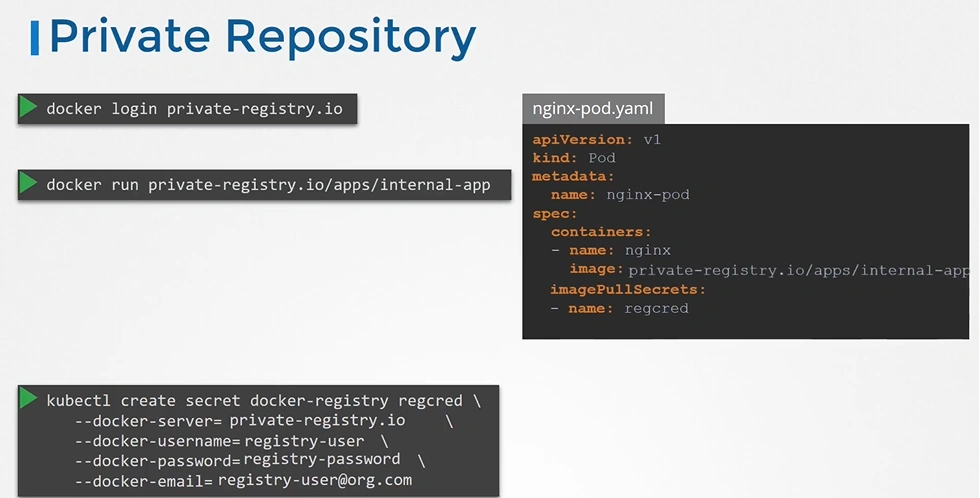
Security Context
Kubernetes SecurityContext with practical examples | by Eugene Butan | Marionete | Medium
Configure a Security Context for a Pod or Container | Kubernetes
10. Docker Security
Security context defines privilege and access control settings for container or Pod.
- Discretionary Access Control: Permission to access an object, like a file, is based on user ID (UID) and group ID (GID).
- Security Enhanced Linux (SELinux): Objects are assigned security labels.
- Running as privileged or unprivileged.
- Linux Capabilities: Give a process some privileges, but not all the privileges of the root user.
- AppArmor: Use program profiles to restrict the capabilities of individual programs.
- Seccomp: Filter a process’s system calls.
Pod Level
When you define a securityContext at the Pod level, it applies to all containers in the pod unless overridden at the container level.
apiVersion: v1
kind: Pod
metadata:
  name: secure-pod
spec:
  securityContext:
    runAsUser: 1000         # Runs all containers as user ID 1000
    runAsGroup: 3000        # Runs with group ID 3000
    fsGroup: 2000           # Sets file system group ownership
  containers:
    - name: my-container
      image: busybox
      command: ["sleep", "3600"]
Container Level
If a securityContext is set at the container level, it overrides pod-level settings for that specific container.
apiVersion: v1
kind: Pod
metadata:
  name: secure-container-pod
spec:
  containers:
    - name: my-container
      image: busybox
      securityContext:
        runAsUser: 2000       # Overrides pod-level security context
        privileged: false     # Ensures container is not privileged
        allowPrivilegeEscalation: false # Prevents privilege escalation
      command: ["sleep", "3600"]
Restricting Privileges using security context:
apiVersion: v1
kind: Pod
metadata:
  name: restricted-pod
spec:
  securityContext:
    runAsUser: 1000
    runAsGroup: 3000
    fsGroup: 2000
  containers:
    - name: secure-container
      image: nginx
      securityContext:
        privileged: false
        allowPrivilegeEscalation: false
        readOnlyRootFilesystem: true
        capabilities:
          drop: ["ALL"]  # Removes all Linux capabilities
Capabilities
10. Docker Security > Capabilities
Linux capabilities provide a fine-grained way to grant specific privileges to a process without giving full root access. Instead of using privileged: true, you can selectively enable only the permissions a container needs.
Capabilities are only supported at the container level and not at the POD level.
- Pods are just a grouping of containers running in the same network namespace but do not execute any processes themselves.
- Each container has its own Linux process namespace, so capabilities must be assigned per container.
apiVersion: v1
kind: Pod
metadata:
  name: capability-demo
spec:
  containers:
    - name: net-container
      image: busybox
      securityContext:
        capabilities:
          add: ["NET_ADMIN"]  # This container can modify network settings
          drop: ["ALL"]  # Remove all other capabilities
      command: ["sleep", "3600"]

    - name: web-container
      image: nginx
      securityContext:
        capabilities:
          drop: ["ALL"]  # No special privileges for this container
Pod Security Policies
We can enforce security policies using Pod Security Standards (PSS) or Pod Security Admission (PSA) to restrict capabilities globally.
apiVersion: policy/v1beta1
kind: PodSecurityPolicy
metadata:
  name: restricted-policy
spec:
  privileged: false  # No privileged containers allowed
  allowedCapabilities: []  # No additional capabilities allowed
Privileged & Unprivileged
A privileged container is a container that has full access to the host machine’s resources.
- Can access and modify the host’s network, storage, devices and process.
- Usage:
- Running a container runtime (Docker-in-Docker).
- Managing networking components (e.g., CNI plugins).
- Accessing hardware devices (e.g., GPUs, USBs).
apiVersion: v1
kind: Pod
metadata:
  name: privileged-pod
spec:
  containers:
    - name: privileged-container
      image: busybox
      securityContext:
        privileged: true  # Grants full access to the host
      command: ["sleep", "3600"]
An unprivileged container runs with limited access and does not have direct control over the host.
- Default mode in Kubernetes
apiVersion: v1
kind: Pod
metadata:
  name: unprivileged-pod
spec:
  containers:
    - name: secure-container
      image: nginx
      securityContext:
        privileged: false  # Default (recommended for security)
        allowPrivilegeEscalation: false
      command: ["nginx", "-g", "daemon off;"]