Core Idea
Docker networking runs on the Container Network Model: a sandbox holds each container’s network stack, endpoints connect it to networks, and drivers (bridge, overlay, macvlan) implement the actual topology.
- CNM is the spec, libnetwork is Docker’s reference implementation, and drivers plug in the real network types.
- Modes: none, bridge, host, macvlan — plus user-defined networks for DNS-based service discovery.
- Single-host bridge, Swarm-wide overlay with a routing mesh; the same primitives carry over to Kubernetes networking.
Docker uses CNM Container Network Model for networking.
Docker network is based on libnetwork , which is the reference implementation of an open-source architecture called the Container Network Model (CNM).
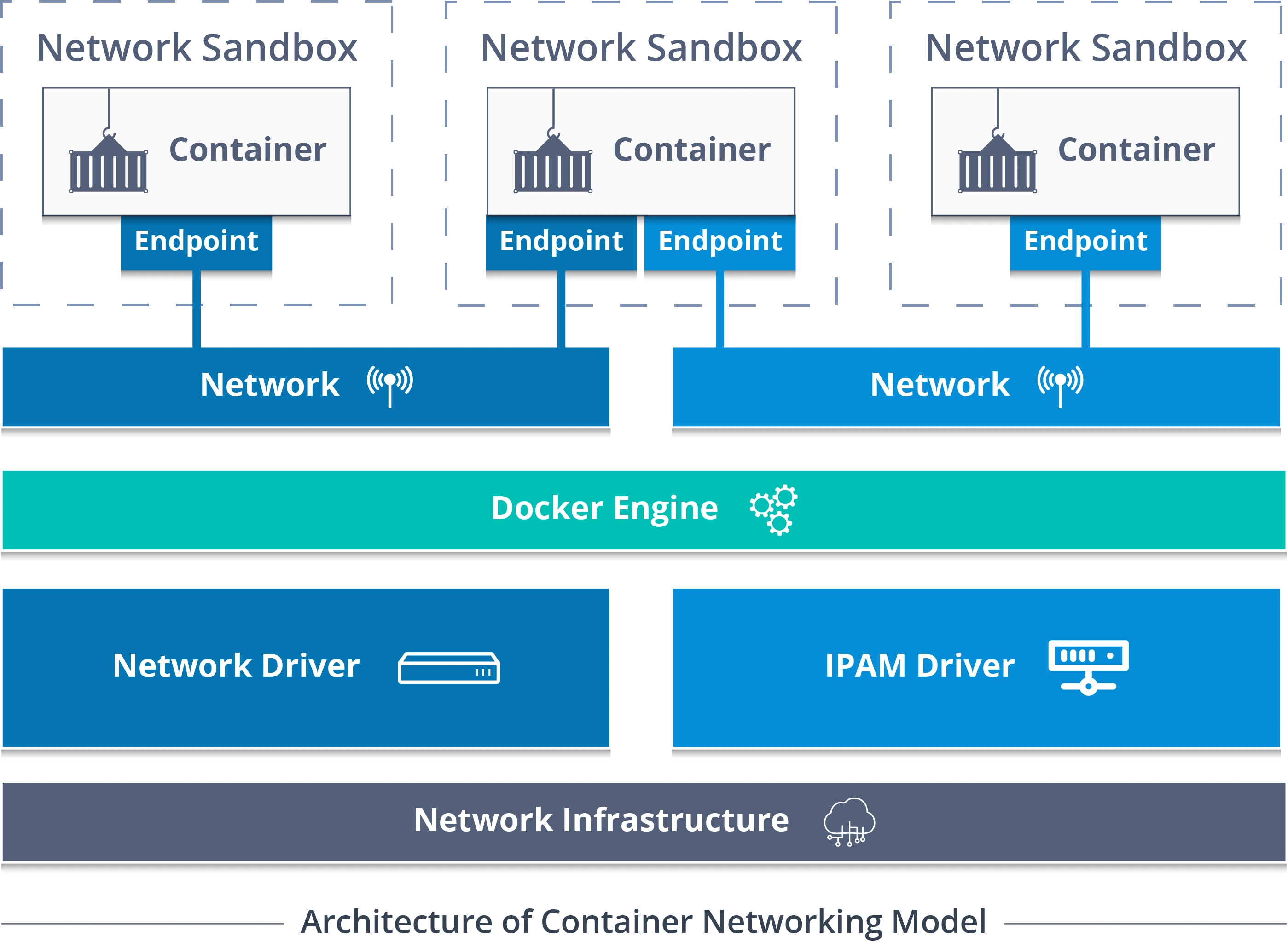
Summary
The CNM is the design specification and outlines the fundamental building blocks of a Docker network.
Libnetwork is a real-world implementation of the CNM. It’s open-sourced as part of the Moby project and used by Docker and other platforms.
Drivers extend the model by implementing specific network topologies such as VXLAN overlay networks
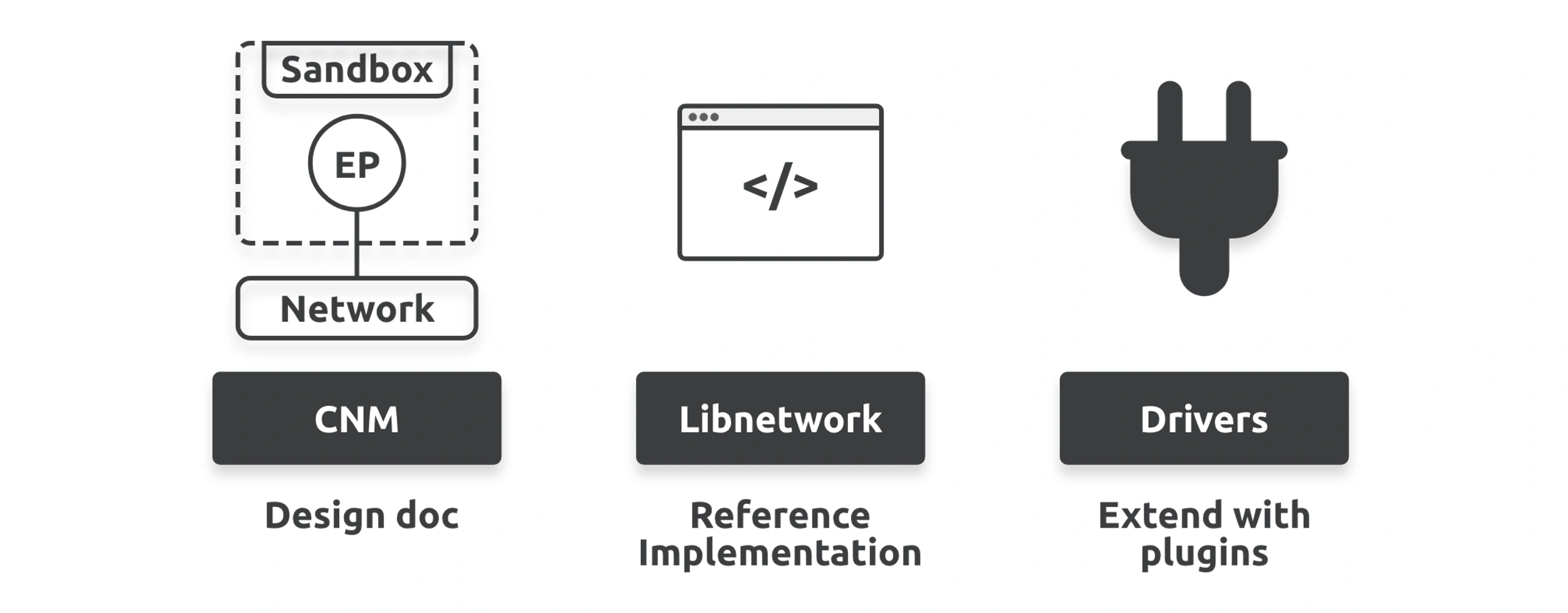
Container Network Model (CNM)
- Sandboxes
- Endpoints
- Networks
A sandbox is an isolated network stack inside a container. It includes Ethernet interfaces, ports, routing tables, DNS configuration, and everything else you’d expect from a network stack.
Endpoints are virtual network interfaces that look, smell, and feel like regular network interfaces. They connect sandboxes to networks.
Endpoints are virtual network interfaces that look, smell, and feel like regular network interfaces. They connect sandboxes to networks.
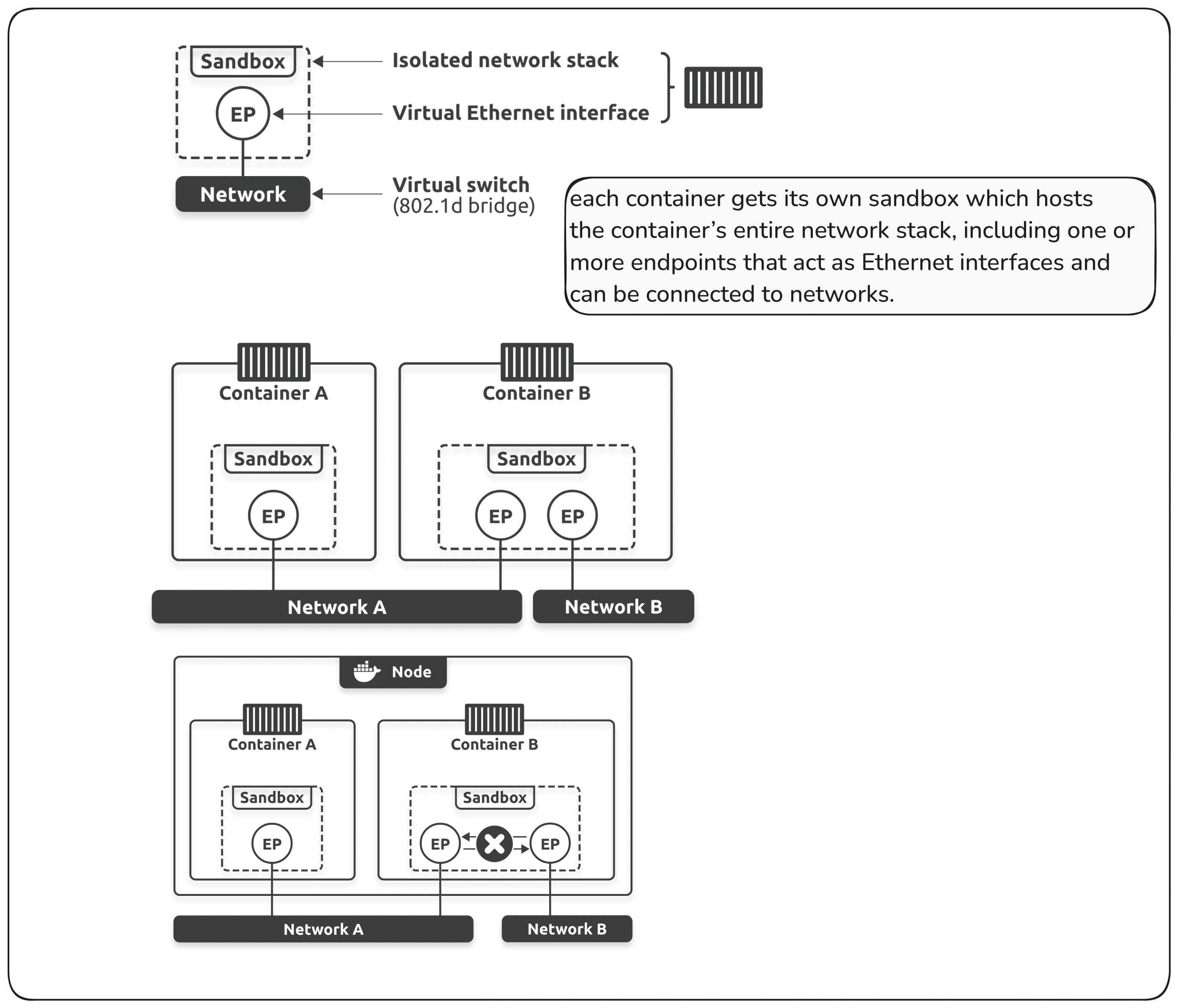
Container A has a single interface (endpoint) and is only connected to Network A. However, Container B has two interfaces connected to Network A and Network B. The containers can communicate with each other because they are both connected to Network A. However, the two endpoints inside of Container B cannot communicate with each other as they’re on different networks.
It’s also important to understand that endpoints behave exactly like regular network adapters, meaning you can only connect them to a single network. This is why Container B needs two endpoints if it wants to connect to both networks.
The CNM does not provide the key-value store, so external ones like Consul, etcd, and Zookeeper are needed.
Libnetwork
Libnetwork is the reference implementation of the CNM.
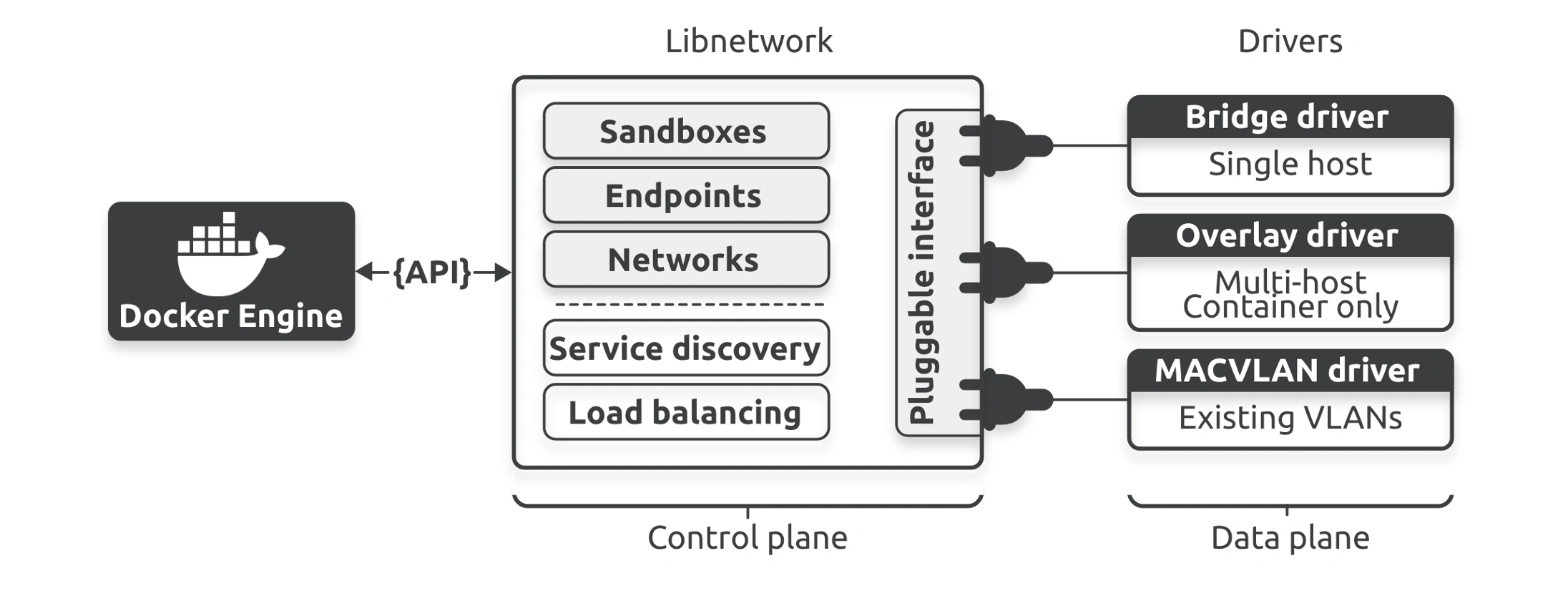
As well as implementing the core components of the CNM, libnetwork also implements the network control plane, including management APIs, service discovery, and ingress-based container load balancing.
Drivers
Libnetwork implements the control plane, but it relies on drivers to implement the data plane. For example, drivers are responsible for creating networks and ensuring isolation and connectivity.
Docker ships with several built-in drivers.
These include bridge, overlay, and macvlan, and they build the most common network topologies. Third parties can also write network drivers to implement other network topologies and more advanced configurations.
Network “modes”
- None —> No networking disables networking for the container
- Bridge —> Container runs in a private network internal to the host
- Host —> The container shares the same IP address and the network namespace as that of the host
- Macvlan —> another advanced option that allows containers to appear as physical devices on your network. It works by assigning each container in the network a unique MAC address
- ipvlan —> an advanced driver that offers precise control over the IPv4 and IPv6 addresses assigned to your containers, as well as layer 2 and 3 VLAN tagging and routing.
- Overlay
- Custom —> Custom bridge networking is the same as bridge networking but uses a bridge explicitly created for that container
| Feature | Macvlan | Ipvlan |
|---|---|---|
| MAC Address | Unique per container | Same as host |
| Works on Layer | L2 (Ethernet) | L2 & L3 |
| Requires Switch Support | ✅ Yes | ❌ No |
| Best Use Case | Physical networks with VLANs | Cloud & virtualized environments |
Single host Bridge networks
simplest type of Docker network.
Warning
The default bridge network does not provide built-in DNS resolution or automatic connectivity between containers by name. therefore containers can’t communicate each other.
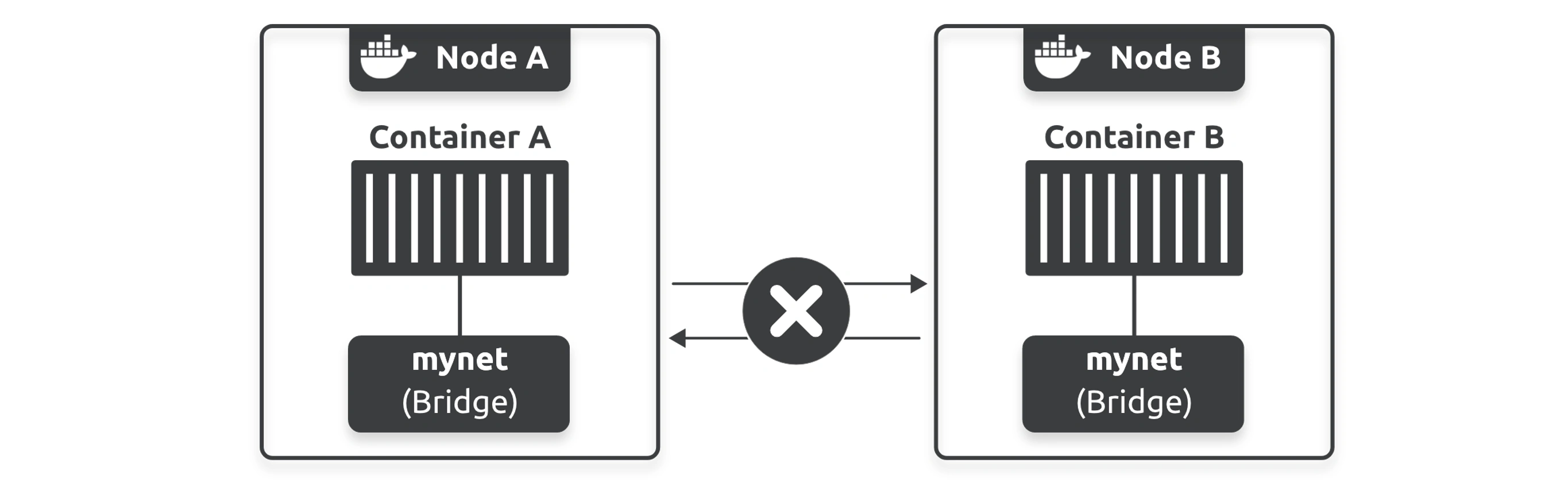
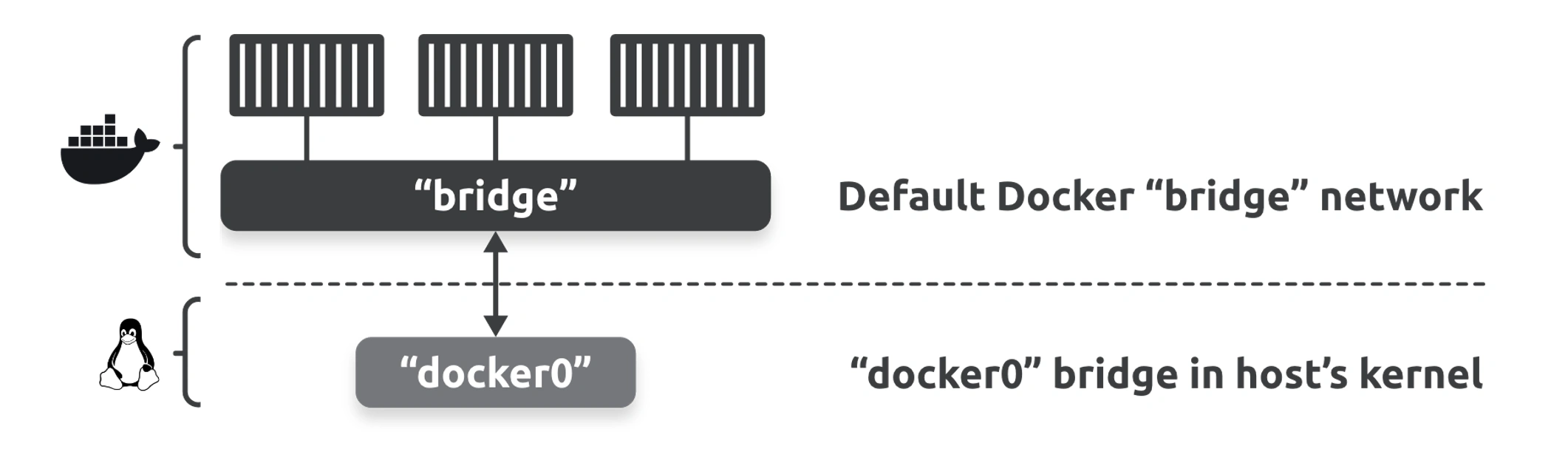
The default bridge network on all Linux-based Docker hosts is called bridge and maps to an underlying Linux bridge in the host’s kernel called docker0.
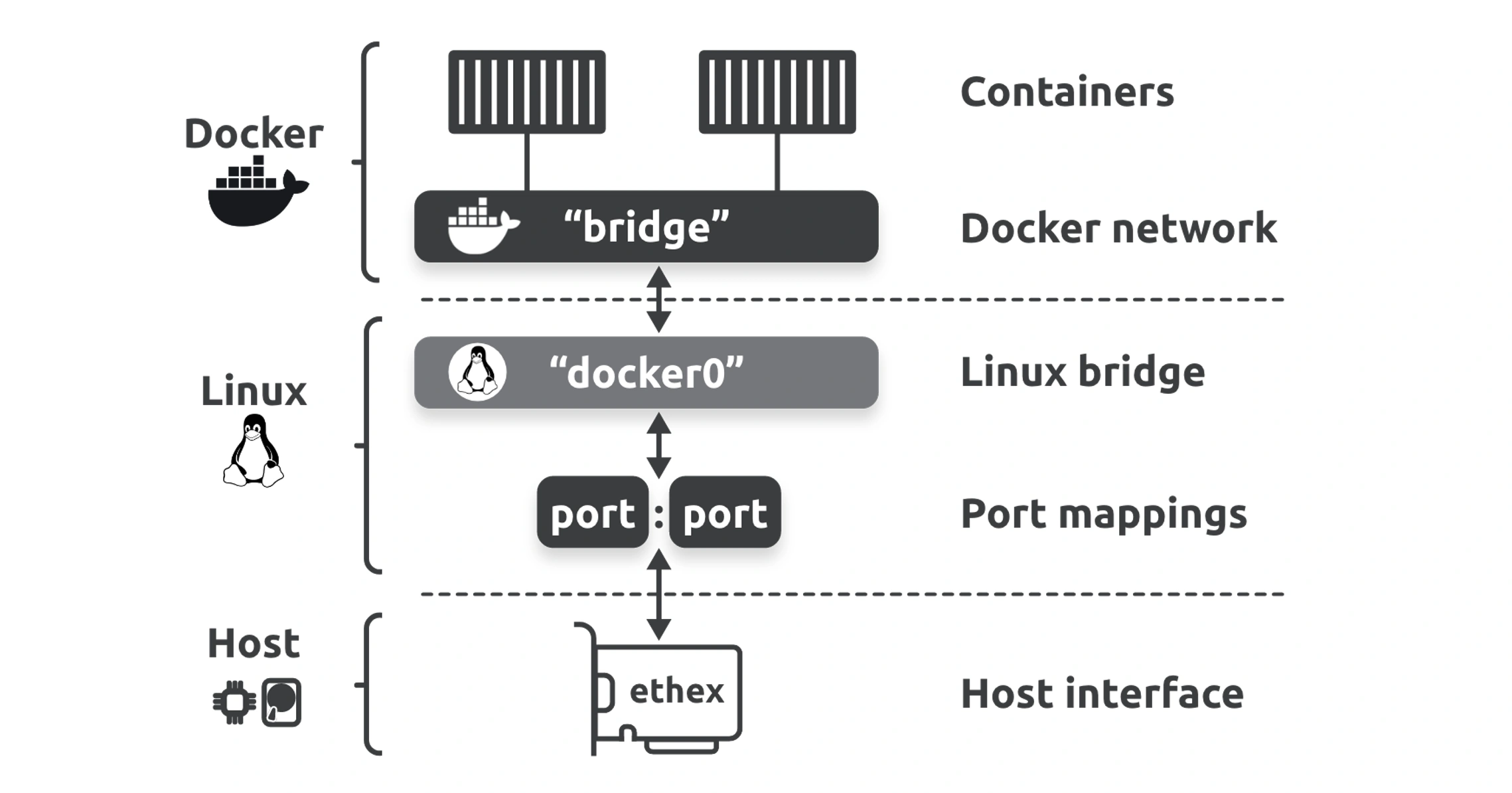
Your veth IDs will be different, but the important thing to understand is that every veth is like a cable with an interface on either end. One end is connected to the Docker network, and the other end is connected to the associated bridge in the kernel.
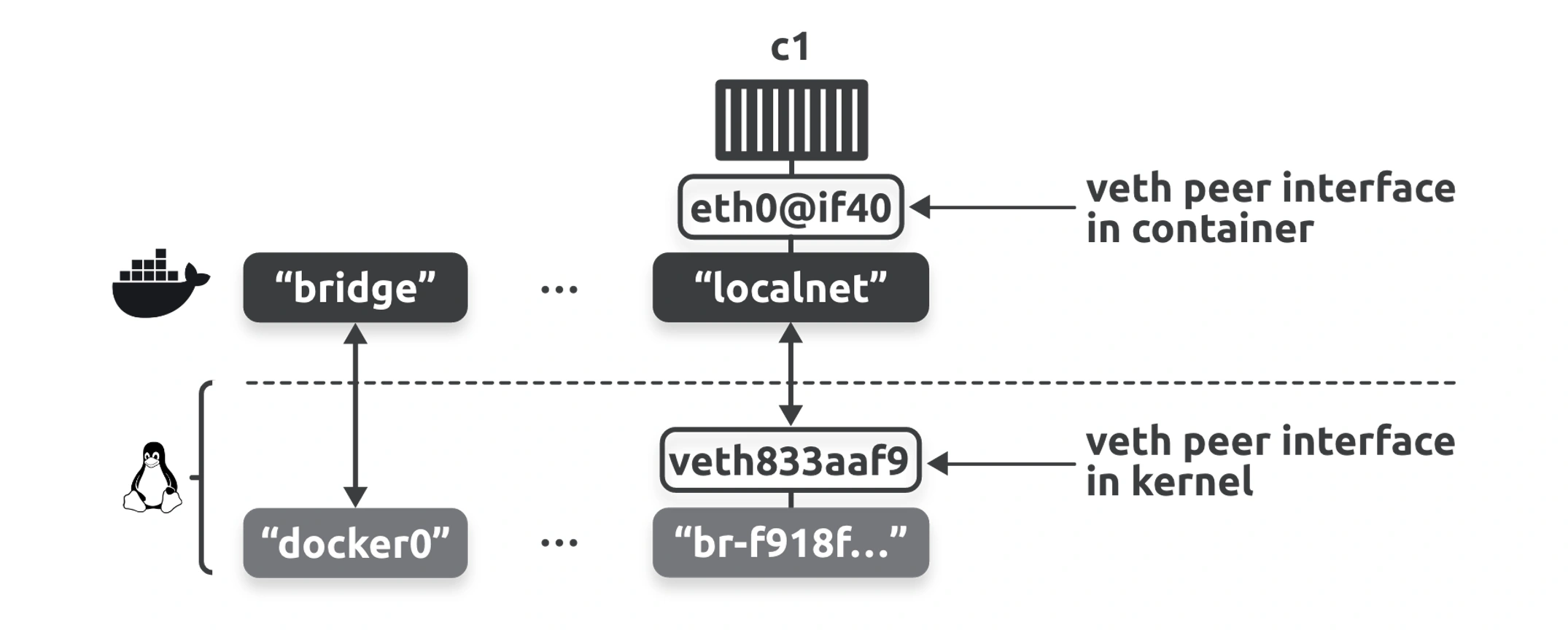
If you add more containers to the localnet network, they’ll all be able to communicate using names. This is because Docker automatically registers container names with an internal DNS service and allows containers on the same network to find each other by name. The exception to this rule is the built-in bridge network that does not support DNS resolution.
Docker’s internal DNS server that holds name-to-IP mappings for all containers started with the --name or --net-alias flag.
What is a Linux Bridge?
- A Linux bridge is a virtual network switch that operates at Layer 2 (Data Link layer) of the OSI model.
- It connects multiple network interfaces, allowing them to communicate as if they were on the same physical Ethernet network.
- It is managed using the
bridge-utilspackage or the built-inipandbrctlcommands.- 🌟 Linux Bridge - Part 1 | Hechao’s Blog
Veth
A veth (short for virtual Ethernet) is a pair of virtual network interfaces that are always created together and act like a “pipe” for network traffic. Anything sent into one end of the pair appears on the other end. These are commonly used in Linux networking for connecting network namespaces, containers, or virtual machines to other networks.
How veth Pairs Work
- A veth pair consists of two connected virtual network interfaces (e.g.,
veth0andveth1).- Data sent to one interface (e.g.,
veth0) is immediately available on the other interface (veth1).- The two interfaces behave like an Ethernet cable linking two devices.
How veth is Used in Docker
- Docker creates a
vethpair for each container.
- One end is placed inside the container.
- The other end is attached to the Docker bridge (
docker0) or another network interface.- Traffic from the container flows through the
vethpair to the host’s network stack or bridge, enabling connectivity to other containers and external networks.
Important
Connecting to existing networks and VLANs
The ability to connect containerized apps to external systems and physical networks is important. A common example is partially containerized apps where the parts running in containers need to be able to communicate with the parts not running in containers.
The built-in MACVLAN driver (transparent if you’re using Windows containers) was created with this in mind.
It gives every container its own IP and MAC address on the external physical network, making each one look, smell, and feel like a physical server or VM.
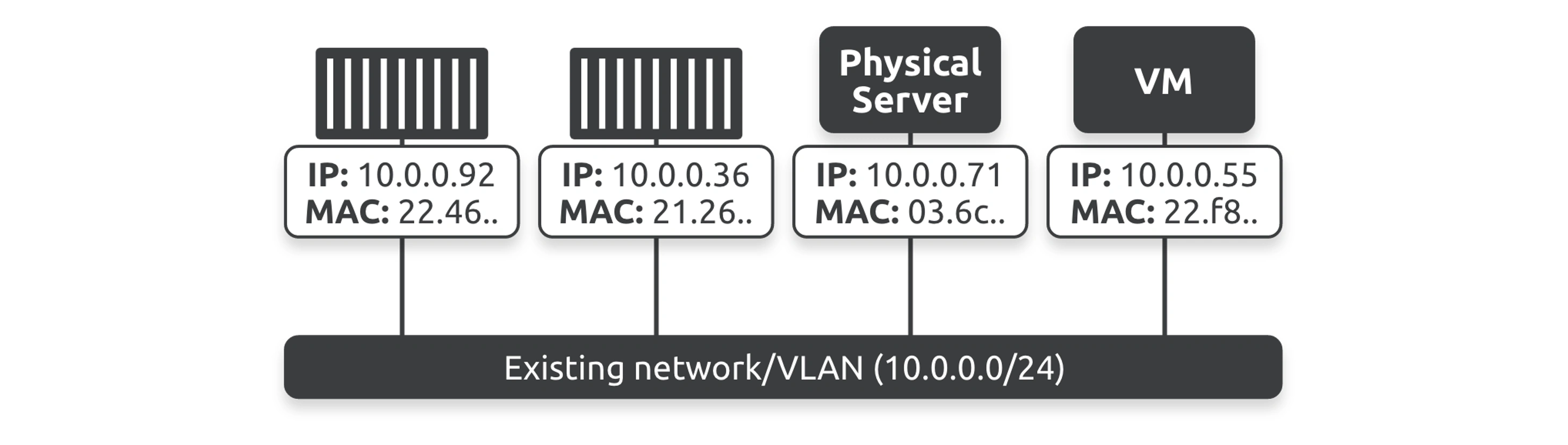
a single Docker host running two MACVLAN networks connecting containers to two different VLANs.
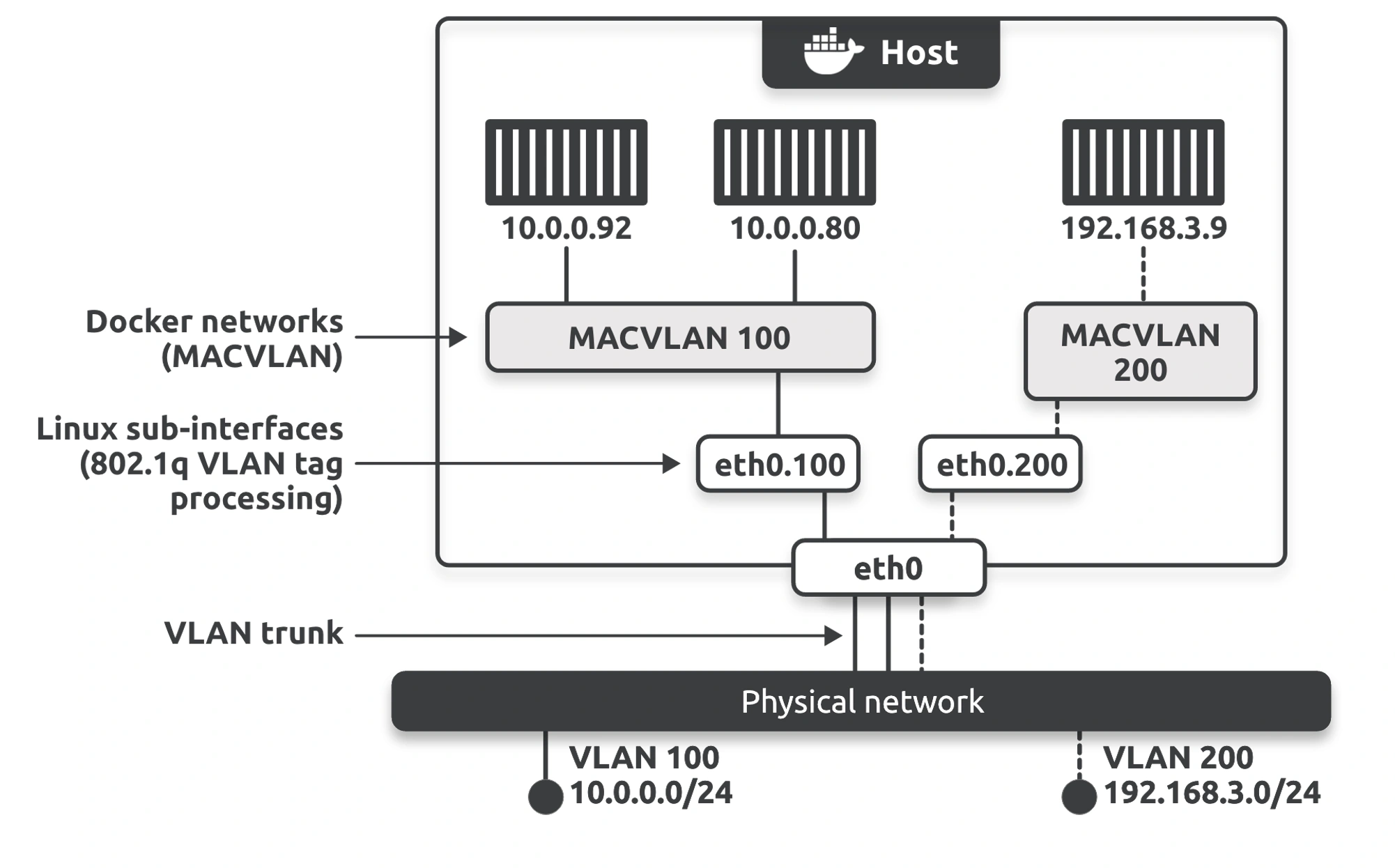
The macvlan driver lets you create Docker networks that connect containers to existing physical networks and VLANs. They make containers first-class citizens on external networks by giving them their own MAC and IP addresses. Unfortunately, you have to run your host NICs in promiscuous mode, meaning they won’t work in public clouds.
Service Discovery
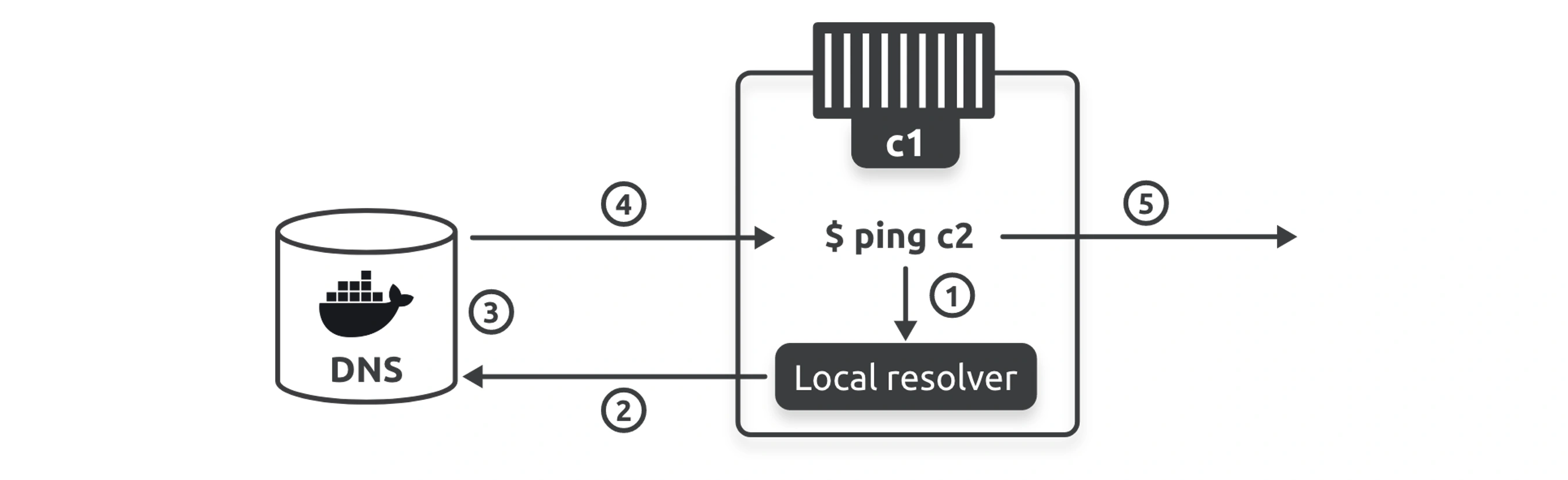
libnetwork also provides service discovery that allows all containers and swarm services to locate each other by name.The only requirement is that the containers be on the same network.
Under the hood, Docker implements a native DNS server and configures every container to use it for name resolution.
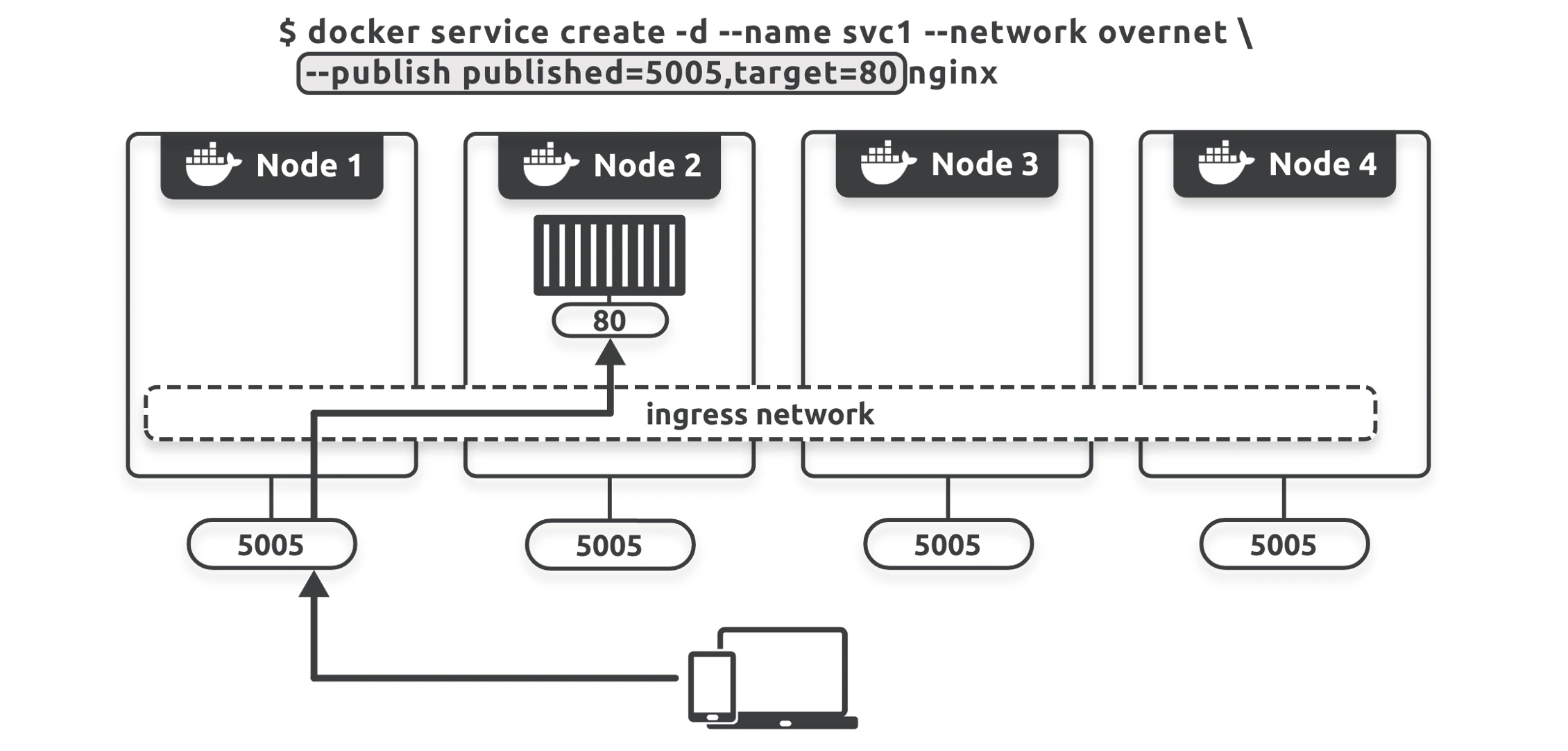
Ingress Load Balancing
This section only applies to Docker Swarm.
Swarm supports two ways of publishing services to external clients:
- Ingress mode (default)
- Host mode
External clients can access ingress mode services via any swarm node — even nodes not hosting a service replica. However, they can only access host mode services via nodes running replicas
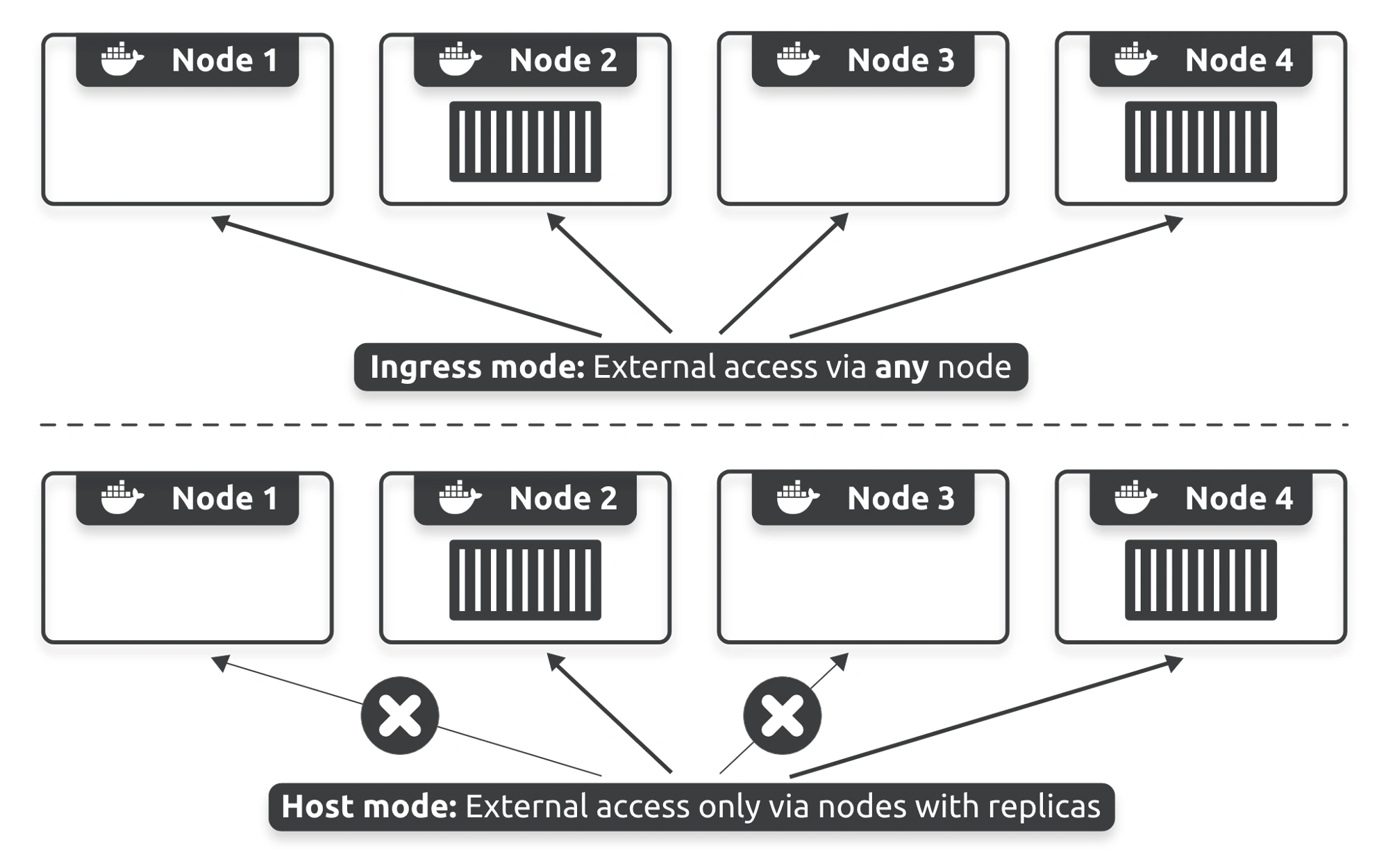
If you want to publish a service in host mode, you’ll need to use the --publish flag with the mode=host option.
Behind the scenes, ingress mode uses a layer 4 routing mesh that Docker calls the service mesh or the swarm-mode service mesh.
Overlay Networking
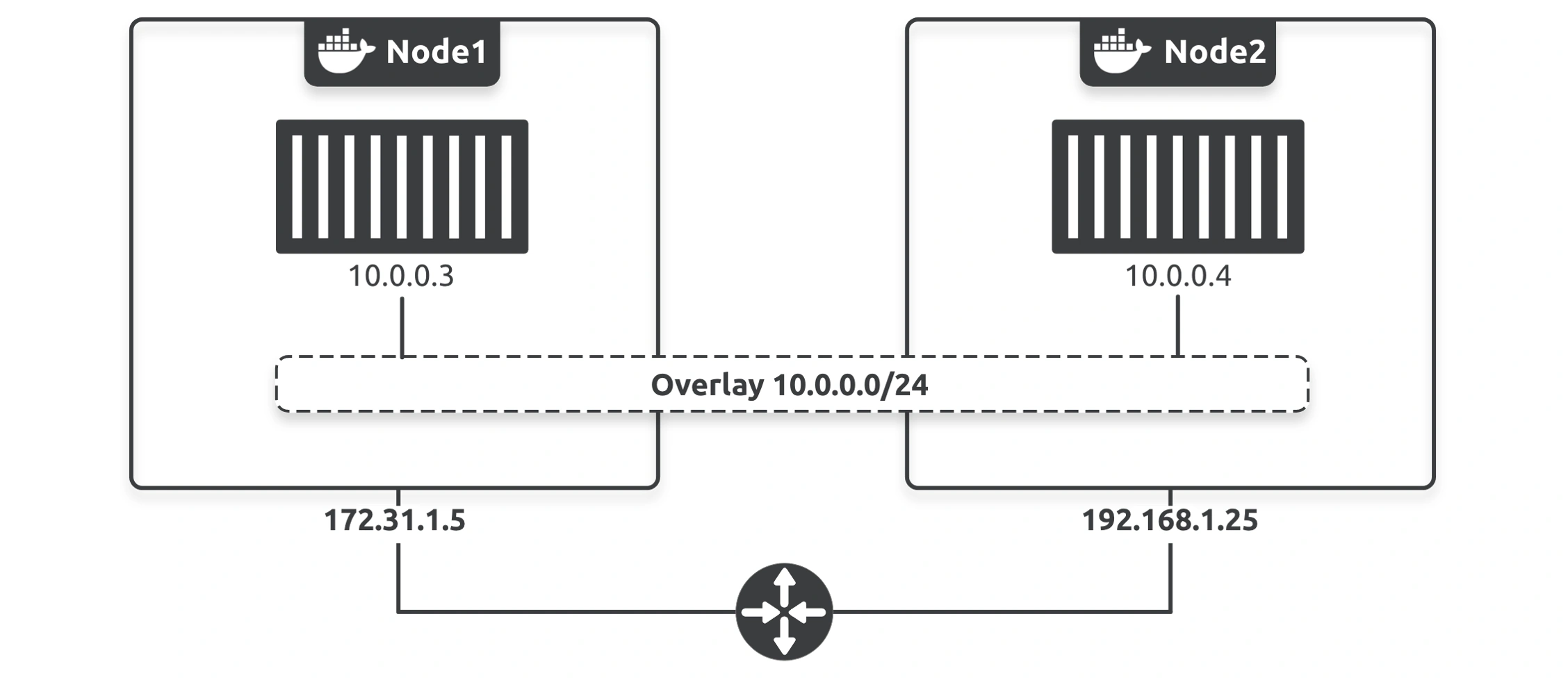
Overlay networks create flat, secure,layer 2 networks that span multiple hosts. Containers on differents host can connect to the same overlay network and communicate directly.
Behind the scenes, Docker builds overlay networking on top of libnetwork and the native overlay driver.
Create Overlay Network
$ docker network create -d overlay -o encrypted uber-net vdu1yly429jvt04hgdm0mjqc6You’ll also need to ensure the following network ports are open between the two nodes:
2377/tcpfor management plane comms7946/tcpand7946/udpfor control plane comms (SWIM-based gossip)4789/udpfor the VXLAN data plane
You’ve created a brand-new encrypted overlay network. The network spans both nodes in the swarm and Docker uses TLS to encrypt it (AES in GCM mode). It also rotates the encryption keys every 12 hours.
If you don’t specify the -o encrypted flag, Docker will still encrypt the control plane (management traffic) but won’t encrypt the data plane (application traffic). This can be important, as encrypting the data plane can decrease network performance by approximately 10%.
By default, you can only attach containers that are part of swarm services to overlay networks. If you want to add standalone containers, you need to create the overlay with the --attachable flag.
How Overlay Networks works
Docker uses VXLAN tunnels to create virtual layer 2 overlay networks.
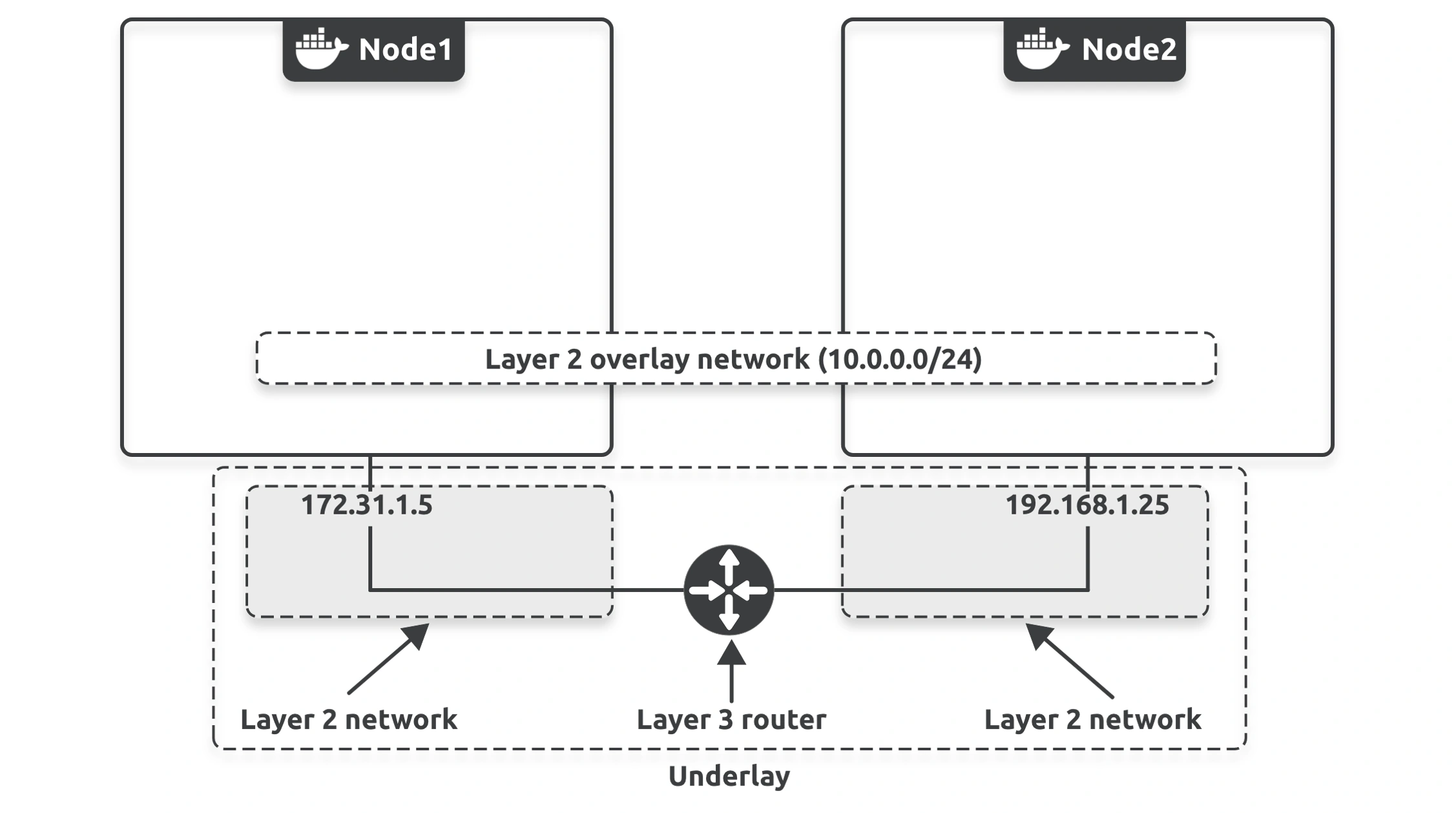
At the highest level, Docker uses VXLANs to create layer 2 networks on top of existing layer 3 infrastructure.
VXLAN is an encapsulation technology and, therefore, transparent to existing routers and network infrastructure. This means the routers and other infrastructure in the underlay network see the VXLAN/overlay traffic as regular IP/UDP packets and handle it without requiring changes.
To create the overlay, Docker creates a VXLAN tunnel through the underlay networks, and this tunnel is what allows the overlay traffic to flow freely without having to interact with the complexity of the underlay networks
Read More
Gossip Protocol Explained - High Scalability -
Docker Deep Dive - Chapter 14
Docker also supports layer 3 routing within an overlay network. For example, you can create a single overlay network with two subnets, and Docker will handle the routing. The following command will create a new overlay called prod-net with two subnets. Docker will automatically create two virtual switches called Br0 and Br1 inside the sandbox and handle all the routing.
docker network create --subnet=10.1.1.0/24 --subnet=11.1.1.0/24 -d overlay prod-netRouting Mesh
01108 - Docker Networking