‘Chapter 4 - Ansible Playbooks’
—Jeff Geerling, “Ansible for DevOps”
‘Chapter 3. Playbooks: A Beginning’
—Bas Meijer, Lorin Hochstein, Rene Moser, “Ansible: Up and Running”
Core Idea
A playbook replaces a shell script with declarative, idempotent YAML: plays run modules against hosts in order, and handlers fire only when something reports a change.
- Playbook architecture, then a side-by-side of a shell script versus the same job as a playbook.
- The idempotence version: run it twice, change nothing the second time.
- Modules as the units of work and handlers (their key characteristics) as the event-driven pieces.
Introduction
An Ansible playbook is a YAML file that defines a series of tasks to be executed on remote servers. Playbooks are the cornerstone of Ansible automation, enabling complex configurations, deployments, and orchestrations in a repeatable, declarative manner.
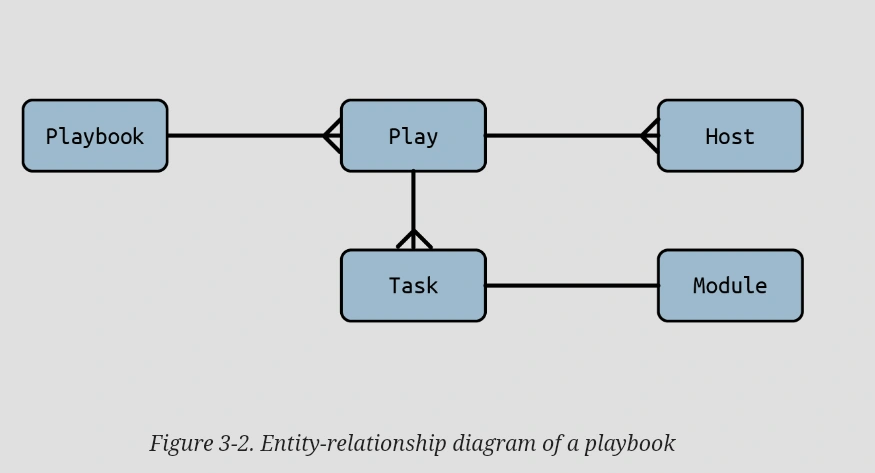
Playbook Architecture
Shell script to Ansible Playbook
Script
# Install Apache
dnf install --quiet -y httpd-devel

# Copy config files
cp httpd.conf /etc/httpd/conf/httpd.conf
cp httpd-vhosts.conf /etc/httpd/conf/httpd-vhosts.conf

# Start Apache and configure it to run at boot.
service httpd start
chkconfig httpd on
Ansible Playbook
---
- hosts: all

  tasks:
	  - name: Install Apache
	    command: dnf install --quiet -y httpd httpd-devel
	  - name: Copy config files
	    command: >
		    cp httpd.conf /etc/httpd/conf/httpd.conf
	  - command: >
			cp httpd-vhosts.conf /etc/httpd/conf/httpd-vhosts.conf
	  - name: Start Apache and configure it to run at boot.
		command: service httpd start
	  - command: chkconfig httpd on
Idempotence version
---
- hosts: all
  become: yes

  tasks:
    - name: Install Apache
      dnf:
        name:
          - httpd
          - httpd-devel
        state: present
    - name: Copy config files
      copy:
        src: "{{ item.src }}"
        dest: "{{ item.dest }}"
        owner: root
        group: root
        mode: 0644
      with_items:
        - src: httpd.conf
          dest: /etc/httpd/conf/httpd.conf
        - src: httpd-vhosts.conf
          dest: /etc/httpd/conf/httpd-vhosts.conf
    - name: Make sure Apache is started now and at boot
      service:
        name: httpd
        state: started
        enabled: yes
👉 04. YAML
Looking at the YAML, it should be clear that a playbook is a list of dictionaries. Specifically, a playbook is a list of plays. Our example is a list that has only a single play.
name :
comment that describes what the play is about. The name is optional, but it’s good style.
become :
If this Boolean variable is true, Ansible will become the become_user to run tasks. This is useful when managing Linux servers, since by default you should not log in as the root user. become can be specified per task,or per play, as needed, and become_user can be used to specify root (the default if omitted) or another user, yet become is subject to your system’s policies.
vars : variables
Tasks
you can use the
--start-at-task <task name>flag to tellansible-playbookto start a playbook in the middle of a play, but you need to reference the task by name.
Modules
Modules are scripts that come packaged with Ansible and perform some kind of action on a host.
package : handle packages
file: file, symlink and directory handling
service: Handle system service
template: Generates a file from a template and copies it to the hosts
Ansible Module Docs
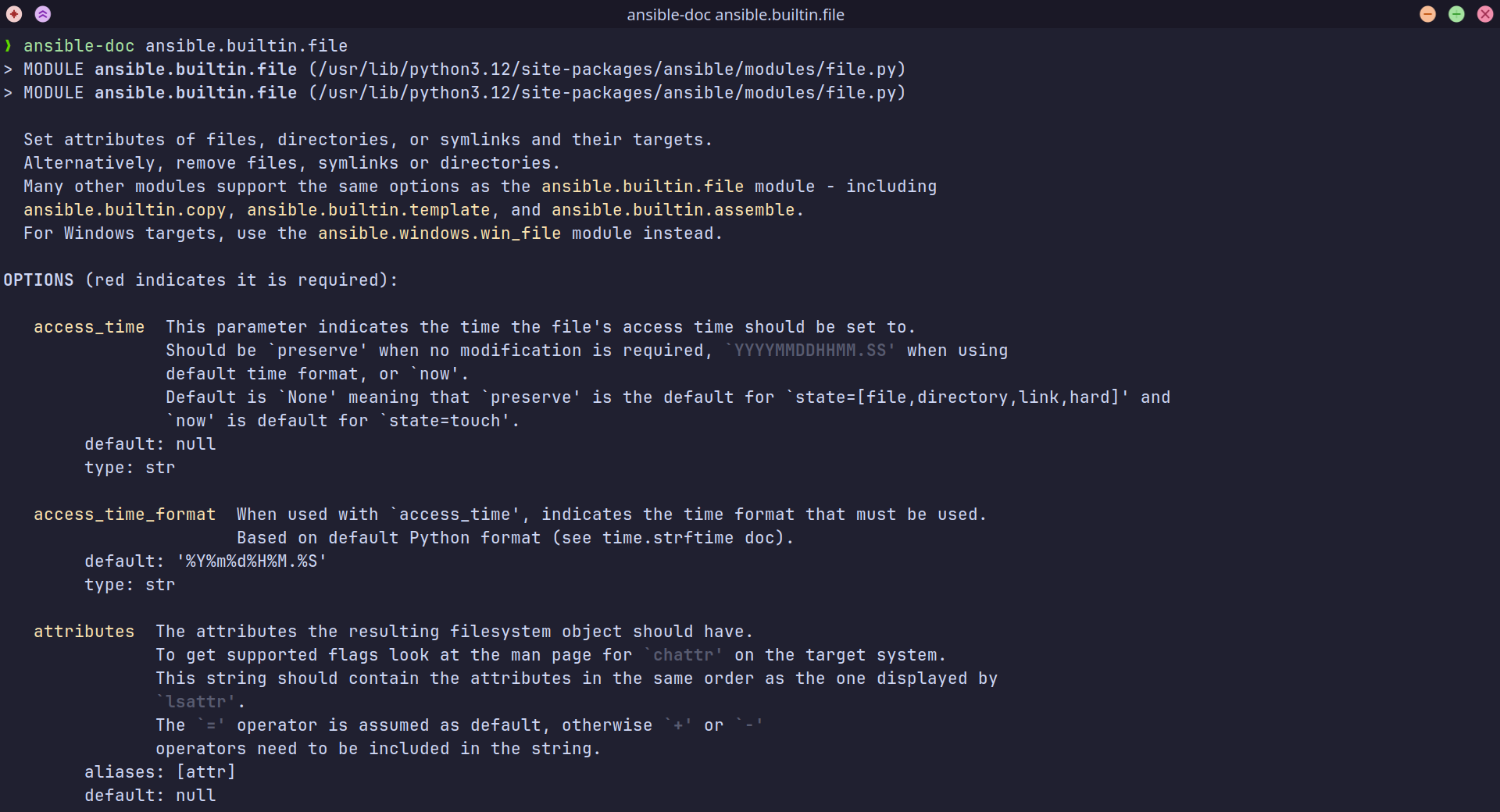
Ansible ships with the
ansible-doccommand-line tool, which shows documentation about the modules you have installed.
Handlers
handlers are special tasks that are triggered by notifications from other tasks. They are typically used to perform actions that should only occur if something changes in a playbook, such as restarting a service after modifying its configuration.
Key Characteristics of Handlers
- Triggered by Notification:
- A handler is executed only when a task explicitly notifies it.
- The notification occurs only if the notifying task reports a
changedstate.
- Execution at the End of a Play:
- By default, handlers are run after all tasks in a play are completed, ensuring that related changes are made before the handler is triggered.
- Idempotency:
- Handlers, like other Ansible tasks, should be idempotent (safe to run multiple times without causing unintended effects).
- Shared Across Tasks:
- Multiple tasks can notify the same handler, and it will run only once per play if triggered
Handlers will run once, and only once, at the end of a play.
Example
---
- hosts: webservers
  become: yes

  tasks:
    - name: Install NGINX
      ansible.builtin.yum:
        name: nginx
        state: present
      notify: Restart NGINX

    - name: Copy NGINX configuration file
      ansible.builtin.copy:
        src: nginx.conf
        dest: /etc/nginx/nginx.conf
      notify: Restart NGINX

  handlers:
    - name: Restart NGINX
      ansible.builtin.service:
        name: nginx
        state: restarted
Force Immediate Execution with listen and meta
Handlers are executed at the end of the play by default. If you need a handler to execute immediately, you can use the meta task with flush_handlers:
---
- hosts: webservers
  become: yes

  vars:
    nginx_config_src: ./nginx.conf
    nginx_config_dest: /etc/nginx/nginx.conf

  tasks:
    - name: Install NGINX
      ansible.builtin.yum:
        name: nginx
        state: present

    - name: Copy NGINX configuration file
      ansible.builtin.copy:
        src: "{{ nginx_config_src }}"
        dest: "{{ nginx_config_dest }}"
        notify: Restart NGINX

    - name: Ensure the NGINX service restarts immediately
      meta: flush_handlers

    - name: Test if the NGINX configuration is valid
      ansible.builtin.command: nginx -t
      register: nginx_test
      failed_when: "'successful' not in nginx_test.stdout"

  handlers:
    - name: Restart NGINX
      ansible.builtin.service:
        name: nginx
        state: restarted
notify: Restart NGINX:- The
Copy NGINX configuration filetask notifies the handlerRestart NGINX.
- The
meta: flush_handlers:- Ensures that the
Restart NGINXhandler is executed immediately after the file copy task. - This is useful because the subsequent task (
nginx -t) depends on the updated configuration being loaded.
- Ensures that the
Using listen for Multiple Names
The listen keyword allows a handler to respond to multiple notifications.
handlers:
  - name: Restart NGINX
    listen:
      - Restart Webserver
      - Reload Webserver
    ansible.builtin.service:
      name: nginx
      state: restarted
Variables
Jinja2 Template
Ansible uses the Jinja2 template engine to implement templating.
Use the .j2 extension to indicate that the file is a Jinja2 template. However, you can use a different extension if you like; Ansible doesn’t care.
Template Designer Documentation — Jinja Documentation (3.1.x)