Core Idea
Ansible is agentless, Python-driven IT automation: describe hosts in an inventory, act through modules and playbooks, and organize everything in a standard directory layout with roles.
- What it is: command-line IT automation for configuration management, application deployment, and orchestration.
- Concepts defined: host, group, inventory, modules, tasks, playbooks, roles.
- The directory layout best practice: inventory, group_vars, host_vars, roles, playbooks.
What’s with the Name Ansible.?
It’s a science-fiction reference. An ansible is a fictional communication device that can transfer information faster than the speed of light.
‘WHAT’S WITH THE NAME ANSIBLE?’
—Bas Meijer, Lorin Hochstein, Rene Moser, “Ansible: Up and Running”
Important
Main Resources Used
- Ansible Up & Running
A comprehensive guide to getting started with Ansible, covering the basics and advanced topics for effective automation.- Ansible for DevOps
A practical guide with examples for using Ansible in real-world DevOps scenarios.- Ansible Documentation
The official Ansible documentation for in-depth reference and the latest updates.- KodeKloud Ansible Advance Course
What is Ansible ?
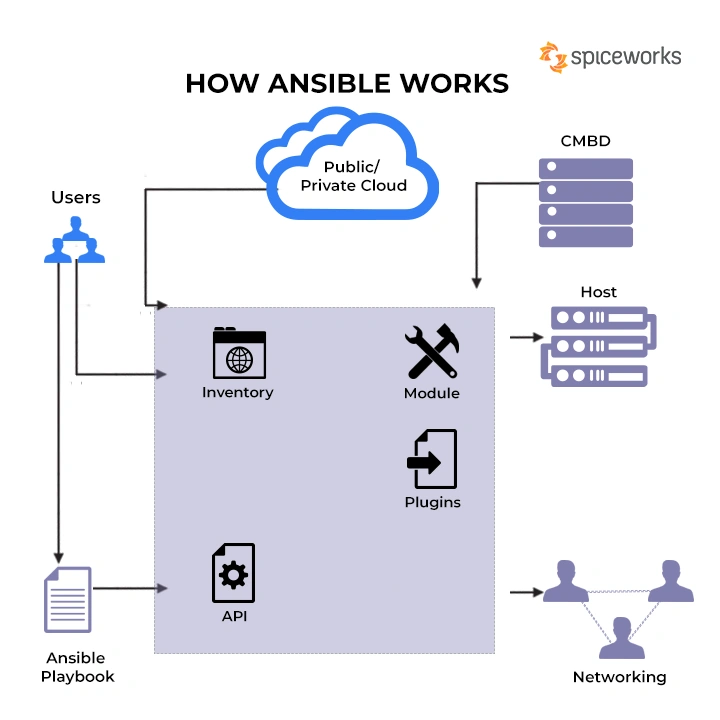
Ansible is an open source, command-line IT automation software application written in Python. It can configure systems, deploy software, and orchestrate advanced workflows to support application deployment, system updates, and more.
Ansible is a tool for IT automation that handles tasks like configuration management, application deployment, and orchestration
Basic Concepts & Terms
Host: A remote machine managed by Ansible.
Group: Several hosts grouped together that share a common attribute.
Inventory: A collection of all the hosts and groups that Ansible manages. Could be a static file in the simple cases or we can pull the inventory from remote sources, such as cloud providers.
Modules: Units of code that Ansible sends to the remote nodes for execution.
Tasks: Units of action that combine a module and its arguments along with some other parameters.
Playbooks: An ordered list of tasks along with its necessary parameters that define a recipe to configure a system.
03. Playbooks
Roles: Redistributable units of organization that allow users to share automation code easier.
Directory Layout
ansible-project/
├── ansible.cfg          # Configuration file for Ansible
├── inventory/           # Inventory files or directories
│   ├── production       # Production inventory
│   └── staging          # Staging inventory
├── group_vars/          # Variables for groups
│   ├── all.yml          # Variables for all groups
│   ├── webservers.yml   # Variables for webservers group
│   └── dbservers.yml    # Variables for database servers group
├── host_vars/           # Variables for specific hosts
│   ├── host1.yml
│   └── host2.yml
├── roles/               # Role definitions
│   ├── common/          # Common role
│   │   ├── tasks/       # Tasks for the common role
│   │   │   └── main.yml
│   │   ├── handlers/    # Handlers for the common role
│   │   │   └── main.yml
│   │   ├── templates/   # Templates for the common role
│   │   ├── files/       # Files for the common role
│   │   ├── vars/        # Variables for the common role
│   │   │   └── main.yml
│   │   ├── defaults/    # Default variables for the common role
│   │   │   └── main.yml
│   │   ├── meta/        # Metadata for the common role
│   │   │   └── main.yml
│   │   └── README.md    # Documentation for the role
│   └── webservers/      # Webservers role (same structure as common)
├── playbooks/           # Playbooks
│   ├── site.yml         # Main playbook
│   ├── webservers.yml   # Playbook for webservers
│   └── dbservers.yml    # Playbook for database servers
├── library/             # Custom modules
├── filter_plugins/      # Custom filter plugins
└── README.md            # Documentation for the project