distributedsystem/microservice/messagequeue systemdesign
RabbitMQ Crash Course
Introduction
Messaging or message queuing is a method of communication between applications or components.
Message Exchanging Patterns
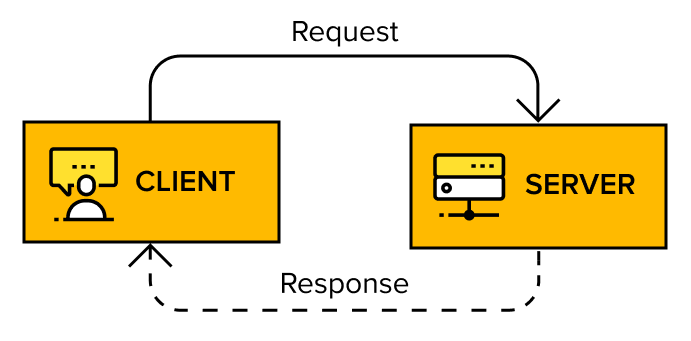
1. Request-Response Pattern
- A client sends a request to a server, which processes it and sends back a response.
- This interaction is synchronous, meaning the client waits for a response before proceeding.
- Examples: Remote Procedure Calls (RPC), Web Services, restaurant reservations.
- Pros: Simple, procedural programming model.
- Cons: Tightly coupled, making the system hard to scale and evolve.
Message Queuing Pattern
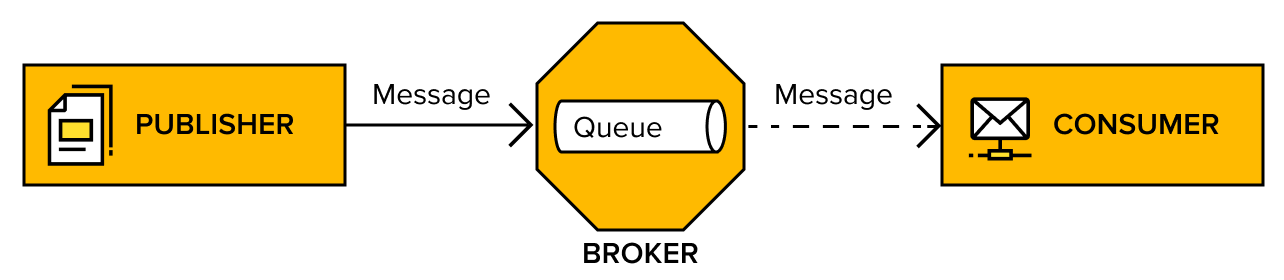
- A producer sends messages to a broker, which delivers them to a consumer asynchronously.
- The producer does not wait for a response; processing continues independently.
- Example: Email communication.
- Pros: Loose coupling, better scalability.
- Cons: No immediate response; may require additional handling if a response is needed.
AMQP
AMQP is an open-standard messaging protocol that defines how systems exchange messages. It ensures interoperability across platforms by specifying a standard wire format for messages.
Key Features
Standardized message exchange between producers, consumers, and brokers.
Vendor-neutral and open-source, with wide language support.
Used in RabbitMQ, which follows the AMQP 0-9-1 specification (with plugins for AMQP 1.0).
Core AMQP Concepts
- Broker – Middleware that routes messages from producers to consumers.
- Virtual Host (vhost) – Isolated namespace within a broker (similar to containers for queues, exchanges, and users).
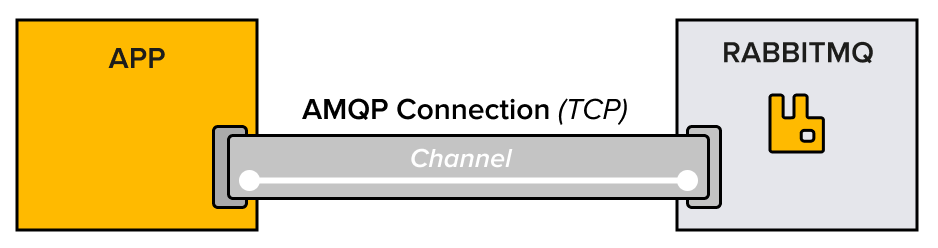
- Connection – A TCP connection between the client and the broker.
- Channel – A virtual connection inside a connection, allowing multiple streams over a single TCP connection.
- Exchange – Determines how messages are routed to queues based on predefined rules (direct, topic, fanout, headers).
- Queue – Stores messages until they are consumed.
- Binding – A link between an exchange and a queue, defining how messages are routed.
Analogy
Think of RabbitMQ (or any message broker) as a Post Office, and exchanges as sorting centers inside the post office.
AMQP Component Post Office Equivalent Broker (RabbitMQ) The entire post office 🏤 that manages all messages (mail, parcels). Exchange A sorting center 📦 inside the post office that decides where mail should go. Queue A mailbox 📬 where sorted letters/packages wait for pickup. Binding The address label 🏷️ that tells which mailbox the mail should be delivered to. Producer The sender ✉️ who drops a letter into the post office. Consumer The recipient 👤 who picks up the letter from their mailbox.
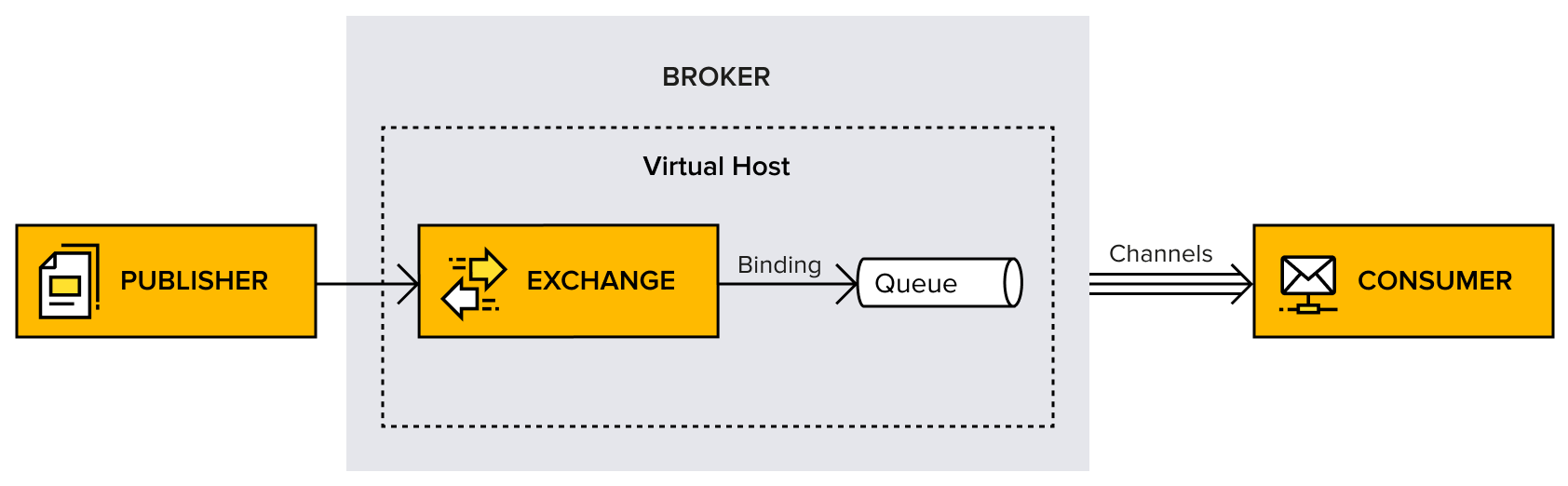
Diagram Representation
graph TD;
    P((Producer))
    X{{Exchange}}
    Q1[[Q₁]]
    Q2[[Q₂]]

    P -->|Publishes Message| X;
    X -->|Routes to Queue| Q1;
    X -->|Routes to Queue| Q2;
    Q1 -->|Delivers to| ConsumerA;
    Q2 -->|Delivers to| ConsumerB;
RabbitMQ
RabbitMQ is a OSS message broker that act as the intermediary/middleman for independent application.
RabbitMQ mainly uses an Erlang based implementation of the Advanced Message Queuing Protocol(AMQP).
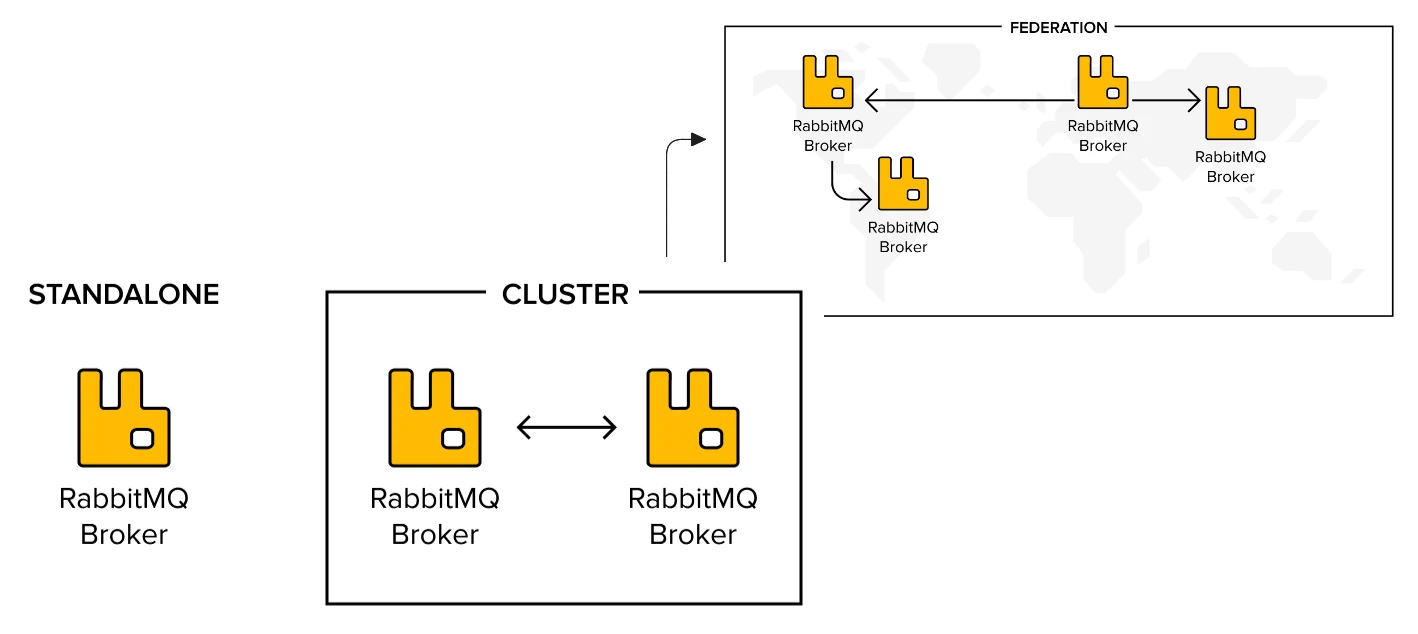
The most common use case for RabbitMQ is a single producer, single consumer queue. Think of it as a pipe where one application puts messages into one end of the pipe and another application reads the messages that come out the other end. Messages are delivered in first in, first out order. These messages may be commands or contain important data.
Every AMQP protocol-related operation occurs over a channel. The channel instances are created by the connection instance. As described, a channel is a virtual (AMQP) connection inside the (TCP) connection.
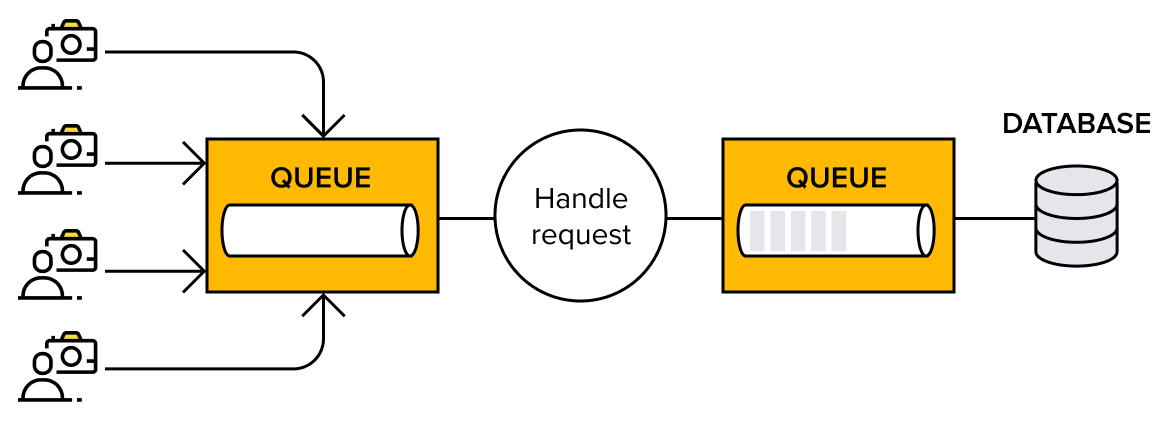
Events and Tasks (Examples)
Events are notifications that tell applications when something has happened. One application can subscribe to events from another application and respond by creating and handling tasks for themselves. A typical use case is when RabbitMQ acts as a task queue that handles slow operations.
- Imagine a social media application such as Instagram. Every time someone publishes a new post, the network (followers) needs to be informed about the new post. This could be a very time-consuming operation. Millions of people could be trying to perform the same task at the same time. The application can, with the use of message queues, enqueue a task onto the queue for each post as it arrives. When the worker receives the request, it retrieves a list of followers for the sender, and updates each of them.
- As another example, think of an email newsletter campaign tool that is sending out thousands of emails to thousands of users. With a possible scenario where many users trigger bulk messages at the same time. The email newsletter campaign tool needs to be able to handle this volume of messages. All these emails can be added to a push queue with instructions to the worker regarding what to send and to whom. Every single email is handled, one by one, until all the emails have been sent.
Users and Virtual hosts
# Create User
rabbitmqctl add_user nimendra 1234

# Create Vhost
rabbitmqctl add_vhost dev-vhost

# set permission
rabbitmqctl set_permission -p dev-vhost nimendra ".*" ".*" ".*"
To recap what was just done, most of the command is straightforward but the ".*" ".*" ".*" part looks a tad mysterious, so let’s analyze it.
It is a triplet of permissions for the considered vhost, which grants configure, write, and read permissions on the designated resources for the considered user and vhost. Resources, which consist of exchanges and queues, are designated by regular expressions that match their names
Exchange Types
Exchanges, like other topology elements in AMQP 0-9-1, are declared by applications using client libraries.
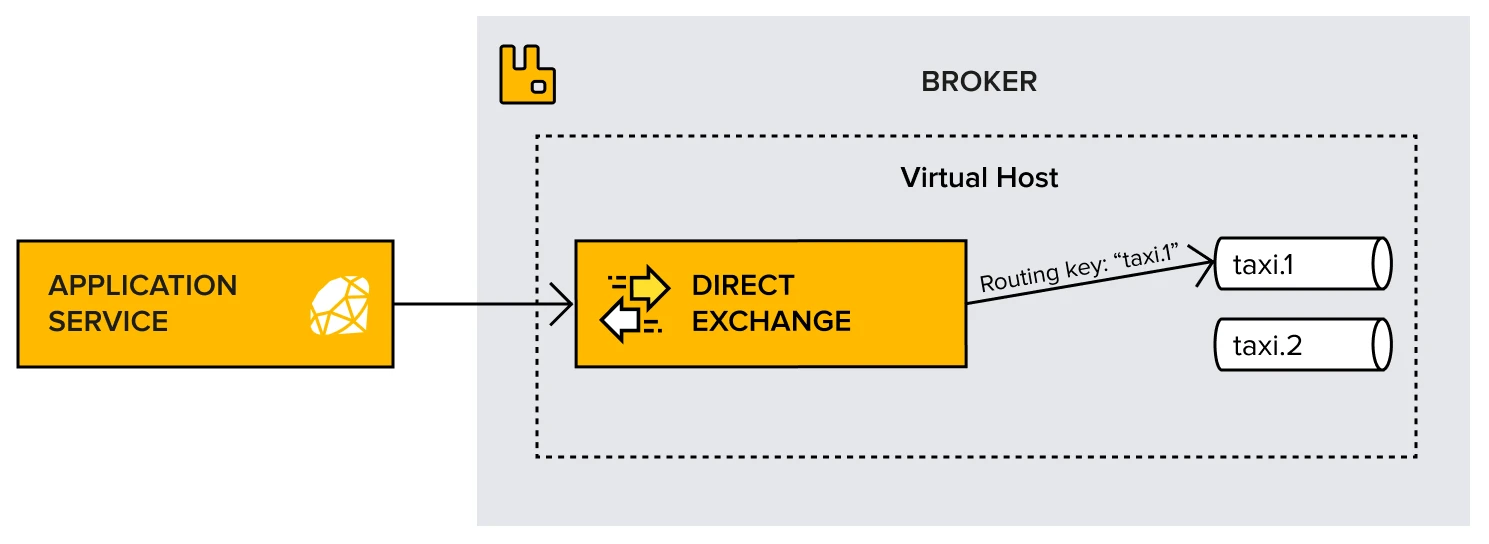
Direct
Routes messages to queues based on an exact routing key match.
- A message contains a routing key.
- The exchange compares the routing key with binding keys of queues.
- If there’s a match, the message is sent only to the matching queue.
---
title: A message with routing key order.created goes only to Queue A.
---
flowchart LR;
	Producer(Producer)
	DirectExchange{{Direct Exchange}}
	QueueA[[Queue A]]
	QueueB[[Queue B]]
    Producer -->|Routing Key: order.created| DirectExchange;
    DirectExchange -->|order.created| QueueA;
    DirectExchange -->|order.shipped| QueueB;
If no queue is bound with the given routing key, the message is discarded (unless an alternate exchange or DLX is configured).
Topic
Routes messages based on wildcard pattern matching in routing keys.
-
Uses wildcards:
*(matches exactly one word)#(matches zero or more words)
-
A queue is bound using pattern-based binding keys.
-
Queue A listens to
user.*(matchesuser.login,user.signup). -
Queue B listens to
user.#(matchesuser.login,user.signup,user.profile.update).
flowchart LR;
	Producer(Producer)
	TopicExchange{{Topic Exchange}}
	QueueA[[Queue A]]
	QueueB[[Queue B]]
    Producer -->|Routing Key: user.signup| TopicExchange;
    TopicExchange -->|user.*| QueueA;
    TopicExchange -->|user.#| QueueB;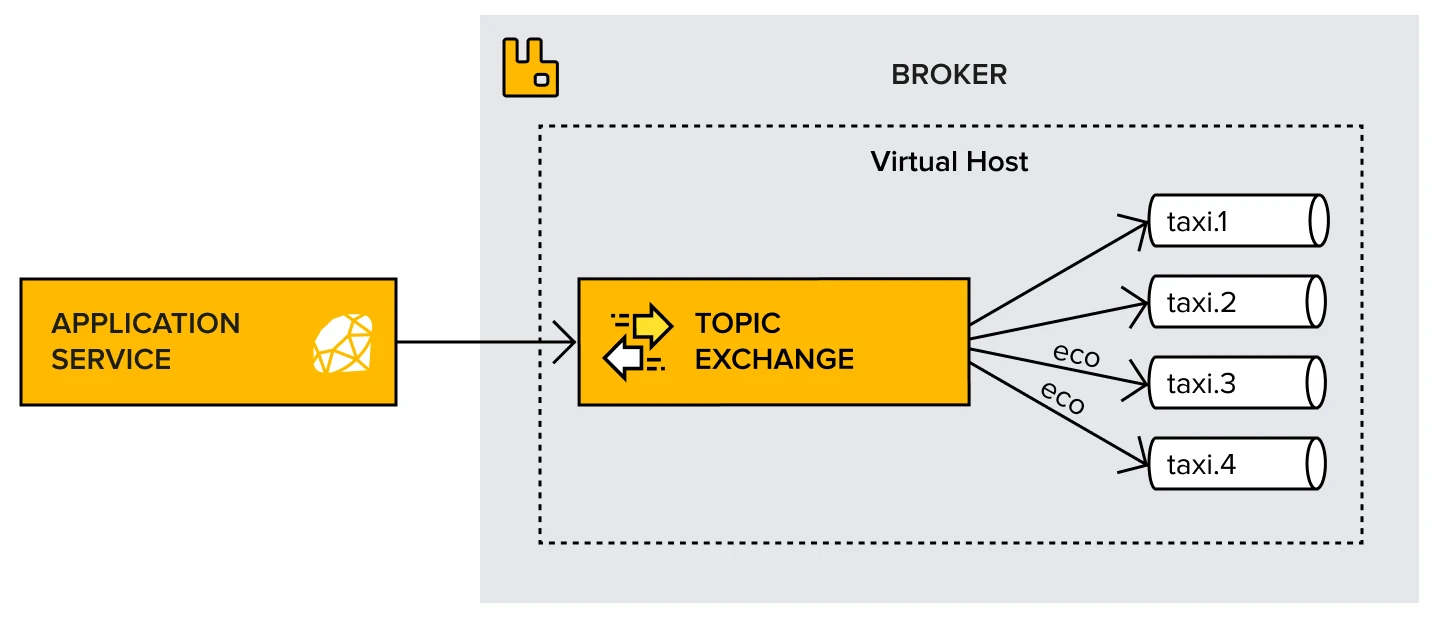
Fanout
Broadcasts messages to all bound queues, ignoring routing keys.
Publisher-Subscriber Architecture
- When a producer sends a message, the exchange copies it to all connected queues.
- Routing keys are ignored.
flowchart LR;
	Producer(Producer)
	FanoutExchange{{Fanout Exchange}}
	QueueA[[Queue A]]
	QueueB[[Queue B]]
	QueueC[[Queue C]]

    Producer --> FanoutExchange;
    FanoutExchange --> QueueA;
    FanoutExchange --> QueueB;
    FanoutExchange --> QueueC;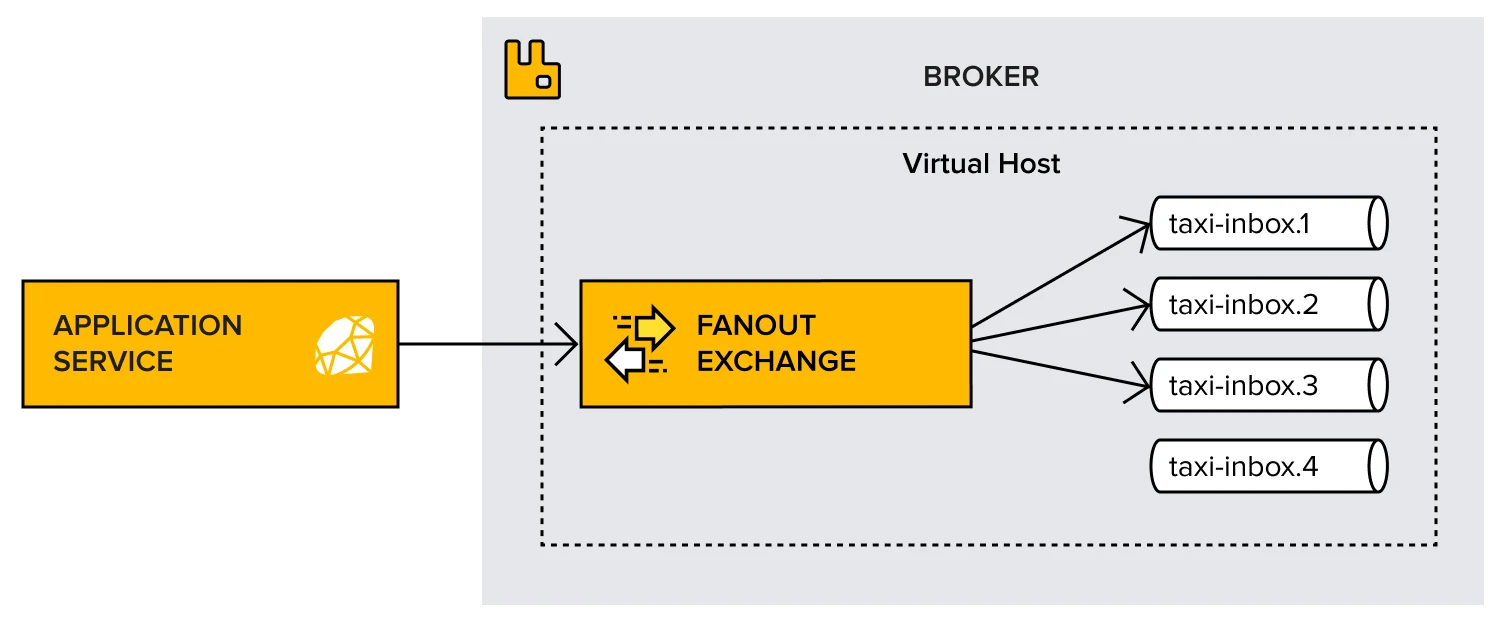
Header Exchange
Routes messages based on message header attributes instead of routing keys.
- Messages contain a headers section.
- Queues bind using header conditions (e.g.,
type=pdf). - The exchange routes messages to queues that match header conditions.
Example:
- Queue A is bound with
{type: pdf, format: A4}. - A message
{type: pdf, format: A4}goes to Queue A.
Default Exchange
The default exchange is a direct exchange that has several special properties:
- It always exists (is pre-declared)
- Its name for AMQP 0-9-1 clients is an empty string (
"") - When a queue is declared, RabbitMQ will automatically bind that queue to the default exchange using its (queue) name as the routing key
Binding
A binding is a link between an exchange and a queue. It defines routing rules that determine which messages should be delivered to a queue based on the exchange type and routing key.
- A queue must be bound to an exchange to receive messages.
- The binding key (used in
directandtopicexchanges) determines which messages the queue will receive. - The exchange routes messages to the queue based on the binding rules.
AMQP Message Structure Summary
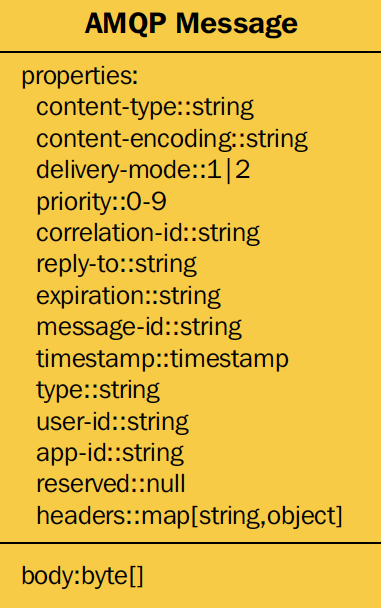
An AMQP message consists of three main parts:
- Properties (Metadata) – Includes standard attributes like
content-type,timestamp,message-id, anddelivery-mode. - Headers – Custom key-value pairs used for advanced routing (mainly in Headers Exchange).
- Body (Payload) – The actual message content (text, JSON, XML, or binary data).
{
  "properties": { "content-type": "application/json", "message-id": "12345" },
  "headers": { "type": "pdf", "format": "A4" },
  "body": { "orderId": "ORD001", "amount": 250.50 }
}
Consuming Messages
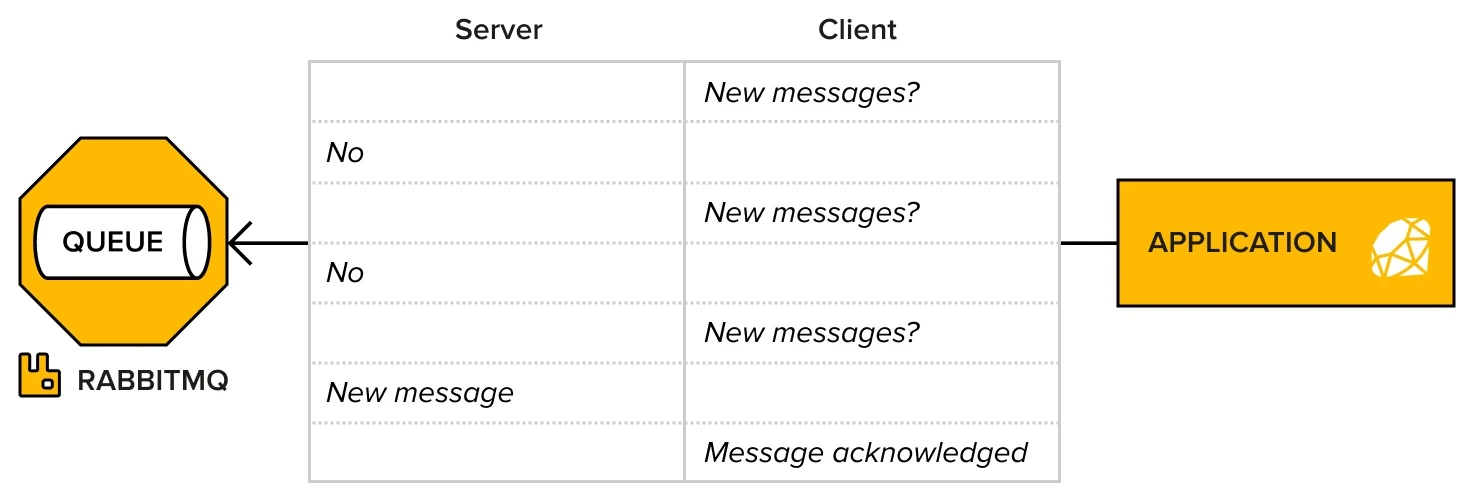
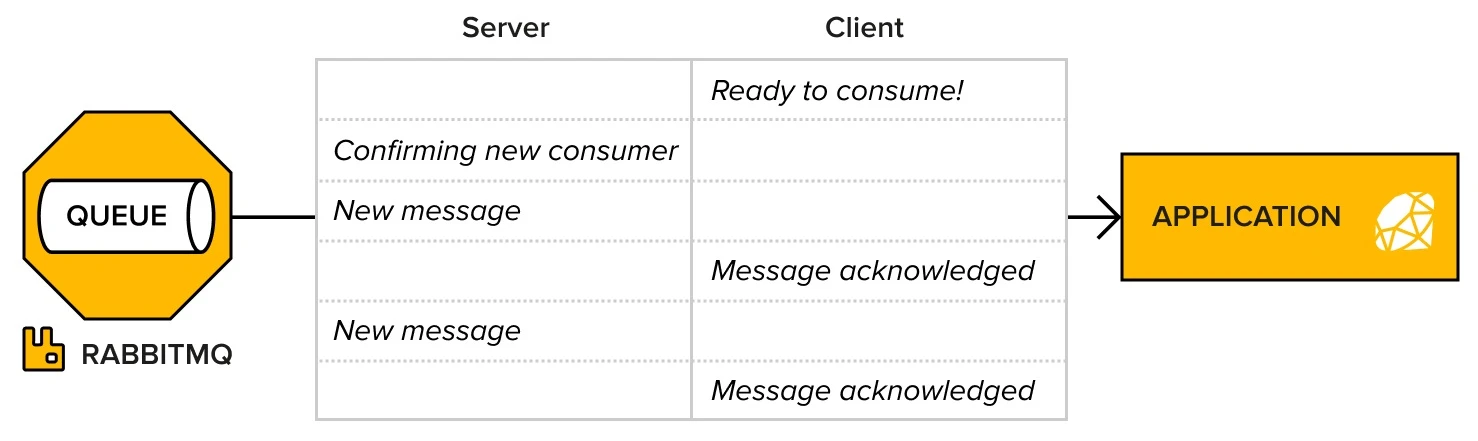
In RabbitMQ, the server-push approach is preferred over polling to avoid performance degradation:
-
Polling-based approach (
basic.get):- The client checks for new messages at regular intervals.
- Can lead to performance issues and high resource usage.
-
Push-based approach (
basic.consume):- The consumer subscribes to a queue, and RabbitMQ pushes messages when available.
- More efficient and less resource-intensive.
- The consumer stays connected as long as the channel is open or the client cancels it.
Ack/Nack
-
Ack (Acknowledgment):
- The consumer acknowledges the message after successful processing.
- Once acknowledged, the message is removed from the queue.
-
Nack (Negative Acknowledgment):
- Used when message processing fails or cannot be completed.
- Nack’ed messages are returned to the queue for another attempt by default.
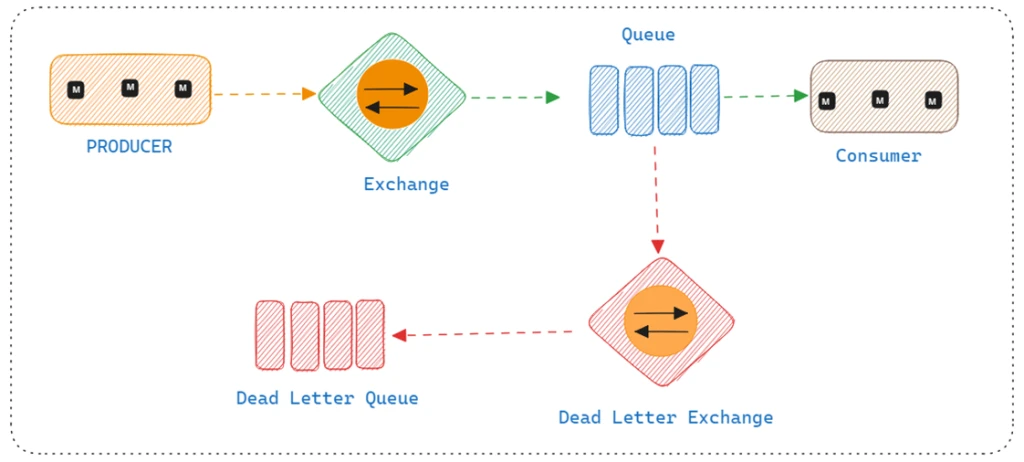
Dead Letter Exchange (DLX)
Dead Letter Exchanges
What is RabbitMQ Dead Letter Exchange and How to Configure it - Tutexchange
Dead Letter Queues
The Problem
‘Things are going very well at Complete Car (CC). The driver-information message feature is gaining traction as more and more drivers join the company. After a few months of activity, one thing becomes clear: not all taxi drivers log in to the application every day, which leads to messages piling up in taxi inbox queues.
Though the amount of data is not detrimental to the system, the idea of having messages lying around in queues, potentially forever, is not satisfactory. Imagine a taxi driver logging in after a couple of weeks of vacation and being flooded with obsolete messages—this is the negative type of user experience that CC is keen to avoid.’
—Lovisa Johansson, “RabbitMQ Essentials - Second Edition”
A Dead Letter Exchange (DLX) is a mechanism in RabbitMQ that allows messages that cannot be delivered or processed successfully to be sent to a special queue, called a dead-letter queue (DLQ), for further inspection or reprocessing. This mechanism is useful for handling failed messages that can’t be routed, rejected, or processed as expected.
How Dead Letter Exchanges Work
When a message is either:
- Rejected (with
basic.nackorbasic.reject), - Expired (based on message TTL),
- Undeliverable (if there’s no queue bound to the exchange),
- Full Queue (when a queue is full and messages can’t be delivered),
The message can be sent to a DLX for logging, inspection, or other actions.
Key Components
- Dead Letter Exchange (DLX):
This is the exchange to which messages are sent when they can’t be delivered to the intended queue. - Dead Letter Queue (DLQ):
This is the queue bound to the DLX where the messages that can’t be delivered will be placed. - Message Expiration:
If a message’s Time-To-Live (TTL) expires, it is sent to the DLX instead of being discarded. - Queue Length Limitation:
If a queue reaches its maximum length, the message is rejected and sent to the DLX.
Configuring DLX in RabbitMQ
You can configure DLX by setting the x-dead-letter-exchange argument on the source queue. Here’s an example configuration:
// Declare a queue with DLX
channel.assertQueue('source-queue', {
    arguments: {
        'x-dead-letter-exchange': 'dlx-exchange' // Set the DLX exchange
    }
});

// Declare the DLX and its queue
channel.assertExchange('dlx-exchange', 'direct');
channel.assertQueue('dlx-queue');
channel.bindQueue('dlx-queue', 'dlx-exchange');
In this setup:
- If messages cannot be delivered to
source-queue, they will be routed todlx-exchange, and placed indlx-queue.
Why Use a Dead Letter Exchange
- Error Handling:
Failed or unprocessable messages are captured and sent to the DLQ for further review or action. - Debugging:
Messages that couldn’t be processed can be inspected in the DLQ to identify why they failed. - Message Reprocessing:
After fixing issues, messages can be manually requeued for processing. - Prevent Message Loss:
Instead of losing messages due to failure conditions, they are stored in the DLQ for later analysis.
Example Scenario
Consider a queue for processing orders:
- If an order cannot be processed (e.g., due to invalid data or a backend system failure), it is nack’ed (negative-acknowledged).
- The message is then routed to a Dead Letter Exchange where it is stored in a Dead Letter Queue for further investigation or retrying after fixing the error.