Intro
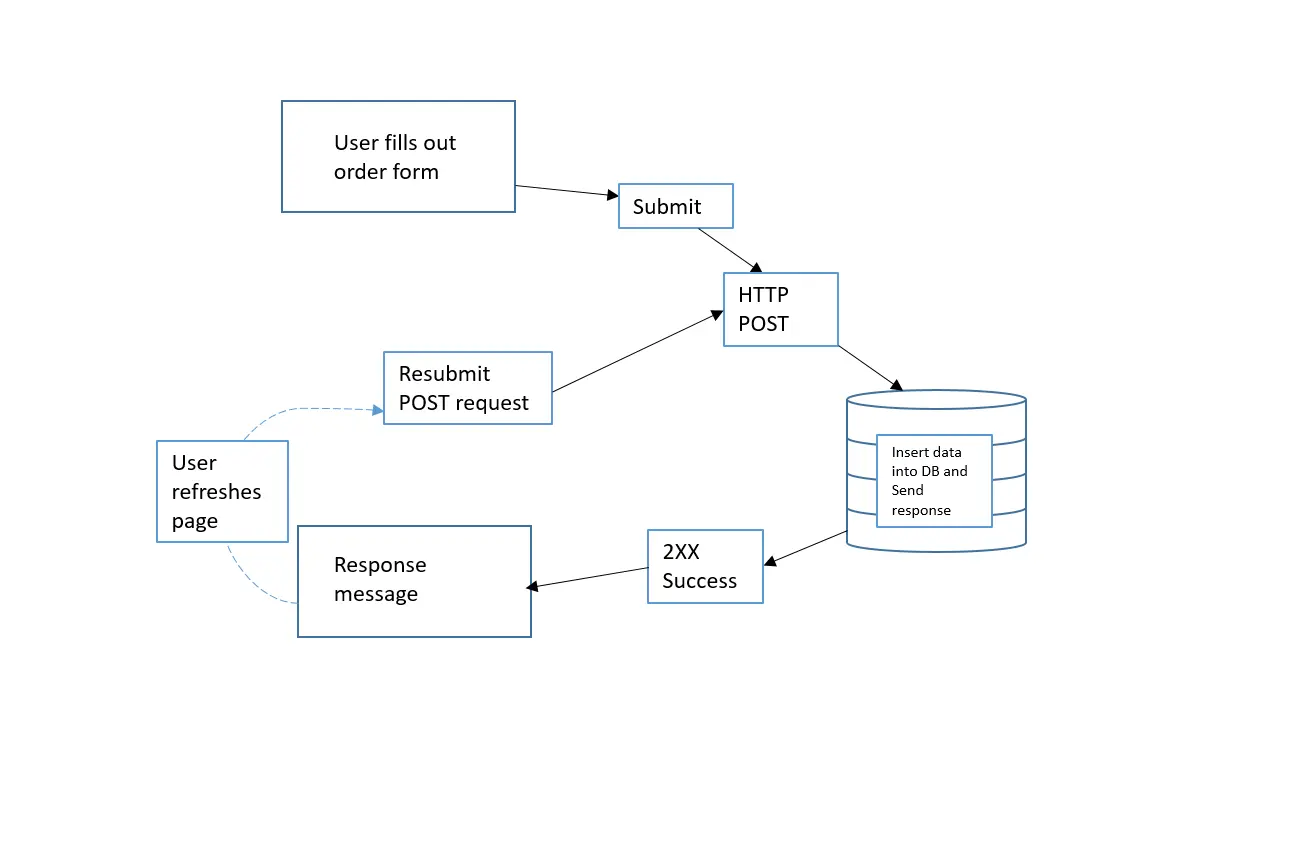
This pattern is particularly useful for handling form submissions and can mitigate issues caused by users refreshing or bookmarking pages that make changes to the server’s state.
Problem
Solution
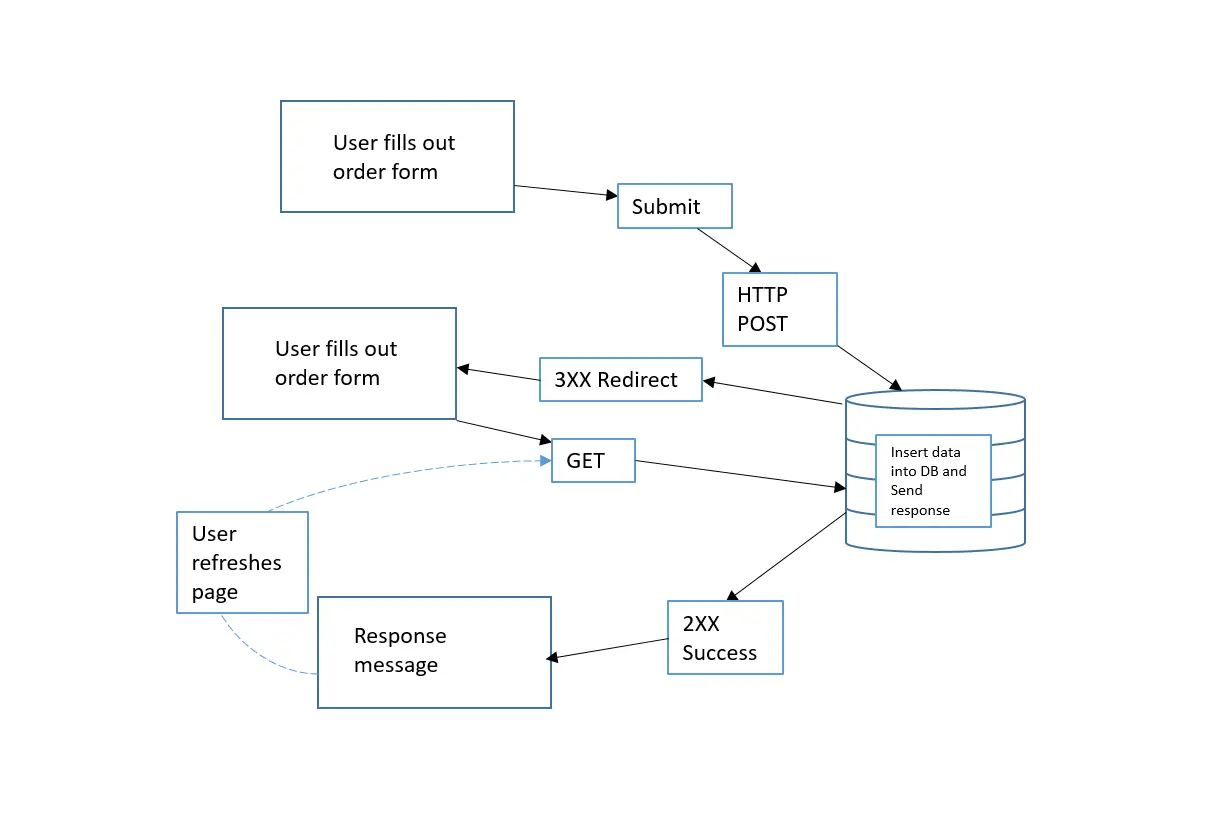
How PRG Works
-
POST Request:
- The user submits a form.
- The browser sends a
POSTrequest to the server. - The server processes the request (e.g., saving data to a database).
-
Redirect (302 Response):
- Instead of directly rendering a response, the server responds with a
302 Foundstatus and aLocationheader pointing to a different URL (often aGETrequest to a confirmation page).
- Instead of directly rendering a response, the server responds with a
-
GET Request:
- The browser follows the redirect and makes a
GETrequest to the new URL. - The server responds with the final page (e.g., a success message or the updated content).
- The browser follows the redirect and makes a
Why Use PRG?
-
Prevents Duplicate Form Submissions:
- Without PRG, refreshing the page after a
POSTrequest resubmits the form. - With PRG, refreshing only reloads the
GETrequest, avoiding duplicate actions.
- Without PRG, refreshing the page after a
-
Improves User Experience:
- Users can bookmark or share the final
GETpage without causing unintended side effects.
- Users can bookmark or share the final
-
Follows REST Principles:
- Helps maintain a clear separation between actions (POST) and retrieval (GET).
Example Scenario
Without PRG
- User submits a form (
POSTto/submit). - The server processes it and returns a success page.
- User refreshes the page → Form gets resubmitted!
With PRG
- User submits a form (
POSTto/submit). - Server processes the data and redirects (
302) to/success. - Browser follows the redirect and makes a
GETrequest to/success. - User refreshes
/success→ No duplicate submission.
const express = require("express");
const bodyParser = require("body-parser");

const app = express();
const PORT = 3000;

app.use(bodyParser.urlencoded({ extended: true }));

// Serve the form page
app.get("/", (req, res) => {
  res.send(`
    <h2>Post/Redirect/Get Example</h2>
    <form action="/submit" method="POST">
      <input type="text" name="name" placeholder="Enter your name" required />
      <button type="submit">Submit</button>
    </form>
  `);
});

// Handle form submission (POST request)
app.post("/submit", (req, res) => {
  const { name } = req.body;

  // Simulating saving data (e.g., to a database)
  console.log(`Received name: ${name}`);

  // Redirect to success page (PRG pattern)
  res.redirect(`/success?name=${encodeURIComponent(name)}`);
});

// Success page (GET request)
app.get("/success", (req, res) => {
  const name = req.query.name || "Guest";
  res.send(`<h2>Thank you, ${name}! Your form was submitted successfully.</h2>
            <a href="/">Go back</a>`);
});

app.listen(PORT, () => {
  console.log(`Server running on http://localhost:${PORT}`);
});