Core Idea
Namespaces split a cluster into virtual clusters for teams and environments, but the isolation is soft: they are not kernel namespaces, and a compromised workload can still cross them.
- Kernel namespaces partition an OS into containers; Kubernetes namespaces partition a cluster into namespaces, each with its own users, permissions, quotas, and policies.
- Use cases: multiple tenants (apps, teams, customers) on one cluster; strong isolation still means separate clusters and hardware. Cluster-scoped objects like Nodes and PVs cannot be namespaced.
- Defaults:
default,kube-system,kube-public,kube-node-lease, plus hands-on creating a namespace and deploying objects into it.
Namespaces
Namespaces are a way of dividing a Kubernetes cluster into multiple virtual clusters.
Important
Kubernetes Namespaces are not the same as kernel namespaces.
- Kernel namespaces partition operating systems into virtual operating systems called containers
- Kubernetes Namespaces partition Kubernetes clusters into virtual clusters called Namespaces.
you can create Namespaces for your
dev,test, andqaenvironments and apply different quotas and policies to each. However, they won’t stop a compromised workload in one Namespace from impacting workloads in other Namespaces.
this command shows namespaced objects. kubectl api-resources | grep -E "true"
Objects that aren’t namespaced, such as Nodes and PersistentVolumes, are cluster-scoped and cannot be isolated to Namespaces.
Unless you specify otherwise, Kubernetes deploys objects to the default Namespace.
Use cases
Namespaces are a way for multiple tenants to share the same cluster.
Tenant is a loose term and can refer to individual applications, different teams or departments, and even external customers.
You’d deploy Finance apps to the finance Namespace, HR apps to the hr Namespace, and Corporate apps to the corporate-ops Namespace. Each Namespace can have its own users, permissions, resource quotas, and policies
They only provide soft isolation and cannot prevent compromised workloads
from escaping the Namespace and impacting workloads in other Namespaces. At the time of writing, the only way to strongly isolate tenants is to run them on their own clusters and their own hardware.
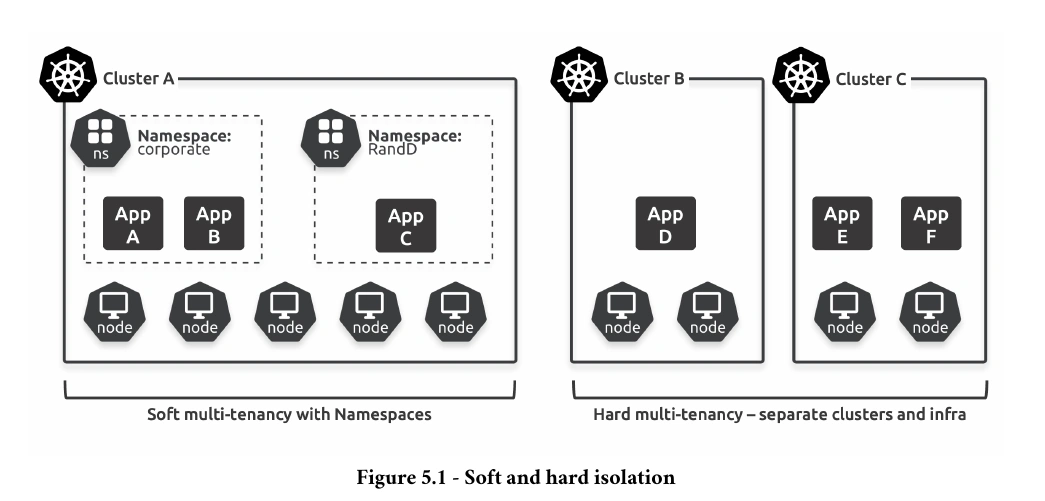
Default Namespaces
Every Kubernetes cluster has a set of pre-created Namespaces.
kubectl get namespaces
- default - Namespace is where new objects go if you don’t specify a Namespace when creating them.
- kube-system - where control plane components such as the internal DNS service and the metrics server run.
- kube-public - for objects that need to be readable by anyone.
- kube-node-lease - used for node heartbeat and managing node leases
👉 Split Brain Condition > 2. Leader Election and Heartbeats
Hands on
Create Namespace
kind: Namespace
apiVersion: v1
	metadata:
		name: shield
		labels:
			env: marvel
set kubeconfig to automatically run commands against a specific Namespace.
kubectl config set-context --current --namespace shieldDeploying objects
apiVersion: v1
kind: ServiceAccount
metadata:
  namespace: shield
  name: default
---
apiVersion: v1
kind: Service
metadata:
  namespace: shield
  name: the-bus
spec:
  type: LoadBalancer
  ports:
  - port: 8080
    targetPort: 8080
  selector:
    env: marvel
---
apiVersion: v1
kind: Pod
metadata:
  namespace: shield
  name: triskelion
  labels:
    env: marvel
spec:
  containers:
  - image: nigelpoulton/k8sbook:shield-01
    name: bus-ctr
    ports:
    - containerPort: 8080