kubernetes kubernetes/networking kubernetes/primer
Core Idea
Pods are ephemeral, so a Service fronts identical pods with a stable DNS name, IP, and port; the service type decides who can reach them.
- Labels give loose coupling between services and pods, and EndpointSlices keep the ready endpoint list.
- Service types walk from in-cluster to outside: ClusterIP, NodePort, LoadBalancer, ExternalName, and headless.
- Hands-on section includes EndpointSlice objects and a Kind setup.
Service
Kubernetes treats Pods as ephemeral1 objects.
This means they’re unreliable, and apps can’t rely on them being there to respond to requests.
Service objects sit in front of one or more identical Pods and expose them via a reliable DNS name, IP address, and port.
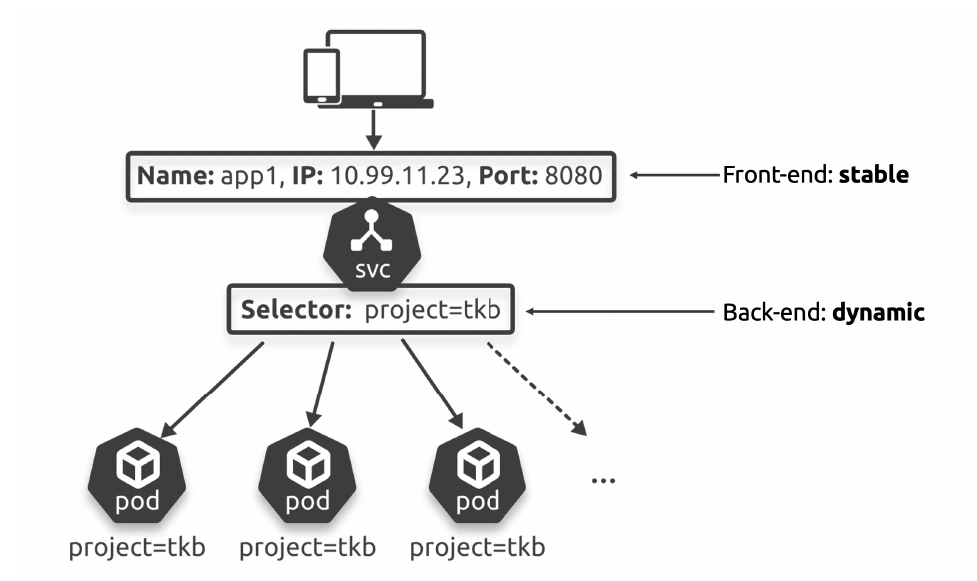
Every Service has a front end and a back end. The front end includes a DNS name, IP address, and network port that Kubernetes guarantees will never change.
The back end is a label selector that sends traffic to healthy Pods with matching labels.Looking back to Figure, the client sends traffic to the Service on either app1:8080 or 10.99.11.23:8080, and Kubernetes guarantees it will reach a Pod with the
project=tkblabel.Services are also intelligent enough to maintain a list of healthy Pods with matching labels. This means you can scale up and down, perform rolling updates and rollbacks,and Pods can even fail, but the Service will always have an up-to-date list of active healthy Pods.
Labels & loose coupling
Services use labels and selectors to know which Pods to send traffic to.
Example:
apiVersion: apps/v1
kind: Deployment
metadata:
	name: tkb-2025
spec:
	replicas: 10
...
	template:
		metadata:
			labels:
				project: tkb
				zone: prod
		spec:
			containers:
...
---
apiVersion: v1
kind: Service
metadata:
	name: tkb
spec:
	ports:
	- port: 8080
	selector:
		project: tkb
		zone: prod
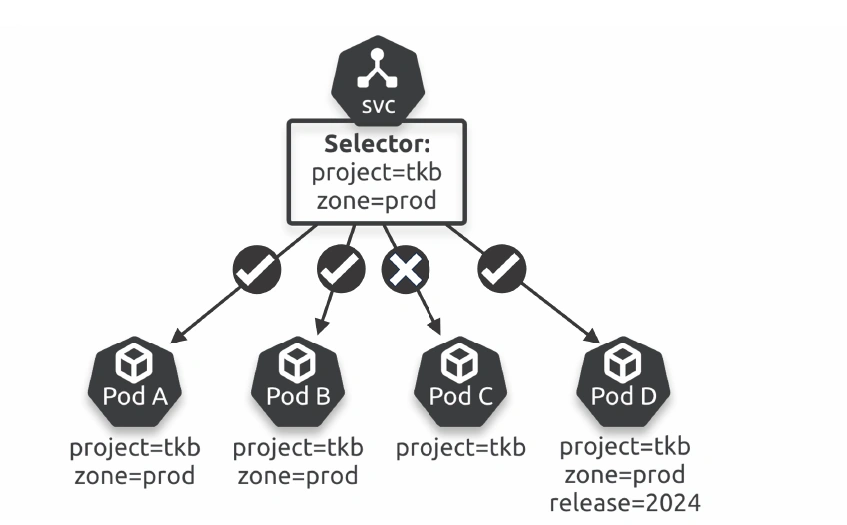
the Service sends traffic to Pod A, Pod B, and Pod D because they have all the labels it’s looking for. It doesn’t matter that Pod D has additional labels.
How- ever, it won’t send traffic to Pod C because it doesn’t have both labels. The following YAML defines a Deployment and a Service.
The Deployment will create Pods with the project=tkb and zone=prod labels, and the Service will send traffic to them.
EndpointSlices
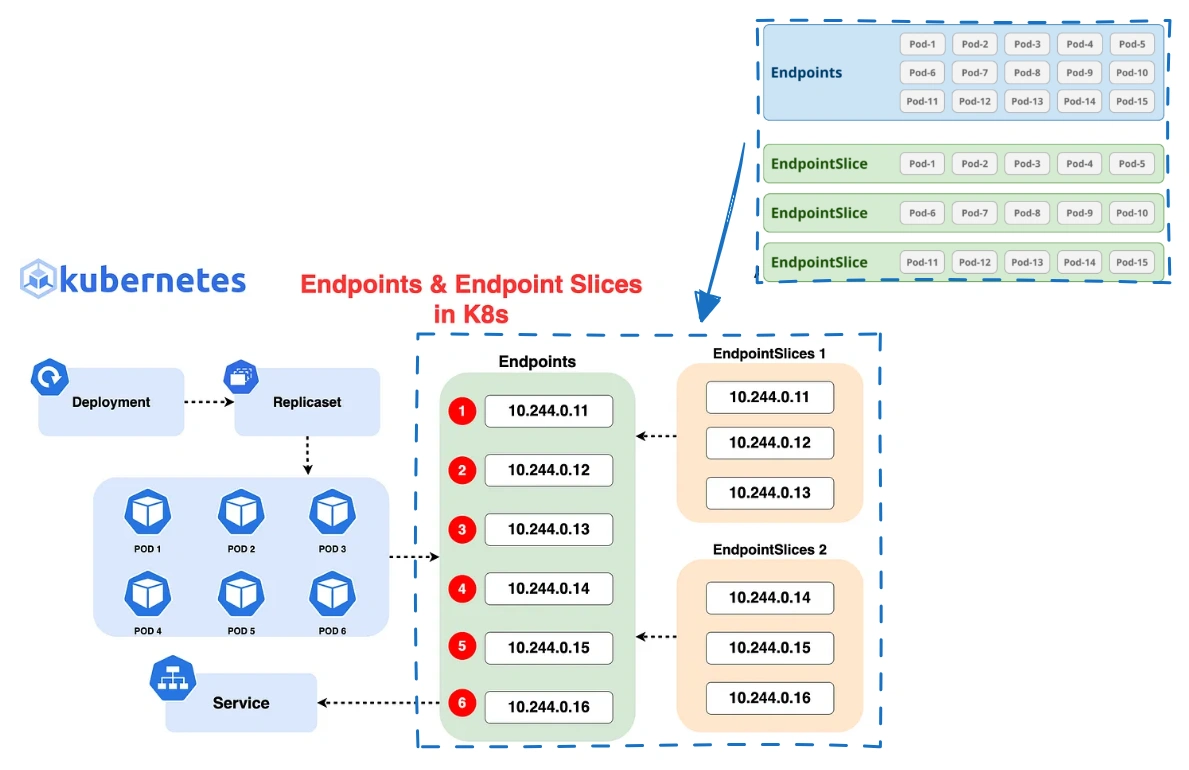
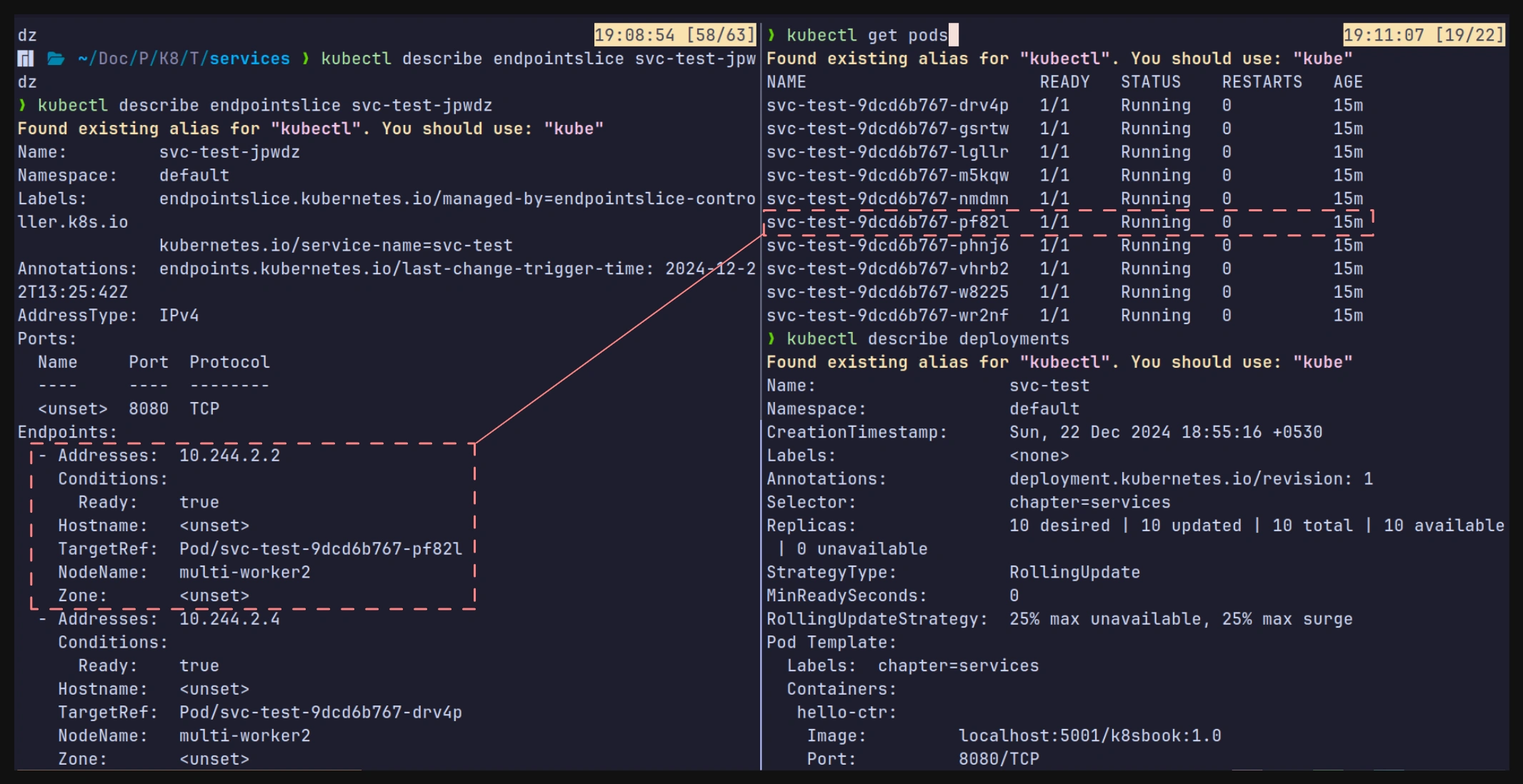
Whenever you create a Service, Kubernetes automatically creates an associated End-pointSlice to track healthy Pods with matching labels.
- You create a Service, and the EndpointSlice controller automatically creates an associated EndpointSlice object.
- Kubernetes then watches the cluster, looking for Pods matching the Service’s label selector.
- Any new Pods matching the selector are added to the EndpointSlice, whereas any deleted Pods get removed.
- Applications send traffic to the Service name, and the application’s container uses the cluster DNS to resolve the name to an IP address.
- The container then sends the traffic to the Service’s IP, and the Service forwards it to one of the Pods listed in the EndpointSlice.
Practical Example
Endpoints:
For a Service with 1,000 Pods, all Pod IPs are stored in one large Endpoints object. This leads to:
- High memory usage.
- Slower updates for changes in Pod IPs or statuses.
EndpointSlices:
For the same Service, the 1,000 Pods are divided into 10 EndpointSlices (e.g., 100 endpoints per slice). This results in:
- Smaller, faster updates.
- Better performance for large-scale applications.
Service Types
-
ClusterIP - Most basic and provides a reliable endpoint (name, IP, and port) on the internal Pod network.
-
NodePort - Services build on top of ClusterIP and allow external clients to connect via a port on every cluster node.
-
LoadBalancers - Build on top of both and integrate with cloud load balancers for extremely simple access from the internet.
-
**ExternalName** - An ExternalName service is used to map a service in your Kubernetes cluster to an external DNS name outside the cluster.
-
Headless Service - A Headless Service is used when you don’t need or want a ClusterIP (not considered a Service Type)
ClusterIP - Accessing apps from inside the cluster
ClusterIP is the default. It gets a name and IP that is programmed into the internal network fabric and is only accessible from inside the cluster.
- The IP is only routable on the internal network
- The name is automatically registered with the cluster’s internal DNS
- All containers are pre-programmed to use the cluster’s DNS to resolve names.
You’re deploying an application called skippy, and you want other applications on the cluster to access it by its name.
To satisfy these requirements, you create a new ClusterIP Service called skippy. Kubernetes creates the Service, assigns it an internal IP, and creates the DNS records in the cluster’s internal DNS.
Kubernetes also configures all containers on the cluster to use the cluster DNS for name resolution.
This means every app on the cluster can connect to the new app using the skippy name.
This doesn’t work outside the cluster, as ClusterIPs aren’t routable, and they require access to the cluster DNS.
NodePort Services - Accessing apps from outside the cluster
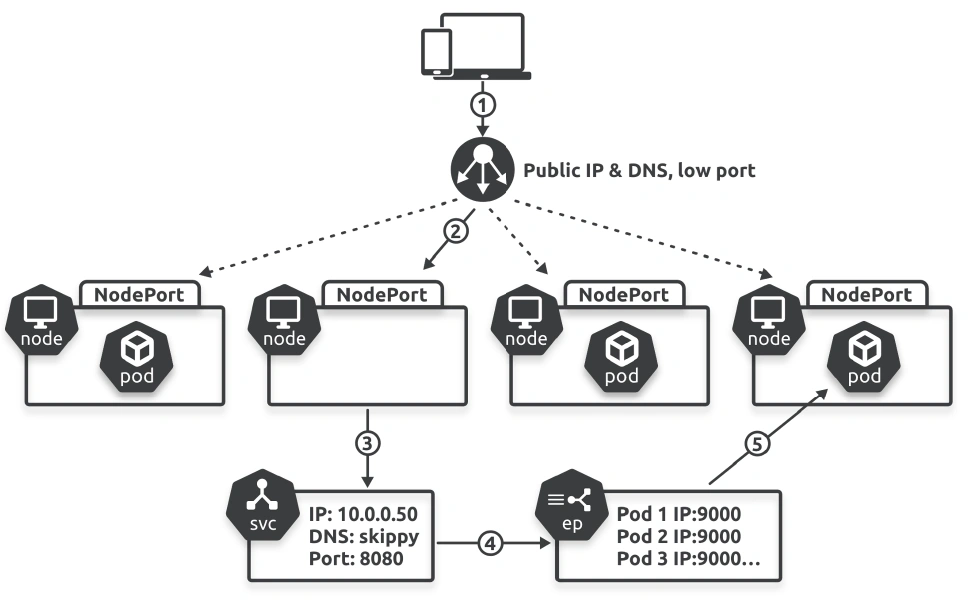
NodePort Services build on top of ClusterIP Services by adding a dedicated port on every cluster node that external clients can use.
apiVersion: v1
kind: Service
metadata:
	name: skippy
spec:
	type: NodePort
	ports:
	- port: 8080 # ClusterIP port
	  targetPort: 9000 # Application port in container
      nodePort: 30050 # External port on every cluster node (nodeport)
	selector:
      app: hello-world
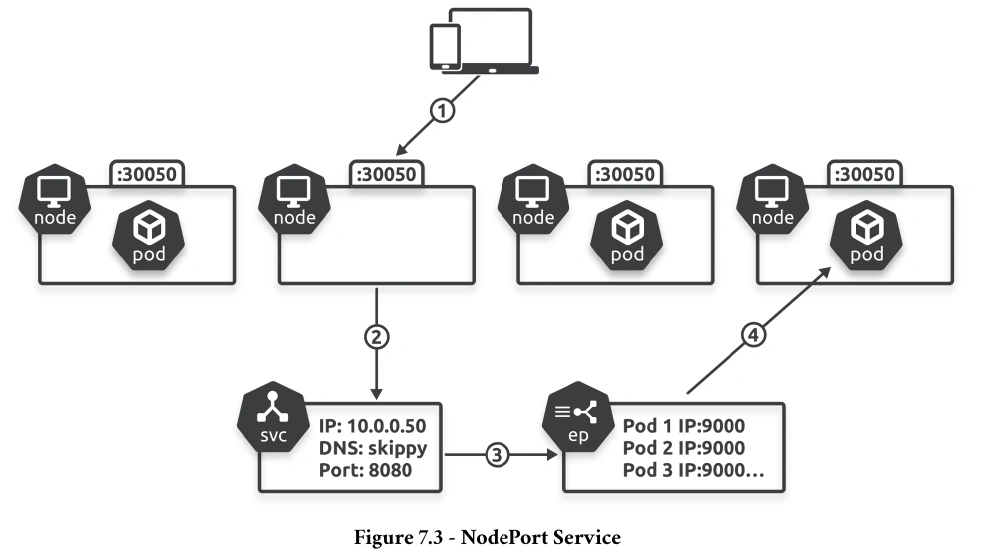
Posting this to the cluster will create a ClusterIP Service with the usual internally routable IP and DNS name. It will also create port 30050 on every cluster node and map it back to the ClusterIP. This means external clients can send traffic to any cluster node
on port 30050 and reach the Service.
The external client could’ve sent the request to any cluster node, and the Service could’ve sent the request to any of the three healthy Pods. In fact, future requests will probably go to other Pods as the Service performs basic round-robin load balancing.
- Nodeport use high-numbered ports between 30000-32767
- Clients need to know the names or IPs of nodes, as well as whether nodes are healthy
LoadBalancer Services - Accessing apps via load balancers
LoadBalancer Services are the easiest way of exposing Services to external clients. They simplify NodePort Services by putting a cloud load balancer in front of them.
apiVersion: v1
kind: Service
metadata:
	name: lb
spec:
	type: LoadBalancer
	ports:
	- port: 8080 # ClusterIP port
	  targetPort: 9000 # Application port in container
	selector:
      app: tkb
It automatically creates the required NodePort and ClusterIP constructs in the background.
ExternalName Service
An ExternalName service is used to map a service in your Kubernetes cluster to an external DNS name outside the cluster. Instead of using a ClusterIP or forwarding traffic to a backend pod, this service simply acts as an alias for an external DNS name.
When a client inside the cluster queries the service, Kubernetes returns a CNAME record pointing to the external name (DNS) specified in the service.
Use cases
- Accessing external resources like third-party APIs or managed databases (e.g., AWS RDS, Google Cloud SQL).
- Simplifying the usage of external services by using an internal Kubernetes service name.
Example
apiVersion: v1
kind: Service
metadata:
  name: my-external-service
spec:
  type: ExternalName
  externalName: api.example.com
Headless Service
A Headless Service is used when you don’t need or want a ClusterIP (a virtual IP to route traffic).
Instead, it lets the service directly expose individual pod IPs to clients.
Maintains stable network identity for each pod.
Bypasses kube-proxy, enabling direct pod proxying.
- By setting the
ClusterIPfield toNone, the service won’t allocate a ClusterIP. - Instead, it relies on DNS to resolve directly to the pods’ IP addresses.
- DNS resolution behavior depends on whether the service is used with or without selectors:
- With Selectors: Kubernetes creates DNS records that resolve to the IP addresses of the selected pods.
- Without Selectors: You can manually create Endpoints for the service.
Use Cases
- Stateful workloads, such as databases (e.g., Cassandra, MongoDB) where clients need to directly access individual pod instances.
- Workloads using custom load balancing where Kubernetes-provided load balancing isn’t required.
Example
apiVersion: v1
kind: Service
metadata:
  name: my-headless-service
spec:
  clusterIP: None
  selector:
    app: my-app
  ports:
    - port: 80
      targetPort: 8080
Services Hands on
$ kubectl expose deployment svc-test --type=LoadBalancer
service/svc-test exposed
❯ kubectl describe svc svc-test
Found existing alias for "kubectl". You should use: "kube"
Name: svc-test
Namespace: default
Labels: <none>
Annotations: <none>
Selector: chapter=services
Type: LoadBalancer
IP Family Policy: SingleStack
IP Families: IPv4
IP: 10.96.121.219
IPs: 10.96.121.219
LoadBalancer Ingress: 172.25.0.6 (Proxy)
Port: <unset> 8080/TCP
TargetPort: 8080/TCP
NodePort: <unset> 31981/TCP
Endpoints: 10.244.2.2:8080,10.244.2.4:8080,10.244.1.3:8080 + 7 more...
Session Affinity: None
External Traffic Policy: Cluster
Internal Traffic Policy: ClusterEndpoints is the list of healthy matching Pods from the Service’s EndpointSlice object.
Session Affinity allows you to control session stickiness — whether or not connections from the same client always go to the same Pod. The default is None and allows connections from the same clients to be forwarded to any Pods. You should try the ClientIP option if your clients and Pods store state in Pods and require session stickiness. However, this is an anti-pattern as microservices apps should be designed for process disposability where clients can connect to any instance of a service.
External Traffic Policy dictates whether traffic hitting the Service will be load balanced across Pods on all cluster nodes or just Pods on the node the traffic arrives on. The default is Cluster, and it sends traffic across Pods on all cluster nodes but obscures source IP addresses. The other option is Local, which only sends traffic to Pods on the node the traffic arrives on but preserves source IPs.
EndpointSlice objects
Kind setup
go install sigs.k8s.io/cloud-provider-kind@latest

./cloud-provider-kind
Footnotes
-
lasting for a very short time. ↩