Service discovery in Kubernetes refers to the process of enabling communication between different services or pods in a dynamic and distributed environment. It ensures that applications can discover and connect to services without needing to know their specific IP addresses, which might change due to scaling, rescheduling, or failures.
Intro
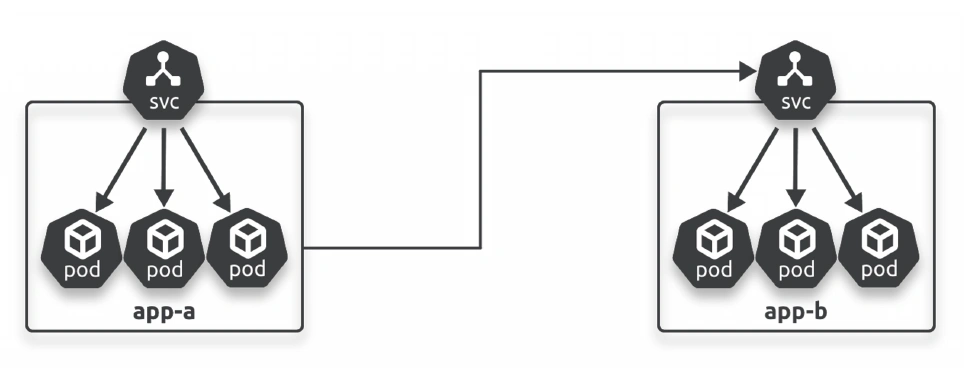
Most Kubernetes clusters run hundreds or thousands of microservices apps. Each one sits behind its own Service for a reliable name and IP.
app talks to another using service.
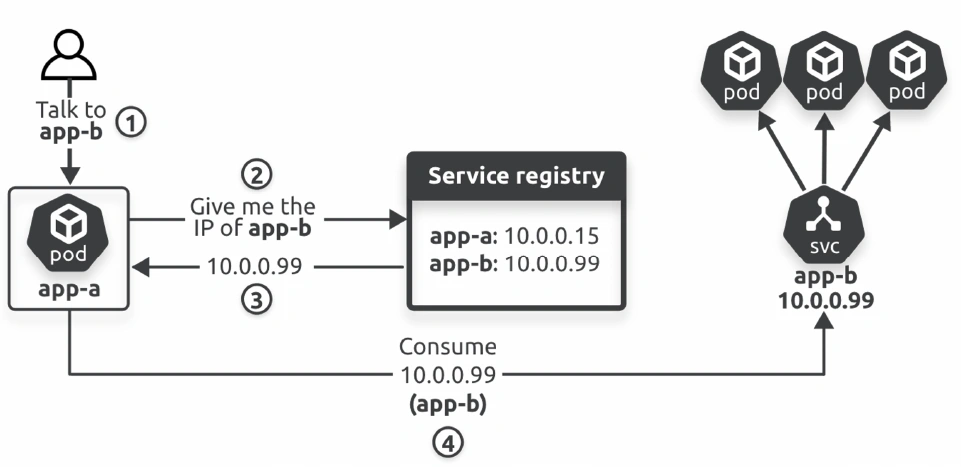
Apps need two things to be able to send requests to other apps:
A way to know the name of the other app (the name of its Service)
A way to convert the name into an IP address
Service registry
The job of a service registry is to maintain a list of Service names and their associated IP addresses. Apps use it to convert Service names into IP addresses.
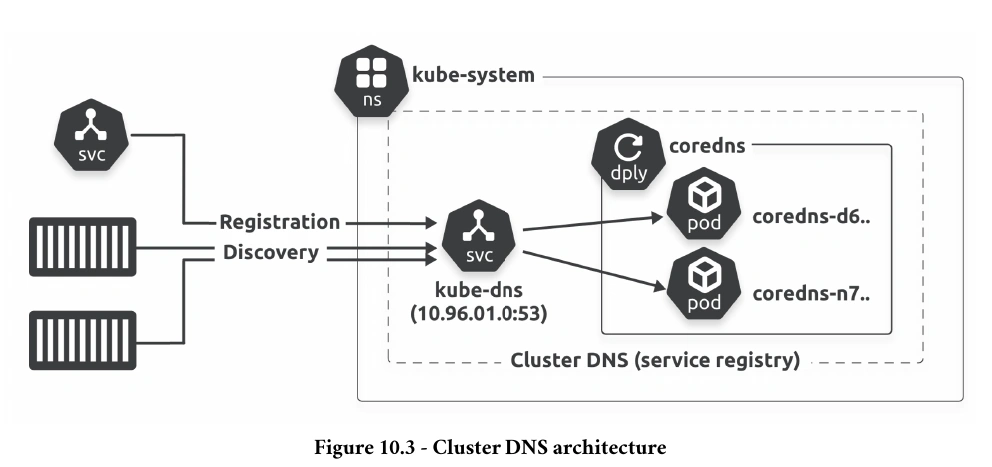
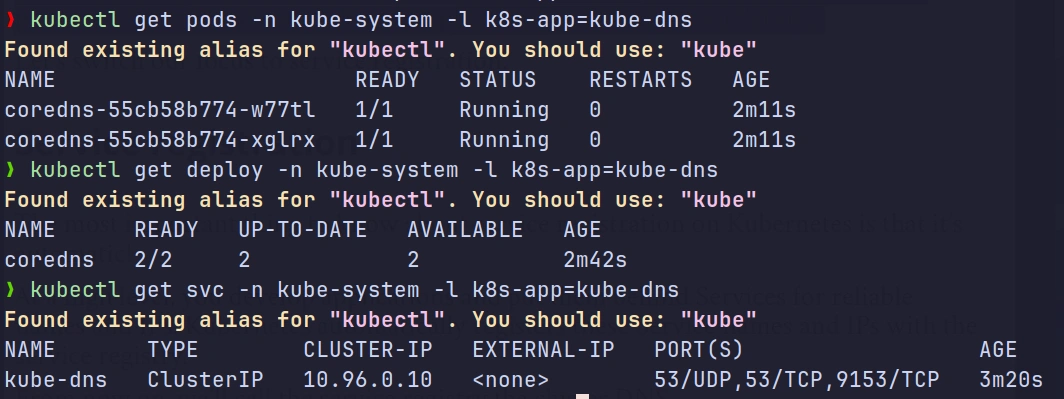
Every Kubernetes cluster has a built-in cluster DNS that it uses as its service registry. It’s a Kubernetes-native application running on the control plane of every Kubernetes cluster as two or more Pods managed by a Deployment and fronted by a Service.
The Deployment is usually called coredns or kube-dns, and the Service is always called kube-dns.
Summary
every Kubernetes cluster runs an internal cluster DNS service that it uses as the service registry. It maps every Service’s name and IP, and runs on the control plane as a set of Pods managed by a Deployment and fronted by a Service.
Service Registration
At a high level, you develop applications and put them behind Services for reliable names and IPs. Kubernetes automatically registers these Service names and IPs with the service registry.
steps:
Assign the Service a name <— developer
Assign the Service an IP <— K8s
Register the name and IP with the cluster DNS <— K8s
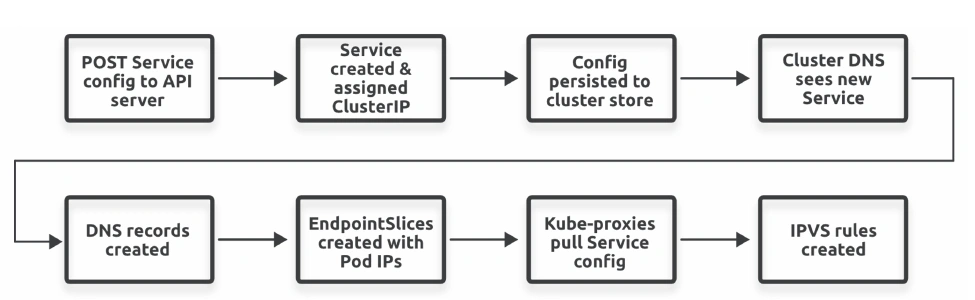
You post a new Service resource manifest to the API server, where it’s authenticated and authorised.
Kubernetes allocates it a ClusterIP and persists its configuration to the cluster store.
The cluster DNS observes the new Service and registers the appropriate DNS A and SRV records.
Associated EndpointSlice objects are created to hold the list of healthy Pod IPs that match the Service’s label selector.
Every node runs a kube-proxy that observes the new objects and creates local routing rules so that requests to the Service’s ClusterIP get routed to Pods.
Service Registry and Endpoints
A service registry is a conceptual database in Kubernetes where information about services is stored, including their name, type, and associated metadata. It doesn’t store direct information about individual pod IPs but focuses on services themselves.
Endpoints represent the actual IP addresses of the pods associated with a service. When a service is created, Kubernetes dynamically maintains a list of pod IPs that belong to the service.
Key Differences
Feature
Service Registry
Endpoints
Purpose
Tracks high-level information about services.
Tracks the actual pods behind a service.
Focus
Service abstraction (DNS, ClusterIP).
Pod IP addresses and ports.
Static/Dynamic
Relatively static after service creation.
Dynamically updated as pods change.
Role in Discovery
Provides a stable interface (name/IP) to access a service.
Maps the service to live backend pods.
Scope
Service-level.
Pod-level.
Flow
+--------------------+| Service Registry |+--------------------+ | | Service Name: my-service | ClusterIP: 10.96.0.1 | DNS: my-service.default.svc.cluster.local V+--------------------+| Kubernetes DNS | <----- Provides service resolution+--------------------+ | | Resolves to ClusterIP: 10.96.0.1 V+--------------------+| Service Object |+--------------------+ | | Maps to: | - Selector: app=my-app V+--------------------+| Endpoints |+--------------------+ | | Backend Pods: | - Pod 1: 10.244.0.5:8080 | - Pod 2: 10.244.0.6:8080 | - Pod 3: 10.244.0.7:8080 V+----------------------------+| Backend Pods (Actual IPs) |+----------------------------+| Pod 1: 10.244.0.5:8080 || Pod 2: 10.244.0.6:8080 || Pod 3: 10.244.0.7:8080 |+----------------------------+
Service Discovery
Service Discovery Basics:
Applications use Service names to connect with others and rely on Kubernetes DNS to resolve these names into IP addresses.
Each Service has a unique ClusterIP and an optional fully qualified domain name (FQDN) like service-name.default.svc.cluster.local.
DNS Configuration for Containers:
Kubernetes automatically configures each container’s /etc/resolv.conf to:
Use the Cluster DNS Service (e.g., 10.96.0.10).
Append search domains like default.svc.cluster.local to short Service names.
How it Works:
An app sends a request to a Service name (e.g., cer).
The Cluster DNS resolves the Service name to the corresponding ClusterIP.
The app then sends requests to this ClusterIP.
ClusterIP and Routing:
ClusterIP is a virtual IP on a special service network, with no direct routes to it.
Traffic to a ClusterIP is sent to the container’s default gateway, which forwards it to the node.
kube-proxy Magic:
Each Kubernetes node runs kube-proxy, which:
Watches for new Services and EndpointSlices.
Updates kernel rules to intercept ClusterIP traffic.
Redirects ClusterIP traffic to healthy Pod IPs based on Service selectors.
ClusterIP Redirection Process:
App → Service Name → Cluster DNS → ClusterIP → kube-proxy → Healthy Pod IP.
Service discovery and Namespaces
Every Kubernetes object gets a name in the cluster address space, and you can partition the address space with Namespaces.
The cluster address space is a DNS domain that we usually call the cluster domain. On most clusters, it’s cluster.local, and object names have to be unique within it.
For example, you can only have one Service called cer in the default Namespace, and it will be called cer.default.svc.cluster.local.
Long names like this are called fully qualified domain names (FQDN), and the format is <object-name>.<namespace>.svc.cluster.local
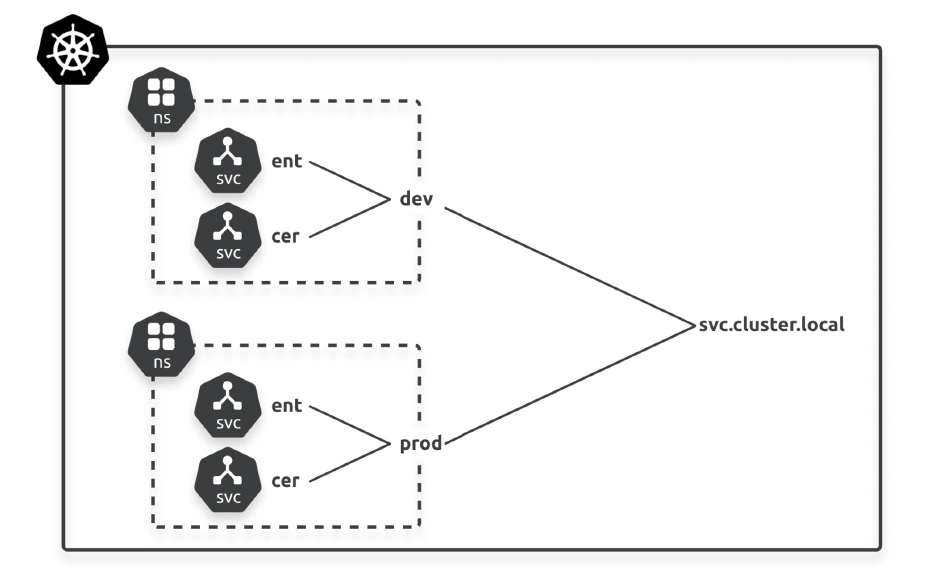
For example, if your cluster has two Namespaces called dev and prod, the address space will be partitioned as follows:
dev: <service-name>.dev.svc.cluster.local
prod: <service-name>.prod.svc.cluster.local
Object names must be unique within a Namespace but not across Namespaces.
As a quick example, Figure shows a single cluster divided into two Namespaces called dev and prod. Both Namespaces have identical instances of the cer Service. This makes Namespaces a good tool for running parallel dev and prod configurations on the same cluster.
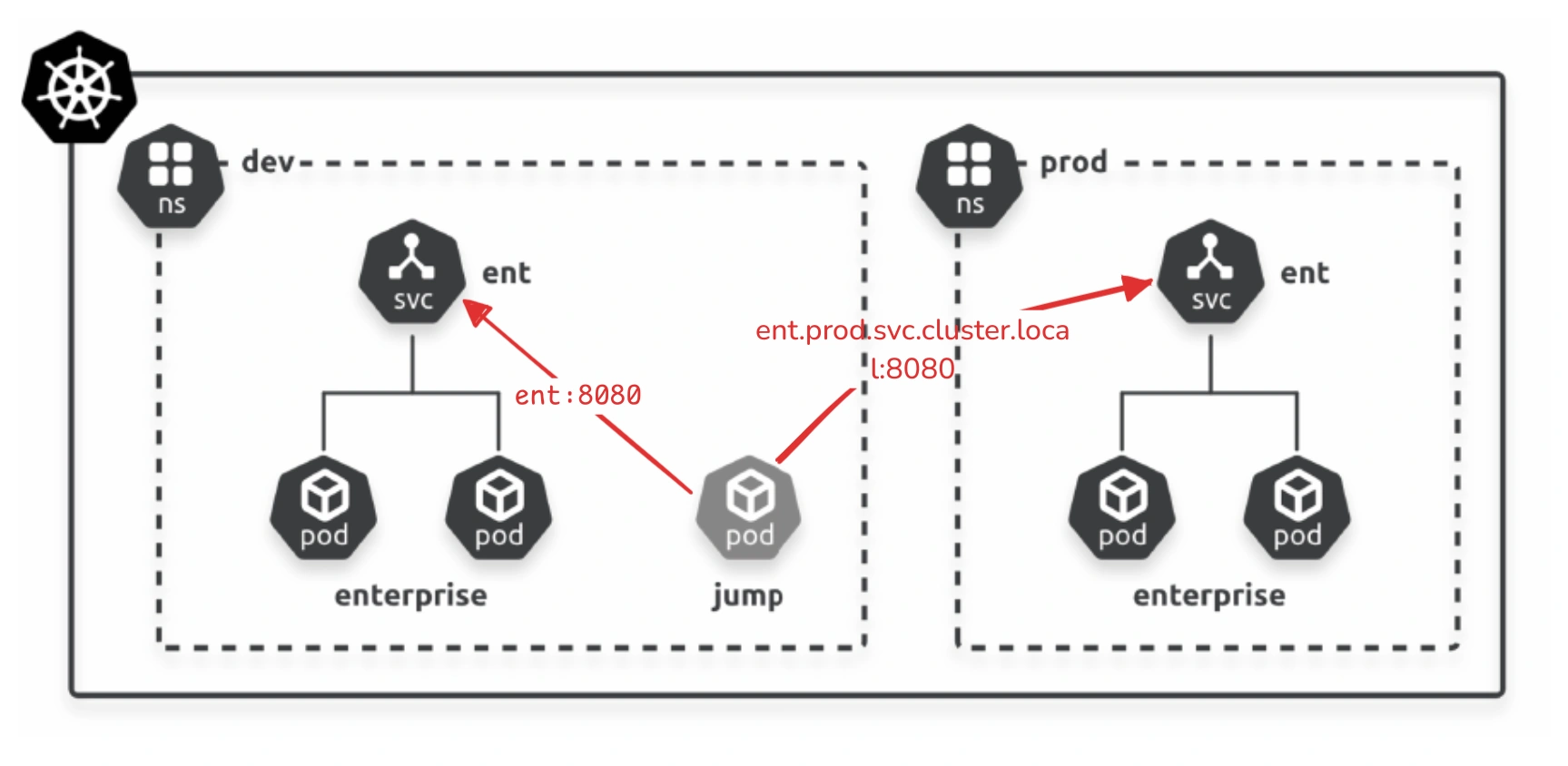
Apps can use short names such as ent and cer to connect to Services in the local Namespace, but they need to use fully qualified domain names to connect to Services in remote Namespaces.
Example
Kubernetes automatically resolves short names to the local Namespace, and that you need to specify FQDNs to connect across Namespaces.
Jump Pod
A jump pod (sometimes called a “bastion pod”) is a Kubernetes pod designed to provide a secure access point to other resources within the cluster. It serves as a temporary or permanent utility pod used for administrative tasks, debugging, or troubleshooting purposes.