‘Chapter 12. Jobs’
—Brendan Burns, “Kubernetes: Up & Running”
Jobs
What Are Kubernetes Jobs? Use Cases, Types & How to Run
Core Idea
Jobs cover the batch side of Kubernetes: run a task to completion once, in parallel, or through a work queue, and use CronJobs when it should run on a schedule.
- Context: long-running processes are most cluster workloads, but some tasks just need to finish.
- Job object plus the three patterns: one shot, parallelism, and work queues.
- CronJobs extend Jobs to time-based runs.
Long running processes make up the large majority of workloads that run on a kubernetes cluster.
but often need to run short-lived, one-off tasks. The Job object is made for handling these types of tasks.
A job creates pods that until successful termination(exit 0).
Use Cases:
- Things only want to do once.
- DB migrations (Go - Database Migration)
- Batch Jobs
- Sending App deployments
Pods vs Jobs
Pods are the basic compute unit used in Kubernetes: they’re a group of one or more containers running on a Node in your cluster. Jobs are an abstraction used to start Pods from a template and then wait for them to terminate when their container processes exit.
Jobs are useful because starting a bare Pod doesn’t provide any lifecycle management capabilities
Job Object
- Run until successful termination
- If the pod fails before successful termination, the job controller will create a new Pod based on the pod template.
Job Patterns
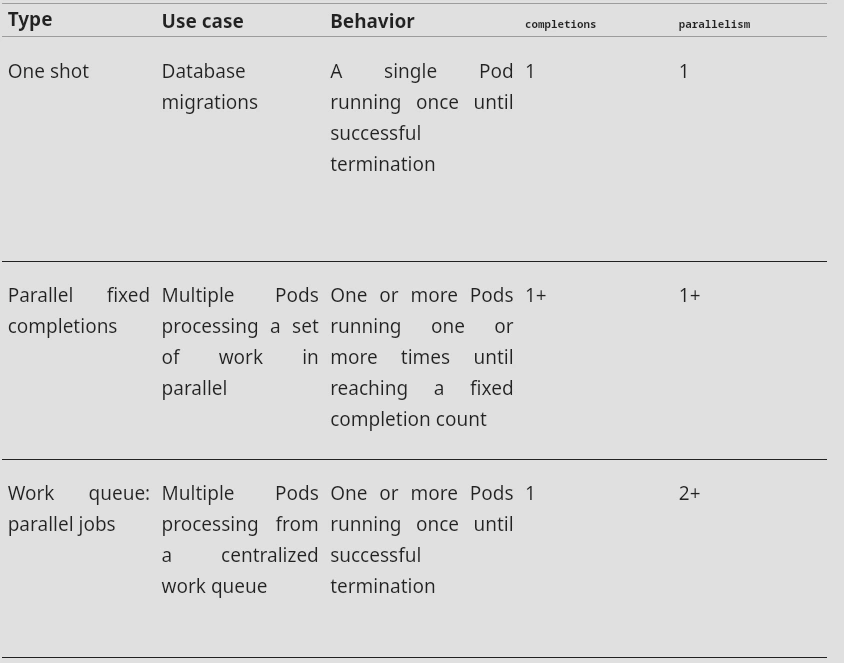
Following table highlights job patterns based on the combination of completions (No. of job completions) and parallelism (No. of pods to run in Parallel) for a job configuration.
Non-parallel processes (One-Shot) are simple Jobs that run one Pod and wait for it to complete. There’s no parallelism involved.
Multiple tasks in parallel (fixed completion count) start and run several Pods in parallel. The Job continues running until a specified number of successful Pod completions have occurred. The Job is then marked as complete.
Multiple tasks in parallel (work queue) start and run several Pods in parallel. They’re used when your process consists of several tasks, but none are dependent on each other. This pattern allows the implementation of work queue systems, but this requires the use of an external service that coordinates what each Pod works on. The Job is complete once any one of the Pods terminates with success and all its peers have also exited.
One Shot
One-shot jobs provide a way to run a single Pod once until successful termination.
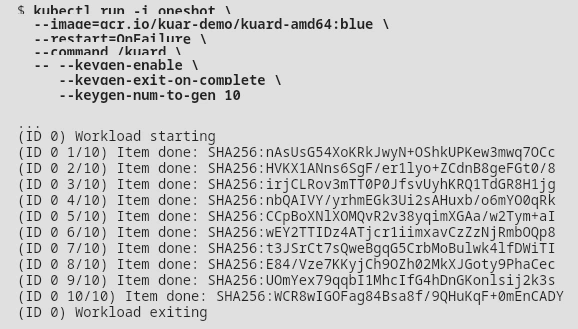
-i—> Interactive Mode
--restart=OnFailure—> is the option that tellskubectlto create a Job object.
All of the options after--are command-line arguments to the container image.
Warning
This job won’t show up in
kubectl get jobsunless you pass the-aflag. Without this flag,kubectlhides completed jobs.
Using YAML
apiVersion: batch/v1
kind: Job
metadata:
  name: demo-job
spec:
  template:
    spec:
      containers:
        - name: demo-job
          image: busybox:latest
          command: ["/bin/sh", "-c", "echo 'Running job';"]
      restartPolicy: OnFailure
The spec.template.spec.restartPolicy field is required for Pods created by Jobs. It can be set to either OnFailure or Never:
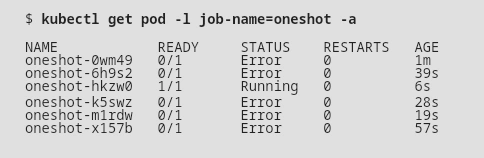
OnFailure— If a container in the Pod fails, the Job controller will recreate the container within the same Pod after an increasing back off delay. This is the default behavior.Never— This policy prevents individual containers from being restarted. The entire Pod will be marked as failed instead, causing the Job controller to start a new Pod that replaces it. If you aren’t careful, this’ll create a lot of “junk” in your cluster.
Labels
Notice that we didn’t specify any labels when creating the Job object. Like with other controllers (such as DaemonSets, ReplicaSets, and Deployments) that use labels to identify a set of Pods, unexpected behaviors can occur if a Pod is reused across objects.
Because jobs have a finite beginning and ending, users often create many of them. This makes picking unique labels more difficult and more critical. For this reason, the Job object will automatically pick a unique label and use it to identify the Pods it creates. In advanced scenarios (such as swapping out a running job without killing the Pods it is managing), users can choose to turn off this automatic behavior and manually specify labels and selectors.
Parallelism
apiVersion: batch/v1
kind: Job
metadata:
  name: demo-job
spec:
  parallelism: 5
  completions: 10
  template:
    metadata:
      labels:
         test: jobs
    spec:
      containers:
        - name: demo-job
          image: busybox:latest
          imagePullPolicy: IfNotPresent
          command: ["/bin/sh", "-c", "echo 'Running job';"]
      restartPolicy: Never
Work Queues
A common use case for jobs is to process work from a work queue. In this scenario, some task creates a number of work items and publishes them to a work queue. A worker job can be run to process each work item until the work queue is empty.
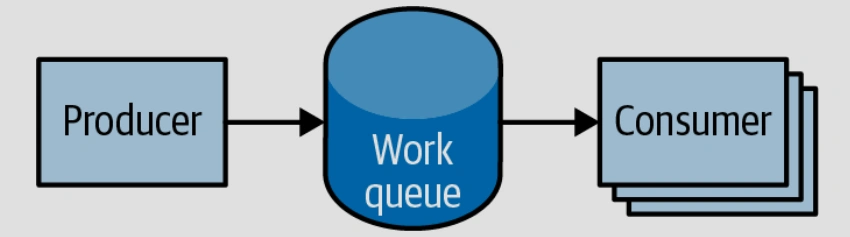
‘Work Queues’
—Brendan Burns, “Kubernetes: Up & Running”
CronJobs
To schedule a job to be run at a certain interval we can use Cronjob.
apiVersion: batch/v1
kind: CronJob # <--
metadata:
  name: example-cron
spec:
  schedule: "0 */5 * * *"
  jobTemplate:
    spec:
      template:
        spec:
          containers:
          - name: batch-job
            image: my-batch-image
          restartPolicy: OnFailure