kubernetes kubernetes/networking kubernetes/primer
Core Idea
Ingress exposes many apps behind one entry point: instead of a cloud load balancer per app, an ingress controller routes by host and path using rules stored in Ingress objects.
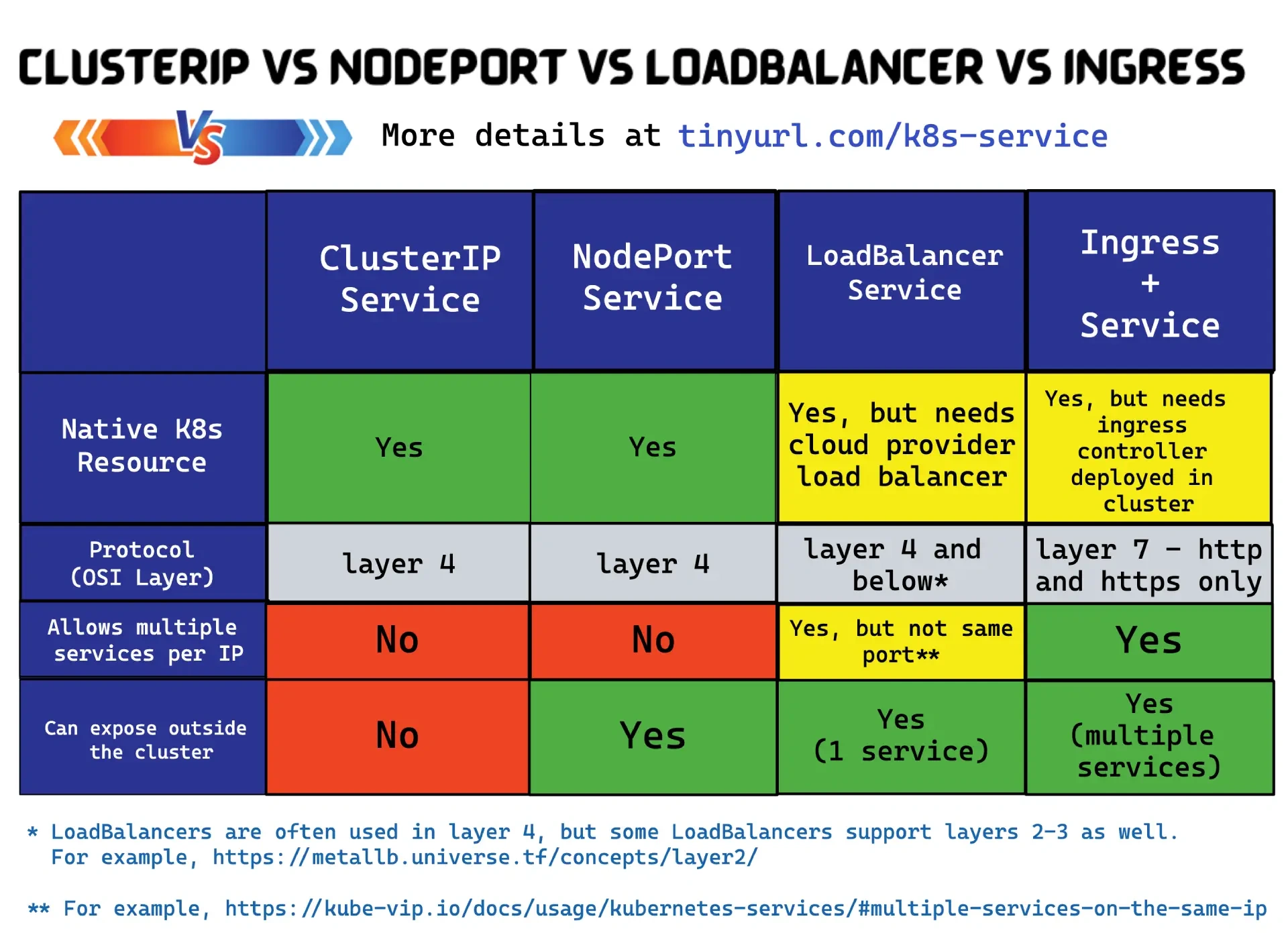
- Motivation in the FAQ: NodePort means high ports and node IPs to track; LoadBalancer is one paid cloud LB per app, so 25 apps means 25 LBs.
- When to use each: LoadBalancer type versus Ingress.
- Architecture split: the Ingress resource (rules, types, benefits) and the Ingress controller that enforces them, cloud-based and non-cloud.
Intro
Why Ingress ?
NodePort Services only work on high port numbers, and clients need to keep track of node IP addresses.
LoadBalancer Services fix this but require a one-to-one mapping between internal Services and cloud load balancers.
This means a cluster with 25 internet-facing apps will need 25 cloud load balancers, and cloud load balancers cost money! Your cloud may also limit the number of load balancers you can create.
Ingress fixes this by letting you expose multiple Services through a single cloud load balancer.
It does this by creating a single cloud load balancer on port 80 or 443 and using host-based and path-based routing to map connections to different Services on the cluster.
Ingress is all about accessing multiple web applications through a single LoadBalancer Service.
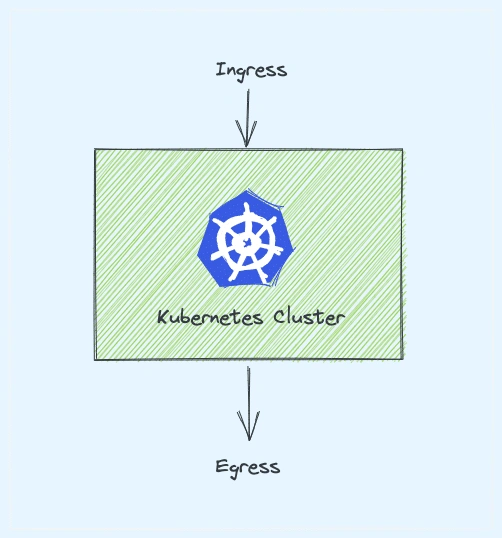
Ingress1 means the traffic that enters the cluster and egress is the traffic that exits the cluster.
LoadBalancer & Ingress
LoadBalancer Exposes a Service externally using a cloud provider’s load balancer.
Works at the Service level. Best for exposing a single Service to the internet.
Ingress Manages external HTTP/HTTPS traffic and routes it to multiple Services.
Works at the cluster level, handling multiple Services. Ideal for managing traffic to multiple Services via HTTP/HTTPS.
When to Use Each ?
Use LoadBalancer Type
- You need to expose a single Service directly to the internet.
- Non-HTTP protocols are required (e.g., TCP or UDP).
- You’re using a cloud provider that supports automatic load balancer provisioning.
Use Ingress
- You want to manage HTTP/HTTPS traffic for multiple Services.
- Need features like path-based or hostname-based routing.
- Want to centralize TLS termination (HTTPS) for all Services.
- Looking for a more cost-effective and organized traffic management solution.
Service meshes increased in popularity, and there’s now some overlap in functionality with ingress. As a result, if you’re planning on deploying a service mesh, you may not need Ingress.
Ingress Architecture
Ingress is defined in the networking.k8s.io/v1 API sub-group, and it requires the usual two constructs:
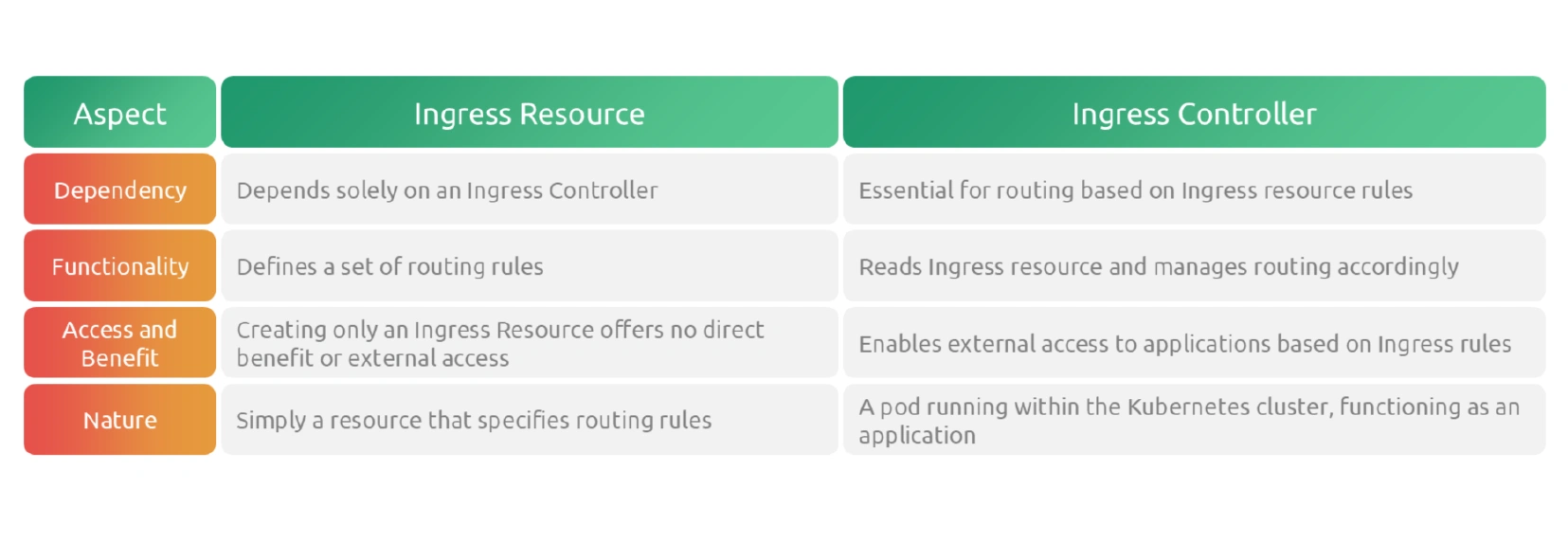
- The resource defines the routing rules
- The controller implements them.
Kubernetes doesn’t have a built-in Ingress controller.
This differs from Deployments, ReplicaSets, Services, and most other resources that have built-in pre-configured controllers.
Some cloud platforms simplify this by allowing you to install one when you build the cluster.
Once you have an Ingress controller, you deploy Ingress resources with rules telling the controller how to route requests.
On the topic of routing, Ingress operates at layer 7 of the OSI model, also known as the application layer. This means it can inspect HTTP headers and forward traffic based on hostnames and paths.
👉 1204-OSI & TCP-IP
- Host based: shield.mcu.com
- Path based: mcu.com/shield
- backend K8s service: shield
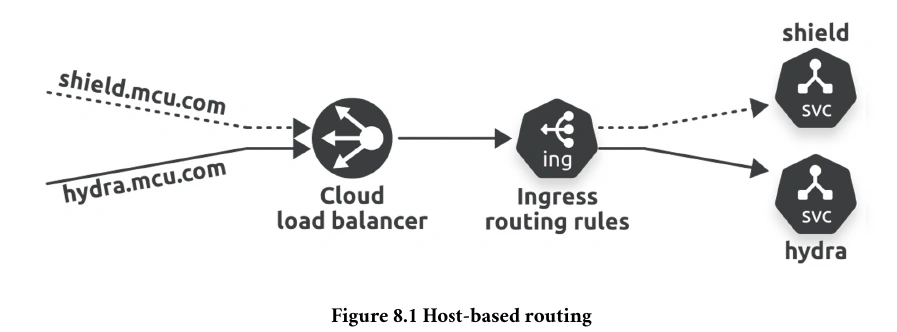
a single Ingress can expose multiple ClusterIP Services through a single cloud load balancer. You create and deploy Ingress resources that tell the Ingress controller how to route requests based on hostnames and paths in request headers. You might have to install an Ingress controller manually.
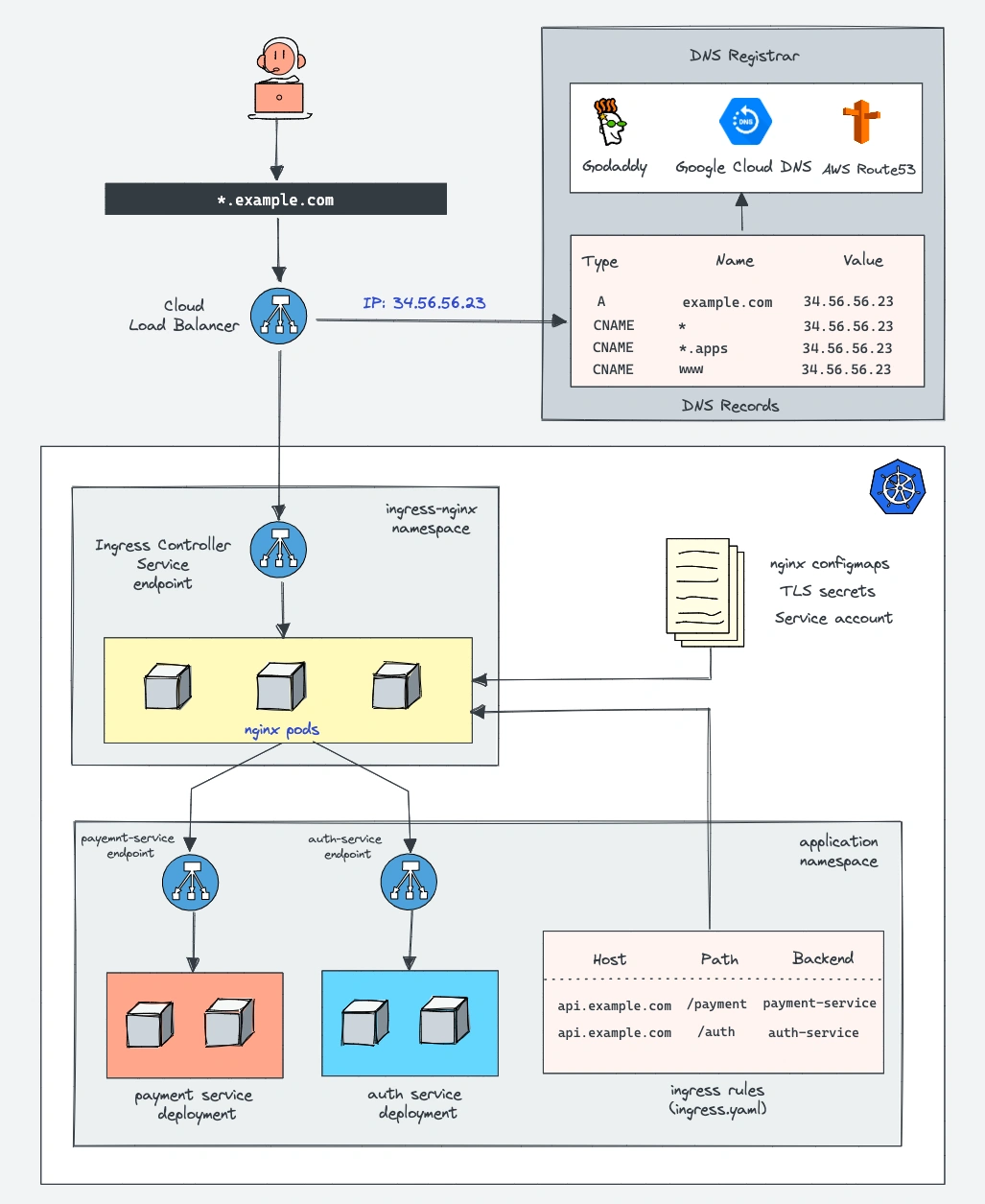
Here is the architecture diagram that explains the ingress & ingress controller setup on a kubernetes cluster.
It shows ingress rules routing traffic to two payment & auth applications.
👉Kubernetes Ingress Tutorial > List of Kubernetes Ingress Controller
Ingress Resource
Example:
apiVersion: networking.k8s.io/v1
kind: Ingress
metadata:
  name: example-ingress
  annotations:
    nginx.ingress.kubernetes.io/rewrite-target: /
spec:
  rules:
  - host: example.com
    http:
      paths:
      - path: /service1
        pathType: Prefix
        backend:
          service:
            name: service1
            port:
              number: 80
      - path: /service2
        pathType: Prefix
        backend:
          service:
            name: service2
            port:
              number: 80
  tls:
  - hosts:
    - example.com
    secretName: example-tls
👉 Objects Vs Resources Vs Custom Resource > What are Kubernetes Resources?
Ingress Types
Ingress resource can be configured in different ways to handle various types of traffic and routing requirements.
- Single Service Ingress : simplest form of ingress routes all traffic to a single backend service. It’s useful for straightforward deployments where a single application or service handles all incoming traffic.
- Simple Fanout: This type of Ingress routes traffic based on the request path to different backend services. It’s useful for hosting multiple services or applications within a single cluster and is one of the most common use cases for Ingress.
- Name-Based Virtual Hosting: This Ingress configuration routes traffic based on the requested hostname. It allows you to use a single IP address to route traffic to multiple domain names, each potentially directed to different services within your cluster.
- TLS/SSL Termination: An Ingress can also handle TLS termination, decrypting incoming HTTPS traffic and forwarding it as HTTP to the backend services. This setup simplifies certificate management and offloads SSL processing from the backend services.
Ingress Benefits
- Centralized Traffic Management
- Enhanced Security
- Flexible Security
- Scalability
- Intergration With Cloud Providers
- Customization and Flexibility
Ingress Controller
An ingress controller acts as a reverse proxy and load balancer inside the Kubernetes cluster.
Without the Ingress Controller, Ingress resources won’t work.
K8s does not include an ingress Controller by default. It needs to to be installed separately.
Examples:
- Nginx Ingress NGINX Ingress Controller| F5
- Traefik Traefik Kubernetes Ingress Documentation - Traefik
- HAProxy HAProxy Ingress
- AWS, Google and Azure also provide Ingress controllers within their Kubernetes platforms.
Ingress & Ingress Controller
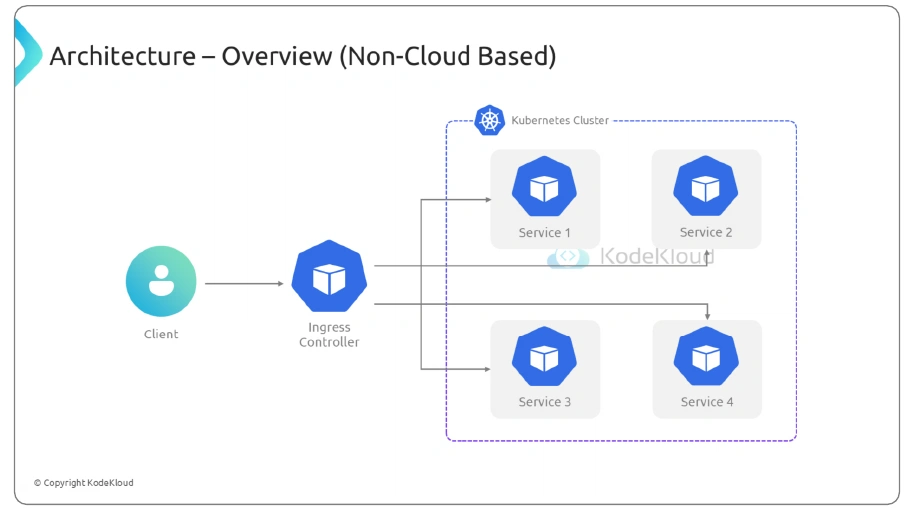
Architecture (Cloud Based & Non-Cloud Based)
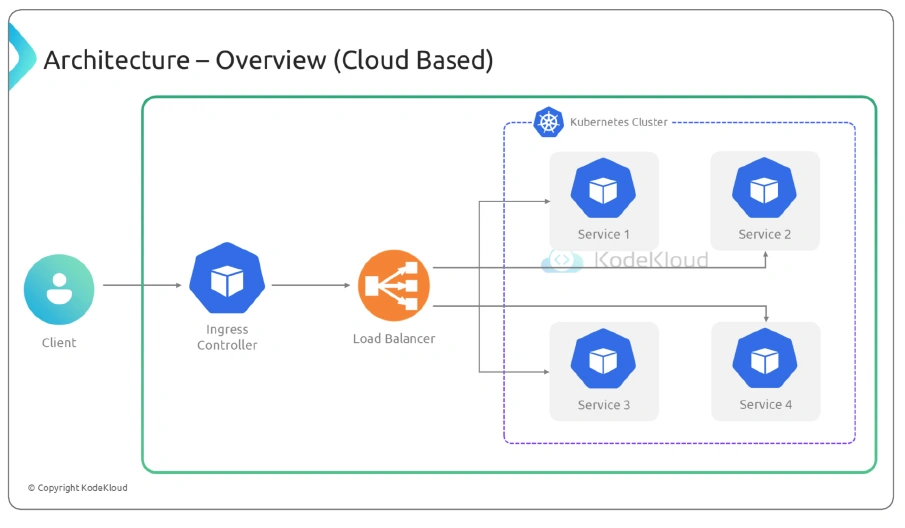
A cloud-based Ingress Controller in Kubernetes is a specialized form of ingress controller that is provided and managed by a cloud service provider. This type of controller integrates with the cloud infrastructure to facilitate the routing of external
HTTP and HTTPS traffic into the cluster. Cloud-based Ingress Controllers are typically deeply integrated with other services offered by the cloud provider
Footnotes
-
Ingress refers to the act of entering. ↩