kubernetes kubernetes/extras kubernetes/networking clippings
Core Idea
CoreDNS gives a host DNS resolution without a managed provider: run it from release binaries or a container, then point hosts at it and define the records it serves.
- Motivation: name resolution breaks down in large environments with many hostnames and IPs, so hosts get pointed at one DNS server instead.
- Installation options: download binaries from the CoreDNS GitHub releases, or run it as a docker image.
- The lecture then configures entries on the server for a given set of IPs.
In the previous lecture, we saw why you need a DNS server, how it can help manage name resolution in large environments with many hostnames and Ips, and how you can configure your hosts to point to a DNS server. In this article, we will see how to configure a host as a DNS server.
We are given a server dedicated as the DNS server and a set of IPs to configure as entries in the server. There are many DNS server solutions out there; in this lecture, we will focus on a particular one – CoreDNS.
So, how do you get core DNS? CoreDNS binaries can be downloaded from their Github releases page or as a docker image. Let’s go the traditional route. Download the binary using curl or wget. And extract it. You get the coredns executable.
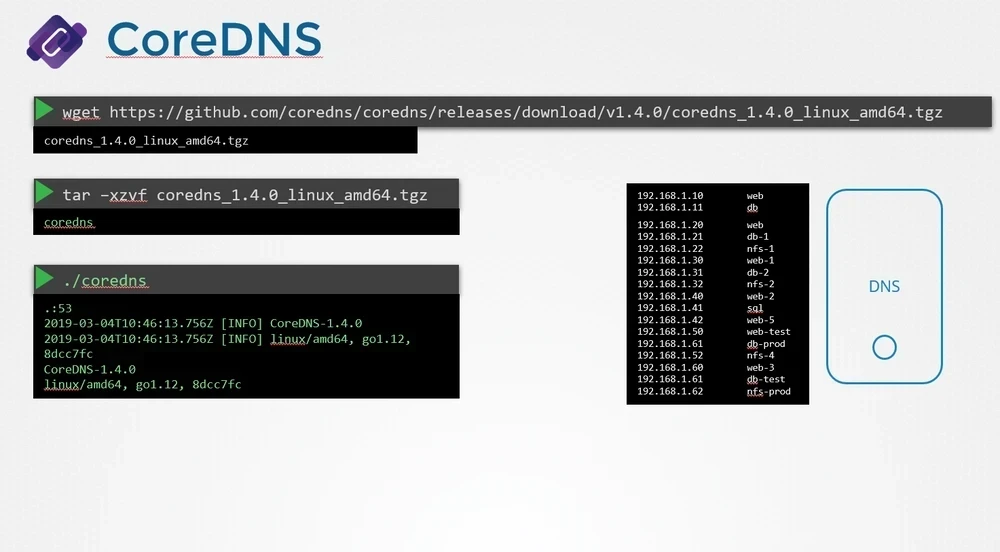
Run the executable to start a DNS server. It, by default, listens on port 53, which is the default port for a DNS server.
Now, we haven’t specified the IP to hostname mappings. For that, you need to provide some configurations. There are multiple ways to do that. We will look at one.
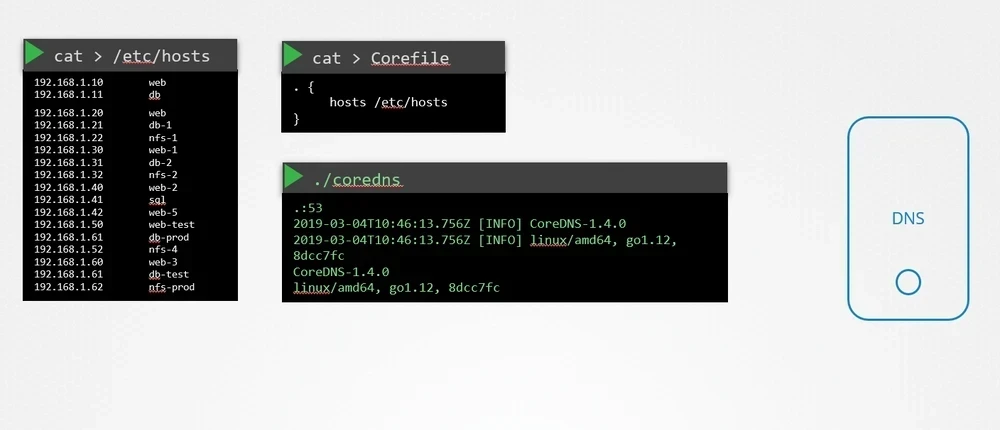
First, we put all of the entries into the DNS servers /etc/hosts file. Then, we configure CoreDNS to use that file. CoreDNS loads its configuration from a file named Corefile.
Here is a simple configuration that instructs CoreDNS to fetch the IP to hostname mappings from the file /etc/hosts. When the DNS server is run, it now picks the IPs and names from the /etc/hosts file on the server.
CoreDNS also supports other ways of configuring DNS entries through plugins. We will look at the plugin that it uses for Kubernetes in a later section.
Read more about CoreDNS here:
https://github.com/kubernetes/dns/blob/master/docs/specification.md