docker manifest | Docker Docs
Mastering Docker Buildx Bake | Docker Docs
Core Idea
A single tag can hide images for many architectures: the registry serves the right one on pull, and a manifest list is the index that makes
docker pull alpinework on any machine.
- Multi-architecture images: pull once per architecture and get the matching variant automatically.
- The manifest list as the index, and the
docker manifestCLI for inspecting it.- What happens behind the scenes when a pull resolves the correct image.
Multi-architecture images
Docker and the registry API adapted and became clever enough to hide images for multiple architectures behind a single tag. This means you can do a docker pull alpine on any architecture and get the correct version of the image. For example, if you’re on an AMD64 machine, you’ll get the AMD64 image.
To make this happen, the Registry API supports two important constructs:
- Manifest lists
- Manifests
The manifest list is exactly what it sounds like — a list of architectures supported by an image tag. Each supported architecture then has its own manifest that lists the layers used to build it
docker buildx imagetools inspect ghcr.io/nmdra/semantic-search:latest

Name:      ghcr.io/nmdra/semantic-search:latest
MediaType: application/vnd.docker.distribution.manifest.list.v2+json
Digest:    sha256:9e5b447f0b0642428a15423a49b74fe11125471a534bfaf43533d61a7b0e211e

Manifests:
  Name:      ghcr.io/nmdra/semantic-search:latest@sha256:749cc8c045072f7d87b5ecdcb7e77a2bb36c53c3fbd6d32547d39981f408d276
  MediaType: application/vnd.docker.distribution.manifest.v2+json
  Platform:  linux/amd64

  Name:      ghcr.io/nmdra/semantic-search:latest@sha256:f30a927ee6abd36d26b15c4234d35befd96e092da29439984e2c84d406c1ca4c
  MediaType: application/vnd.docker.distribution.manifest.v2+json
  Platform:  linux/arm64
Your output may include additional annotations, but if you look closely, you’ll see a single manifest list pointing to two manifests.
Manifest List
MediaType: application/vnd.docker.distribution.manifest.v2+json is the manifest list. Each that line refers to a manifest for each specific architecture.
On the left, you can see a manifest list with entries for the different architectures supported by the image. The arrows show that each entry in the manifest list points to a manifest defining the image config and the list of layers making up the image for that architecture.
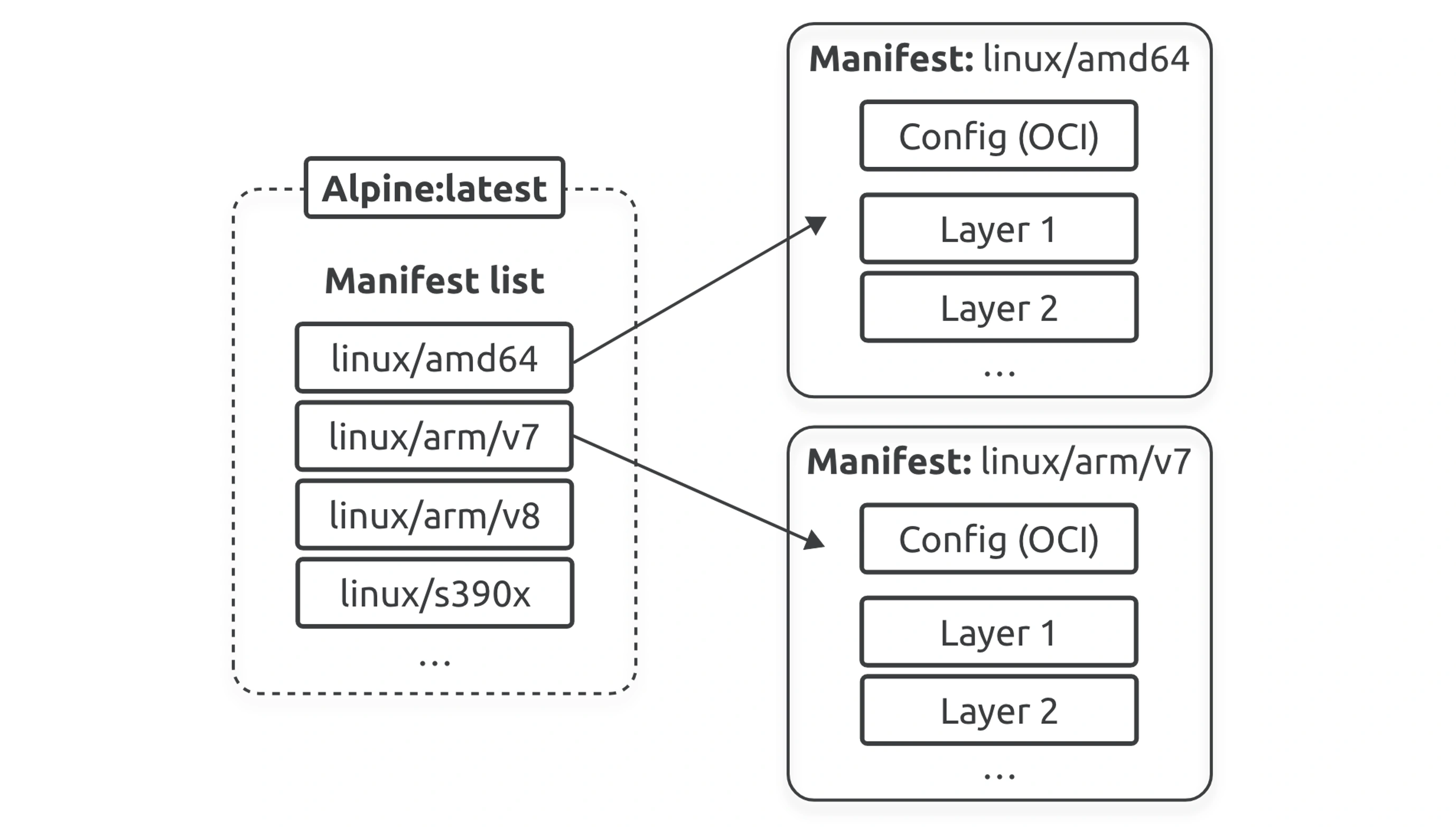
Docker Manifest
Docker Manifest is a metadata file that describes one or more container images. It allows Docker to manage and pull the appropriate image for a specific platform architecture (like amd64, arm64, etc.) under a single image name (also called a multi-architecture image or multi-platform image).
docker buildx build \
  --platform=linux/amd64,linux/arm64 \
  -t nigelpoulton/tu-demo:latest \
--push .- Build images for each platform (
amd64andarm64). - Push those platform-specific images to the registry.
- Create a Docker Manifest (a manifest list) that groups both images under the tag
nigelpoulton/tu-demo:latest.
Behind the Scenes
This uses OCI image spec:
- Pushes:
nigelpoulton/tu-demo:latest@<digest-for-amd64>nigelpoulton/tu-demo:latest@<digest-for-arm64>
- Then creates a manifest list:
{
  "manifests": [
    { "platform": { "architecture": "amd64", "os": "linux" }, "digest": "sha256:..." },
    { "platform": { "architecture": "arm64", "os": "linux" }, "digest": "sha256:..." }
  ]
}