Core Idea
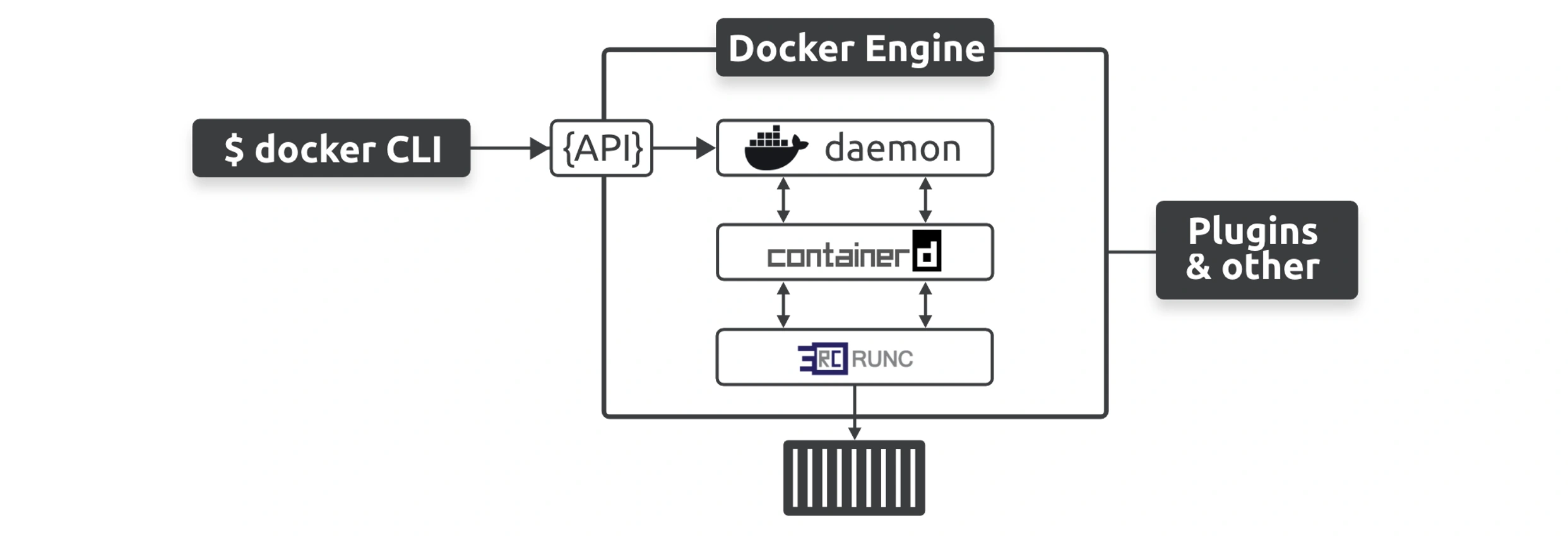
The Docker Engine is a chain of specialists: the API and daemon coordinate, containerd manages, runc creates, and shims babysit, and together they turn a command into a running container.
- The intro’s inventory: API, image builder, high-level runtime, low-level runtime, shims.
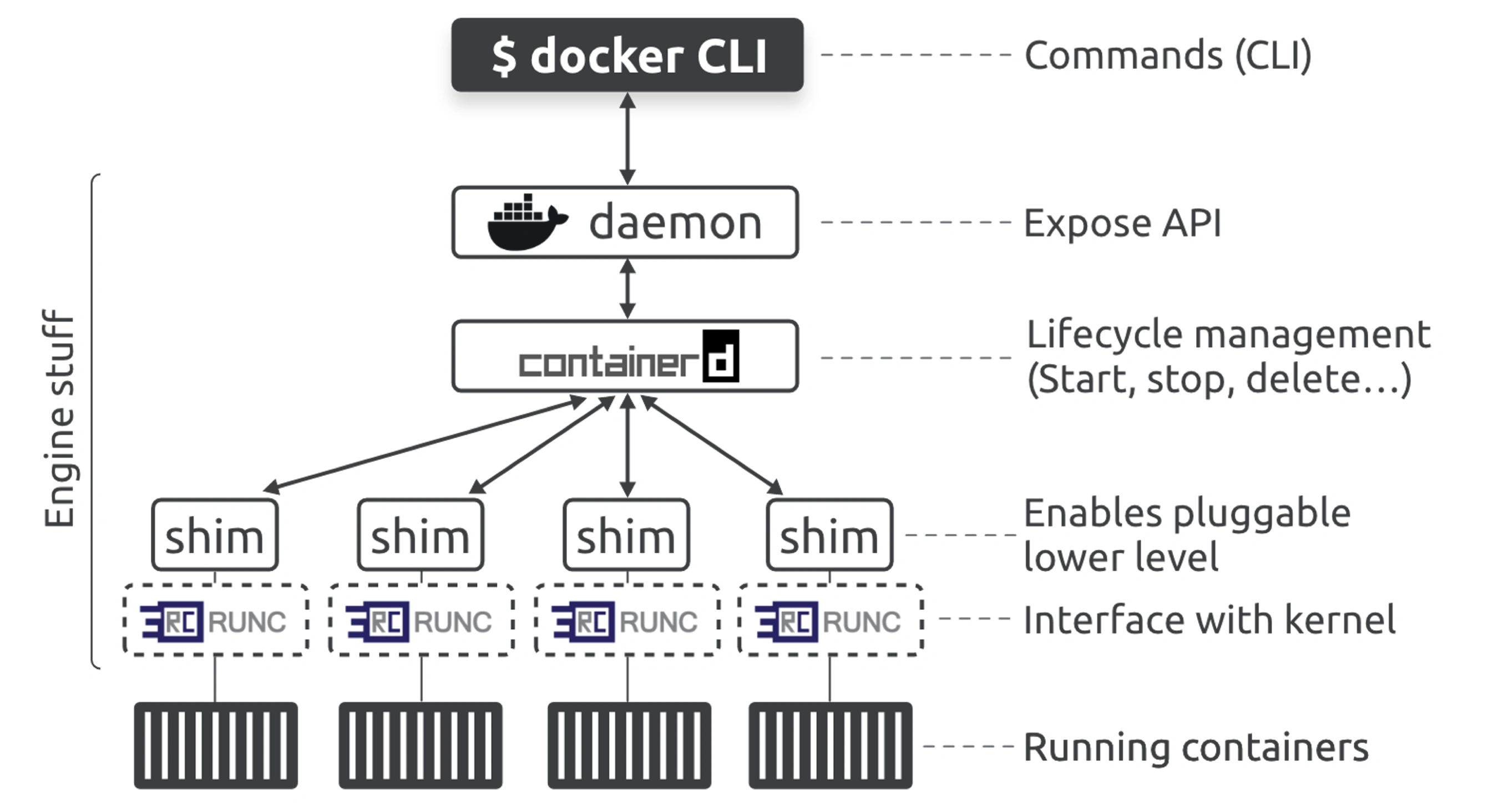
- The cast in order: daemon, runc, containerd.
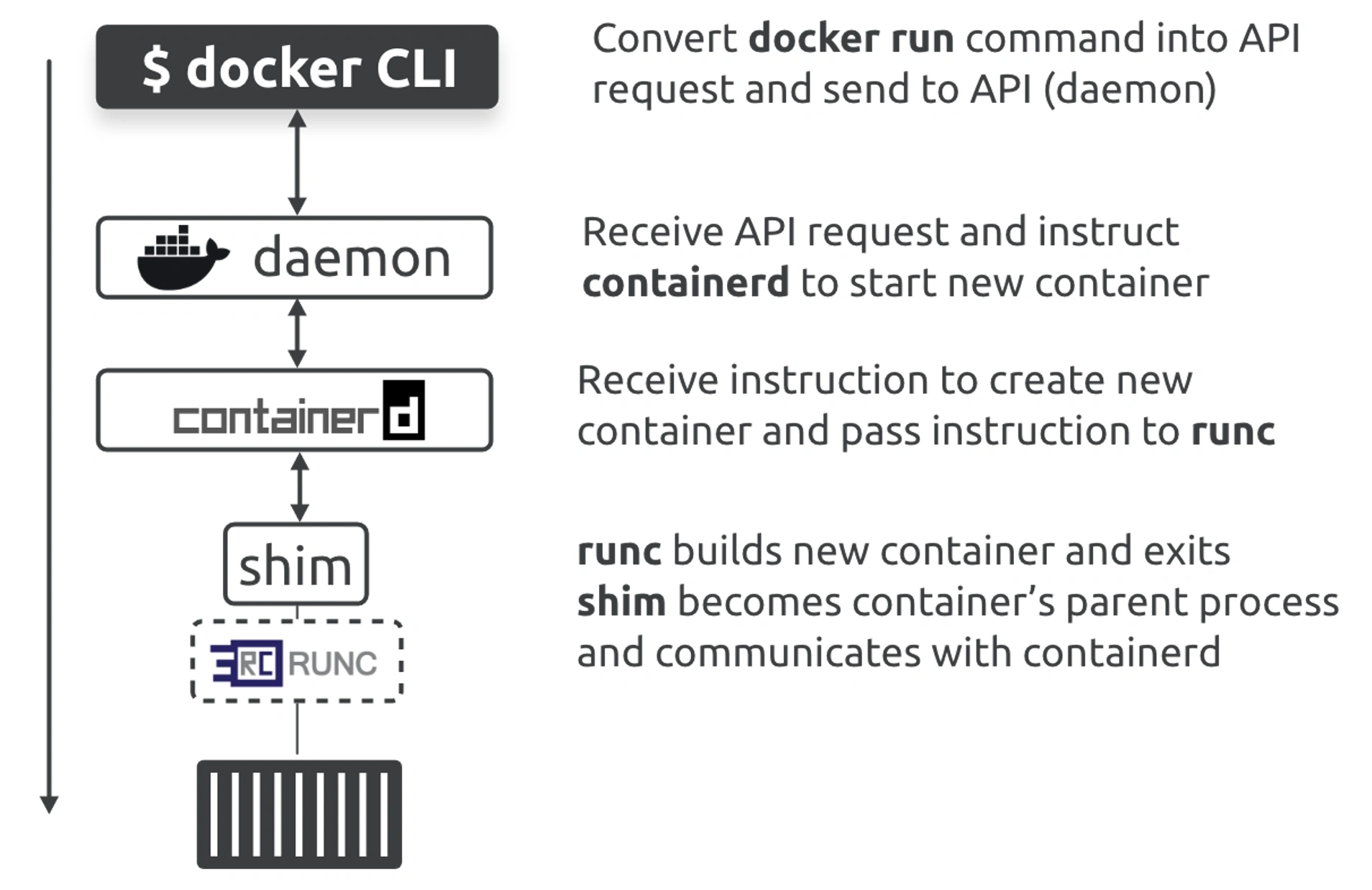
- The container start path, with the shim’s role at the end.
Intro
The Docker Engine is made from many specialized tools that work together to create and run containers — the API, image builder, high-level runtime, low-level runtime, shims, etc.
Daemon
The daemon was a monolithic binary containing all the code for the API, image builders, container execution, volumes, networking, and more
LXC did the hard work of interfacing with the Linux kernel and constructing the required namespaces and cgroups to build and start containers.
Replacing LXC
Docker replaced LXC with its own tool, libcontainer. The goal of libcontainer was to be a platform-agnostic tool that gave Docker access to the fundamental container building blocks in the host kernel.
Docker break apart and refactor the daemon to small specialized tool.
runc
- runc is a lightweight CLI wrapper for libcontainer that you can download and use to manage OCI-compliant containers.
- Docker uses runc as its low-level runtime.
Info
containerd operates as the high-level runtime managing lifecycle events
runc operates as the low-level runtime executing lifecycle events by interfacing with the kernel to do the work of actually building containers and deleting them
Tip
Docker and Kubernetes both use runc as their default low-level runtime, and both pair it with the containerd high-level runtime
containerd
- it manages lifecycle events such as starting, stopping, and deleting containers.
- However, it needs a low-level runtime to perform the actual work. Most of the time, containerd is paired with runc as its low-level runtime
- it uses shims that make it possible to replace runc with other low-level runtimes.
Starting container
the Docker client converts them into API requests and sends them to the API exposed by the daemon.
The daemon can expose the API on a local socket or over the network. On Linux, the local socket is /var/run/docker.sock and on Windows it’s \pipe\docker_engine.
The daemon receives the request, interprets it as a request to create a new container, and passes it to containerd. Remember that the daemon no longer contains any code to create containers.
The daemon communicates with containerd via a CRUD-style API over gRPC.
👉 gRPC
Despite its name, even containerd cannot create containers. It converts the required Docker image into an OCI bundle and tells runc to use this to create a new container.
runc interfaces with the OS kernel to pull together all the constructs necessary to create a container (namespaces, cgroups, etc.). The container is started as a child process of runc, and as soon as the container starts, runc exits.
Shim
Shims are a popular software engineering pattern, and the Docker Engine uses them in between containerd and the OCI layer, bringing the following benefits:
- Daemonless containers
- Improves efficiency
- Makes the OCI layer pluggable
containerd forks a shim and a runc process for every new container. However, each runc process exits as soon as the container starts running, leaving the shim process as the container’s parent process. The shim is lightweight and sits between containerd and the container. It reports on the container’s status and performs low-level tasks such as keeping the container’s STDIN and STDOUT streams open.
👉 Shim