Controlling how Ansible behaves: precedence rules — Ansible Community Documentation
Core Idea
Ansible’s behavior lives in
ansible.cfg, but several locations compete; the precedence rules decide which one wins, so know the chain before you debug settings.
- Config file basics:
ansible.cfgstores configuration, default location/etc/ansible/ansible.cfg.- Precedence: which location overrides which.
- Viewing the effective config plus an annotated example covering inventory, timeouts, roles, logs, remote user, privilege escalation, host key checking, and verbosity.
- Ansible use
ansible.cfgfile to store configuration. - Default config file location =
/etc/ansible/ansible.cfg - We can override ansible config file.
Precedence
Ansible looks for an ansible.cfg file in the following places, in this order:
- File specified by the
ANSIBLE_CONFIGenvironment variable - ./ansible.cfg (
ansible.cfgin the current directory) - ~/.ansible.cfg (.ansible.cfg in your home directory)
- /etc/ansible/ansible.cfg (Linux) or /usr/local/etc/ansible/ansible.cfg (*BSD)
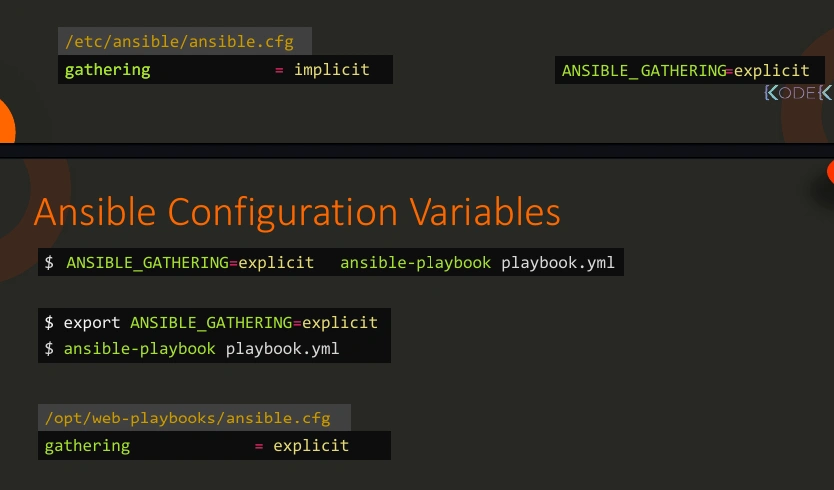
Important
Any command-line option will override any configuration setting.
View Config
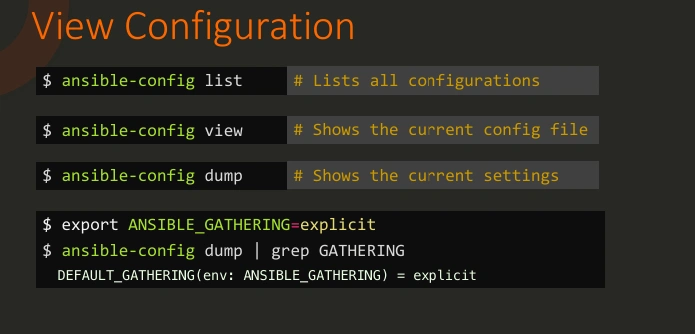
Example
Ansible Configuration Settings — Ansible Community Documentation
[defaults]
# Specify the inventory file
inventory = ./inventory

# Set the default module timeout (seconds)
timeout = 30

# Directory where Ansible keeps its roles
roles_path = ./roles

# Specify the location of a log file
log_path = ./ansible.log

# Specify the default remote user
remote_user = ansible_user

# Enable privilege escalation by default
become = True
become_method = sudo

# Retry files location
retry_files_enabled = True
retry_files_save_path = ./retries

# Disable host key checking
host_key_checking = False

# Control verbosity (uncomment for more debug information)
# debug = True

# Enable gathering facts
gathering = smart
fact_caching = jsonfile
fact_caching_connection = ./fact_cache
fact_caching_timeout = 86400

[privilege_escalation]
# Set options for privilege escalation
become = True
become_method = sudo
become_user = root
become_ask_pass = False

[inventory]
# Cache inventory for better performance
enable_plugins = host_list, script, yaml, ini, auto

[ssh_connection]
# Control SSH options
pipelining = True
ssh_args = -o ControlMaster=auto -o ControlPersist=60s
scp_if_ssh = True

[callback]
# Enable stdout callback for better output
stdout_callback = yaml
# Callback plugins location
callback_plugins = ./callback_plugins

[retry_files]
# Enable or disable retry files
enabled = True
path = ./retries

[diff]
# Enable diff mode for showing changes in files or templates
always = True
context = 3

[logging]
# Control logging options
log_path = ./ansible.log
Important
Some settings in the
ansible.cfgfile can be overridden directly in the playbook or even in the inventory file or via command-line arguments. However, the scope of override depends on the specific setting.
---
- hosts: all
  become: false  # Overrides `become = True` in ansible.cfg
  tasks:
    - name: Check user
      command: whoami
ansible-playbook playbook.yaml --user myuser --become-method su --become-user root