systemdesign database/databaseengineering
Lexical Search Techniques
Lexical search (also called keyword search) is a text-matching technique that searches documents or data based on the exact words or sequences of characters (lexemes) in the query.
It does not understand meaning or context—just matches based on surface-level forms (e.g., spelling, word stems).
- Exact Match Search
- Matches query terms exactly with stored data (case-sensitive or insensitive).
- SQL
WHERE name = 'Alice', dictionary lookup.
- Full Text Search (FTS)
- Breaks down text into tokens and uses inverted indexes to match keywords.
- Often includes ranking, stemming, stop word removal.
- PostgreSQL (
tsvector,tsquery), MySQL FTS, Elasticsearch.
- Fuzzy Search
- Finds approximate matches using edit distance (e.g., Levenshtein).
- Allows typos or partial matches.
Semantic Search
Semantic search is a data searching technique that focuses on understanding the contextual meaning and intent behind a user’s search query, rather than only matching keywords.
Traditional search engines typically focus on matching keywords within a search query to corresponding keywords in indexed web pages. In contrast, semantic search aims to comprehend the deeper meaning and intent behind a user’s search, much like a human would.
Imagine searching for “best laptops for graphic design students.” A traditional search engine might focus solely on matching those keywords to web pages. Whereas, a semantic search engine would try to understand that you are looking for laptops with specific features like powerful graphics cards, ample RAM, and color-accurate displays. It would then return results that recommend laptops suitable for graphic design tasks.
How it works ?
Semantic search engines use NLP, knowledge graphs, and machine learning to understand and match user intent with relevant content. Here’s a concise summary of the process:
- Query Understanding
- NLP techniques extract entities, intent, and context from the query.
- Example: “best places to eat in Colombo” → identifies “places”, “eat”, and “Colombo” as key concepts.
- Embedding & Vectorization
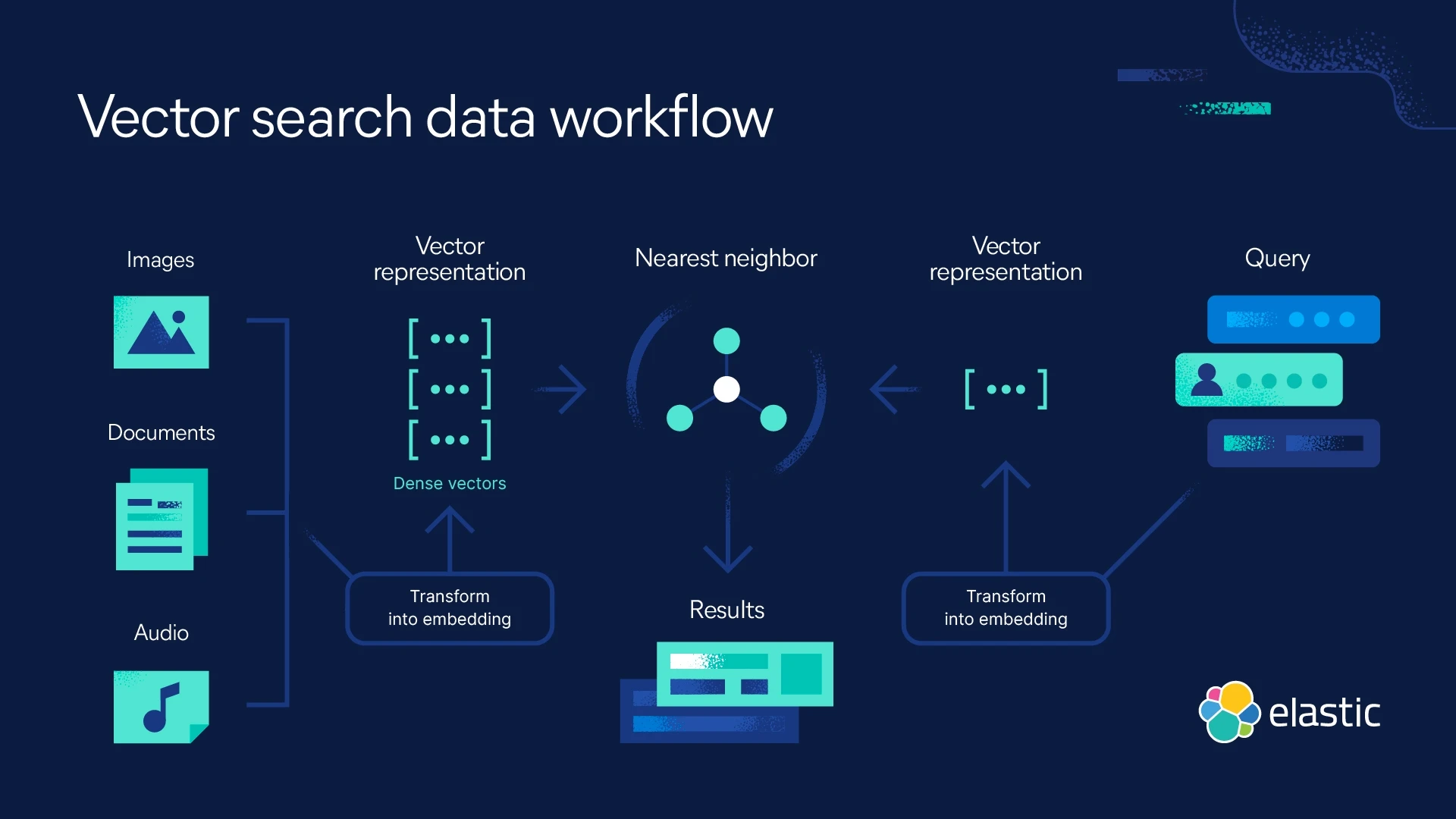
- Converts the query and documents into dense vector representations using language models (like OpenAI, Gemini, BERT).
- Vectors capture semantic meaning.
- Similarity Matching (Vector Search)
- Finds documents with embedding closest to the query embedding.
- Uses cosine similarity or other distance metrics.
- Ranking & Result Retrieval
- Combines semantic similarity, relevance, and sometimes user preferences or knowledge graphs to rank and return the most meaningful results.
Technologies
- Embeddings: BERT, OpenAI, Gemini, Cohere, Sentence Transformers
- Vector Databases: FAISS, pgvector (PostgreSQL), Pinecone, Weaviate, Redis
- NLP Tasks: Named Entity Recognition, Dependency Parsing, Sentiment Analysis
- Knowledge Graphs: Google’s Knowledge Graph, Wikidata, DBpedia
A Knowledge Graph helps machines understand the meaning of data by connecting entities and relationships—enabling semantic understanding, better search, and intelligent reasoning.
Vector Search
- The query is turned into a vector with the same number of dimensions as the stored data.
- The database finds the closest vectors using similarity measures (like cosine similarity) in multi-dimensional space.
Full Text Search
The Problem
Suppose you have a collection of text documents, such as:
Blog posts
Book descriptions
Product reviews
You want to let users search through this collection using natural language queries like:“space exploration in the 1960s”
But naive string matching (
LIKE '%space%') won’t work well because:
- It only finds exact substrings.
- It doesn’t understand synonyms or relevance.
- It can’t rank results by how well they match.
Full-text search is the process of searching through textual content (such as documents or database fields) by analyzing and indexing the text, allowing users to retrieve results based on words, phrases, or patterns—rather than exact matches.
Main Concepts
Indexing
During the indexing stage, the system analyzes the text content of documents and stores the data in a structured format.
- Tokenization: Breaking down text into individual words or units called tokens. This is like separating a sentence into individual words.
- Example:
Input:"The quick brown fox jumps"
Output:["the", "quick", "brown", "fox", "jumps"]
- Example:
- Stemming: Reducing words to their root form, such as “running” to “run”. This ensures that variations of the same word are treated as a single term during search.
- Example:
"running","runner", and"ran"→"run"
Search for"run"will match all of them.
- Example:
- Stop word removal: Removing common words that are not particularly meaningful in search, such as “the”, “a”, and “is”. This helps to reduce the index size and improve search speed.
- Example:
From:["the", "quick", "brown", "fox"]
To:["quick", "brown", "fox"]
Words like"the"are removed.
- Example:
- Building an index(Inverted Index): Creating a data structure that maps keywords to their locations within documents. This index acts as a roadmap, allowing the search engine to quickly locate relevant documents.
The indexing process is crucial for the performance of a full-text search system. A well-structured index allows for fast and efficient retrieval of relevant documents even within massive datasets.
Searching
After building an index, FTS allows users to submit queries and retrieve relevant documents by analyzing the query and matching it against indexed content—not just exact matches but also by assessing keyword proximity and relevance.
- Basic Search
- Matches keywords anywhere in the text, regardless of order or proximity.
- Simple and low-cost, but may return many irrelevant results, especially for common words.
- Fuzzy Search
- Handles typos or word variations (e.g., “programing” vs. “programming”).
- Useful for user-generated content or noisy data.
- Proximity Search
- Finds keywords that appear near each other (e.g.,
"Lincoln /3 Mary Todd"). - Enhances result relevance by focusing on relationships between terms—especially useful in research or historical archives.
- Finds keywords that appear near each other (e.g.,
Full Text Search PostgreSQL
Uses tsvector to stores searchable data, tsquery to represent search queries.
- A
tsvectoris a normalized, searchable version of a text. - A
tsqueryis how you express your search logic.
-- Create a sample table with a tsvector column for full-text indexing
CREATE TABLE articles (
  id SERIAL PRIMARY KEY,
  title TEXT,
  content TEXT,
  tsv tsvector
);

-- Insert a document and preprocess it for search using 'english' analyzer
INSERT INTO articles (title, content, tsv) VALUES (
  'Mars Mission',
  'NASA launched a new mission to Mars with advanced AI.',
  to_tsvector('english', 'NASA launched a new mission to Mars with advanced AI.')
);

-- Create a GIN index on the tsvector column to speed up search
CREATE INDEX idx_fts ON articles USING GIN(tsv);

-- Search using tsquery: finds documents with both "mars" and "ai"
SELECT id, title
FROM articles
WHERE tsv @@ to_tsquery('english', 'mars & ai');

-- Optionally, rank results by relevance
SELECT id, title, ts_rank(tsv, to_tsquery('mars & ai')) AS rank
FROM articles
WHERE tsv @@ to_tsquery('mars & ai')
ORDER BY rank DESC;
Full Text Search with Elasticsearch
Elasticsearch is a powerful full-text search engine built on top of Apache Lucene. It’s designed for distributed, real-time, scalable search and analytics — ideal for logs, documents, e-commerce, and more.
# Create Index
curl -X PUT localhost:9200/articles -H "Content-Type: application/json" -d '
{
  "mappings": {
    "properties": {
      "title":    { "type": "text", "analyzer": "english" },
      "content":  { "type": "text", "analyzer": "english" }
    }
  }
}'

# Index Document
curl -X POST localhost:9200/articles/_doc/1 -H "Content-Type: application/json" -d '
{
  "title": "Mars Mission",
  "content": "NASA launched a new mission to Mars with advanced AI."
}'

# Search with Match query
curl -X GET localhost:9200/articles/_search -H "Content-Type: application/json" -d '
{
  "query": {
    "match": {
      "content": "mars ai"
    }
  }
}'
Full-Text Search vs Semantic Search
Query: "astronaut survives on red planet"
| System | Top Match Found | Why? |
|---|---|---|
| Full-Text Search | "NASA launched a mission to Mars" | Only if the word “Mars” appears; “red planet” ≠ “Mars” |
| Semantic Search | "NASA launched a mission to Mars" | Match even without exact words — based on meaning |
How Does Full-Text Search Work under the Hood by Philipp Krenn