database/redis projectnotes docker
Redis
Sharing Linux socket between Docker containers - Stack Overflow
🌟 RabbitMQ vs Redis OSS - Difference Between Pub/Sub Messaging Systems - AWS
Redis is defined as data structure server. Redis provides multiple functionality like memcache, queue, pubsub.
Pubsub
Publisher-Subscriber Architecture
Redis Pub/Sub In-Depth | by Joud W. Awad | Medium
🌟 Pub/Sub (Publish/Subscribe) - Redis
DS05.4 - Asynchronous Messaging Services > Point-to-Point (PTP)
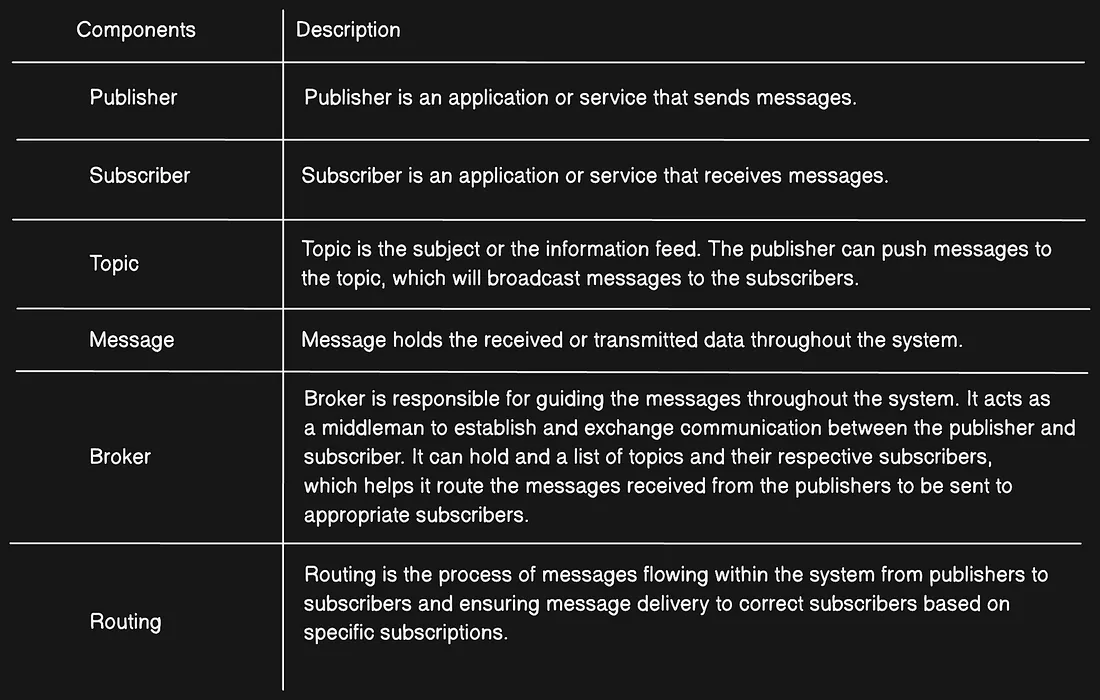
Pubsub System Components
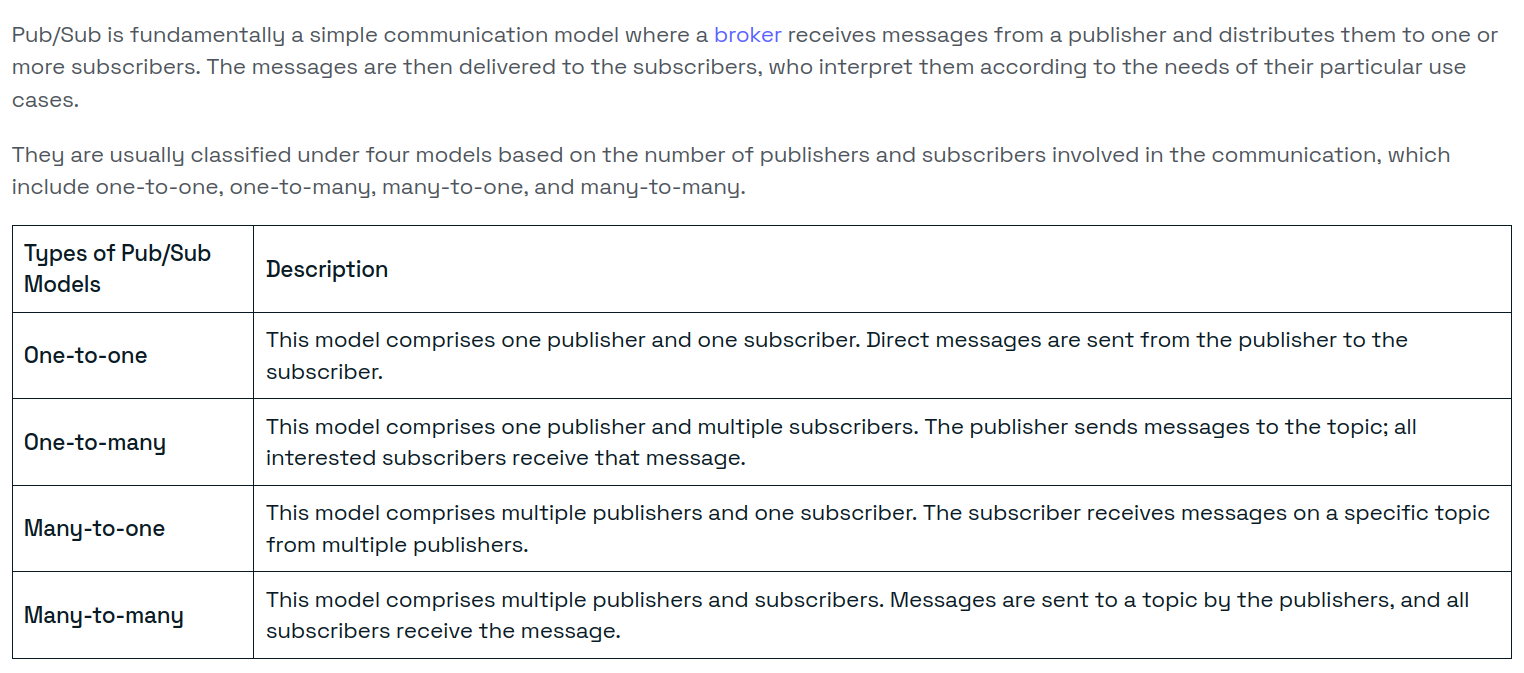
Types of Pub/Sub Models
PubSub on Redis
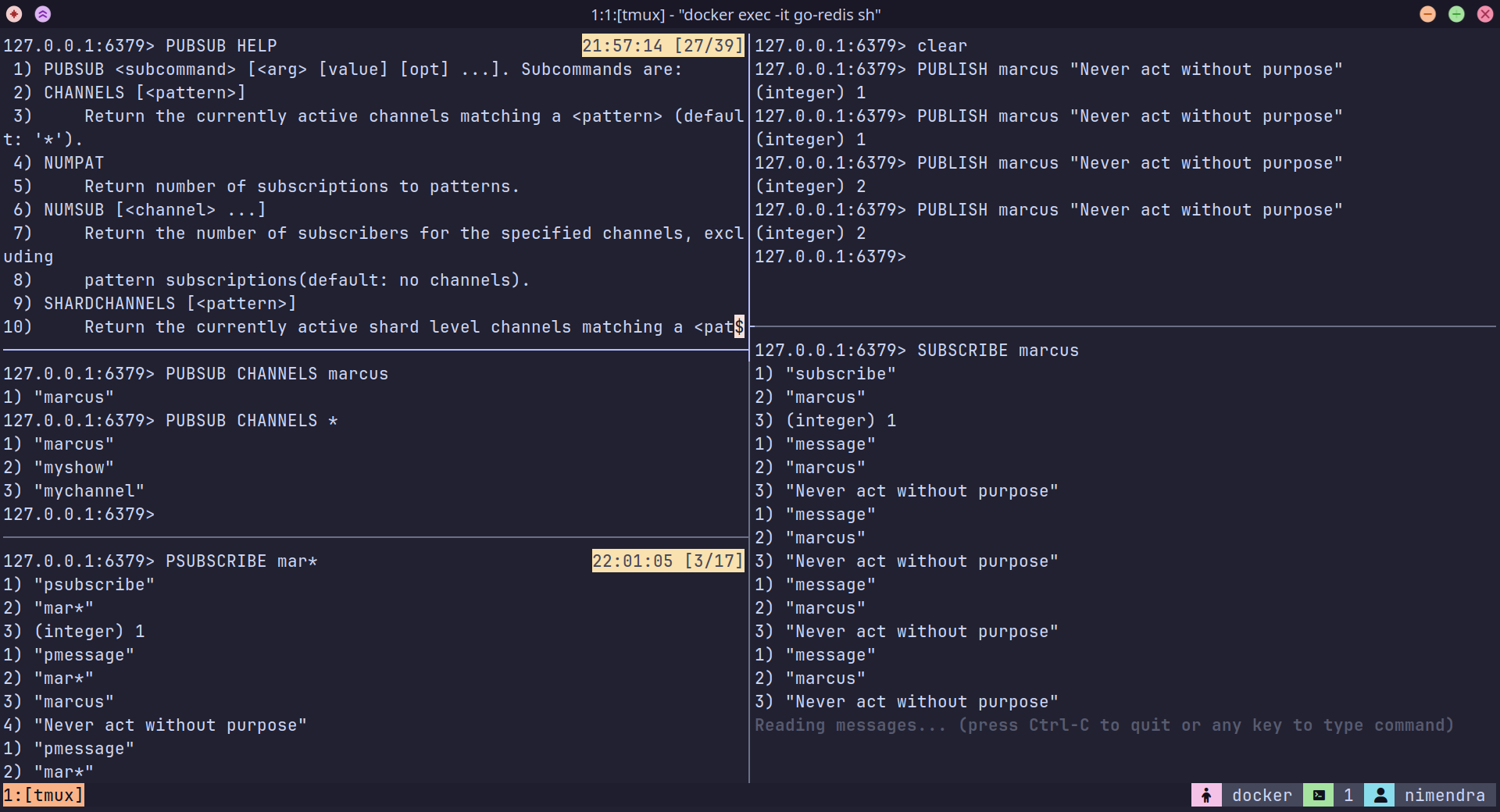
In Redis, clients(Publishers) can “publish” messages to a named channel (topic/subject), and other clients(Subscribers) can “subscribe” to that channel to receive the messages.
When a client publishes a message to a channel, Redis delivers that message to all clients that are subscribed to that channel.
Redis Pub/Sub is synchronous. Subscribers and publishers must be connected at the same time in order for the message to be delivered.
Explanation
In this context, synchronous means that all parties need to be active at the same time to be able to communicate.
asynchronous means communication can still happen even if not all participants are present at the same time. To enable this pattern, persisting messages is mandatory, otherwise there would be no way to guarantee delivery in the face of failures. Tools in this category mainly consist of queue-based(RabbitMQ) or stream-based(Kafka) solutions.
Redis Streams, Redis PubSub and Kafka
Publish/subscribe is a pretty simple paradigm. Think of it like you’re running a talk show on a radio station. That’s PUBLISH. You’re hoping at least one or more people will pick up your channel to listen to your messages on the radio show (SUBSCRIBE) and maybe even do some stuff, but you’re not talking to folks directly.
publish subscribe - What is Redis pubsub and how do I use it? - Stack Overflow
On Redis CLI
Using Go
We can create pub/sub using Go Channels without Redis. Go channels have fewer capabilities compared to Redis pub/sub.
- Go Channels work only withing a single process (same Goroutine)
- Redis Pub/Sub works across multiple servers
- Redis can handle thousands of connections efficiently.
- Go channels are limited to local concurrency.
// Calls redis's SUBCRIBE command
// Redis keeps this connection open to push new messages.
sub := client.Subscribe(ctx, channel)
// Returns a **Go channel** that receives messages from Redis asynchronously
// Whenever Redis receives a new message on `mychannel`, it pushes the message to `ch`.
ch := sub.Channel()
Full Connection Flow
- Subscriber starts and subscribes to
mychannel.
sub := client.Subscribe(ctx, "mychannel")- Redis acknowledges and keeps the connection open.
- Publisher sends a message.
client.Publish(ctx, "mychannel", "Hello, Redis!")- Redis forwards the message to all subscribers.
- Redis pushes the message to all subscribed clients.
- The Go channel
chreceives the message asynchronously. - The loop prints the message.
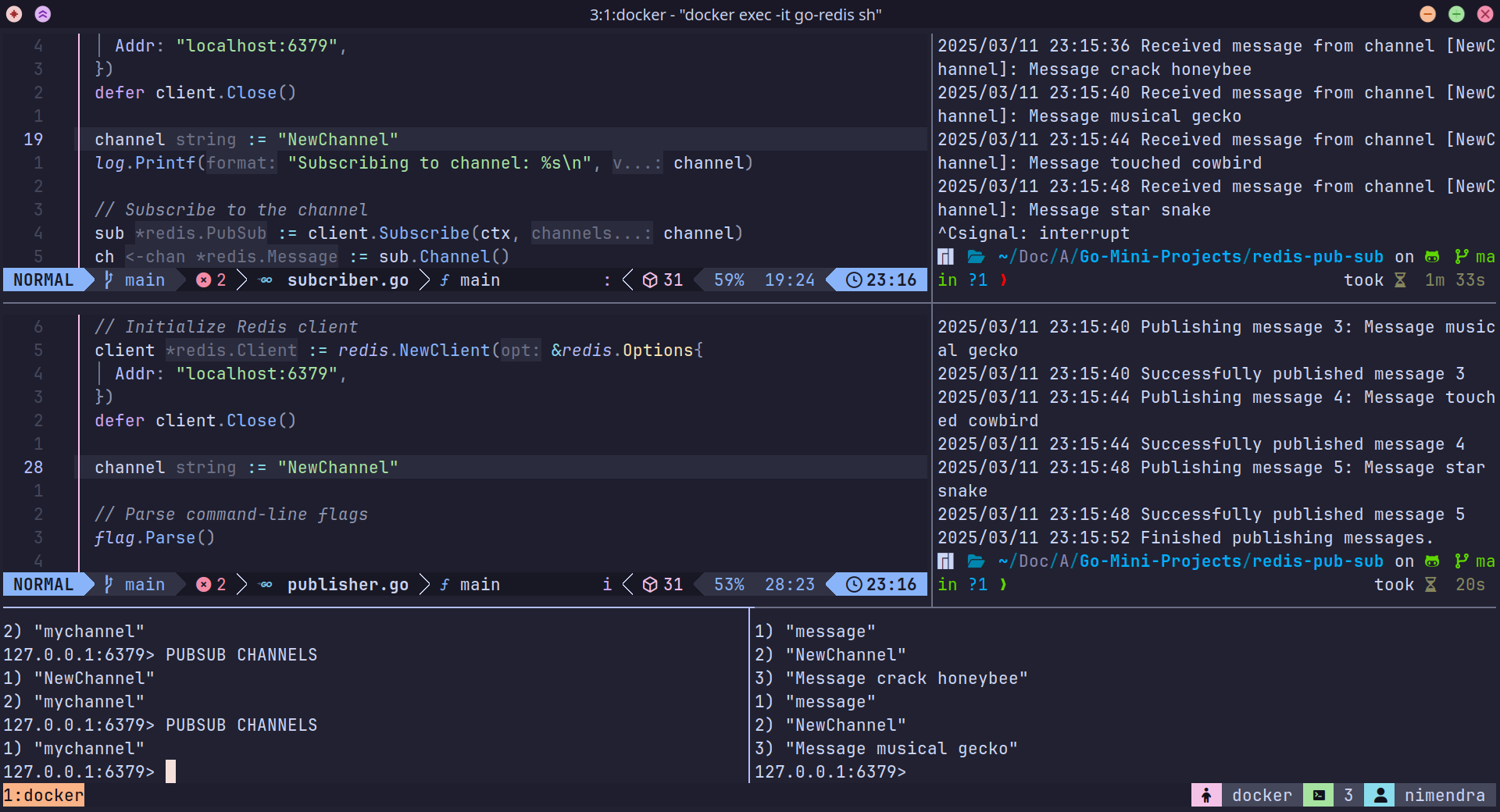
Code
Publisher.go
var ctx = context.Background()

var (
	words     = flag.Int("words", 2, "No. words in the petname")
	separator = flag.String("separator", " ", "Separator between words")
)

func main() {
	// Initialize Redis client
	client := redis.NewClient(&redis.Options{
		Addr: "localhost:6379",
	})
	defer client.Close()

	channel := "mychannel"

	// Parse command-line flags
	flag.Parse()

	log.Printf("Starting publisher... Publishing to channel: %s\n", channel)

	for i := 1; i <= 5; i++ {
		name := petname.Generate(*words, *separator)
		message := fmt.Sprintf("Message %s", name)

		log.Printf("Publishing message %d: %s\n", i, message)

		err := client.Publish(ctx, channel, message).Err()
		if err != nil {
			log.Fatalf("Could not publish message: %v", err)
		} else {
			log.Printf("Successfully published message %d\n", i)
		}

		time.Sleep(4 * time.Second) // Simulate delay between messages
	}

	log.Println("Finished publishing messages.")
}
Subscriber.go
var ctx = context.Background()

func main() {
	// Connect to Redis
	client := redis.NewClient(&redis.Options{
		Addr: "localhost:6379",
	})
	defer client.Close()

	channel := "mychannel"
	log.Printf("Subscribing to channel: %s\n", channel)

	// Subscribe to the channel
	sub := client.Subscribe(ctx, channel)
	ch := sub.Channel()

	log.Println("Successfully subscribed! Waiting for messages...")

	// Listen for messages
	for msg := range ch {
		log.Printf("Received message from channel [%s]: %s\n", msg.Channel, msg.Payload)
	}
}
Why use
ctxhere?
- Context allows cancellation of blocking operations (e.g., waiting for messages).
- If the application shuts down, you can cancel the Redis subscription cleanly.
- Go - Context